
Fn Keys for Laptop Display Brightness Control Don't Work

5er driver

New member
Local time
10:43 PM
Messages
17
I have an Acer Aspire 8935G with W7 HP 64 on an SSD and Vista HP 64 on an HDD. The Fn keys controlling the display brightness control work on the Vista boot but not on the W7 boot. All the other Fn keys function as they should on the W7 boot. The Aspire has an OEM ATI Radeon HD4670 graphics card. I've tried all 3 available driver versions for the card & OS from AMD but these two Fn keys won't work. Any ideas what's going on here? Do the W7 drivers override or deactivate the Fn brightness control keys?
 

My Computer My Computer

At a glance

SSDs: Windows 7 HP 64, HDDs: Vista HP 64PC: Intel Q9650, Laptop: Intel T9900PC: 8 GB, Laptop: 8 GBPC: Gigabyte GeForce GTX-280, Laptop: ATI HD4670
Computer Manufacturer/Model Number
PC: Self Configured, Laptop: Acer 8935G
OS
SSDs: Windows 7 HP 64, HDDs: Vista HP 64
CPU
PC: Intel Q9650, Laptop: Intel T9900
Motherboard
PC: Asus P5Q-SE, Laptop: Acer
Memory
PC: 8 GB, Laptop: 8 GB
Graphics Card(s)
PC: Gigabyte GeForce GTX-280, Laptop: ATI HD4670
Hard Drives
PC: SSD, OCZ Vertzex 60 GB
PC: HDD, WD VelociRaptor 300 GB
PC: HDD, Seagate Baracuda 250 GB?
Laptop: SSD, Mushkin Callisto Deluxe 240 GB
Laptop: HDD, WD Caviar Black 500 GB

My Computer My Computer

At a glance

Windows 7 Home Premium 64bitIntel(R) Core(TM) i3-2120 CPU @ 3.30GHz3.00 GB(1) Intel(R) HD Graphics (2) VNC Mirror Driver
Computer type
PC/Desktop
Computer Manufacturer/Model Number
Packard Bell
OS
Windows 7 Home Premium 64bit
CPU
Intel(R) Core(TM) i3-2120 CPU @ 3.30GHz
Motherboard
Packard Bell IPISB-AG
Memory
3.00 GB
Graphics Card(s)
(1) Intel(R) HD Graphics (2) VNC Mirror Driver
Sound Card
Realtek High Definition Audio
Monitor(s) Displays
AIO LCD
Screen Resolution
1920 x 1080
Hard Drives
WDC WD10EADX-22TDHB0 ATA Device
Fixed hard disk media
4 partitions
931.51 GB
Keyboard
Wireless
Mouse
Wireless
Antivirus
Microsoft Security Essentials
Browser
IE; Firefox
Other Info
Also:
Samsung N220 Plus Netbook - Windows 7 Home
HP laptop
iPad 5
Thanks Irene, it gave me some ideas of where and what to look for......but to no avail.
My W7 OS is on the C: drive, the issues stated on the other forum were that the users had installed the OS on a drive other than C:.
 

My Computer My Computer

At a glance

SSDs: Windows 7 HP 64, HDDs: Vista HP 64PC: Intel Q9650, Laptop: Intel T9900PC: 8 GB, Laptop: 8 GBPC: Gigabyte GeForce GTX-280, Laptop: ATI HD4670
Computer Manufacturer/Model Number
PC: Self Configured, Laptop: Acer 8935G
OS
SSDs: Windows 7 HP 64, HDDs: Vista HP 64
CPU
PC: Intel Q9650, Laptop: Intel T9900
Motherboard
PC: Asus P5Q-SE, Laptop: Acer
Memory
PC: 8 GB, Laptop: 8 GB
Graphics Card(s)
PC: Gigabyte GeForce GTX-280, Laptop: ATI HD4670
Hard Drives
PC: SSD, OCZ Vertzex 60 GB
PC: HDD, WD VelociRaptor 300 GB
PC: HDD, Seagate Baracuda 250 GB?
Laptop: SSD, Mushkin Callisto Deluxe 240 GB
Laptop: HDD, WD Caviar Black 500 GB
Thanks Irene, it gave me some ideas of where and what to look for......but to no avail.
My W7 OS is on the C: drive, the issues stated on the other forum were that the users had installed the OS on a drive other than C:.

Sorry to hear that, 5er driver.
Hopefully one of the other members will have other ideas.
 

My Computer My Computer

At a glance

Windows 7 Home Premium 64bitIntel(R) Core(TM) i3-2120 CPU @ 3.30GHz3.00 GB(1) Intel(R) HD Graphics (2) VNC Mirror Driver
Computer type
PC/Desktop
Computer Manufacturer/Model Number
Packard Bell
OS
Windows 7 Home Premium 64bit
CPU
Intel(R) Core(TM) i3-2120 CPU @ 3.30GHz
Motherboard
Packard Bell IPISB-AG
Memory
3.00 GB
Graphics Card(s)
(1) Intel(R) HD Graphics (2) VNC Mirror Driver
Sound Card
Realtek High Definition Audio
Monitor(s) Displays
AIO LCD
Screen Resolution
1920 x 1080
Hard Drives
WDC WD10EADX-22TDHB0 ATA Device
Fixed hard disk media
4 partitions
931.51 GB
Keyboard
Wireless
Mouse
Wireless
Antivirus
Microsoft Security Essentials
Browser
IE; Firefox
Other Info
Also:
Samsung N220 Plus Netbook - Windows 7 Home
HP laptop
iPad 5
Not direct help as such but a couple of "Work-arounds":

Download monitorBright 1.0 Free - A monitor tool for you to use. - Softpedia

<http://www.softpedia.com/get/System/System-Miscellaneous/monitorBright.shtml>

http://www.instantfundas.com/2009/02/display-tuner-adjust-monitor-brightness.html

<http://www.instantfundas.com/2009/02/display-tuner-adjust-monitor-brightness.html>

http://download.cnet.com/Desktop-Lighter/3000-2108_4-10822614.html

Volume Control for Windows 7 - A volume control Widget - Windows 7 Download

<http://www.windows7download.com/win7-volume-control/hugntrgl.html>

matt.malensek


Comprehensive controls;>

http://www.addictivetips.com/window...l-controller-for-different-windows-functions/

http://www.nirsoft.net/utils/volumouse.html

Regards....Mike Connor
 

My Computer My Computer

At a glance

Several, including Windows 7 x64 Ultimate
OS
Several, including Windows 7 x64 Ultimate
I have an Acer Aspire 8935G with W7 HP 64 on an SSD and Vista HP 64 on an HDD. The Fn keys controlling the display brightness control work on the Vista boot but not on the W7 boot. All the other Fn keys function as they should on the W7 boot. The Aspire has an OEM ATI Radeon HD4670 graphics card. I've tried all 3 available driver versions for the card & OS from AMD but these two Fn keys won't work. Any ideas what's going on here? Do the W7 drivers override or deactivate the Fn brightness control keys?

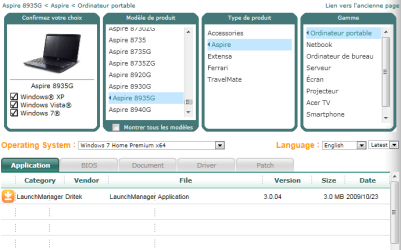
Have you install the "Acer Launch Manager" for windows 7 x64bits on the Ssd?
 

Attachments

  • Capture.PNG
    Capture.PNG
    17.9 KB · Views: 527

My Computer My Computer

At a glance

Windows 7 Professional SP1 - x64 [Non-UEFI Boot]Ivy Bridge Core i5 3570K (Delidded)G.Skill "Ares" DDR3 PC3-12800 - 1600MHz (16Gb)Asus Dual-RX480-O4G
Computer type
PC/Desktop
Computer Manufacturer/Model Number
Custom Build
OS
Windows 7 Professional SP1 - x64 [Non-UEFI Boot]
CPU
Ivy Bridge Core i5 3570K (Delidded)
Motherboard
Asus P8Z77-V LE PLUS
Memory
G.Skill "Ares" DDR3 PC3-12800 - 1600MHz (16Gb)
Graphics Card(s)
Asus Dual-RX480-O4G
Sound Card
Creative Sound Blaster Z w/5.1 sound system
Monitor(s) Displays
Asus IPS 23"
Screen Resolution
16/9
Hard Drives
Internal:
500Go Sata 6Gb/s (x2)
500Go Sata 3Gb/s (x2)
SSD 60Go Sata 6Gb/s
PSU
In Win C 900W Series 80+ Platinum
Case
Thermaltake Chaser A71
Cooling
Custom Water Cooling Loop
Keyboard
Cooler Master QuickFire XTi
Mouse
Razer Imperator 2012 (4G)
Antivirus
MSE
Browser
IE 11.0.xxx Rtm
Other Info
"Raid0" with Intel Smart Response Technology (HDD/SSD)
Have you install the "Acer Launch Manager" for windows 7 x64bits on the Ssd?

Yes I did, both versions and the Fn brightness keys don't work with either version.

I'm going to try some of the "Work Arounds" that Mike posted.

Thanks everyone....but I'm still irked about these keys & W7. :shock:
 

My Computer My Computer

At a glance

SSDs: Windows 7 HP 64, HDDs: Vista HP 64PC: Intel Q9650, Laptop: Intel T9900PC: 8 GB, Laptop: 8 GBPC: Gigabyte GeForce GTX-280, Laptop: ATI HD4670
Computer Manufacturer/Model Number
PC: Self Configured, Laptop: Acer 8935G
OS
SSDs: Windows 7 HP 64, HDDs: Vista HP 64
CPU
PC: Intel Q9650, Laptop: Intel T9900
Motherboard
PC: Asus P5Q-SE, Laptop: Acer
Memory
PC: 8 GB, Laptop: 8 GB
Graphics Card(s)
PC: Gigabyte GeForce GTX-280, Laptop: ATI HD4670
Hard Drives
PC: SSD, OCZ Vertzex 60 GB
PC: HDD, WD VelociRaptor 300 GB
PC: HDD, Seagate Baracuda 250 GB?
Laptop: SSD, Mushkin Callisto Deluxe 240 GB
Laptop: HDD, WD Caviar Black 500 GB
Back
Top