folder addresses?

dazco

Banned
Local time
2:28 AM
Messages
126
Sorry, i know i'm a PITA, but there are so many things i need but can't find in 7, so i will likely drive you all crazy with the questions. I try to google first, but if it's taking forever to find the answer i post here.

Queston: in other windows versions i could have an address bar at the top of any windows folder so i could see and/or copy the path. I can't seem to find that as an option, and w/o it i'll be spending literally hours over time trying to do simple things that should take seconds. For example, i can find where the system sounds are stored via a file find app i have by simply search for *.wav. But i can't navigate to that folder in my email options so i can use a sound in there for email alert because i have no idea where the folder is. I sincerely hope it's possible because w/o the ability to see a folder's pathway, 7 will be a real pain to use for me, as that was a daily event for me. (seeing and using a folders path)
 

My Computer

OS
windows 7 pro 64 bit
CPU
i5 760
Motherboard
GIGABYTE GA-P55A-UD3
Memory
4GB G skill DDR3 1600
Graphics Card(s)
XFX 5850
Sound Card
audigy 2 ZS
Monitor(s) Displays
samsung 22" 1650x1080
Hard Drives
Patriot SSD 120GB Inferno
maxtor 300GB IDE storage drive
PSU
Corsair TX650w
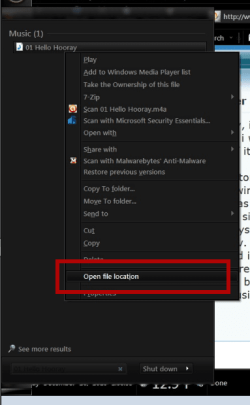
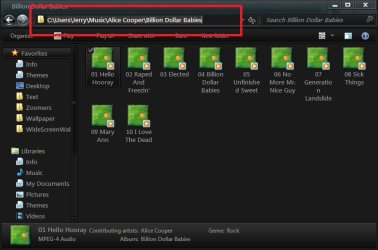
If you search from the start menu then right click & look for Open file location It will open it then click in address bar & copy the location.
Jerry
 

Attachments

  • z.PNG
    z.PNG
    27.4 KB · Views: 1
  • v.jpg
    v.jpg
    43.5 KB · Views: 1
  • b.jpg
    b.jpg
    44.2 KB · Views: 1

My Computer

Computer type
Laptop
Computer Manufacturer/Model Number
Sager NP9170
OS
Win 7 Pro x64 / Win 10 Pro
CPU
Intel(R) Core(TM) i7-3630QM CPU @ 2.40GHz
Motherboard
CLEVO P170EM
Memory
12 GB
Graphics Card(s)
(1) Intel(R) HD Graphics 4000 (2) NVIDIA GeForce GTX 675M
Sound Card
(1) Realtek High Definition Audio (2) Intel(R) Display Aud
Monitor(s) Displays
17.3
Screen Resolution
1920x1080
Hard Drives
(1) Samsung 860 EVO 500GB(OS) (1) Samsung 860 EVO 500GB(Data)
Keyboard
Backlite
Antivirus
MSE, Malwarebytes Pro
Browser
Firefox
Other Info
DESKTOP: Custom-built.
OS: Win 10 Pro x64.
CASE: Rosewill R5.
CPU: Intel I5 4670K CPU @ 3.40GHz.
CPU COOLER: Cool Master Hyper 212 EVO.
MOTHERBOARD: Asus Z87-A.
MEMORY: Kingston HyperX 2x4 GB.
GPU: Nvidia Geforce 650 TI.
PSU: Corsair TX750.
DRIVES: (1) Samsung 840 120 GB SSD (2) Western Digital blue 500 GB 7200 RPM.
But i can't find things that way, so i need to be able to see the address in a window thats already open.
 

My Computer

OS
windows 7 pro 64 bit
CPU
i5 760
Motherboard
GIGABYTE GA-P55A-UD3
Memory
4GB G skill DDR3 1600
Graphics Card(s)
XFX 5850
Sound Card
audigy 2 ZS
Monitor(s) Displays
samsung 22" 1650x1080
Hard Drives
Patriot SSD 120GB Inferno
maxtor 300GB IDE storage drive
PSU
Corsair TX650w
Hello Dazco,

You can also left click on a blank space in the address bar to see the full path.

In addition, you could add the Path column to see the full paths of items as well when you are using Details view.

Hope this helps,
Shawn
 

My Computer

Computer type
PC/Desktop
Computer Manufacturer/Model Number
Self built custom
OS
64-bit Windows 11 Pro for Workstations
CPU
Intel i7-8700K OC'd to 5 GHz
Motherboard
ASUS ROG Maximus XI Formula Z390
Memory
64 GB (4x16GB) G.SKILL TridentZ RGB DDR4 3600 MHz
Graphics Card(s)
ASUS ROG-STRIX-GTX1080TI-O11G-GAMING
Sound Card
Integrated
Monitor(s) Displays
2 x Samsung Odyssey G7 27"
Screen Resolution
2560x1440
Hard Drives
1TB Samsung 990 PRO M.2,
4TB Samsung 990 PRO PRO M.2,
TerraMaster F8 SSD Plus NAS
PSU
Seasonic Prime Titanium 850W
Case
Thermaltake Core P3
Cooling
Corsair Hydro H115i
Keyboard
Logitech wireless K800
Mouse
Logitech MX Master 4
Internet Speed
2 Gb/s Download and 100 Mb/s Upload
Antivirus
Malwarebyte Anti-Malware Premium
Browser
Google Chrome
Other Info
Logitech Z625 speaker system,
Logitech BRIO 4K Pro webcam,
HP Color LaserJet Pro MFP M477fdn,
APC SMART-UPS RT 1000 XL - SURT1000XLI,
Galaxy S23 Plus phone
Thnaks, thats good, tho is there any way to make folders default to that? (the address in the address bar instead of having to click it? If not, this will do but it sure would be nive if that were default view.
 

My Computer

OS
windows 7 pro 64 bit
CPU
i5 760
Motherboard
GIGABYTE GA-P55A-UD3
Memory
4GB G skill DDR3 1600
Graphics Card(s)
XFX 5850
Sound Card
audigy 2 ZS
Monitor(s) Displays
samsung 22" 1650x1080
Hard Drives
Patriot SSD 120GB Inferno
maxtor 300GB IDE storage drive
PSU
Corsair TX650w
No way that I know of. :(
 

My Computer

Computer type
PC/Desktop
Computer Manufacturer/Model Number
Self built custom
OS
64-bit Windows 11 Pro for Workstations
CPU
Intel i7-8700K OC'd to 5 GHz
Motherboard
ASUS ROG Maximus XI Formula Z390
Memory
64 GB (4x16GB) G.SKILL TridentZ RGB DDR4 3600 MHz
Graphics Card(s)
ASUS ROG-STRIX-GTX1080TI-O11G-GAMING
Sound Card
Integrated
Monitor(s) Displays
2 x Samsung Odyssey G7 27"
Screen Resolution
2560x1440
Hard Drives
1TB Samsung 990 PRO M.2,
4TB Samsung 990 PRO PRO M.2,
TerraMaster F8 SSD Plus NAS
PSU
Seasonic Prime Titanium 850W
Case
Thermaltake Core P3
Cooling
Corsair Hydro H115i
Keyboard
Logitech wireless K800
Mouse
Logitech MX Master 4
Internet Speed
2 Gb/s Download and 100 Mb/s Upload
Antivirus
Malwarebyte Anti-Malware Premium
Browser
Google Chrome
Other Info
Logitech Z625 speaker system,
Logitech BRIO 4K Pro webcam,
HP Color LaserJet Pro MFP M477fdn,
APC SMART-UPS RT 1000 XL - SURT1000XLI,
Galaxy S23 Plus phone
Ok, well this is good enough. Thanks 4 the help.
 

My Computer

OS
windows 7 pro 64 bit
CPU
i5 760
Motherboard
GIGABYTE GA-P55A-UD3
Memory
4GB G skill DDR3 1600
Graphics Card(s)
XFX 5850
Sound Card
audigy 2 ZS
Monitor(s) Displays
samsung 22" 1650x1080
Hard Drives
Patriot SSD 120GB Inferno
maxtor 300GB IDE storage drive
PSU
Corsair TX650w
Never mind my last post. ;)

You could use the Classic Explorer option in the free program Classic Shell to disable the bread crumbs to have this.
 

My Computer

Computer type
PC/Desktop
Computer Manufacturer/Model Number
Self built custom
OS
64-bit Windows 11 Pro for Workstations
CPU
Intel i7-8700K OC'd to 5 GHz
Motherboard
ASUS ROG Maximus XI Formula Z390
Memory
64 GB (4x16GB) G.SKILL TridentZ RGB DDR4 3600 MHz
Graphics Card(s)
ASUS ROG-STRIX-GTX1080TI-O11G-GAMING
Sound Card
Integrated
Monitor(s) Displays
2 x Samsung Odyssey G7 27"
Screen Resolution
2560x1440
Hard Drives
1TB Samsung 990 PRO M.2,
4TB Samsung 990 PRO PRO M.2,
TerraMaster F8 SSD Plus NAS
PSU
Seasonic Prime Titanium 850W
Case
Thermaltake Core P3
Cooling
Corsair Hydro H115i
Keyboard
Logitech wireless K800
Mouse
Logitech MX Master 4
Internet Speed
2 Gb/s Download and 100 Mb/s Upload
Antivirus
Malwarebyte Anti-Malware Premium
Browser
Google Chrome
Other Info
Logitech Z625 speaker system,
Logitech BRIO 4K Pro webcam,
HP Color LaserJet Pro MFP M477fdn,
APC SMART-UPS RT 1000 XL - SURT1000XLI,
Galaxy S23 Plus phone
Sorry, i know i'm a PITA, but there are so many things i need but can't find in 7, so i will likely drive you all crazy with the questions. I try to google first, but if it's taking forever to find the answer i post here.

Queston: in other windows versions i could have an address bar at the top of any windows folder so i could see and/or copy the path. I can't seem to find that as an option, and w/o it i'll be spending literally hours over time trying to do simple things that should take seconds. For example, i can find where the system sounds are stored via a file find app i have by simply search for *.wav. But i can't navigate to that folder in my email options so i can use a sound in there for email alert because i have no idea where the folder is. I sincerely hope it's possible because w/o the ability to see a folder's pathway, 7 will be a real pain to use for me, as that was a daily event for me. (seeing and using a folders path)


All you have to do is click in the address bar, and it will change to the path you are familiar with seeing.
 

My Computer

Computer Manufacturer/Model Number
Custom
OS
Windows 7 Ultimate RTM (Technet)
CPU
3.00 gigahertz Intel Core2 Duo E8400
Motherboard
ASUSTeK Computer INC. P5K/EPU Rev 1.xx
Memory
4GB
Graphics Card(s)
ATI Radeon X1950 Pro
Sound Card
Built in HD Audio
Monitor(s) Displays
22" Gateway LCD
Screen Resolution
1920 x 1200
Hard Drives
ST3160023A [Hard drive] (160.04 GB) -- drive 0, rev 8.01, ST3500630AS [Hard drive] (500.11 GB) -- drive 2, rev 3.AAK
ST3500630AS [Hard drive] (500.11 GB) -- drive 1, rev 3.AAK
Keyboard
Logitech G11
Mouse
Microsoft Wireless Laser Mouse 5000
Internet Speed
13.44 Mbps
Hello Lee,

Tru dat, but he was looking for a way to disable bread crumbs and to always have the full path displaying in the address bar. :)
 

My Computer

Computer type
PC/Desktop
Computer Manufacturer/Model Number
Self built custom
OS
64-bit Windows 11 Pro for Workstations
CPU
Intel i7-8700K OC'd to 5 GHz
Motherboard
ASUS ROG Maximus XI Formula Z390
Memory
64 GB (4x16GB) G.SKILL TridentZ RGB DDR4 3600 MHz
Graphics Card(s)
ASUS ROG-STRIX-GTX1080TI-O11G-GAMING
Sound Card
Integrated
Monitor(s) Displays
2 x Samsung Odyssey G7 27"
Screen Resolution
2560x1440
Hard Drives
1TB Samsung 990 PRO M.2,
4TB Samsung 990 PRO PRO M.2,
TerraMaster F8 SSD Plus NAS
PSU
Seasonic Prime Titanium 850W
Case
Thermaltake Core P3
Cooling
Corsair Hydro H115i
Keyboard
Logitech wireless K800
Mouse
Logitech MX Master 4
Internet Speed
2 Gb/s Download and 100 Mb/s Upload
Antivirus
Malwarebyte Anti-Malware Premium
Browser
Google Chrome
Other Info
Logitech Z625 speaker system,
Logitech BRIO 4K Pro webcam,
HP Color LaserJet Pro MFP M477fdn,
APC SMART-UPS RT 1000 XL - SURT1000XLI,
Galaxy S23 Plus phone
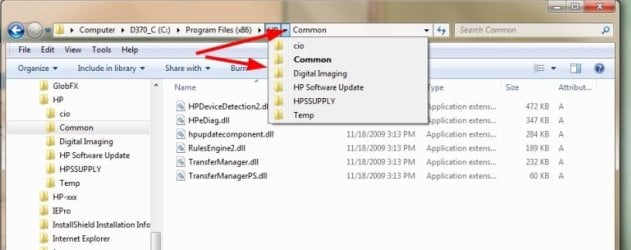
When I first started using Win 7 I also missed the full path in the Address bar. Now that I've been using Win 7 for awhile, I've come to really like the bread crumbs that are shown.

What I like about is that you can click on any segment to see what else is available under it, not just what is shown. I know you can do the same by expanding folders in the left pane but I find this very useful.

BreadCrumbs.jpg
 

My Computer

Computer type
PC/Desktop
Computer Manufacturer/Model Number
Lenovo IdeaCenter 450
OS
Windows 10 Pro X64
CPU
Intel Quad Core i7-4770 @ 3.4Ghz
Memory
16.0GB PC3-12800 DDR3 SDRAM 1600 MHz
Graphics Card(s)
Intel Integrated HD Graphics
Sound Card
Realtek HD Audio
Monitor(s) Displays
HP 22" LCD
Screen Resolution
1680 x 1050
Hard Drives
250GB Samsung EVO SATA-3 SSD
2TB Seagate ST2000DM001 SATA-2
1.5TB Seagate ST3150041AS SATA
Keyboard
Dell USB
Mouse
Lenovo USB
Internet Speed
Cable via Road Runner 3MB Upload, 30MB Download
Antivirus
Windows Defender, MBAM Pro, MBAE
Browser
Seamonkey
Other Info
UEFI/GPT
PLDS DVD-RW DH16AERSH
Back
Top