Folder Background - Change

How to Change Folder Background with AveFolderBG for Windows 7


I happened upon the fix awhile back that enabled Folder Backgrounds in Windows 7 and have since fixed AveFolderBG to work with Windows 7

   Warning
It is recommended to create a restore point before doing this in case a mistake is made, or you do not like the results.

This way you could quickly do a System Restore with the restore point to undo it.


xqjssg.jpg


The application works by adding itself to the Folders Property pages. Just Right-Click a Folder, Choose Customize this Folder, or click Properties and you will be presented with a new menu tab.​

The fix has a few side-effects such as Tiles are no longer an option under view and is switched to Extended Tiles. Auto Arrange is no longer disabled under Icon View. In some cases you may need to redo you Folder settings after applying the Install.​


   Note
To Install AveFolderBG:
  • Download the 32-bit or 64-bit AveFolderBG ZIP file below for your same 32-bit or 64-bit Windows 7.
  • Extract (drag and drop) the AveFolderBGW732bit or AveFolderBGW764bit folder and it's contents from the ZIP file, and open it.
  • Right click on the install.bat file and click on Run as administrator.
  • When finished, restart the computer.

To Uninstall AveFolderBG:
  • Right click on the unstall.bat file and click on Run as administrator.
  • When finished, restart the computer.


32Bit AveFolderBG Download for Windows 7


64Bit AveFolderBG Download for Windows 7


Original Homepage for Aves Vista Background
 

Attachments

Last edited by a moderator:
LeeWhittington's background changed issue

It installs fine and works after I log-off/log-on. When I restart the computer all the backgrounds are gone. :geek:

FYI:

1.)I use DJ Gx's Snow Leopard theme
2.)I use the windows orb changer

both work fine
 
Last edited:

My Computer

Computer Manufacturer/Model Number
Sager NP2096
OS
7 Ultimate 64 bit Service Pack 1
CPU
Intel Core 2 Duo P9500 @ 2.53GHz (lower wattage chip)
Motherboard
JHL 90 (U2E1)
Memory
4.0GB Dual-Channel DDR 2 @ 398MHz (5-5-5-18)
Graphics Card(s)
512MB GeForce 9600M GT
Sound Card
Realtek High Definition Audio
Monitor(s) Displays
Generic PnP Monitor
Screen Resolution
1680x1050
Hard Drives
Hitachi 244GB @ 7200rpm (IDE)
Cooling
nature
Keyboard
generic
Mouse
Microsoft Wireless Mobile Mouse 3500
Internet Speed
30 megabits down, 5 megabits up
Other Info
1.)Staples 4-Port USB 2.0 Mobile Hub
2.)WNDR3700 - NETGEAR RangeMax Dual Band Wireless-N Gigabit Router
3.)Logitech Webcam C250
4.)Logitech M570
The hack\tweak it uses sometimes fails, for what reason noone knows. It did it as well when it was originally written for Vista. Though I only added the patch to work in Windows 7 I am also working on my own complete version and hopefully be able to figure out a workaround.

When they don't show up, usually if you log off or restart explorer they will show back up
 

My Computer

Computer Manufacturer/Model Number
Toshiba Satellite
OS
Windows 7 Premium 32Bit\64Bit
The hack\tweak it uses sometimes fails, for what reason noone knows. It did it as well when it was originally written for Vista. Though I only added the patch to work in Windows 7 I am also working on my own complete version and hopefully be able to figure out a workaround.

When they don't show up, usually if you log off or restart explorer they will show back up

Thank you for responding. I will wait for your new software. :geek:
 

My Computer

Computer Manufacturer/Model Number
Sager NP2096
OS
7 Ultimate 64 bit Service Pack 1
CPU
Intel Core 2 Duo P9500 @ 2.53GHz (lower wattage chip)
Motherboard
JHL 90 (U2E1)
Memory
4.0GB Dual-Channel DDR 2 @ 398MHz (5-5-5-18)
Graphics Card(s)
512MB GeForce 9600M GT
Sound Card
Realtek High Definition Audio
Monitor(s) Displays
Generic PnP Monitor
Screen Resolution
1680x1050
Hard Drives
Hitachi 244GB @ 7200rpm (IDE)
Cooling
nature
Keyboard
generic
Mouse
Microsoft Wireless Mobile Mouse 3500
Internet Speed
30 megabits down, 5 megabits up
Other Info
1.)Staples 4-Port USB 2.0 Mobile Hub
2.)WNDR3700 - NETGEAR RangeMax Dual Band Wireless-N Gigabit Router
3.)Logitech Webcam C250
4.)Logitech M570
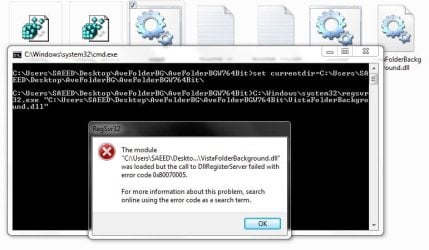
in my pc give this error
1.JPG
please help me
 

My Computer

Computer Manufacturer/Model Number
dell 1558
OS
windows 7 home preminm x64
CPU
i7
Motherboard
dell
Memory
DDR3 4G
Graphics Card(s)
ATI HD 5470 1G
Monitor(s) Displays
15.6 LED
Hard Drives
Hitachi 500G
Thanks to folder background apps, I now have hope; there is a chance I will not snap my Windows 7 install disk in half, shred & burn it, without ceremony...

I not only use background images in my folders for my own satisfaction, I use folder backgrounds to create more marketable presentations when burning software, music, videos and tutorials to disk. I receive a great deal more business from people who see a folder with a unique, content-related background image, just like a webpage.

Realistically, what if all webpages looked like a dull, barren Windows 7 folder...?
(I realize Facebook already does, and always has.)

By comparison, Windows 2000 not only integrated the folder customization into the interface, it hid the respective settings in the protected system files of each folder. To later move the folder somewhere else (exception being: Vista or VII) had no detrimental affect on the user's settings. This is not true of the 3rd-party apps; if the background's source file (often from an entirely separate folder - even a different partition) is moved, the vison is ...gone.

That much having been said, you come up with a way to use folder backgrounds in W2K, XP and 7, my friend, and I'll give you 40 bucks for it. Seriously.
 

My Computer

Computer Manufacturer/Model Number
scorpivs
OS
Windows 7 Ultimate x86 Signature
CPU
Intel i7 940 Socket 1366
Motherboard
ASRock X58 Extreme
Memory
Kingston 3x1GB 1600
Graphics Card(s)
XFX HD 4870
Sound Card
Onboard Realtek Audio
Monitor(s) Displays
Dell 15.5" CRT
Hard Drives
WD 160GB SATA
PSU
Ultra LSP750
Case
Bench/Whatever is available
Cooling
Stock Intel Cooling for i7 940
Links does not work anymore...
 

My Computer

Computer Manufacturer/Model Number
Sony Vaio
OS
Windows 7 Home premium x64
CPU
Intel i5 520m at 2.4GHz(plus turbo mode at 2.9GHz)
Memory
4GB ddr3 1067
Graphics Card(s)
Nvidia 330m
Hello Stsaerox,

Sorry about that. Links have been fixed. :)
 

My Computer

Computer type
PC/Desktop
Computer Manufacturer/Model Number
Self built custom
OS
64-bit Windows 11 Pro for Workstations
CPU
Intel i7-8700K OC'd to 5 GHz
Motherboard
ASUS ROG Maximus XI Formula Z390
Memory
64 GB (4x16GB) G.SKILL TridentZ RGB DDR4 3600 MHz
Graphics Card(s)
ASUS ROG-STRIX-GTX1080TI-O11G-GAMING
Sound Card
Integrated
Monitor(s) Displays
2 x Samsung Odyssey G7 27"
Screen Resolution
2560x1440
Hard Drives
1TB Samsung 990 PRO M.2,
4TB Samsung 990 PRO PRO M.2,
TerraMaster F8 SSD Plus NAS
PSU
Seasonic Prime Titanium 850W
Case
Thermaltake Core P3
Cooling
Corsair Hydro H115i
Keyboard
Logitech wireless K800
Mouse
Logitech MX Master 4
Internet Speed
2 Gb/s Download and 100 Mb/s Upload
Antivirus
Malwarebyte Anti-Malware Premium
Browser
Google Chrome
Other Info
Logitech Z625 speaker system,
Logitech BRIO 4K Pro webcam,
HP Color LaserJet Pro MFP M477fdn,
APC SMART-UPS RT 1000 XL - SURT1000XLI,
Galaxy S23 Plus phone
Thank you. No problem...
 

My Computer

Computer Manufacturer/Model Number
Sony Vaio
OS
Windows 7 Home premium x64
CPU
Intel i5 520m at 2.4GHz(plus turbo mode at 2.9GHz)
Memory
4GB ddr3 1067
Graphics Card(s)
Nvidia 330m
You're most welcome. :)
 

My Computer

Computer type
PC/Desktop
Computer Manufacturer/Model Number
Self built custom
OS
64-bit Windows 11 Pro for Workstations
CPU
Intel i7-8700K OC'd to 5 GHz
Motherboard
ASUS ROG Maximus XI Formula Z390
Memory
64 GB (4x16GB) G.SKILL TridentZ RGB DDR4 3600 MHz
Graphics Card(s)
ASUS ROG-STRIX-GTX1080TI-O11G-GAMING
Sound Card
Integrated
Monitor(s) Displays
2 x Samsung Odyssey G7 27"
Screen Resolution
2560x1440
Hard Drives
1TB Samsung 990 PRO M.2,
4TB Samsung 990 PRO PRO M.2,
TerraMaster F8 SSD Plus NAS
PSU
Seasonic Prime Titanium 850W
Case
Thermaltake Core P3
Cooling
Corsair Hydro H115i
Keyboard
Logitech wireless K800
Mouse
Logitech MX Master 4
Internet Speed
2 Gb/s Download and 100 Mb/s Upload
Antivirus
Malwarebyte Anti-Malware Premium
Browser
Google Chrome
Other Info
Logitech Z625 speaker system,
Logitech BRIO 4K Pro webcam,
HP Color LaserJet Pro MFP M477fdn,
APC SMART-UPS RT 1000 XL - SURT1000XLI,
Galaxy S23 Plus phone
Hello again.

I'm trying to make a simple silent installer for this but it cannon be installed. Can you help me? (see the attachement it is for x64 systems)

I've already checked the option for administrative access in sfx options but it does not help...
 
Last edited by a moderator:

My Computer

Computer Manufacturer/Model Number
Sony Vaio
OS
Windows 7 Home premium x64
CPU
Intel i5 520m at 2.4GHz(plus turbo mode at 2.9GHz)
Memory
4GB ddr3 1067
Graphics Card(s)
Nvidia 330m
Doesn't work for me at all

WIn 7 64bit Home Premium

Doesn't work at all.

No Errors installing but after restarting no changes. Click on Folder properties and no Folder Background tab

Very disappointing :(
 

My Computer

OS
win7 64bit
WIn 7 64bit Home Premium

Doesn't work at all.

No Errors installing but after restarting no changes. Click on Folder properties and no Folder Background tab

Very disappointing :(

Did you run this as administrator?
 

My Computer

Computer Manufacturer/Model Number
Sony Vaio
OS
Windows 7 Home premium x64
CPU
Intel i5 520m at 2.4GHz(plus turbo mode at 2.9GHz)
Memory
4GB ddr3 1067
Graphics Card(s)
Nvidia 330m
I have successfully installed it, but I have noticed it changed the select image effect (ItemsView__ListView_ListItem_HotSelectedImage, Selected and NotFocused) - and so I decided to uninstall it...But after the uninstallation, when I restarted, my custom made Visual Style is no longer with its aforementioned select images, but with the same default grey which appeared when I was using Folder Background...I have tried to delete and reinstall my visual style, but nothing helps - it is still showing that ugly grey rectangle instead of the theme's one...
Can somebody help me, please?
:cry:
 

My Computer

Computer Manufacturer/Model Number
Dell Inspiron 1520
OS
Windows 7 Ultimate x86
Hello Bayleis. and welcome to Seven Forums.

If you have a restore point dated before using this available, you could do a system restore with it to hopefully undo and fix this.

Hope this helps, :)
Shawn
 

My Computer

Computer type
PC/Desktop
Computer Manufacturer/Model Number
Self built custom
OS
64-bit Windows 11 Pro for Workstations
CPU
Intel i7-8700K OC'd to 5 GHz
Motherboard
ASUS ROG Maximus XI Formula Z390
Memory
64 GB (4x16GB) G.SKILL TridentZ RGB DDR4 3600 MHz
Graphics Card(s)
ASUS ROG-STRIX-GTX1080TI-O11G-GAMING
Sound Card
Integrated
Monitor(s) Displays
2 x Samsung Odyssey G7 27"
Screen Resolution
2560x1440
Hard Drives
1TB Samsung 990 PRO M.2,
4TB Samsung 990 PRO PRO M.2,
TerraMaster F8 SSD Plus NAS
PSU
Seasonic Prime Titanium 850W
Case
Thermaltake Core P3
Cooling
Corsair Hydro H115i
Keyboard
Logitech wireless K800
Mouse
Logitech MX Master 4
Internet Speed
2 Gb/s Download and 100 Mb/s Upload
Antivirus
Malwarebyte Anti-Malware Premium
Browser
Google Chrome
Other Info
Logitech Z625 speaker system,
Logitech BRIO 4K Pro webcam,
HP Color LaserJet Pro MFP M477fdn,
APC SMART-UPS RT 1000 XL - SURT1000XLI,
Galaxy S23 Plus phone
Thanks, Shawn, this was the first thing I attempted, but sadly only my most recent restore point is available and it is from after I installed folder background, so doesn't help...
I was wondering if it might be due to something messed up in the registry keys, but this glitch only happens to the visual style I was using while having folder background - because when I apply other VS, they work properly...This is silly, I know, but it is driving me nuts, as I can't figure out what to do...It is my favourite Visual style and now I can't use it properly.
Thanks anyway! If anyone else has an idea, please let me know...
 

My Computer

Computer Manufacturer/Model Number
Dell Inspiron 1520
OS
Windows 7 Ultimate x86
The only other thing I can think of is to run a sfc /scannow command to hopefully restore any modified and corrupted system files back to default to undo this if the program modified any.
 

My Computer

Computer type
PC/Desktop
Computer Manufacturer/Model Number
Self built custom
OS
64-bit Windows 11 Pro for Workstations
CPU
Intel i7-8700K OC'd to 5 GHz
Motherboard
ASUS ROG Maximus XI Formula Z390
Memory
64 GB (4x16GB) G.SKILL TridentZ RGB DDR4 3600 MHz
Graphics Card(s)
ASUS ROG-STRIX-GTX1080TI-O11G-GAMING
Sound Card
Integrated
Monitor(s) Displays
2 x Samsung Odyssey G7 27"
Screen Resolution
2560x1440
Hard Drives
1TB Samsung 990 PRO M.2,
4TB Samsung 990 PRO PRO M.2,
TerraMaster F8 SSD Plus NAS
PSU
Seasonic Prime Titanium 850W
Case
Thermaltake Core P3
Cooling
Corsair Hydro H115i
Keyboard
Logitech wireless K800
Mouse
Logitech MX Master 4
Internet Speed
2 Gb/s Download and 100 Mb/s Upload
Antivirus
Malwarebyte Anti-Malware Premium
Browser
Google Chrome
Other Info
Logitech Z625 speaker system,
Logitech BRIO 4K Pro webcam,
HP Color LaserJet Pro MFP M477fdn,
APC SMART-UPS RT 1000 XL - SURT1000XLI,
Galaxy S23 Plus phone
Folder Images on domain workstations

Excellent tweak for W7, thankyou. Wanted BGImages for shared folders on workstations on a domain.
The idea worked well with XP can't understand why not standard with W7.
Your mod works well for Administrator but could not work out how to install for All Users.
Any attempt to use regedit for other users brings up the dreaded UAC and also issues with permissions for ordinary Users.
Hit on the idea yesterday of using your batch file loading VistaFolderBackground.dll and a vbscript at startup which modifies registry for HKCU.
Used RegWrite initially but it can't handle the long hex strings.
Found StdRegProv / SetBinaryValue and used a hex to decimal converter to add these values to registry.
So far have found I only need to add the HKLM values, the 2 short HKCU values + generic folder keys/values. Users can't access the My Docs, Music etc folders anyway.
I also find, so far, that it works without removing the original 'Bags' key + subkeys (couldn't remove them anyway for each user due to permissions issues again), just adding the relevant subkeys to it.
Am testing it now.
On original test machine, where I did remove all Bags subkeys, I did find a few days ago that all the original Bags subkeys had been reinstated and the Folder Background tab had mysteriously disappeared, probably after a Windows update.
Hopefully, with the VistaFolderBackground.dll and Bags keys being reloaded every logon this will get around this issue.
Are there any unexpected consequences of not removing all these Bags subkeys?
Keep up the good work.
 

My Computer

OS
W7 Professional 32 bit
So nice. There is one other fix on this site, but this one is way better. Thanks for making this fix possible.
 

My Computer

Computer type
Laptop
Computer Manufacturer/Model Number
HP EliteBook 8730W
OS
Windows 7 Home (64bit)
Hard Drives
SSD Intel 520
Back
Top