Folder Customization keeps reverting back

Jonesab7

New member
Local time
5:18 PM
Messages
5
I have a bunch of pictures in folders on my computer. When I view them they are viewed as icons only so I want to change the folder to a "picture" folder.

I right click the folder in question and click Properties-->Customize and change it from "general items" to "pictures" I then click "also apply this templete so subfolders". Then I click apply and OK.

When I go back into the folder or the properties this setting instantly reverts back to "general items". The folder I do and any sub-folders as well. I don't understand why this isn't sticking!?!
 

My Computer

Computer type
PC/Desktop
OS
Windows 7 Home Premium 64bit
try this
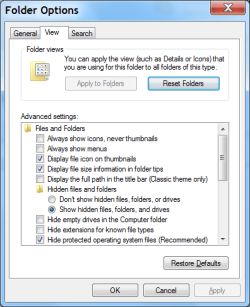
click organize then click folder and search options .
in the window that opens click the view tab and see if the topmost item on the list is checked.

you want it to be unchecked ,so it shows thumbnails not icons.
 

My Computer

Computer Manufacturer/Model Number
Hewlett packard/p6512uk
OS
Microsoft Windows 7 Home Premium 64-bit 7600
CPU
IIx4 amd athelon 635 processor
Motherboard
FOXCONN 2AA9
Memory
2x2gb
Graphics Card(s)
ati radeon HD 5450
Sound Card
(1) Realtek High Definition Audio (2) AMD High Definition
Monitor(s) Displays
samsung lcd tv 32"
Screen Resolution
1360x 768
Hard Drives
(1) WDC WD10 01FAES-60Z2A0 SATA Disk Device (2) Maxtor OneTouch USB Device (3) ST310003 33AS USB Device (4) WD My Book 1111 USB Device
PSU
?
Cooling
air!
Keyboard
wireless hp
Mouse
wireless Hp,optical
Internet Speed
1.10mb/s
Antivirus
MSE
Browser
Firefox
try this
click organize then click folder and search options .
in the window that opens click the view tab and see if the topmost item on the list is checked.

you want it to be unchecked ,so it shows thumbnails not icons.

It is currently unchecked.
 

My Computer

Computer type
PC/Desktop
OS
Windows 7 Home Premium 64bit
ok, what program do you use to view your pictures?
im presuming this is the icon showing on the picture files.
 

My Computer

Computer Manufacturer/Model Number
Hewlett packard/p6512uk
OS
Microsoft Windows 7 Home Premium 64-bit 7600
CPU
IIx4 amd athelon 635 processor
Motherboard
FOXCONN 2AA9
Memory
2x2gb
Graphics Card(s)
ati radeon HD 5450
Sound Card
(1) Realtek High Definition Audio (2) AMD High Definition
Monitor(s) Displays
samsung lcd tv 32"
Screen Resolution
1360x 768
Hard Drives
(1) WDC WD10 01FAES-60Z2A0 SATA Disk Device (2) Maxtor OneTouch USB Device (3) ST310003 33AS USB Device (4) WD My Book 1111 USB Device
PSU
?
Cooling
air!
Keyboard
wireless hp
Mouse
wireless Hp,optical
Internet Speed
1.10mb/s
Antivirus
MSE
Browser
Firefox
ok, what program do you use to view your pictures?
im presuming this is the icon showing on the picture files.

I use Windows Photo Viewer as the default
 

My Computer

Computer type
PC/Desktop
OS
Windows 7 Home Premium 64bit

My Computer

Computer Manufacturer/Model Number
Hewlett packard/p6512uk
OS
Microsoft Windows 7 Home Premium 64-bit 7600
CPU
IIx4 amd athelon 635 processor
Motherboard
FOXCONN 2AA9
Memory
2x2gb
Graphics Card(s)
ati radeon HD 5450
Sound Card
(1) Realtek High Definition Audio (2) AMD High Definition
Monitor(s) Displays
samsung lcd tv 32"
Screen Resolution
1360x 768
Hard Drives
(1) WDC WD10 01FAES-60Z2A0 SATA Disk Device (2) Maxtor OneTouch USB Device (3) ST310003 33AS USB Device (4) WD My Book 1111 USB Device
PSU
?
Cooling
air!
Keyboard
wireless hp
Mouse
wireless Hp,optical
Internet Speed
1.10mb/s
Antivirus
MSE
Browser
Firefox
Additionally, you may try doing this as well:

:ar: Enable viewing of hidden files in explorer
:ar: Open the folder in question and find a .ini file whose icon looks like a blank ruled page with a gear on it
:ar: Delete it and then try resetting the folder customizations (from "general" to "picture")

Does this help?
 

My Computer

Computer type
PC/Desktop
OS
Windows 7 Home Premium x64
Additionally, you may try doing this as well:

:ar: Enable viewing of hidden files in explorer
:ar: Open the folder in question and find a .ini file whose icon looks like a blank ruled page with a gear on it
:ar: Delete it and then try resetting the folder customizations (from "general" to "picture")

Does this help?

I set "show hidden files and folders" when I looked in the folder however I did not see any .ini file.
 

My Computer

Computer type
PC/Desktop
OS
Windows 7 Home Premium 64bit
Last edited:

My Computer

Computer type
PC/Desktop
Computer Manufacturer/Model Number
n/a
OS
W7 Ultimate SP1, LM19.2 MATE, W10 Home 1703, W10 Pro 1703 VM, #All 64 bit
CPU
AMD Phenom II x6 1100T, 3.3 GHz
Motherboard
ASUS M4A88T-M/USB3 (AM3)
Memory
12GB DDR3 1333 G-Skill (4GB x 2), G-Skill (2GB x 2)
Graphics Card(s)
NVIDIA GeForce GTX 660
Sound Card
Realtek?
Monitor(s) Displays
Samsung S23B350
Screen Resolution
1920x1080
Hard Drives
WD Green 2TB (SATA), WD Green 3TB (SATA), WD Blue 4TB (SATA), WD Blue 6TB (SATA)
PSU
Cooler Master
Case
Antec GX300 Tower
Cooling
3x Antec TRICOOL 120mm Fans
Mouse
Wired Optical
Internet Speed
DSL
Antivirus
Avast
Browser
Pale Moon (64 bit)
Other Info
2018-12-27 Upgraded HDDs
2015-12-10 Upgraded case, graphics card, storage
2015-08-15 Upgraded motherboard & RAM
2015-07-15 Upgraded LM17.1 to LM17.2
Additionally, you may try doing this as well:

:ar: Enable viewing of hidden files in explorer
:ar: Open the folder in question and find a .ini file whose icon looks like a blank ruled page with a gear on it
:ar: Delete it and then try resetting the folder customizations (from "general" to "picture")

Does this help?

I set "show hidden files and folders" when I looked in the folder however I did not see any .ini file.

In addition to showing hidden files, also uncheck "Hide protected operating system files" (click Yes when prompted).

Now get back to your folder and check if there's a file named "desktop" there. If yes, right click it and click properties and make sure "read only" is unchecked.

Now delete this file and reset your folder properties/customization accordingly.

Does this help? Post back any problem you face. :)
 

My Computer

Computer type
PC/Desktop
OS
Windows 7 Home Premium x64
Back
Top