Folder Icons Help

robotnerd

New member
Local time
9:16 AM
Messages
2
Location
Land of the Long White Cloud
Hi guys,
Today I have been trying to customize the icons on my laptop. In particular the folder ones, I have used both downloaded ones, and ones I have made myself in Adobe Fireworks, but each time I am having the same problem. When I set the folder to have a new icon, the icon always turns out really small, so if I view the folder in medium, large or x-large icons, the folder icon always stays the small icon size. I have tried using a different sized icon from 124x124pixels to 3500x3500 pixels, and the folder still remains small!

If anyone knows what I can do to get the folder icon to be bigger, this would be much appreciated, as I am sick of the default icons, and I generally view my folders in large icon view.

Thanks :)

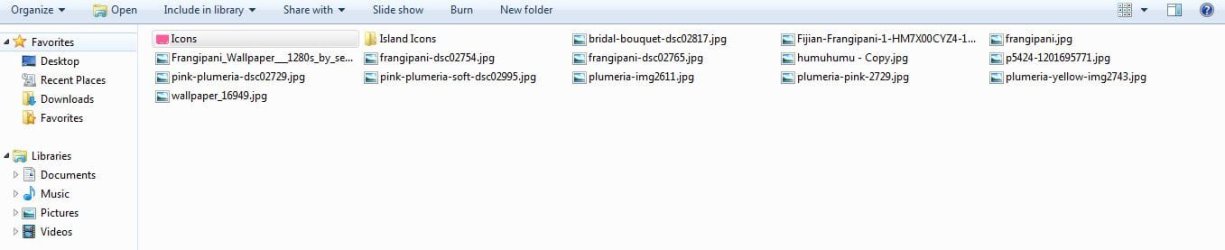
Note; The first attachment shows the folder with the new icon when it is in small icons view, the second shows it in x-large icons view. The folder with the new icon is the 'Icons' folder (the pink one)
 

Attachments
  • smalliconview.JPG
    smalliconview.JPG
    38 KB · Views: 14
  • largeiconview.JPG
    largeiconview.JPG
    51.3 KB · Views: 19
Last edited:

My Computer

Computer Manufacturer/Model Number
VPCEB25FG
OS
Windows 7 Home Premium 64bit
CPU
Intel Core i3
Memory
4GB
Hard Drives
320GB

My Computer

Computer type
PC/Desktop
Computer Manufacturer/Model Number
Gateway DX4831-01e (Mid-Tower Desktop)
OS
Originally Win 7 Hm Prem x64 Ver 6.1.7600 Build 7601-SP1 | Upgraded to Windows 10 December 14, 2019
CPU
Intel i3 530 2.93GHz, 2933MHz 2 Cores 4 Logical Processors
Motherboard
Gateway H57M01 133 megahertz
Memory
6GB of 1,333MHz DDR3 SDRAM
Graphics Card(s)
32MB Intel Graphics Media Accelerator HD IGChip
Sound Card
Realtek High Definition Audio
Monitor(s) Displays
Gateway HX2000 20inch TFT active matrix TN
Screen Resolution
1600 x 900 x 59 hertz
Hard Drives
WDC WD10EADS-00M2B0 [HDD] (1000.20 GB) -- drive 0,
HL-DT-ST DVDRAM GH41N [CD-ROM dr]
Four card readers, and Four USB 2.0
PSU
300watts.
Case
Mid-Tower Desktop
Cooling
Stock from Gateway
Keyboard
Natural Ergonomic Keyboard 4000, see Other Info
Mouse
Orig. Gateway wore out now using Insignia USB wired optical
Internet Speed
Vz FIOS 10ms png 57.64Mbps down 65.53Mbps up Speedtest.org
Antivirus
Zamana Anti-logger with Anti-malware, MSE, Windows Firewall,
Browser
IE11.0.9600.19399-Upd ver11.0.135, Firefox 68.0.1 x64
Other Info
System Specs by Belarc.

BIOS: American Megatrends Inc. P01-A0 11/17/2009

Replaced the MS 'Natural' Standard PS/2 Enhanced 101-102 Keyboard with a new Natural Ergonomic Keyboard 4000 on August 1st 2014.

Canon Pixma MG3222 Printer.

Updated to IE11 on 12102015 | Fios Quantum Router g1100

Additional AV: SpywareBlaster, manual Mbam, SAS
Does Adobe Fireworks create proper windows icon files? If not you might like to try IcoFX. I have changed several folder icons successfully using icons created with it. You can download it from here IcoFX - The Free Icon Editor - Download
 

My Computer

Computer type
Laptop
Computer Manufacturer/Model Number
Hewlett-Packard/G62-107SA Notebook
OS
Microsoft Windows 7 Home Premium 64-bit Service Pack 1
CPU
Intel(R) Core(TM) i3 CPU M 330 @ 2.13GHz
Motherboard
Hewlett-Packard 1425
Memory
8 GB DDR3
Graphics Card(s)
Intel(R) HD Graphics
Sound Card
Realtek High Definition Audio
Monitor(s) Displays
Builtin
Screen Resolution
1366 x 768 x 32 bits (4294967296 colors) @ 60 Hz
Hard Drives
250 GB SATA Hard Disk Drive 7200 rpm
2TB Seagate GoFlex USB 2 Drive
1TB Iomega Prestige USB 2 Drive
1.5TB Iomega Prestige USB 2 Drive (Samsung)
2TB WD MyBook Live NAS.
Mouse
Logitech Anywhere MX
Internet Speed
152 Mbs download 10 Mbs upload
Antivirus
Norton 360
Browser
Chrome
Hello robotnerd ... welcome aboard !

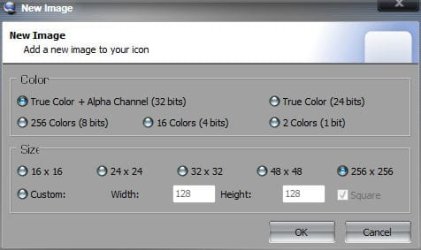
In windows 7 the folder icons are per class .... that means they are to be changed throughout the system to work appropriately . On the other hand , if you want to change only one icon using the customization tab, you should follow Kado .... I will add just one line with him .... while convertina a png to ico, use this settings (as you are making a single icon... otherwise there should be 13 layers at least).
Capture.JPG

This will provide a 32 bit 256x256 pixels icons .... which will be applied with various sizes nicely .
 

My Computer

Computer type
PC/Desktop
Computer Manufacturer/Model Number
Self Assembled
OS
Microsoft Windows 10 Pro Insider Preview 64-bit
CPU
Intel(R) Core(TM) i3-4130 CPU @ 3.40GHz
Motherboard
Gigabyte Technology Co., Ltd. B85M-D3H
Memory
Corsair Vengence 4GB x2 (8.00GB Dual-Channel DDR3 @ 798MHz)
Graphics Card(s)
2047MB GeForce GTS 450 (ZOTAC International)
Sound Card
Onboard (Realtek High Definition Audio)
Monitor(s) Displays
LG Flatron E2040T
Screen Resolution
1600x900
Hard Drives
Western Digital 1 TB
Seagate 500 GB
PSU
Corsair VS550
Case
Cooler Master K380
Cooling
Cooler Master Seidon 120V Plus
Keyboard
Logitech MK260r
Mouse
Logitech MK260r
Internet Speed
PMPL Broadband
Antivirus
Windows Defender + MBAM
Browser
Firefox
Other Info
Dell Studio 15" Laptop
No, fireworks doesn't make .ico files, I have just been saving them as gifs and converting them using irfan view, but Ico FX seems to work a lot better!

My icons are now working, so thanks! :party:
 

My Computer

Computer Manufacturer/Model Number
VPCEB25FG
OS
Windows 7 Home Premium 64bit
CPU
Intel Core i3
Memory
4GB
Hard Drives
320GB
No, fireworks doesn't make .ico files, I have just been saving them as gifs and converting them using irfan view, but Ico FX seems to work a lot better!

My icons are now working, so thanks! :party:

That's good news. Any further problems please come back you will get all the help you need here. :D
 

My Computer

Computer type
Laptop
Computer Manufacturer/Model Number
Hewlett-Packard/G62-107SA Notebook
OS
Microsoft Windows 7 Home Premium 64-bit Service Pack 1
CPU
Intel(R) Core(TM) i3 CPU M 330 @ 2.13GHz
Motherboard
Hewlett-Packard 1425
Memory
8 GB DDR3
Graphics Card(s)
Intel(R) HD Graphics
Sound Card
Realtek High Definition Audio
Monitor(s) Displays
Builtin
Screen Resolution
1366 x 768 x 32 bits (4294967296 colors) @ 60 Hz
Hard Drives
250 GB SATA Hard Disk Drive 7200 rpm
2TB Seagate GoFlex USB 2 Drive
1TB Iomega Prestige USB 2 Drive
1.5TB Iomega Prestige USB 2 Drive (Samsung)
2TB WD MyBook Live NAS.
Mouse
Logitech Anywhere MX
Internet Speed
152 Mbs download 10 Mbs upload
Antivirus
Norton 360
Browser
Chrome
Back
Top