Folder Image Cover

BlazingInferno

New member
Hi There!
I'm wondering if there is a way to choose exactly what the folder picture is.
For example, I have a folder storing FLAC files with a cover image that I want to put onto the containing folder, but I don't know how to do so (yes, the FLAC files all have the same cover that needs going on the whole folder).
Thank-you!
 
Last edited:

My Computer

OS
Windows 7 Home Premium 64-bit
Install the free program Folderico . You can choose whatever icon for Your folders.
 

My Computer

OS
Win 7 Ult 64-bit
CPU
AMD Athlon 455 3core
Memory
6 Gb 1333Mhz
Graphics Card(s)
GForce 545 1,5Gb 192-bit
Monitor(s) Displays
LG IPS234
Hard Drives
1tb
Case
Acer Predator
Last edited by a moderator:

My Computer

OS
Windows 7 Ultimate x64 SP1
CPU
Intel Core i7-2600
Motherboard
Gigabyte GA-P67A-UD3P-B3
Memory
12 GB Patriot Extreme DDR3-1333
Graphics Card(s)
Nvidia GTX 470
Monitor(s) Displays
Dell UltraSharp 2209WA
Hard Drives
OCZ Agility3 240 GB, WD5001AALS, WD7501AALS
PSU
OCZ ModStream 700W
Case
CoolerMaster HAF 912 Advanced
Cooling
CoolerMaster Hyper 212 Plus
That works only if you are not accessing the folder via a library. If the folder is in a library you have to go to the real folder to find that tab. The icon / picture still shows in the library though.
 

My Computer

Computer type
Laptop
Computer Manufacturer/Model Number
Hewlett-Packard/G62-107SA Notebook
OS
Microsoft Windows 7 Home Premium 64-bit Service Pack 1
CPU
Intel(R) Core(TM) i3 CPU M 330 @ 2.13GHz
Motherboard
Hewlett-Packard 1425
Memory
8 GB DDR3
Graphics Card(s)
Intel(R) HD Graphics
Sound Card
Realtek High Definition Audio
Monitor(s) Displays
Builtin
Screen Resolution
1366 x 768 x 32 bits (4294967296 colors) @ 60 Hz
Hard Drives
250 GB SATA Hard Disk Drive 7200 rpm
2TB Seagate GoFlex USB 2 Drive
1TB Iomega Prestige USB 2 Drive
1.5TB Iomega Prestige USB 2 Drive (Samsung)
2TB WD MyBook Live NAS.
Mouse
Logitech Anywhere MX
Internet Speed
152 Mbs download 10 Mbs upload
Antivirus
Norton 360
Browser
Chrome
How exactly do I find the "true" location and not just the libary location.
Also, folderico only lets me put icons as images and not just pictures.

Thanks For All Your Replies So Far!
 

My Computer

OS
Windows 7 Home Premium 64-bit
If for instance the folder is in the Videos library and if your data drive was C: you would go to c:\users\(your user name)\My Videos and find the folder in there. The reason for this is that the libraries only contain links to the real folders.
 

My Computer

Computer type
Laptop
Computer Manufacturer/Model Number
Hewlett-Packard/G62-107SA Notebook
OS
Microsoft Windows 7 Home Premium 64-bit Service Pack 1
CPU
Intel(R) Core(TM) i3 CPU M 330 @ 2.13GHz
Motherboard
Hewlett-Packard 1425
Memory
8 GB DDR3
Graphics Card(s)
Intel(R) HD Graphics
Sound Card
Realtek High Definition Audio
Monitor(s) Displays
Builtin
Screen Resolution
1366 x 768 x 32 bits (4294967296 colors) @ 60 Hz
Hard Drives
250 GB SATA Hard Disk Drive 7200 rpm
2TB Seagate GoFlex USB 2 Drive
1TB Iomega Prestige USB 2 Drive
1.5TB Iomega Prestige USB 2 Drive (Samsung)
2TB WD MyBook Live NAS.
Mouse
Logitech Anywhere MX
Internet Speed
152 Mbs download 10 Mbs upload
Antivirus
Norton 360
Browser
Chrome
Something like this ?
Capture.JPG

If so , the procedure is .....
1. Obtain the picture you want to display as folder preview .
2. Edit it to a squarish resolution, say 400x400 (optional, but it will make the preview better).
3. Place it in the target folder.
4. Rename it as "Folder.jpg"
5. Make it hidden (optional).

You cannot make a thumbnail preview static .... it will change with folder usage and disk cleanup etc . So it is the process to forced generation of a static preview .
 

My Computer

Computer type
PC/Desktop
Computer Manufacturer/Model Number
Self Assembled
OS
Microsoft Windows 10 Pro Insider Preview 64-bit
CPU
Intel(R) Core(TM) i3-4130 CPU @ 3.40GHz
Motherboard
Gigabyte Technology Co., Ltd. B85M-D3H
Memory
Corsair Vengence 4GB x2 (8.00GB Dual-Channel DDR3 @ 798MHz)
Graphics Card(s)
2047MB GeForce GTS 450 (ZOTAC International)
Sound Card
Onboard (Realtek High Definition Audio)
Monitor(s) Displays
LG Flatron E2040T
Screen Resolution
1600x900
Hard Drives
Western Digital 1 TB
Seagate 500 GB
PSU
Corsair VS550
Case
Cooler Master K380
Cooling
Cooler Master Seidon 120V Plus
Keyboard
Logitech MK260r
Mouse
Logitech MK260r
Internet Speed
PMPL Broadband
Antivirus
Windows Defender + MBAM
Browser
Firefox
Other Info
Dell Studio 15" Laptop
CHANGE FOLDER ICON’S DISPLAYED IMAGE (PICTURE)
To choose a file to show on this folder’s icon open Windows Explorer + go to the desired folder.
Click once on the folder to highlight it, but do not open it. Instead, right-click on it + open Properties, Customize.
Under ‘Folder Picture’ click on “Choose a file to show on this folder’s icon.”
Follow on-screen directions.
 

My Computer

Computer Manufacturer/Model Number
HP Pavillion dv5t (generation 1)
OS
Vista 64 bit and 32 bit (SP2)
CPU
Intel(R) Core(TM)2 Duo Processor T9400 (2.53 GHz
Memory
4GB DDR2 System Memory (2 Dimm)
Graphics Card(s)
512 MB NVIDIA GeForce 9600M GT
Monitor(s) Displays
15.4" diagonal WSXGA+ High-Definition HP BrightView Widescre
Screen Resolution
1680 x 1050
Hard Drives
320GB 5400RPM SATA Hard Drive with HP ProtectSmart Hard Drive Protection
Keyboard
Built-in HP
Mouse
Built in - Synaptics TouchPad V6.5 on PS/2 Port
Internet Speed
Max
Other Info
~ Intel Next-Gen Wireless-N Mini-card w/Bluetooth ~ Blu-Ray ROM DVD+/-R/RW ~ Integ. HDTV Hybrid Tuner ~ 12 Cell Battery ~ MS Office (Home Premium) 2007 ~
Something like this ?
View attachment 141740

If so , the procedure is .....
1. Obtain the picture you want to display as folder preview .
2. Edit it to a squarish resolution, say 400x400 (optional, but it will make the preview better).
3. Place it in the target folder.
4. Rename it as "Folder.jpg"
5. Make it hidden (optional).

You cannot make a thumbnail preview static .... it will change with folder usage and disk cleanup etc . So it is the process to forced generation of a static preview.

This is work for me but only with default folder. Did you change all icon file or only default folder icon? Only default folder is compatible with thumbnail? is that right?

And i couldn't find a easy solution for thumbnail like this
2mf0m6f.jpg

Only way is convert all images to ico and put as folder icon? But this is too hard with many folders :huh:
Note : robitabu's try seems good but i can't say i understand all :confused:
http://www.sevenforums.com/customization/37230-viewing-folder-thumbnails-like-xp.html

Thanks for help
 

My Computer

OS
Windows 7 x64
Converting Images into Icons can be timeconsuming but it's not THAT hard.

I use PS to create a suitable PNG Image ( larger than 256x256 but smaller than 512x512 ) with transparency where needed and then convert it into an ICO using ConvertICO which takes care of the rest like resizing.

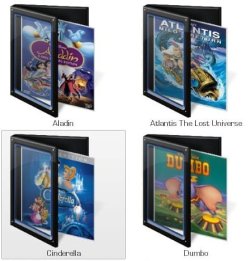
I started doing this quite a while ago and so far ended with almost 900 Icons ( click for larger Images ):


Carefull though... It's quite addictive.
 

My Computer

OS
Windows 7 Ultimate x64
CPU
Intel Core Quad I7 950
Motherboard
EVGA X58 SLI Classified
Memory
12GB Corsair Dominator
Graphics Card(s)
EVGA GTX480 1536MB / ASUS 8800GTX 768MB
Monitor(s) Displays
DELL 3007WFP / DELL 2407WFP / Wacom Cintiq 21UX
Screen Resolution
2560x1600 / 1920x1600 / 1600x1200
Hard Drives
OCZ RevoDrive X2 240GB
2x Western Digital Caviar Green 2TB
Case
Lian-Li Tyr-X2000B
Cooling
Noctua NH-U12P
Keyboard
Logitech Wireless Illuminated / Logitech G13
Mouse
Logitech Performance Mouse MX / 3DConnexion SpacePilot PRO
Internet Speed
100MBit
It looks awesome :p

Changing the icon is not a real problem, but it the the thumbnail preview display pattern (angular and below the icon) which makes the difference .

Unfortunately till now no way to modify it is discovered ... or publicly announced . robitabu worked good, but didn't share the final result with anybody :(
 

My Computer

Computer type
PC/Desktop
Computer Manufacturer/Model Number
Self Assembled
OS
Microsoft Windows 10 Pro Insider Preview 64-bit
CPU
Intel(R) Core(TM) i3-4130 CPU @ 3.40GHz
Motherboard
Gigabyte Technology Co., Ltd. B85M-D3H
Memory
Corsair Vengence 4GB x2 (8.00GB Dual-Channel DDR3 @ 798MHz)
Graphics Card(s)
2047MB GeForce GTS 450 (ZOTAC International)
Sound Card
Onboard (Realtek High Definition Audio)
Monitor(s) Displays
LG Flatron E2040T
Screen Resolution
1600x900
Hard Drives
Western Digital 1 TB
Seagate 500 GB
PSU
Corsair VS550
Case
Cooler Master K380
Cooling
Cooler Master Seidon 120V Plus
Keyboard
Logitech MK260r
Mouse
Logitech MK260r
Internet Speed
PMPL Broadband
Antivirus
Windows Defender + MBAM
Browser
Firefox
Other Info
Dell Studio 15" Laptop
Awesome anime series :devil:

I have problem with desktop.ini now :(
Example : There's a folder called "A" and i want use same icon always at that folder. (after move etc.)

a.ico in folder and there's desktop.ini file,

[.ShellClassInfo]
IconResource=D:\A\a.ico,0
[ViewState]
Mode=
Vid=
FolderType=Pictures

Folder ico will change if i move it. I'm trying this;
[.ShellClassInfo]
ConfirmFileOp=1
IconFile=a.ico
IconIndex=0
But didn't work now. So I want to use the icon in the folder at all times.
if there is %...% tag for it i don't know. Any solution?

Thanks for help
 
Last edited:

My Computer

OS
Windows 7 x64
Back
Top