Folder name "Pictures" varies in different parts of Windows Explorer

Nick Sergeant

New member
Local time
3:30 PM
Messages
30
Location
Australia
Folder name "Pictures" varies in different parts of Windows Explorer

Hello,

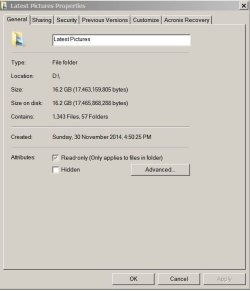
I have a folder I named "Latest Pictures" in my extra (non-OS) SSD drive. Confusingly, in some places it is just called "Pictures". I cannot recall its history, so it may have begun as that name. Since it is on a drive that was empty when I got the PC I am assuming it is not a system folder. (I don't actually have a "Pictures" folder on my C:\ drive either.)

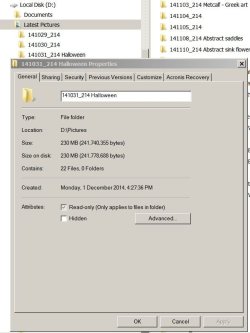
Folder shows correct name on left pane of Windows Explorer, however, if I look at Properties for one of its sub-folders the path is like, "D:\Pictures". Similarly, in Adobe Lightroom, the folder is simply called "Pictures". I thought of reinstalling it until I noticed that Windows has the anomaly.

(Note that this folder is not part of a library but I suspect it once was.)

I'd appreciate any suggestions.

Nick
 
Last edited:

My Computer My Computer

At a glance

Microsoft Windows 7 Professional 64-bit 7601 ...Intel(R) Core(TM) i7-4790K CPU @ 4.00GHz16GB Corsair (2x8GB) DDR3 2133MHz Dimm, Unbuf...Leadtek nVidia Quadro K620 PCI Express 3.0 x1...
Computer type
PC/Desktop
Computer Manufacturer/Model Number
AusPC build
OS
Microsoft Windows 7 Professional 64-bit 7601 Multiprocessor Free Service Pack 1
CPU
Intel(R) Core(TM) i7-4790K CPU @ 4.00GHz
Motherboard
ASUSTeK COMPUTER INC. Z97-PRO(Wi-Fi ac)
Memory
16GB Corsair (2x8GB) DDR3 2133MHz Dimm, Unbuffered, 11
Graphics Card(s)
Leadtek nVidia Quadro K620 PCI Express 3.0 x16, 2GB DDR3, 12
Sound Card
(1) Bluetooth Hands-free Audio (2) NVIDIA High Definition
Monitor(s) Displays
Eizo
Screen Resolution
1920 x nnnn
Hard Drives
(1) Samsung SSD 840 EVO 120G SCSI Disk Device
(2) Samsung SSD 840 EVO 120G SCSI Disk Device
(3) ST2000DM 001-1CH164 SCSI Disk Device
(4) LaCie Rugged FW/USB USB Device
(5) WD Elements 10B8 USB Device
(6) WD Elements 10B8 USB Devic
PSU
850W Seasonic S12D Power Supply PSUSEAS12-D850W
Case
Black PC-9F Mid Tower Chassis (USB3)
Keyboard
Dell
Mouse
Mionix Naos 7000 Optical Gaming Mouse, ADNS-3100 Optical Sen
Antivirus
MSE plus Malwarebytes
Browser
Firefox
It sounds like the pictures folder from your C was once moved to that D drive. Look into Properties > Location tab whether you can move it back to default.

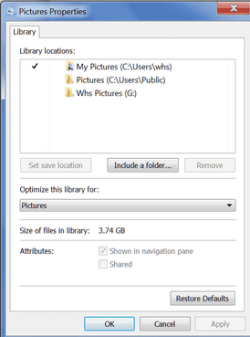
Also - if you could post a picture of the Properties of the picture Library, that would help understand what's going on. Example below:
 

Attachments

  • 2015-01-14_2143.png
    2015-01-14_2143.png
    12.7 KB · Views: 16

My Computer My Computer

At a glance

Vista, Windows7, Mint Mate, Zorin, Windows 8from 1.6GHz Duo to i7
Computer Manufacturer/Model Number
HP, Dell, Gateway, Toshiba - 4 laptops and 2 desktops
OS
Vista, Windows7, Mint Mate, Zorin, Windows 8
CPU
from 1.6GHz Duo to i7
Monitor(s) Displays
2x HP w2207
Hard Drives
5x HDD, 7x SSD, 12x Externals
Keyboard
with trackball - no mices
Mouse
Trackball mice
Internet Speed
DSL 6000
Thanks for your reply.

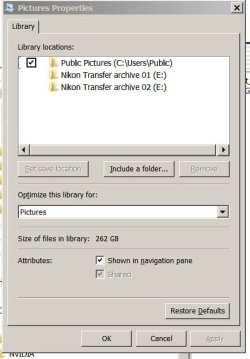
Here are some snaps of Properties for Pictures library, the folder in question "Latest Pictures" as well as the anomaly seen in Sub-folder Properties.
 

Attachments

  • Pictures Library Properties.JPG
    Pictures Library Properties.JPG
    37.5 KB · Views: 15
  • Latest Pictures Folder Properties.JPG
    Latest Pictures Folder Properties.JPG
    36 KB · Views: 15
  • Sub-folder Properties.JPG
    Sub-folder Properties.JPG
    53.5 KB · Views: 1

My Computer My Computer

At a glance

Microsoft Windows 7 Professional 64-bit 7601 ...Intel(R) Core(TM) i7-4790K CPU @ 4.00GHz16GB Corsair (2x8GB) DDR3 2133MHz Dimm, Unbuf...Leadtek nVidia Quadro K620 PCI Express 3.0 x1...
Computer type
PC/Desktop
Computer Manufacturer/Model Number
AusPC build
OS
Microsoft Windows 7 Professional 64-bit 7601 Multiprocessor Free Service Pack 1
CPU
Intel(R) Core(TM) i7-4790K CPU @ 4.00GHz
Motherboard
ASUSTeK COMPUTER INC. Z97-PRO(Wi-Fi ac)
Memory
16GB Corsair (2x8GB) DDR3 2133MHz Dimm, Unbuffered, 11
Graphics Card(s)
Leadtek nVidia Quadro K620 PCI Express 3.0 x16, 2GB DDR3, 12
Sound Card
(1) Bluetooth Hands-free Audio (2) NVIDIA High Definition
Monitor(s) Displays
Eizo
Screen Resolution
1920 x nnnn
Hard Drives
(1) Samsung SSD 840 EVO 120G SCSI Disk Device
(2) Samsung SSD 840 EVO 120G SCSI Disk Device
(3) ST2000DM 001-1CH164 SCSI Disk Device
(4) LaCie Rugged FW/USB USB Device
(5) WD Elements 10B8 USB Device
(6) WD Elements 10B8 USB Devic
PSU
850W Seasonic S12D Power Supply PSUSEAS12-D850W
Case
Black PC-9F Mid Tower Chassis (USB3)
Keyboard
Dell
Mouse
Mionix Naos 7000 Optical Gaming Mouse, ADNS-3100 Optical Sen
Antivirus
MSE plus Malwarebytes
Browser
Firefox
These look like 2 different folders.

I would suspect that the folder with the name "Pictures" was the original folder from the C partition which was incorrectly moved to D - it lost the location tab. Go to D and right click on this folder and INCLUDE it into the pictures library. Then highlight it in the picture library properties and click the "set save location" button.

The other folder I would move as subfolder into the pictures folder. Then you have a clean slate.
 

My Computer My Computer

At a glance

Vista, Windows7, Mint Mate, Zorin, Windows 8from 1.6GHz Duo to i7
Computer Manufacturer/Model Number
HP, Dell, Gateway, Toshiba - 4 laptops and 2 desktops
OS
Vista, Windows7, Mint Mate, Zorin, Windows 8
CPU
from 1.6GHz Duo to i7
Monitor(s) Displays
2x HP w2207
Hard Drives
5x HDD, 7x SSD, 12x Externals
Keyboard
with trackball - no mices
Mouse
Trackball mice
Internet Speed
DSL 6000
I did try your suggestion but to no avail. I then thought you may have slightly misunderstood this issue.

There is currently no folder called Pictures, though there is a library called Pictures. As far as I recall I have not copied Pictures folder from C:\ to D:\ then renamed it "Latest Pictures". Possibly I created Pictures on D then renamed it.

I wondered if it's necessary in Win 7 to have a folder called Pictures? If so then I will have to accede to that ruling and ensure I have that folder.
 

My Computer My Computer

At a glance

Microsoft Windows 7 Professional 64-bit 7601 ...Intel(R) Core(TM) i7-4790K CPU @ 4.00GHz16GB Corsair (2x8GB) DDR3 2133MHz Dimm, Unbuf...Leadtek nVidia Quadro K620 PCI Express 3.0 x1...
Computer type
PC/Desktop
Computer Manufacturer/Model Number
AusPC build
OS
Microsoft Windows 7 Professional 64-bit 7601 Multiprocessor Free Service Pack 1
CPU
Intel(R) Core(TM) i7-4790K CPU @ 4.00GHz
Motherboard
ASUSTeK COMPUTER INC. Z97-PRO(Wi-Fi ac)
Memory
16GB Corsair (2x8GB) DDR3 2133MHz Dimm, Unbuffered, 11
Graphics Card(s)
Leadtek nVidia Quadro K620 PCI Express 3.0 x16, 2GB DDR3, 12
Sound Card
(1) Bluetooth Hands-free Audio (2) NVIDIA High Definition
Monitor(s) Displays
Eizo
Screen Resolution
1920 x nnnn
Hard Drives
(1) Samsung SSD 840 EVO 120G SCSI Disk Device
(2) Samsung SSD 840 EVO 120G SCSI Disk Device
(3) ST2000DM 001-1CH164 SCSI Disk Device
(4) LaCie Rugged FW/USB USB Device
(5) WD Elements 10B8 USB Device
(6) WD Elements 10B8 USB Devic
PSU
850W Seasonic S12D Power Supply PSUSEAS12-D850W
Case
Black PC-9F Mid Tower Chassis (USB3)
Keyboard
Dell
Mouse
Mionix Naos 7000 Optical Gaming Mouse, ADNS-3100 Optical Sen
Antivirus
MSE plus Malwarebytes
Browser
Firefox
Back
Top