Hi,
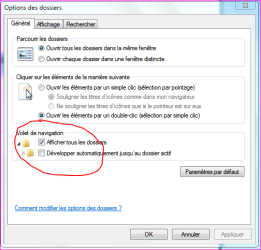
I've got an annoying problem which is similar to [but not sure if its the same as] some other complaints about the navigation pane reported here (like this & this).
It seems to happen only when the navigation pane is open on file commands like "open..." and "save as...".
When the dialog opens and I left click a folder opening arrow on the left hand pane, the folder expands but then after half a second or so it jumps back to whatever folder was previously expanded. Both parts of the tree remain expanded but I have to scroll to get to the one I just expanded, which is very annoying.
Has anyone else come across this (sorry - tried a search but couldn't find it)?
Is there a way to change it?
I've got an annoying problem which is similar to [but not sure if its the same as] some other complaints about the navigation pane reported here (like this & this).
It seems to happen only when the navigation pane is open on file commands like "open..." and "save as...".
When the dialog opens and I left click a folder opening arrow on the left hand pane, the folder expands but then after half a second or so it jumps back to whatever folder was previously expanded. Both parts of the tree remain expanded but I have to scroll to get to the one I just expanded, which is very annoying.
Has anyone else come across this (sorry - tried a search but couldn't find it)?
Is there a way to change it?
My Computer
- OS
- Windows 7 Ultimate 64 bit, Home Premium