Folder Not Displaying in Explorer

stelorone

New member
Local time
4:51 AM
Messages
19
Hi all...

I noticed a couple of days ago that after I installed MS Office 2007, the My Documents folder (which I created on my data drive) did not list in MS Word when I went to open a file. All of the other folders were accounted for. I dismissed this as a slight glitch in MS Office.

This morning, I went to look for a file contained within the My Documents folder using Explorer and the folder was missing. Of course, I was shocked to see this. Thankfully I set up a weekly backup on an external drive, so my data could be recovered there, and that backup just happened to occur last night. Whew. Now, I opened up the backup to restore my files when the backup asked if I wanted to replace the existing file with the backup.

So, essentially, the folder and files exist on my drive, but Explorer and MS Office, etc. are not displaying this folder. This is obviously something that I cannot have as this is my main data folder.

On the weekend I switched "on" the "display hidden files and folders" which mysteriously got turned 'off'. (I always have these listed/visible as I am the only one using my computer). Not sure if this contributed to the issue I'm having now?

Please let me know if there is a fix.
 

My Computer

OS
Windows 7 Professional 64 bit
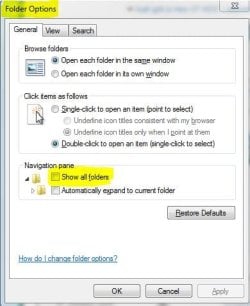
What if you go to Folder Options, and click on "Show all folders"?
 

Attachments

  • Capture.JPG
    Capture.JPG
    33.4 KB · Views: 13

My Computer

Computer Manufacturer/Model Number
Dell and Custom
OS
Systems 1 and 2: Windows 7 Enterprise x64, Win 8 Developer
CPU
System 1: i7 [email protected], System 2: AMD FX-4100 Zambezi 3.6G
Motherboard
System 1:Dell 06NWYK System 2: ASUS M5A97 AM3+
Memory
System 1: 8GB System 2: 8GB
Graphics Card(s)
System 1: ATI FirePro V4800 System 2: Radeon HD 6850
Sound Card
System 1: onboard System 2: onboard
Monitor(s) Displays
System1: Viewsonic HDMI 24"
Screen Resolution
System 1: 1920x1080 System 2: 1920x1080
Hard Drives
System 1: Mirrored .5B drives System 2: Seagate Barracuda ST1000DM003 1TB 7200 RPM 64MB Cache SATA 6.0Gb/s
Case
System 1: Dell System 2: Cooler Master
Internet Speed
10 MBPS
I will try that after work today. Would that account for the folder not displaying in MS Office as well? Seems odd that this is happening system-wide (not JUST in Explorer)...
 

My Computer

OS
Windows 7 Professional 64 bit
I looked at the Folder Options, and "Show All Folders" was already selected. FYI, I've had this O/S since June, and up until l this week it was working just fine. Now the folder's not displaying, and I can't access files that I used to be able to.

I need to find a solution to this as this is the most accessed folder on my system. Again, any thoughts are appreciated.
 

My Computer

OS
Windows 7 Professional 64 bit
Can you check the permissions on this folder and compare it to you other folders?
 

My Computer

Computer Manufacturer/Model Number
Dell and Custom
OS
Systems 1 and 2: Windows 7 Enterprise x64, Win 8 Developer
CPU
System 1: i7 [email protected], System 2: AMD FX-4100 Zambezi 3.6G
Motherboard
System 1:Dell 06NWYK System 2: ASUS M5A97 AM3+
Memory
System 1: 8GB System 2: 8GB
Graphics Card(s)
System 1: ATI FirePro V4800 System 2: Radeon HD 6850
Sound Card
System 1: onboard System 2: onboard
Monitor(s) Displays
System1: Viewsonic HDMI 24"
Screen Resolution
System 1: 1920x1080 System 2: 1920x1080
Hard Drives
System 1: Mirrored .5B drives System 2: Seagate Barracuda ST1000DM003 1TB 7200 RPM 64MB Cache SATA 6.0Gb/s
Case
System 1: Dell System 2: Cooler Master
Internet Speed
10 MBPS
I looked at the Folder Options, and "Show All Folders" was already selected. FYI, I've had this O/S since June, and up until l this week it was working just fine. Now the folder's not displaying, and I can't access files that I used to be able to.

I need to find a solution to this as this is the most accessed folder on my system. Again, any thoughts are appreciated.

Let's go at this differently.

Run System File Checker from a command prompt. Please follow the procedure given in this tutorial:
System File Checker - SFC /SCANNOW Command
 

My Computer

Computer Manufacturer/Model Number
Toshiba Satellite S875D-S7239 laptop
OS
MS Windows 7 Ultimate SP1 64-bit
CPU
AMD A10-4600M
Motherboard
AMD Pumori (Socket FT1)
Memory
6.00 GB Dual-Channel DDR3 @ 798MHz (11-11-12-28)
Graphics Card(s)
AMD Radeon HD 7660G
Sound Card
High Definition Audio Device
Monitor(s) Displays
Generic PnP Monitor (1600x900@60Hz)
Screen Resolution
1600x900@60Hz
Hard Drives
SSD 119GB Corsair CSSD-V128GB2 ATA Device
Keyboard
Standard PS/2 Keyboard
Mouse
HP Wireless Optical Mobile Mouse Model FHA-3410
Internet Speed
What the local pub, local coffee shop offers.
Other Info
Optical Drive:MATSHITA BD-CMB UJ160B ATA Device


Also have an Asus ha1002xp netbook with Win 7 Ultimate installed.
Before I run the System File Checker, I just noticed that I had "Don't Show Hidden Files, Folders, and Drives" checked in Folder Options.

So... apparently this is a hidden folder (it appears to be 'faded' when listed in Explorer). I just caught on to this. So how is it that this folder is a hidden / system folder? Is it because I named it "My Documents" (a throwback to XP, btw). Is there any way to convert it to a non-hidden folder?

I checked "Show Hidden Files... etc" and it now shows up in Explorer and Word...
 

My Computer

OS
Windows 7 Professional 64 bit
That "my documents" is actually a so-called junction point.
 

My Computer

Computer Manufacturer/Model Number
Toshiba Satellite S875D-S7239 laptop
OS
MS Windows 7 Ultimate SP1 64-bit
CPU
AMD A10-4600M
Motherboard
AMD Pumori (Socket FT1)
Memory
6.00 GB Dual-Channel DDR3 @ 798MHz (11-11-12-28)
Graphics Card(s)
AMD Radeon HD 7660G
Sound Card
High Definition Audio Device
Monitor(s) Displays
Generic PnP Monitor (1600x900@60Hz)
Screen Resolution
1600x900@60Hz
Hard Drives
SSD 119GB Corsair CSSD-V128GB2 ATA Device
Keyboard
Standard PS/2 Keyboard
Mouse
HP Wireless Optical Mobile Mouse Model FHA-3410
Internet Speed
What the local pub, local coffee shop offers.
Other Info
Optical Drive:MATSHITA BD-CMB UJ160B ATA Device


Also have an Asus ha1002xp netbook with Win 7 Ultimate installed.
What does that mean, exactly? I don't follow...

All I know is that I created that folder when I migrated over from XP. I had that folder backed up and I thought it would be simple to just add it to my new system.

Is there any way to make it a non-hidden folder? Or should I rename it? Or is it OK to leave it as-is?

Thanks. Much appreciated!
 

My Computer

OS
Windows 7 Professional 64 bit
Leave it alone.
 

My Computer

Computer Manufacturer/Model Number
Toshiba Satellite S875D-S7239 laptop
OS
MS Windows 7 Ultimate SP1 64-bit
CPU
AMD A10-4600M
Motherboard
AMD Pumori (Socket FT1)
Memory
6.00 GB Dual-Channel DDR3 @ 798MHz (11-11-12-28)
Graphics Card(s)
AMD Radeon HD 7660G
Sound Card
High Definition Audio Device
Monitor(s) Displays
Generic PnP Monitor (1600x900@60Hz)
Screen Resolution
1600x900@60Hz
Hard Drives
SSD 119GB Corsair CSSD-V128GB2 ATA Device
Keyboard
Standard PS/2 Keyboard
Mouse
HP Wireless Optical Mobile Mouse Model FHA-3410
Internet Speed
What the local pub, local coffee shop offers.
Other Info
Optical Drive:MATSHITA BD-CMB UJ160B ATA Device


Also have an Asus ha1002xp netbook with Win 7 Ultimate installed.
What does that mean, exactly? I don't follow...

All I know is that I created that folder when I migrated over from XP. I had that folder backed up and I thought it would be simple to just add it to my new system.

If you dragged it over to the new system in your User directory the contents were probably merged into "C:\Users\[username]\Documents" Microsoft removed "My" from the various directories.
 

My Computer

Computer type
PC/Desktop
Computer Manufacturer/Model Number
Alienware Aurora ALX R4
OS
Windows 10 Pro (x64)
CPU
Intel Core i7-3930K (3.2GHz - 4.5GHz)
Motherboard
Alienware Aurora-R4 x79
Memory
4x Samsung 4GB PC3-12800 DDR3 (16GB 1600MHz)
Graphics Card(s)
Nvidia Geforce GTX 690
Sound Card
SteelSeries Siberia Elite
Monitor(s) Displays
Dell UltraSharp U3011
Screen Resolution
2560x1600
Hard Drives
Samsung 850 Pro 256 GB, Seagate 1TB Desktop Hybrid HDD, 2x Western Digital 4TB Green HDD
PSU
875W Some Dell PSU <.<
Case
Alienware Aurora ALX
Cooling
Custom Liquid Cooling (EK CPU & GPU blocks) dual EK 480RAD
Keyboard
Logitech G710+ Mechanical
Mouse
Logitech G700s
Internet Speed
Verizon Fios (50 mbps average)
Other Info
Server: Intel NUC D54250WYK: i5-4250U, 16GB, 256 GB mSATA, Windows Server 2012 R2
Back
Top