Solved Folder not included in Windows 7 back-up

alberto99

New member
Local time
5:48 AM
Messages
5
I have Windows 7 64 bit where C-drive is SSD and F-drive is the original hard drive. All the Libraries are on the F-drive but I do hold the Adobe Lightroom folder in c/users/owner along with WLM contacts,favorites and a few other things.

The Windows back-up i use is "files in libraries and personal folders for all users and system image"

I have just recently moved the Lightroom catalog from My Pictures (on the hard drive) to the c-drive as above in order to speed things up. But, on my first back-up after doing this, I noticed that the Lightroom folder was not included in the back-up even though all the other folders on c/users/owner were included,

Is there any reason why the Windows back-up might decide to ignore that particular folder
 

My Computer My Computer

OS
Windows 7 Home Premium 64 bit
CPU
i5
It sounds like you need to go through the setup procedure again to get it to see the changes. That happens sometimes.
 

My Computer My Computer

Computer type
Laptop
Computer Manufacturer/Model Number
Hewlett-Packard/G62-107SA Notebook
OS
Microsoft Windows 7 Home Premium 64-bit Service Pack 1
CPU
Intel(R) Core(TM) i3 CPU M 330 @ 2.13GHz
Motherboard
Hewlett-Packard 1425
Memory
8 GB DDR3
Graphics Card(s)
Intel(R) HD Graphics
Sound Card
Realtek High Definition Audio
Monitor(s) Displays
Builtin
Screen Resolution
1366 x 768 x 32 bits (4294967296 colors) @ 60 Hz
Hard Drives
250 GB SATA Hard Disk Drive 7200 rpm
2TB Seagate GoFlex USB 2 Drive
1TB Iomega Prestige USB 2 Drive
1.5TB Iomega Prestige USB 2 Drive (Samsung)
2TB WD MyBook Live NAS.
Mouse
Logitech Anywhere MX
Internet Speed
152 Mbs download 10 Mbs upload
Antivirus
Norton 360
Browser
Chrome
hello Kado,
Thanks for the reply but I don't know what you mean. What set up procedure are you referring to - the one where I tell the back-up program what kind of back-up I want (I use the recommended one, as i have always done) or are you suggesting that I should delete my Lightroom folder then re-add it?

As I mentioned in the earlier post, all the other folders in c/users/owner were happily saved to the back-up. These included Appdata, Contacts and Favorites among others. There were no problems with the F-drive

If it's of any help, I look at the back-up folders using:
control panel/backup & restore/restore my files/Browse for files (or folders)
 

My Computer My Computer

OS
Windows 7 Home Premium 64 bit
CPU
i5
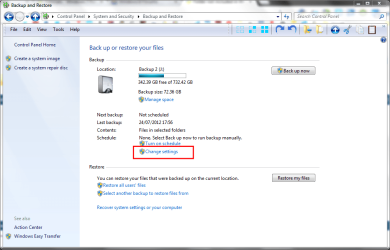
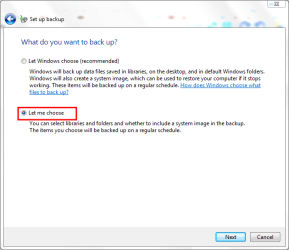
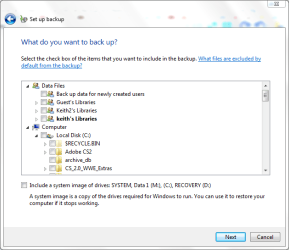
If you follow the screen shots below you will be able to see and set what is backed up.

screenshot235_2013-01-31.png

screenshot236_2013-01-31.png

screenshot237_2013-01-31.png

screenshot238_2013-01-31.png
 

My Computer My Computer

Computer type
Laptop
Computer Manufacturer/Model Number
Hewlett-Packard/G62-107SA Notebook
OS
Microsoft Windows 7 Home Premium 64-bit Service Pack 1
CPU
Intel(R) Core(TM) i3 CPU M 330 @ 2.13GHz
Motherboard
Hewlett-Packard 1425
Memory
8 GB DDR3
Graphics Card(s)
Intel(R) HD Graphics
Sound Card
Realtek High Definition Audio
Monitor(s) Displays
Builtin
Screen Resolution
1366 x 768 x 32 bits (4294967296 colors) @ 60 Hz
Hard Drives
250 GB SATA Hard Disk Drive 7200 rpm
2TB Seagate GoFlex USB 2 Drive
1TB Iomega Prestige USB 2 Drive
1.5TB Iomega Prestige USB 2 Drive (Samsung)
2TB WD MyBook Live NAS.
Mouse
Logitech Anywhere MX
Internet Speed
152 Mbs download 10 Mbs upload
Antivirus
Norton 360
Browser
Chrome
Hello Kado,
Thanks for your suggestion. I did this and made sure that the Lightroom folder was ticked as well as Appdata, contacts etc

It is now working fine but i have no idea why it was not working earlier.

Thanks for your help
John
 

My Computer My Computer

OS
Windows 7 Home Premium 64 bit
CPU
i5
Windows backup can be a bit temperamental. I doesn't like any change to the structure of the folders being backed up. That is something to remember for the future.
 

My Computer My Computer

Computer type
Laptop
Computer Manufacturer/Model Number
Hewlett-Packard/G62-107SA Notebook
OS
Microsoft Windows 7 Home Premium 64-bit Service Pack 1
CPU
Intel(R) Core(TM) i3 CPU M 330 @ 2.13GHz
Motherboard
Hewlett-Packard 1425
Memory
8 GB DDR3
Graphics Card(s)
Intel(R) HD Graphics
Sound Card
Realtek High Definition Audio
Monitor(s) Displays
Builtin
Screen Resolution
1366 x 768 x 32 bits (4294967296 colors) @ 60 Hz
Hard Drives
250 GB SATA Hard Disk Drive 7200 rpm
2TB Seagate GoFlex USB 2 Drive
1TB Iomega Prestige USB 2 Drive
1.5TB Iomega Prestige USB 2 Drive (Samsung)
2TB WD MyBook Live NAS.
Mouse
Logitech Anywhere MX
Internet Speed
152 Mbs download 10 Mbs upload
Antivirus
Norton 360
Browser
Chrome
Back
Top