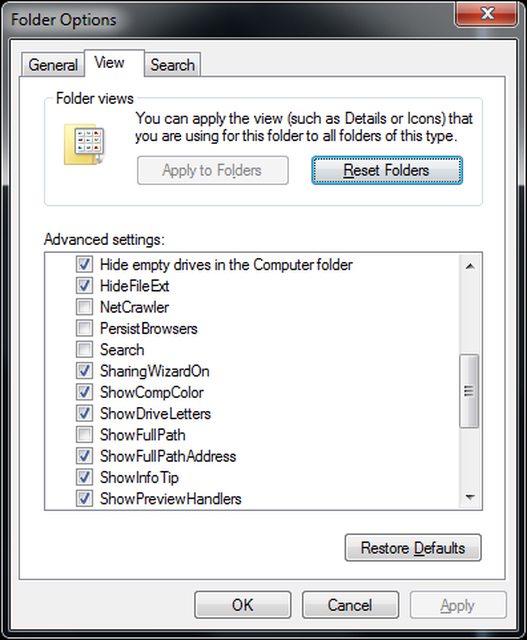
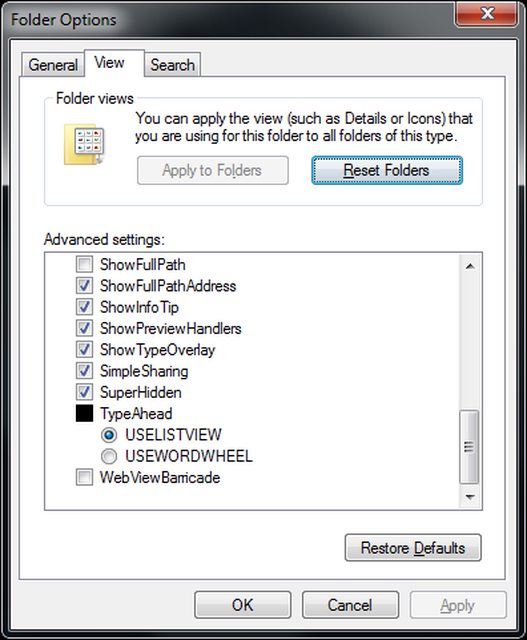
Folder Options, again. *sigh*

Hakon

New member
Local time
7:01 AM
Messages
72
I've had this problem multiple times, but never understood what caused it nor found a fix for it, since it didn't really cause any problems (except for the occasional need to see system files). It does however annoy me quite a lot.

The following screenshots will explain it:
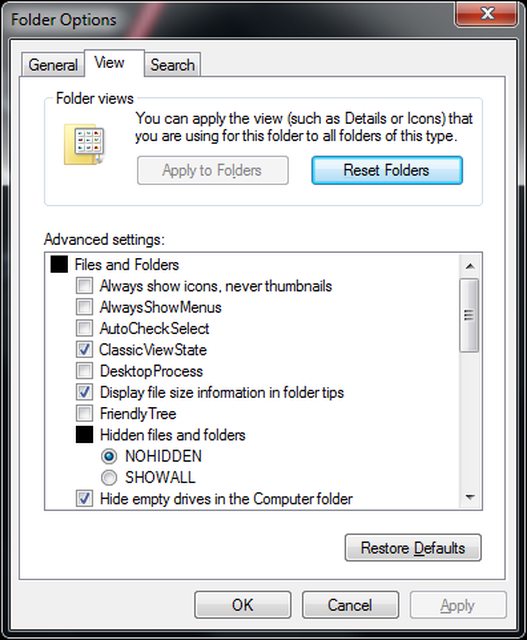


Let it be known, that I can't change any of the settings. They are stuck like this. My computer is clean from viruses and malware, and there are no files or registry entries hidden from the Windows API, so I'm pretty sure I don't have a rootkit.

Has anyone else had this problem?
What could cause this?
What could fix this?

Thanks in advance for your replies :)
 

My Computer

Computer Manufacturer/Model Number
Custom
OS
Windows 7 build 7600 64 bit
CPU
Phenom II X4 955 retail 3.2GHz
Motherboard
ASRock M3A790GXH/USB3 ATX AMD AMD3
Memory
4x GeiL 2GB Value PC3-10660 CL9 DC DDR3-1333, CL 9-9-9-28
Graphics Card(s)
PowerColor Radeon HD5850 PCS+ 1024MB, 256-bit GDDR5
Sound Card
Built in
Hard Drives
G.Skill Phoenix Pro 120GB SATA2 SSD Sandforce SF-120
Samsung Spinpoint 500GB SATA2 7200RPM
PSU
Tacens Radix III Smart 520W
Reset Folder option doesn't work?
 

My Computer

Computer Manufacturer/Model Number
HCL
OS
Winbdows 7 ultimate x64 | Ubuntu 12.04 x64 LTS
CPU
Core 2 Duo e7400 @ 2.90GHz
Motherboard
Gigabyte G31M-ES2L
Memory
3GB DDR2
Graphics Card(s)
Asus Nvidia GTX 560Ti 1GB
Sound Card
On-board
Monitor(s) Displays
HCL eZeeBee 18.5" LCD
Screen Resolution
1366x768 @ 60Hz
Hard Drives
Western Digital 320GB
PSU
Corsair CX500 V2 500W
Cooling
Stock
Keyboard
Stock
Mouse
Stock
Internet Speed
15-25kBps D/L | 10kBps U/L | Hey Don't laugh
Nope, nothing changes. Neither the settings nor the look.
 

My Computer

Computer Manufacturer/Model Number
Custom
OS
Windows 7 build 7600 64 bit
CPU
Phenom II X4 955 retail 3.2GHz
Motherboard
ASRock M3A790GXH/USB3 ATX AMD AMD3
Memory
4x GeiL 2GB Value PC3-10660 CL9 DC DDR3-1333, CL 9-9-9-28
Graphics Card(s)
PowerColor Radeon HD5850 PCS+ 1024MB, 256-bit GDDR5
Sound Card
Built in
Hard Drives
G.Skill Phoenix Pro 120GB SATA2 SSD Sandforce SF-120
Samsung Spinpoint 500GB SATA2 7200RPM
PSU
Tacens Radix III Smart 520W
Those screenshots do not look like native Windows folder options. If you have used some third party apps to personalize your Windows, you have to search the answer from documentation of that app.
 

My Computer

Computer type
Laptop
Computer Manufacturer/Model Number
HP ENVY 17-1150eg
OS
Windows 10 Pro x64 EN-GB
CPU
1.6 GHz Intel Core i7-720QM Processor
Memory
6 GB
Graphics Card(s)
ATI Mobility Radeon HD 5850 Graphics
Sound Card
Beats sound system with integrated subwoofer
Monitor(s) Displays
17" laptop display, 22" LED and 32" Full HD TV through HDMI
Screen Resolution
1600*900 (1), 1920*1080 (2&3)
Hard Drives
Internal: 2 x 500 GB SATA Hard Disk Drive 7200 rpm
External: 2TB for backups, 3TB USB3 network drive for media
Cooling
As Envy runs a bit warm, I have it on a Cooler Master pad
Keyboard
Logitech diNovo Media Desktop Laser (bluetooth)
Mouse
Logitech Performance Mouse MX
Internet Speed
50/10 Mbps VDSL
Antivirus
Windows Defender 4.3.9431.0
Browser
Maxthon 3.5.2., IE11
Does it work from a administrator account?
 

My Computer

Computer Manufacturer/Model Number
HCL
OS
Winbdows 7 ultimate x64 | Ubuntu 12.04 x64 LTS
CPU
Core 2 Duo e7400 @ 2.90GHz
Motherboard
Gigabyte G31M-ES2L
Memory
3GB DDR2
Graphics Card(s)
Asus Nvidia GTX 560Ti 1GB
Sound Card
On-board
Monitor(s) Displays
HCL eZeeBee 18.5" LCD
Screen Resolution
1366x768 @ 60Hz
Hard Drives
Western Digital 320GB
PSU
Corsair CX500 V2 500W
Cooling
Stock
Keyboard
Stock
Mouse
Stock
Internet Speed
15-25kBps D/L | 10kBps U/L | Hey Don't laugh
Those screenshots do not look like native Windows folder options. If you have used some third party apps to personalize your Windows, you have to search the answer from documentation of that app.

Either this or he has fiddled around with system files and registry a lot.
 

My Computer

Computer Manufacturer/Model Number
HCL
OS
Winbdows 7 ultimate x64 | Ubuntu 12.04 x64 LTS
CPU
Core 2 Duo e7400 @ 2.90GHz
Motherboard
Gigabyte G31M-ES2L
Memory
3GB DDR2
Graphics Card(s)
Asus Nvidia GTX 560Ti 1GB
Sound Card
On-board
Monitor(s) Displays
HCL eZeeBee 18.5" LCD
Screen Resolution
1366x768 @ 60Hz
Hard Drives
Western Digital 320GB
PSU
Corsair CX500 V2 500W
Cooling
Stock
Keyboard
Stock
Mouse
Stock
Internet Speed
15-25kBps D/L | 10kBps U/L | Hey Don't laugh
Those are not native window folder options. There is some third party application being used to produce folder options like that.

Do you know what third party application, or have you applied special themes or other customisation?

Regards....Mike Connor
 

My Computer

OS
Several, including Windows 7 x64 Ultimate
I use no 3rd party apps to customize my windows, I don't fiddle with the registry (trust me, I learnt my lesson, it does NOT pay off). The screenshots were taken on an administrative account. The options are the same on a limited account, I also tried creating a new user (both administrative and limited) and looking at the settings there, they were the same. I'd just like to throw it out there that I'm on my 4th year in IT, have managed windows and linux based servers and worked in IT for a while, so I'm not that new to computers.
I honestly have no idea what could be causing this :shock:
 

My Computer

Computer Manufacturer/Model Number
Custom
OS
Windows 7 build 7600 64 bit
CPU
Phenom II X4 955 retail 3.2GHz
Motherboard
ASRock M3A790GXH/USB3 ATX AMD AMD3
Memory
4x GeiL 2GB Value PC3-10660 CL9 DC DDR3-1333, CL 9-9-9-28
Graphics Card(s)
PowerColor Radeon HD5850 PCS+ 1024MB, 256-bit GDDR5
Sound Card
Built in
Hard Drives
G.Skill Phoenix Pro 120GB SATA2 SSD Sandforce SF-120
Samsung Spinpoint 500GB SATA2 7200RPM
PSU
Tacens Radix III Smart 520W
Hakon, if you have not changed folder options yourself for instance with some personalization hacks or app, as you say, then basically the only option is that your Windows is not genuine and original. Those screenshots are most definitely not from original, native Windows 7 folder properties. If this is the case, if your Windows is a self made or downloaded, cracked copy, then this is a wrong place to ask help to get your issues solved.

Kari
 

My Computer

Computer type
Laptop
Computer Manufacturer/Model Number
HP ENVY 17-1150eg
OS
Windows 10 Pro x64 EN-GB
CPU
1.6 GHz Intel Core i7-720QM Processor
Memory
6 GB
Graphics Card(s)
ATI Mobility Radeon HD 5850 Graphics
Sound Card
Beats sound system with integrated subwoofer
Monitor(s) Displays
17" laptop display, 22" LED and 32" Full HD TV through HDMI
Screen Resolution
1600*900 (1), 1920*1080 (2&3)
Hard Drives
Internal: 2 x 500 GB SATA Hard Disk Drive 7200 rpm
External: 2TB for backups, 3TB USB3 network drive for media
Cooling
As Envy runs a bit warm, I have it on a Cooler Master pad
Keyboard
Logitech diNovo Media Desktop Laser (bluetooth)
Mouse
Logitech Performance Mouse MX
Internet Speed
50/10 Mbps VDSL
Antivirus
Windows Defender 4.3.9431.0
Browser
Maxthon 3.5.2., IE11
It's Genuine, I get it for free, so I have no reason to crack it ;)
 

My Computer

Computer Manufacturer/Model Number
Custom
OS
Windows 7 build 7600 64 bit
CPU
Phenom II X4 955 retail 3.2GHz
Motherboard
ASRock M3A790GXH/USB3 ATX AMD AMD3
Memory
4x GeiL 2GB Value PC3-10660 CL9 DC DDR3-1333, CL 9-9-9-28
Graphics Card(s)
PowerColor Radeon HD5850 PCS+ 1024MB, 256-bit GDDR5
Sound Card
Built in
Hard Drives
G.Skill Phoenix Pro 120GB SATA2 SSD Sandforce SF-120
Samsung Spinpoint 500GB SATA2 7200RPM
PSU
Tacens Radix III Smart 520W
Hakon, I'm just saying those screenshots are not from genuine, original Windows 7. Absolutely, 100% sure not. You can say what you want to, it does not change this fact.

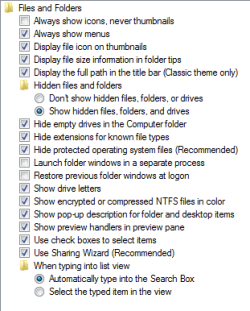
Here's how Folder Properties > View looks in original Windows 7:

Folder_properties_view.png

Kari
 

My Computer

Computer type
Laptop
Computer Manufacturer/Model Number
HP ENVY 17-1150eg
OS
Windows 10 Pro x64 EN-GB
CPU
1.6 GHz Intel Core i7-720QM Processor
Memory
6 GB
Graphics Card(s)
ATI Mobility Radeon HD 5850 Graphics
Sound Card
Beats sound system with integrated subwoofer
Monitor(s) Displays
17" laptop display, 22" LED and 32" Full HD TV through HDMI
Screen Resolution
1600*900 (1), 1920*1080 (2&3)
Hard Drives
Internal: 2 x 500 GB SATA Hard Disk Drive 7200 rpm
External: 2TB for backups, 3TB USB3 network drive for media
Cooling
As Envy runs a bit warm, I have it on a Cooler Master pad
Keyboard
Logitech diNovo Media Desktop Laser (bluetooth)
Mouse
Logitech Performance Mouse MX
Internet Speed
50/10 Mbps VDSL
Antivirus
Windows Defender 4.3.9431.0
Browser
Maxthon 3.5.2., IE11
It's Genuine, I get it for free, so I have no reason to crack it ;)

Is this a modified manufacturer's version of windows?

It is definitely not original retail windows, and I have never seen an OEM version with Folder Options like that.

Anyway, without knowing more about it there is no way I can see to give you any sensible advice.

Regards....Mike Connor
 

My Computer

OS
Several, including Windows 7 x64 Ultimate
Thanks for your reply, I can assure you they are. This has happened to me before, as I stated, multiple times. Before I got Windows for free, I used the Windows Loader, I had this issue before and after I used said activation tool. My installed copy of Windows is from MSDNAA, and the checksums verified.

On a more related note, could this be caused by HashTab, TeraCopy, or VirtualCloneDrive?
 

My Computer

Computer Manufacturer/Model Number
Custom
OS
Windows 7 build 7600 64 bit
CPU
Phenom II X4 955 retail 3.2GHz
Motherboard
ASRock M3A790GXH/USB3 ATX AMD AMD3
Memory
4x GeiL 2GB Value PC3-10660 CL9 DC DDR3-1333, CL 9-9-9-28
Graphics Card(s)
PowerColor Radeon HD5850 PCS+ 1024MB, 256-bit GDDR5
Sound Card
Built in
Hard Drives
G.Skill Phoenix Pro 120GB SATA2 SSD Sandforce SF-120
Samsung Spinpoint 500GB SATA2 7200RPM
PSU
Tacens Radix III Smart 520W
Those are definitely not the standard options with Windows 7. Mine are exactly the same as Kari's above. The only way that you can get alternative options like that is through the use of 3rd party programs.
 

My Computer

Computer type
PC/Desktop
Computer Manufacturer/Model Number
Dwarf Dwf/11/2012 r09/2013
OS
Windows 8.1 Pro RTM x64
CPU
Intel Core-i5-3570K 4-core @ 3.4GHz (Ivy Bridge) (OC 4.4GHz)
Motherboard
ASRock Z77 Extreme4-M
Memory
4 x 4GB DDR3-1600 Corsair Vengeance CMZ8GX3M2A1600C9B (16GB)
Graphics Card(s)
MSI GeForce GTX770 Gaming OC 2GB
Sound Card
Realtek High Definition on board solution (ALC 898)
Monitor(s) Displays
ViewSonic VA1912w Widescreen (VGA)
Screen Resolution
1440x900
Hard Drives
OCZ Agility 3 SSD 120GB SATA III x2 (RAID 0)
Samsung HD501LJ 500GB SATA II x2
Hitachi HDS721010CLA332 1TB SATA II
Iomega 1.5TB Ext USB 2.0
WD 2.0TB Ext USB 3.0
PSU
XFX Pro Series 850W Semi-Modular
Case
Gigabyte IF233
Cooling
1 x 120mm Front Inlet 1 x 120mm Rear Exhaust
Keyboard
Microsoft Comfort Curve Keyboard 3000 (USB)
Mouse
Microsoft Comfort Mouse 3000 for Business (USB)
Internet Speed
NetGear DG834Gv3 ADSL Modem/Router (Ethernet) ~4.0 Mb/s (O2)
Antivirus
Avast! 8.0.1497
Browser
IE 11
Other Info
Optical Drive: HL-DT-ST BD-RE BH10LS30 SATA Bluray
Lexmark S305 Printer/Scanner/Copier (USB)
WEI Score: 8.1/8.1/8.5/8.5/8.25
Asus Eee PC 1011PX Netbook (Windows 7 x86 Starter)
Thanks for your reply, I can assure you they are. This has happened to me before, as I stated, multiple times. Before I got Windows for free, I used the Windows Loader, I had this issue before and after I used said activation tool. My installed copy of Windows is from MSDNAA, and the checksums verified.

On a more related note, could this be caused by HashTab, TeraCopy, or VirtualCloneDrive?


No, it can not be caused by those things. You have a completely different set and display of "Folder Options" which is a standard windows component.

The only way to get something like you have there is by very heavy customistation, i.e. a completely different theme, loads of registry hacks, or a completely different shell.

Explorer is the standard shell, but there are others which would allow modding like this. For instance this;

SharpEnviro

or similar things.

The point is, that as none of us knows what has been done, or how, there is no way to give you any advice on fixing it! :) Obviously my colleagues here are as baffled as I am by it.

Regards....Mike Connor
 

My Computer

OS
Several, including Windows 7 x64 Ultimate
None of the programs you mentioned do not rename all folder options. Besides, to get folder properties to let you enable SuperHidden and WebViewBarricade is only possible by modifying the registry for at least some extent, which you said can not be cause of your issue.

I hope you don't take this wrong, but a non-hacked, not modifed Windows 7 from MSDNAA do not have Folder Properties > View options as in your screenshots.

Kari
 

My Computer

Computer type
Laptop
Computer Manufacturer/Model Number
HP ENVY 17-1150eg
OS
Windows 10 Pro x64 EN-GB
CPU
1.6 GHz Intel Core i7-720QM Processor
Memory
6 GB
Graphics Card(s)
ATI Mobility Radeon HD 5850 Graphics
Sound Card
Beats sound system with integrated subwoofer
Monitor(s) Displays
17" laptop display, 22" LED and 32" Full HD TV through HDMI
Screen Resolution
1600*900 (1), 1920*1080 (2&3)
Hard Drives
Internal: 2 x 500 GB SATA Hard Disk Drive 7200 rpm
External: 2TB for backups, 3TB USB3 network drive for media
Cooling
As Envy runs a bit warm, I have it on a Cooler Master pad
Keyboard
Logitech diNovo Media Desktop Laser (bluetooth)
Mouse
Logitech Performance Mouse MX
Internet Speed
50/10 Mbps VDSL
Antivirus
Windows Defender 4.3.9431.0
Browser
Maxthon 3.5.2., IE11

My Computer

OS
Win7U 64 RTM
CPU
Q9550
Motherboard
GA-EP45-UD3R
Memory
8GB Gskill
Graphics Card(s)
ASUS|EAH4850/HTDI/1GD3/A
Sound Card
xfi Plat
Monitor(s) Displays
Dell 2405fpw
Screen Resolution
1920x1200
Hard Drives
Seagate & WD sata Drives
PSU
Antec
Case
Antec
Keyboard
MS Natural Ergonomic 4000
Mouse
Logitech MX610 USB Cordless
I'm In ...

Hi Gang - I'm in the wanting that folder size column camp. I've been sort of following this issue here & that 'other' thread and am curious about the 3rd-party s/w people are claiming can be used as an interim alternative. What's this site's recommendation? I'm willing to try one of these as long as they do not pose a threat to my computer.

thnx,
-Marcos
 

My Computer

Computer type
PC/Desktop
Computer Manufacturer/Model Number
HP (HP-P6212F)
OS
Microsoft Windows 7 Home Premium 64-bit 7601 Multiprocessor Free Service Pack 1
CPU
Pentium(R) Dual-Core CPU E5300 @ 2.60GHz
Motherboard
PEGATRON CORPORATION Benicia
Memory
6.00 GB
Graphics Card(s)
Intel(R) G33/G31 Express Chipset Family
Sound Card
Realtek High Definition Audio
Monitor(s) Displays
24'' HP WS LCD
Screen Resolution
1920 x 1080 x 32 bits (4294967296 colors) @ 60 Hz
Hard Drives
(1) ATA Hitachi HDT72106 SCSI Disk Device (2) Generic- Compact Flash USB Device (3) Generic- MS/MS-Pro USB Device (4) Generic- SD/MMC USB Device (5) Generic- SM/xD-Picture USB Device (6) Verbatim STORE N GO USB Device
Keyboard
Logitech G510s
Mouse
Logitech Trackball M570
Antivirus
Microsoft Security Essentials / Malwarebytes
Browser
IE / Firefox / Chrome
Checked a load of mods and can't find anything like it, here a sample;

customised "folder options" screen shots - Google Search

Anyway, until you can give more information about it, ( and I hope it is not some weird practical joke from a fourth year IT student "jobbed up" to bamboozle us), EOT for me.

Regards....Mike Connor
 

My Computer

OS
Several, including Windows 7 x64 Ultimate
It just occurred to me, as I ran SFC, that I didn't re-install Windows after having my 4 broken memory chips replaced... oh lawds, format time ?
I used to get up to 3 BSOD's a day with those broken chips :cry:

Code:
C:\Users\hakon>sfc /scannow

Beginning system scan.  This process will take some time.

Beginning verification phase of system scan.
Verification 100% complete.

Windows Resource Protection did not find any integrity violations.

C:\Users\hakon>
 

My Computer

Computer Manufacturer/Model Number
Custom
OS
Windows 7 build 7600 64 bit
CPU
Phenom II X4 955 retail 3.2GHz
Motherboard
ASRock M3A790GXH/USB3 ATX AMD AMD3
Memory
4x GeiL 2GB Value PC3-10660 CL9 DC DDR3-1333, CL 9-9-9-28
Graphics Card(s)
PowerColor Radeon HD5850 PCS+ 1024MB, 256-bit GDDR5
Sound Card
Built in
Hard Drives
G.Skill Phoenix Pro 120GB SATA2 SSD Sandforce SF-120
Samsung Spinpoint 500GB SATA2 7200RPM
PSU
Tacens Radix III Smart 520W
Back
Top