Solved Folder Permissions Issue

timw128

New member
Member
VIP
Local time
9:36 AM
Messages
294
Location
Michigan, USA
Hello-
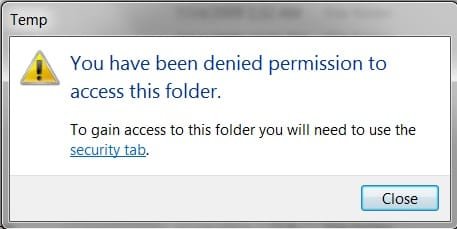
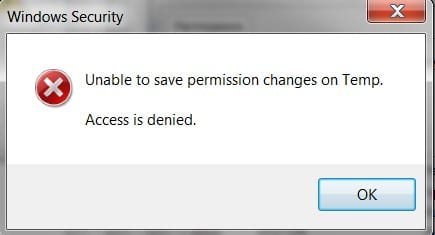
Something has went wrong within my 'Temp' folder to where I can not access it, nor gain permission. All is fine with the System, and 'sfc /scannow' runs clean.

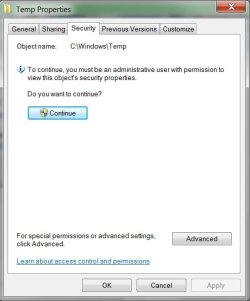
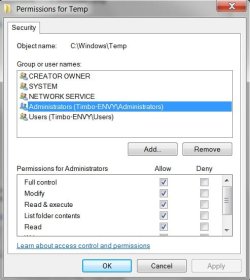
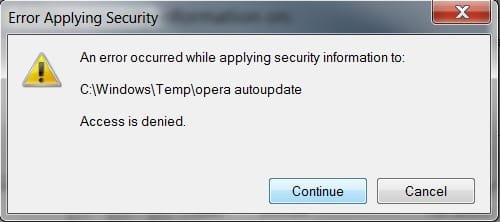
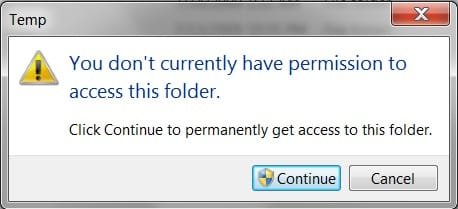
The issues has something to do with Avast and Opera Auto Updater. No matter what I do, I get denied trying to change permissions. Please note the 6 attached screen shots that are in sequence. I have no idea what is going on here.

Thanks for any and all help. If you need more info, please notify.

tim
 

Attachments
  • 1.jpg
    1.jpg
    14.5 KB · Views: 25
  • 2.jpg
    2.jpg
    13.6 KB · Views: 25
  • 3.jpg
    3.jpg
    28.1 KB · Views: 25
  • 4.jpg
    4.jpg
    34.1 KB · Views: 25
  • 5.jpg
    5.jpg
    13.2 KB · Views: 25
  • 6.jpg
    6.jpg
    9.9 KB · Views: 25

My Computer

Computer type
PC/Desktop
Computer Manufacturer/Model Number
HP ENVY 700-515xt CTO, with more cam, headers, and 4.11 gears.
OS
Windows 7 Pro SP1 x64
CPU
Intel Haswell i7-4770 3.4GHz
Motherboard
OEM Kaili2 (MSI MS-7826 v2.0)
Memory
G. SKILLS 32GB Ripjaws X Series DDR3 1600 SDRAM
Graphics Card(s)
Integrated HD4600- upgrade coming!
Sound Card
Integrated...for now.
Monitor(s) Displays
Dell ST-2310 Digital
Screen Resolution
I like 1920x1080
Hard Drives
C\:-Samsung 850PRO SSD-256gb, D:\-SG Barracuda 7200 HDD 1 TB (Storage)
PSU
350w OEM (About to become a display in the aquarium!)
Case
ENVY OEM
Cooling
FANS
Keyboard
Logitech and HP- USB.
Mouse
Logitech LS1 (Alltime favorite of mine!) and HP- both USB
Internet Speed
65Mbps Down (min)/4.5Mbps UP- Charter Comm HS cable
Antivirus
avast! Internet Security 2015/MBAM
Browser
Opera, at present. Love that Chromium horsepower!
Hi there,

Let's begin by seeing the permissions settings on that "C:\Windows\Temp" directory of yours...

Open an Elevated Command Prompt, enter the command line below, then post the command's output back here for us to review so that we can determine if anything needs fixing.
Code:
icacls "C:\Windows\Temp"


Edit: note, by default, all users should be denied the ability to view the contents of the 'Windows\Temp' folder.
 
Last edited:

My Computer

Computer type
PC/Desktop
OS
Windows 10, Windows 8.1 Pro, Windows 7 Professional, OS X El Capitan
Thanks for the response, Pyprohly. First, I should tell you that I just put an SSD in here and did a clean install of Windows 7 Pro SP1 x64. I am using an HDD for a D:\ Storage drive, and I had moved the Page File over there and Old Timers TFC Cleaner. I think that's what had caused some issues. That .exe has disappeared and I try to download it now and mt Avast won't let me do. Anyway, more on that later, as I'll get to your query now.
Here it is-
 

Attachments

  • cmd1.jpg
    cmd1.jpg
    36.4 KB · Views: 0

My Computer

Computer type
PC/Desktop
Computer Manufacturer/Model Number
HP ENVY 700-515xt CTO, with more cam, headers, and 4.11 gears.
OS
Windows 7 Pro SP1 x64
CPU
Intel Haswell i7-4770 3.4GHz
Motherboard
OEM Kaili2 (MSI MS-7826 v2.0)
Memory
G. SKILLS 32GB Ripjaws X Series DDR3 1600 SDRAM
Graphics Card(s)
Integrated HD4600- upgrade coming!
Sound Card
Integrated...for now.
Monitor(s) Displays
Dell ST-2310 Digital
Screen Resolution
I like 1920x1080
Hard Drives
C\:-Samsung 850PRO SSD-256gb, D:\-SG Barracuda 7200 HDD 1 TB (Storage)
PSU
350w OEM (About to become a display in the aquarium!)
Case
ENVY OEM
Cooling
FANS
Keyboard
Logitech and HP- USB.
Mouse
Logitech LS1 (Alltime favorite of mine!) and HP- both USB
Internet Speed
65Mbps Down (min)/4.5Mbps UP- Charter Comm HS cable
Antivirus
avast! Internet Security 2015/MBAM
Browser
Opera, at present. Love that Chromium horsepower!
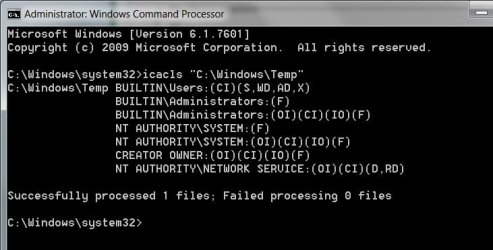
Nothing is wrong with that and in fact not having permissions to the windows\temp folder is the default and normal thing. That's the system-wide temporary folder, used by services and the system itself only.

Ordinary programs use the per-user temp folders, located under c:\users\<yourusername>\appdata\local\temp
There you'll find almost every temporary file causing problems. There is little reason to ever go to the system-wide one, that being the reason of the default permission.
 

My Computer

Computer type
Laptop
Computer Manufacturer/Model Number
Toshiba Sattelite A665-S6092
OS
Windows 7 Ultimate x64
CPU
Intel Core i7-740QM
Memory
8 GB DDR3
Graphics Card(s)
NVIDIA GeForce 330GT
Screen Resolution
1366x768
Hard Drives
Samsung 840 SSD 500GB
1TB USB3 external HD
Cooling
Coolermaster Notepal U3 notebook cooling pad
Internet Speed
3mbps ASDL
Antivirus
ClamWin 0.98.7
Browser
Opera 12.17 x86 (main), Firefox 38 (sec), IE11 (last resort)
Thank you, but your response in no way addresses the problem I am experiencing at present.

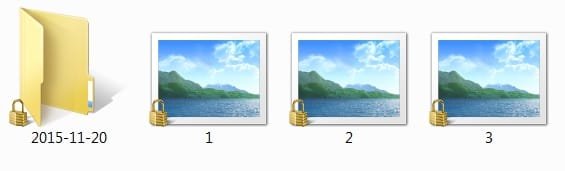
Of further note, now I can't see any of My Pictures, there is a little lock on the icon, and the photo shows in the folder as 'generic'.
 

Attachments

  • g1.jpg
    g1.jpg
    10.6 KB · Views: 19

My Computer

Computer type
PC/Desktop
Computer Manufacturer/Model Number
HP ENVY 700-515xt CTO, with more cam, headers, and 4.11 gears.
OS
Windows 7 Pro SP1 x64
CPU
Intel Haswell i7-4770 3.4GHz
Motherboard
OEM Kaili2 (MSI MS-7826 v2.0)
Memory
G. SKILLS 32GB Ripjaws X Series DDR3 1600 SDRAM
Graphics Card(s)
Integrated HD4600- upgrade coming!
Sound Card
Integrated...for now.
Monitor(s) Displays
Dell ST-2310 Digital
Screen Resolution
I like 1920x1080
Hard Drives
C\:-Samsung 850PRO SSD-256gb, D:\-SG Barracuda 7200 HDD 1 TB (Storage)
PSU
350w OEM (About to become a display in the aquarium!)
Case
ENVY OEM
Cooling
FANS
Keyboard
Logitech and HP- USB.
Mouse
Logitech LS1 (Alltime favorite of mine!) and HP- both USB
Internet Speed
65Mbps Down (min)/4.5Mbps UP- Charter Comm HS cable
Antivirus
avast! Internet Security 2015/MBAM
Browser
Opera, at present. Love that Chromium horsepower!
Thank you, but your response in no way addresses the problem I am experiencing at present.
As Alejandro has pointed out, the permissions on your 'Windows\Temp' are pretty much perfect. What is the problem you are facing with this folder exactly?

Of further note, now I can't see any of My Pictures, there is a little lock on the icon, and the photo shows in the folder as 'generic'.
The location of the 'My Picture' folder resides in a very different location than that of the 'Windows\Temp' folder. How broad does your permission issue span, Timw? Is it just the 'Windows\Temp' and 'User\%username%\Picture' locations where you are facing problems with?

A gold lock on an item indicates that only one, single user account on your machine has any sort of access to that item (effectively one ACE in the items's ACL, with exceptions). Timw, are all your files under "C:\Users\%username%\Pictures" affected? If so, please run the following command so we can view the permissions of this folder in order for us to help you correct them,
Code:
icacls "C:\Users\%username%\Pictures"
If it's just a few stray items you are having problems with, on one of the items, run a command similar to the below,
Code:
icacls "C:\Users\%username%\Pictures\somefile.jpg"
 

My Computer

Computer type
PC/Desktop
OS
Windows 10, Windows 8.1 Pro, Windows 7 Professional, OS X El Capitan
I got fed up with it and reinstalled Windows. It went a lot deeper, but I wanted to start at the beginning with this thread. Somehow, UAC settings and system settings inadvertently changed.
So, I have everything running good again... had a nightmare with the Windows Update download and install issues, but they, too, are resolved. Hopefully, MS will accept my license key again. It's the 2nd time I used the COA case license key.
Now, I think I'll shoot a system image after we get the license authorized. If it doesn't go through, have to buy a key and disk from Newegg. This is one reason I like to buy Full Retail editions of Windows.
Thanks for all the input- 'Tis much appreciated! :)

Regards-

tim
 

My Computer

Computer type
PC/Desktop
Computer Manufacturer/Model Number
HP ENVY 700-515xt CTO, with more cam, headers, and 4.11 gears.
OS
Windows 7 Pro SP1 x64
CPU
Intel Haswell i7-4770 3.4GHz
Motherboard
OEM Kaili2 (MSI MS-7826 v2.0)
Memory
G. SKILLS 32GB Ripjaws X Series DDR3 1600 SDRAM
Graphics Card(s)
Integrated HD4600- upgrade coming!
Sound Card
Integrated...for now.
Monitor(s) Displays
Dell ST-2310 Digital
Screen Resolution
I like 1920x1080
Hard Drives
C\:-Samsung 850PRO SSD-256gb, D:\-SG Barracuda 7200 HDD 1 TB (Storage)
PSU
350w OEM (About to become a display in the aquarium!)
Case
ENVY OEM
Cooling
FANS
Keyboard
Logitech and HP- USB.
Mouse
Logitech LS1 (Alltime favorite of mine!) and HP- both USB
Internet Speed
65Mbps Down (min)/4.5Mbps UP- Charter Comm HS cable
Antivirus
avast! Internet Security 2015/MBAM
Browser
Opera, at present. Love that Chromium horsepower!
Back
Top