Solved Folder Problem

novashenron

New member
Local time
9:56 AM
Messages
23
Hi. I've been having a problem. When I open a folder and then open another folder inside this folder its contents open in a new window. Any suggestions to solve this?
 

My Computer

OS
Windows 7 Home Premium 32bit.
CPU
Intel Core i7 CPU 860
Memory
4 GB
Graphics Card(s)
Ati Radeon HD 5750
Screen Resolution
1920 x 1080
Hard Drives
1 TB
Hi, welcome to the forums :)

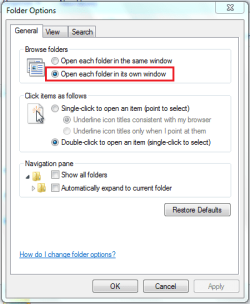
You need to make sure that you've not accidentally set the following option (open explorer then click Organize > Folder and Search options)

folder.PNG

If so then choose the top option then click ok and it should work properly.


OS
 

My Computer

Computer Manufacturer/Model Number
Compaq Desktop
OS
Windows 7 Ultimate x64
CPU
AMD Sempron Dual Core
Memory
3GB
Graphics Card(s)
NVIDIA GeForce 6150SE nForce 430
Screen Resolution
1024x768
Hard Drives
150GB Sata
Go to explorer settings, folder options;


Click on "Open each folder in the same window".

Regards....Mike Connor
 

My Computer

OS
Several, including Windows 7 x64 Ultimate
Thanks for the quick reply but i already have active the option to open each folder in the same window.
I have tried to reset it again but it doesnt work.
 

My Computer

OS
Windows 7 Home Premium 32bit.
CPU
Intel Core i7 CPU 860
Memory
4 GB
Graphics Card(s)
Ati Radeon HD 5750
Screen Resolution
1920 x 1080
Hard Drives
1 TB
Click on organize in the upper left hand corner, then select 'folder and search options', then select 'open each folder in same window'.
I hope this helps. :)

Man your quick today Mike lol
 

My Computer

Computer Manufacturer/Model Number
Custom
OS
Windows 7 ultimate X64
CPU
Core i7 870 Lynnfield
Motherboard
MSI P55-GD55
Memory
4GB Corsair XMS 3 1600Mhz
Graphics Card(s)
GeForce 8800 GTS (for the time being)
Sound Card
Onboard 7.1 digital
Monitor(s) Displays
Dell 19"
Screen Resolution
1280x1024
Hard Drives
Barracuda 750Gb
PSU
Corsair TX 650w
Case
Thermaltake Armour Extreme Edition
Cooling
Corsair H50
Keyboard
Dell XPS slim
Mouse
Dell XPS mouse (only good product)
Internet Speed
100 Mbps +/-
I cant even restore my system to a previous point. I get an error message. Also when I play flv files the explorer.exe stops responding.
 

My Computer

OS
Windows 7 Home Premium 32bit.
CPU
Intel Core i7 CPU 860
Memory
4 GB
Graphics Card(s)
Ati Radeon HD 5750
Screen Resolution
1920 x 1080
Hard Drives
1 TB
Thanks for the quick reply but i already have active the option to open each folder in the same window.
I have tried to reset it again but it doesnt work.

Download this and run it;

Malwarebytes

Tell us what it says.

Regards....Mike Connor
 

My Computer

OS
Several, including Windows 7 x64 Ultimate
It gives me the option to remove...Thats what it says about my errors:

Malwarebytes' Anti-Malware 1.50.1.1100
Malwarebytes

Database version: 5363

Windows 6.1.7600
Internet Explorer 9.0.8112.16421

6/4/2011 1:15:35 πμ
mbam-log-2011-04-06 (01-15-29).txt

Scan type: Quick scan
Objects scanned: 163649
Time elapsed: 3 minute(s), 43 second(s)

Memory Processes Infected: 0
Memory Modules Infected: 0
Registry Keys Infected: 7
Registry Values Infected: 0
Registry Data Items Infected: 0
Folders Infected: 0
Files Infected: 6

Memory Processes Infected:
(No malicious items detected)

Memory Modules Infected:
(No malicious items detected)

Registry Keys Infected:
HKEY_CURRENT_USER\SOFTWARE\JCFSE7V7Z1 (Trojan.FakeAlert) -> No action taken.
HKEY_CURRENT_USER\SOFTWARE\JP595IR86O (Trojan.FakeAlert) -> No action taken.
HKEY_CURRENT_USER\SOFTWARE\NtWqIVLZEWZU (Trojan.FakeAlert) -> No action taken.
HKEY_CURRENT_USER\SOFTWARE\SMH2B46TDP (Trojan.FakeAlert) -> No action taken.
HKEY_CURRENT_USER\SOFTWARE\Z30KYPG3WS (Trojan.FakeAlert) -> No action taken.
HKEY_CURRENT_USER\SOFTWARE\ZE18MW23GY (Trojan.FakeAlert) -> No action taken.
HKEY_CURRENT_USER\Software\Microsoft\Windows\CurrentVersion\Internet Settings\Zones\ (Hijack.Zones) -> No action taken.

Registry Values Infected:
(No malicious items detected)

Registry Data Items Infected:
(No malicious items detected)

Folders Infected:
(No malicious items detected)

Files Infected:
c:\Users\Public\documents\Server\admin.txt (Malware.Trace) -> No action taken.
c:\Users\Public\documents\Server\server.dat (Malware.Trace) -> No action taken.
c:\Windows\hosts (Trojan.Agent) -> No action taken.
c:\Windows\Tasks\{22116563-108c-42c0-a7ce-60161b75e508}.job (Trojan.Downloader) -> No action taken.
c:\Windows\Tasks\{35dc3473-a719-4d14-b7c1-fd326ca84a0c}.job (Trojan.Downloader) -> No action taken.
c:\Windows\Tasks\{bbaeaeaf-1275-40e2-bd6c-bc8f88bd114a}.job (Trojan.Downloader) -> No action taken.
 

My Computer

OS
Windows 7 Home Premium 32bit.
CPU
Intel Core i7 CPU 860
Memory
4 GB
Graphics Card(s)
Ati Radeon HD 5750
Screen Resolution
1920 x 1080
Hard Drives
1 TB
Run a full scan please. The quick scan is not sufficient to detect all problems.

Your machine is infected and we need to know how badly and what with.

Regards....Mike Connor
 

My Computer

OS
Several, including Windows 7 x64 Ultimate
I dont know if this helps but i uninstalled an update called windows internet explorer 9 candidate. By the way when I did it Internet Explorer wasnt deleted Also do I need to have a certain amount of space into my disk to make a system restore?Also the antimalware didnt find anything more than normal trojans which i deleted.
 
Last edited:

My Computer

OS
Windows 7 Home Premium 32bit.
CPU
Intel Core i7 CPU 860
Memory
4 GB
Graphics Card(s)
Ati Radeon HD 5750
Screen Resolution
1920 x 1080
Hard Drives
1 TB
Malware on your system can affect the system very considerably. Removing the malware does not automatically repair your system. If unusual things are happening then it is invariably due to the malware having changed settings or caused other damage.

The quick scan you did showed seven registry keys and six files infected with malware. There is no way to find out what damage the malware has caused within any reasonable time-frame.

My advice would be to wipe your machine and reinstall the operating system.

Regards....Mike Connor
 

My Computer

OS
Several, including Windows 7 x64 Ultimate
Execute this file - it helped me.
 

Attachments

My Computer

OS
Win 7 Ult 64-bit
CPU
AMD Athlon 455 3core
Memory
6 Gb 1333Mhz
Graphics Card(s)
GForce 545 1,5Gb 192-bit
Monitor(s) Displays
LG IPS234
Hard Drives
1tb
Case
Acer Predator
Bisval - what are the contents of this file? What does it do?

Regards,
Golden
 

My Computer

Computer type
PC/Desktop
Computer Manufacturer/Model Number
Golden Mk. I.4
OS
Windows 10 Pro x64 ; Xubuntu x64
CPU
Intel i7 860 @ 2.80 GHz O/C'ed to 4.0GHz
Motherboard
Gigabyte P55A-UD3R Rev.1. Award BIOS F13
Memory
16GB Corsair Vengance DDR3 @ 661 MHz Dual Channel (9-9-9-24)
Graphics Card(s)
EVGA NVidia GTX 560 1024MB
Sound Card
Realtek Integrated
Monitor(s) Displays
Dual Samsung SyncMaster 2494HS
Screen Resolution
1920*1080 and 1920*1080
Hard Drives
1*Samsung 840 EVO 120GB SSD;
1*OCZ Vertex 2 60GB SSD;
2*Samsung F3 SpinPoint 1TB in RAID0;
1*Samsung F1 SpinPoint 1TB;
2*Western Digital 1TB External USB 3.0
1*Western Digital 500GB External USB 3.0
1*Seagate 500GB External USB 2.0
PSU
Thermaltake ToughPower QFan 750W
Case
Thermaltake Element S VK60001W2Z
Cooling
Corsair H60 Water Cooling, 2*230mm and 2*80mm case fans
Keyboard
Logitech G110
Mouse
Logitech MX518
Execute this file - it helped me.

Nobody with any sense is going to click on a file they know nothing about. Please describe what it is and what it does, and provide a link to the program's download page.

Regards....Mike Connor
 

My Computer

OS
Several, including Windows 7 x64 Ultimate
This is a command script with name : RegisterActxprxyAndIeproxy . I had the same problem and found this decision in this forum a month ago
 

My Computer

OS
Win 7 Ult 64-bit
CPU
AMD Athlon 455 3core
Memory
6 Gb 1333Mhz
Graphics Card(s)
GForce 545 1,5Gb 192-bit
Monitor(s) Displays
LG IPS234
Hard Drives
1tb
Case
Acer Predator
Thanks Bisval - that appears to be correct:

Windows 7 folder in new window

However, malware is known to cause similar symptoms (Trojan.Downloader is notorious for this behavior), so the first port of call is to make sure the system is not infected. The above link I posted mentions this too.

Regards,
Golden
 

My Computer

Computer type
PC/Desktop
Computer Manufacturer/Model Number
Golden Mk. I.4
OS
Windows 10 Pro x64 ; Xubuntu x64
CPU
Intel i7 860 @ 2.80 GHz O/C'ed to 4.0GHz
Motherboard
Gigabyte P55A-UD3R Rev.1. Award BIOS F13
Memory
16GB Corsair Vengance DDR3 @ 661 MHz Dual Channel (9-9-9-24)
Graphics Card(s)
EVGA NVidia GTX 560 1024MB
Sound Card
Realtek Integrated
Monitor(s) Displays
Dual Samsung SyncMaster 2494HS
Screen Resolution
1920*1080 and 1920*1080
Hard Drives
1*Samsung 840 EVO 120GB SSD;
1*OCZ Vertex 2 60GB SSD;
2*Samsung F3 SpinPoint 1TB in RAID0;
1*Samsung F1 SpinPoint 1TB;
2*Western Digital 1TB External USB 3.0
1*Western Digital 500GB External USB 3.0
1*Seagate 500GB External USB 2.0
PSU
Thermaltake ToughPower QFan 750W
Case
Thermaltake Element S VK60001W2Z
Cooling
Corsair H60 Water Cooling, 2*230mm and 2*80mm case fans
Keyboard
Logitech G110
Mouse
Logitech MX518
Actxprxy.dll and ieproxy.dll are needed for the proper functioning of Internet Explorer. The script linked by Bisval simply re-registers both these dlls. No harm can come out from that, in fact there are many accounts of how re-registering these solved the "explorer always opens new window" problem.
 

My Computer

Computer Manufacturer/Model Number
Too many to describe...
OS
Windows 7 x64 pro/ Windows 7 x86 Pro/ XP SP3 x86
This is a command script with name : RegisterActxprxyAndIeproxy . I had the same problem and found this decision in this forum a month ago

Thanks!

Regards....Mike Connor
 

My Computer

OS
Several, including Windows 7 x64 Ultimate
BisVal you are a life saver... Thanks a lot man!!!
 

My Computer

OS
Windows 7 Home Premium 32bit.
CPU
Intel Core i7 CPU 860
Memory
4 GB
Graphics Card(s)
Ati Radeon HD 5750
Screen Resolution
1920 x 1080
Hard Drives
1 TB
Back
Top