Folder shortcut missing from taskbar, windows 7

gliew87

New member
Local time
2:55 AM
Messages
12
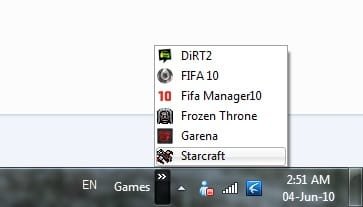
i cr8 a folder and all my game shortcut into d folder. i mk it appear at left side d date there taskbar there. but d folder alwys went missing after few restart. i alwys need recreate again d shortcut at the taskbar. any solution to this bug? testing on windows 7 professional and ultimate. both same. alwys missing d folder shortcut. using original windows with updates. i dont want keep repeating doing the same keep adding the shortcut folder. any solution?

see picture below.

picture with the shortcut folder, after few restart become sec picture without folder shortcut.

post-349876-1275148742.jpg


few restarts become

post-349876-1275148751.jpg


i wan the shortcut look like this.

76636d1275591112t-folder-shortcut-missing-taskbar-windows-7-untitled.jpg
 
Last edited:

My Computer

OS
7
Welcome

Try this put the folder, then right click on task bar and lock. Tell me what happens.
 

My Computer

Computer type
PC/Desktop
Computer Manufacturer/Model Number
Dell XPS 420
OS
Windows 10, Home Clean Install
CPU
Intel Core2 processsor Q8200(2.33Ghz 1333FSB) Quad Core Tech
Motherboard
Dell
Memory
6 gb
Graphics Card(s)
ATI Radeon 256MB HD3650
Sound Card
Intergrated 7.1 Channel Audio
Monitor(s) Displays
Dell SP2009W 20"
Hard Drives
640 GB Serial ATA Hard drive
Cooling
Fan
Keyboard
Dell USB Keyboard
Mouse
Dell Premium Optical USB
Internet Speed
DSL 2.85
You could try pinning the shortcut to the task bar and or the start menu. Create as you did before and open file then right click on the icon in taskbar and "pin it" to task bar??
 

My Computer

Computer Manufacturer/Model Number
HP Compaq dc7100
OS
windows 7 Ultimate 64 Bit
CPU
Intel Pentium 4 531, 3000 MHz (15 x 200)
Motherboard
HP Compaq dc7100
Memory
3 Gigs DDR
Graphics Card(s)
EVGA e-GeForce 9500 GT
Sound Card
AD1981B(L) @ Intel 82801FB ICH6
Monitor(s) Displays
Acer AL1912 19.5"
Hard Drives
Drive #1 - WDC WD1200BEVS-22LAT0 (111 GB)
Drive #2 - HDT722525DLA380 (232 GB)
Drive #3 - WDC (Model Unknown) (320GB)
PSU
HP 340W Max
Case
HP Slim-Line
Cooling
Standard PSU dual fan,HP CPU side mount cooling,2.5 Case fan
Welcome

Try this put the folder, then right click on task bar and lock. Tell me what happens.

mind to explain? i not really understand what u trying to ask me do?
 

My Computer

OS
7
I would be very happy to try to explain

Put the folder on the taskbar

Then move the cursor to another part of the task bar

Right click on your mouse

Then select lock taskbar
 

My Computer

Computer type
PC/Desktop
Computer Manufacturer/Model Number
Dell XPS 420
OS
Windows 10, Home Clean Install
CPU
Intel Core2 processsor Q8200(2.33Ghz 1333FSB) Quad Core Tech
Motherboard
Dell
Memory
6 gb
Graphics Card(s)
ATI Radeon 256MB HD3650
Sound Card
Intergrated 7.1 Channel Audio
Monitor(s) Displays
Dell SP2009W 20"
Hard Drives
640 GB Serial ATA Hard drive
Cooling
Fan
Keyboard
Dell USB Keyboard
Mouse
Dell Premium Optical USB
Internet Speed
DSL 2.85
You could try pinning the shortcut to the task bar and or the start menu. Create as you did before and open file then right click on the icon in taskbar and "pin it" to task bar??

u meant pin it after putting on start menu? but after pin i click it will open d folder. but i dont wan a folder been opened. i wan a list appear. i upload how i want it to be. as pict below
 

Attachments

  • Untitled.jpg
    Untitled.jpg
    8.1 KB · Views: 7

My Computer

OS
7
Maybe I don't quite understand what you are trying to do. But as far as I can see, this is a toolbar of a folder called "Games". Where did you park that folder (which is the repository of the toolbar) and did you either delete or move it after you created the toolbar? That would be an explanation for the disappearance of the toolbar.
 

My Computer

Computer Manufacturer/Model Number
HP, Dell, Gateway, Toshiba - 4 laptops and 2 desktops
OS
Vista, Windows7, Mint Mate, Zorin, Windows 8
CPU
from 1.6GHz Duo to i7
Monitor(s) Displays
2x HP w2207
Hard Drives
5x HDD, 7x SSD, 12x Externals
Keyboard
with trackball - no mices
Mouse
Trackball mice
Internet Speed
DSL 6000
erm inside d folder with games shortcut. all still exist and nth been moved. i put under my documents, evertime i restart it will missing again and again. but when i move the game folder to d:, the shrcut at taskbar will remain 2 or 3 times after restart. and then also missing and i need readd again d folder at taskbar
 

My Computer

OS
7
erm inside d folder with games shortcut. all still exist and nth been moved. i put under my documents, evertime i restart it will missing again and again. but when i move the game folder to d:, the shrcut at taskbar will remain 2 or 3 times after restart. and then also missing and i need readd again d folder at taskbar
Put the folder on the desktop. Maybe (or maybe not) that helps. I always keep the repository folder on the desktop and never had the problem you describe.
 

My Computer

Computer Manufacturer/Model Number
HP, Dell, Gateway, Toshiba - 4 laptops and 2 desktops
OS
Vista, Windows7, Mint Mate, Zorin, Windows 8
CPU
from 1.6GHz Duo to i7
Monitor(s) Displays
2x HP w2207
Hard Drives
5x HDD, 7x SSD, 12x Externals
Keyboard
with trackball - no mices
Mouse
Trackball mice
Internet Speed
DSL 6000
er is not that folder missing, the folder still there at at my documents, but after adding new toolbar at taskbar there, after restart it(the new toolbar that i added) will missing. i do not keep d folder at desktop as i wan keep desktop clean and neat.
 

My Computer

OS
7
er is not that folder missing, the folder still there at at my documents, but after adding new toolbar at taskbar there, after restart it(the new toolbar that i added) will missing. i do not keep d folder at desktop as i wan keep desktop clean and neat.
I understand - keeping the desktop clean is a good thing. I meant to put it there for a test to see whether it might have something to do with the location of the folder. But if you do not want to make that test, that's OK.
 

My Computer

Computer Manufacturer/Model Number
HP, Dell, Gateway, Toshiba - 4 laptops and 2 desktops
OS
Vista, Windows7, Mint Mate, Zorin, Windows 8
CPU
from 1.6GHz Duo to i7
Monitor(s) Displays
2x HP w2207
Hard Drives
5x HDD, 7x SSD, 12x Externals
Keyboard
with trackball - no mices
Mouse
Trackball mice
Internet Speed
DSL 6000
oh. i thought u asking me to put at desktop and without adding on the taskbar. ok i get it now. i will try now.
 

My Computer

OS
7
aaaaaaaaaa still d same. after restart d toolbar i added on taskbar still gone missing. but d folder at desktop still there. is there any registry tweaking can solve this prob? or maybe other way?
 

My Computer

OS
7
Did you lock it as I asked?
 

My Computer

Computer type
PC/Desktop
Computer Manufacturer/Model Number
Dell XPS 420
OS
Windows 10, Home Clean Install
CPU
Intel Core2 processsor Q8200(2.33Ghz 1333FSB) Quad Core Tech
Motherboard
Dell
Memory
6 gb
Graphics Card(s)
ATI Radeon 256MB HD3650
Sound Card
Intergrated 7.1 Channel Audio
Monitor(s) Displays
Dell SP2009W 20"
Hard Drives
640 GB Serial ATA Hard drive
Cooling
Fan
Keyboard
Dell USB Keyboard
Mouse
Dell Premium Optical USB
Internet Speed
DSL 2.85
yea locked as usual. erm now i think i foudn a solution. but not sure how long it can last longer? asi restart it will disappear, but after two files i del and mk d folder named as the two folder, restart twice and my new added toolbar still there.

two files GDIPFONTCACHEV1.DAT and IconCache.db from C:\Users\owner\AppData\Local

replaced by two folder named according including extension. will update again it solved my prob or not. but for now, tried two restart and yet d toolbar still there. yaahoooooooo
 

My Computer

OS
7
er, who edit my post as solved? haiz prob again arise.
 

My Computer

OS
7
Back
Top