
You are using an out of date browser. It may not display this or other websites correctly.
You should upgrade or use an alternative browser.
You should upgrade or use an alternative browser.
Folder size?
- Thread starter IgorJ
- Start date

- Local time
- 2:52 PM
- Messages
- 1,828
What exactly are you wanting to do??
The size of the files inside would be the size of the folder.
The size of the files inside would be the size of the folder.
My Computer
- Computer Manufacturer/Model Number
- SMN-Productions
- OS
- Windows 7 x86/x64, Server 2008r2, Web Server 2008
- CPU
- i7 v2 3930K Steping stone 2
- Motherboard
- ASUS Rampage IV Extreme
- Memory
- G.SKILL Ripjaws Z Series 32GB
- Graphics Card(s)
- AMD HD 5770
- Monitor(s) Displays
- Acer 21" and Samsung 20"
- Hard Drives
- Patriot Pyro 80GB
- PSU
- 1000 Watt
- Case
- HAF-X
- Cooling
- 4 Fans
- Keyboard
- Black Widow Ultimate
- Local time
- 2:52 PM
- Messages
- 1,828
just right click on it and hit property's it will show up as size on disk
My Computer
- Computer Manufacturer/Model Number
- SMN-Productions
- OS
- Windows 7 x86/x64, Server 2008r2, Web Server 2008
- CPU
- i7 v2 3930K Steping stone 2
- Motherboard
- ASUS Rampage IV Extreme
- Memory
- G.SKILL Ripjaws Z Series 32GB
- Graphics Card(s)
- AMD HD 5770
- Monitor(s) Displays
- Acer 21" and Samsung 20"
- Hard Drives
- Patriot Pyro 80GB
- PSU
- 1000 Watt
- Case
- HAF-X
- Cooling
- 4 Fans
- Keyboard
- Black Widow Ultimate

In addition, you can hover with the cursor over the folder, it will show you the size of the same. You can speed up the time needed for the pop up to show, check this tut:
http://www.sevenforums.com/tutorials/1884-mouse-hover-time-change.html
http://www.sevenforums.com/tutorials/1884-mouse-hover-time-change.html
My Computer
- Computer Manufacturer/Model Number
- Micro-Star International/MS-7529
- OS
- Windows 7 Ultimate x32
- CPU
- DualCore Intel Pentium E2200, 2218 MHz (11 x 202)
- Motherboard
- MSI G31M3 V2 (MS-7529) (2 PCI, 1 PCI-E x16,2 DDR2 DIMM)
- Memory
- 2 GB DDR2-800 DDR2 SDRAM
- Graphics Card(s)
- nVIDIA GeForce 9500GT 1GB
- Sound Card
- Realtek ALC888/1200 @ Intel 82801GB ICH7
- Monitor(s) Displays
- Samsung SyncMaster 2253BW (Digital) 22'' LCD
- Screen Resolution
- 1680x1050
- Hard Drives
- SAMSUNG HD322IJ ATA Device (298 GB , IDE)
(mckillwashere) Heh maybe I'm not expert for windows but I know that.
Like you can see size of any file inside folder I'm asking is there an option to see size of folder without clicking on properties?
Like you can see size of any file inside folder I'm asking is there an option to see size of folder without clicking on properties?
My Computer
- OS
- Windows 7
- Local time
- 2:52 PM
- Messages
- 1,828
You can try the program called "everything"
You just said without entering a folder.... I am almost sure you can click on it and it will calculate the size and display it at the bottom.
You just said without entering a folder.... I am almost sure you can click on it and it will calculate the size and display it at the bottom.
My Computer
- Computer Manufacturer/Model Number
- SMN-Productions
- OS
- Windows 7 x86/x64, Server 2008r2, Web Server 2008
- CPU
- i7 v2 3930K Steping stone 2
- Motherboard
- ASUS Rampage IV Extreme
- Memory
- G.SKILL Ripjaws Z Series 32GB
- Graphics Card(s)
- AMD HD 5770
- Monitor(s) Displays
- Acer 21" and Samsung 20"
- Hard Drives
- Patriot Pyro 80GB
- PSU
- 1000 Watt
- Case
- HAF-X
- Cooling
- 4 Fans
- Keyboard
- Black Widow Ultimate

- Local time
- 12:52 PM
- Messages
- 1,308
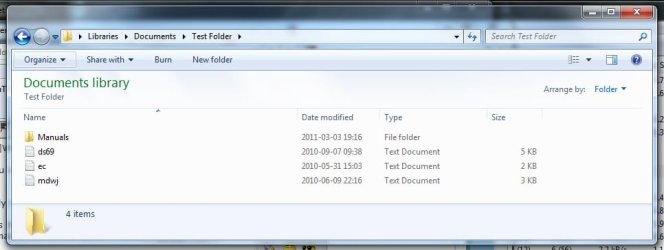
What exactly do you not understand? It is not a question of 'wanting to do' but rather, wanting to SEE. The op is very clear. OK - I wll attempt to simplify, what the op is requesting is that IN ADDITION to seeing the size of files under the size column of the explorer main window, the size of FOLDERS do not display and wants to be able to see it. In the attached image the size of the files are displayed BUT NOT the size of the folder (named 'Manuals').What exactly are you wanting to do??
....
Attachments
My Computer
- Computer type
- PC/Desktop
- Computer Manufacturer/Model Number
- HP (HP-P6212F)
- OS
- Microsoft Windows 7 Home Premium 64-bit 7601 Multiprocessor Free Service Pack 1
- CPU
- Pentium(R) Dual-Core CPU E5300 @ 2.60GHz
- Motherboard
- PEGATRON CORPORATION Benicia
- Memory
- 6.00 GB
- Graphics Card(s)
- Intel(R) G33/G31 Express Chipset Family
- Sound Card
- Realtek High Definition Audio
- Monitor(s) Displays
- 24'' HP WS LCD
- Screen Resolution
- 1920 x 1080 x 32 bits (4294967296 colors) @ 60 Hz
- Hard Drives
- (1) ATA Hitachi HDT72106 SCSI Disk Device (2) Generic- Compact Flash USB Device (3) Generic- MS/MS-Pro USB Device (4) Generic- SD/MMC USB Device (5) Generic- SM/xD-Picture USB Device (6) Verbatim STORE N GO USB Device
- Keyboard
- Logitech G510s
- Mouse
- Logitech Trackball M570
- Antivirus
- Microsoft Security Essentials / Malwarebytes
- Browser
- IE / Firefox / Chrome

- Local time
- 1:22 AM
- Messages
- 35,002
Yes, there is !Hi, is there any option that can show folder size in win explorer? There is a column size but it only shows size of files inside the folder.
Info Extended for Explorer W7 by ~RajTheeban95 on deviantART
It is a quote from the developer's description :
- folder/file size (System.Size) : it displays the size of the item ( 680 Mo for example)
My Computer
- Computer type
- PC/Desktop
- Computer Manufacturer/Model Number
- Self Assembled
- OS
- Microsoft Windows 10 Pro Insider Preview 64-bit
- CPU
- Intel(R) Core(TM) i3-4130 CPU @ 3.40GHz
- Motherboard
- Gigabyte Technology Co., Ltd. B85M-D3H
- Memory
- Corsair Vengence 4GB x2 (8.00GB Dual-Channel DDR3 @ 798MHz)
- Graphics Card(s)
- 2047MB GeForce GTS 450 (ZOTAC International)
- Sound Card
- Onboard (Realtek High Definition Audio)
- Monitor(s) Displays
- LG Flatron E2040T
- Screen Resolution
- 1600x900
- Hard Drives
- Western Digital 1 TB
Seagate 500 GB
- PSU
- Corsair VS550
- Case
- Cooler Master K380
- Cooling
- Cooler Master Seidon 120V Plus
- Keyboard
- Logitech MK260r
- Mouse
- Logitech MK260r
- Internet Speed
- PMPL Broadband
- Antivirus
- Windows Defender + MBAM
- Browser
- Firefox
- Other Info
- Dell Studio 15" Laptop
- Local time
- 12:52 PM
- Messages
- 1,308
So, we are all agreed that, like the size of the files under the SIZE column, we want to see the size of the folder under the SIZE column as well (see post #8).
My Computer
- Computer type
- PC/Desktop
- Computer Manufacturer/Model Number
- HP (HP-P6212F)
- OS
- Microsoft Windows 7 Home Premium 64-bit 7601 Multiprocessor Free Service Pack 1
- CPU
- Pentium(R) Dual-Core CPU E5300 @ 2.60GHz
- Motherboard
- PEGATRON CORPORATION Benicia
- Memory
- 6.00 GB
- Graphics Card(s)
- Intel(R) G33/G31 Express Chipset Family
- Sound Card
- Realtek High Definition Audio
- Monitor(s) Displays
- 24'' HP WS LCD
- Screen Resolution
- 1920 x 1080 x 32 bits (4294967296 colors) @ 60 Hz
- Hard Drives
- (1) ATA Hitachi HDT72106 SCSI Disk Device (2) Generic- Compact Flash USB Device (3) Generic- MS/MS-Pro USB Device (4) Generic- SD/MMC USB Device (5) Generic- SM/xD-Picture USB Device (6) Verbatim STORE N GO USB Device
- Keyboard
- Logitech G510s
- Mouse
- Logitech Trackball M570
- Antivirus
- Microsoft Security Essentials / Malwarebytes
- Browser
- IE / Firefox / Chrome
I find a tool can add just a column into the windows explorer. But it doesn't support Windows x64.
Just forget the name of the tool.
Just forget the name of the tool.
My Computer
- Computer Manufacturer/Model Number
- ?
- OS
- Windows 7 Home Premium 64bit
- CPU
- ?
- Motherboard
- ?
- Memory
- ?
- Graphics Card(s)
- ?
- Sound Card
- ?
- Monitor(s) Displays
- ?
- Hard Drives
- ?
- PSU
- ?
- Case
- ?
- Cooling
- ?