folder sizes

Maxheadroom

New member
Power User
VIP
Local time
4:31 PM
Messages
246
not sure where else i should put this,
why cant i see how large most of my folders are unless i right click on the folder?
thanks
 

My Computer

Computer Manufacturer/Model Number
home built
OS
windows 7 64bit build 7600
CPU
Intel I7 920
Motherboard
ASUS P6T Deluxe V2
Memory
Corsair 6GB (3x2GB) 1600MHz Triple Channel i7
Graphics Card(s)
XFX RADEON HD 5870
Sound Card
Creative Xfi Elite pro
Monitor(s) Displays
Hyundai W240D 24" Samsung Syncmaster 930
Screen Resolution
1920x1200 and 1280x1024
Hard Drives
WD Velociraptor 150gb
Western Digital WD7502ABYS 750GB Raid Edition
PSU
Corsair 850W TX Series PSU
Case
Coolermaster HAF 932 Full Tower
Cooling
Noctua NH-U12P
Keyboard
logitech G15 orange
Mouse
logitech mx revolution
Internet Speed
13mb
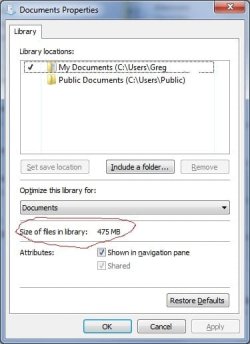
If you right click on a folder and click properties, I can see the size of the folder. See the attached.

Is this what you were trying to accomplish? I've circled it in Red.

Greg
 

Attachments

  • Folder Size.jpg
    Folder Size.jpg
    27.1 KB · Views: 6

My Computer

Computer Manufacturer/Model Number
Alienware Aurora
OS
Windows 7 Professional (64bit)
CPU
Core i7 Extreme 975 @ 3.33GHz overclocked to 3.6 GHz
Motherboard
Alienware 0H869M
Memory
12 GB DDR3 1333MHz
Graphics Card(s)
NVIDIA GeForce GTX 295 1.8 GB RAM
Sound Card
Creative SB X-Fi Titanium
Monitor(s) Displays
Dell 2407WFP
Screen Resolution
1920 x 1200
Hard Drives
OCZ Vertex 2 100GB SSD - Primary Drive, Western Digital 300GB SATA-II 3GB/X, 10,000 RPM, 16MB Cache - Secondary Drive
PSU
875 Watt
Case
Cosmic Black
Cooling
Alienware High-Performance Liquid Cooling
Keyboard
Logitech
Mouse
Logitech
Internet Speed
60/3MB Service
Other Info
Logitech Z-5500 THX-Certified 505-Watt 5.1 Digital Surround Sound Speaker System
Hello Max,

This is the same in Vista as well.

Folder Size - Vista Forums

This was done on purpose. On large content folders, it can take a few seconds to gather the size information for it. Now image that mulitplied by how many folders are in the window (EX: C:\Windows\System32). It could make navigating Windows Explorer an extremely slow nightmare.

Hope this helps some,
Shawn
 

My Computer

Computer type
PC/Desktop
Computer Manufacturer/Model Number
Self built custom
OS
64-bit Windows 11 Pro for Workstations
CPU
Intel i7-8700K OC'd to 5 GHz
Motherboard
ASUS ROG Maximus XI Formula Z390
Memory
64 GB (4x16GB) G.SKILL TridentZ RGB DDR4 3600 MHz
Graphics Card(s)
ASUS ROG-STRIX-GTX1080TI-O11G-GAMING
Sound Card
Integrated
Monitor(s) Displays
2 x Samsung Odyssey G7 27"
Screen Resolution
2560x1440
Hard Drives
1TB Samsung 990 PRO M.2,
4TB Samsung 990 PRO PRO M.2,
TerraMaster F8 SSD Plus NAS
PSU
Seasonic Prime Titanium 850W
Case
Thermaltake Core P3
Cooling
Corsair Hydro H115i
Keyboard
Logitech wireless K800
Mouse
Logitech MX Master 4
Internet Speed
2 Gb/s Download and 100 Mb/s Upload
Antivirus
Malwarebyte Anti-Malware Premium
Browser
Google Chrome
Other Info
Logitech Z625 speaker system,
Logitech BRIO 4K Pro webcam,
HP Color LaserJet Pro MFP M477fdn,
APC SMART-UPS RT 1000 XL - SURT1000XLI,
Galaxy S23 Plus phone
ok thanks, just seems a bit odd that theres a "size" columb there but generaly always empty.
 

My Computer

Computer Manufacturer/Model Number
home built
OS
windows 7 64bit build 7600
CPU
Intel I7 920
Motherboard
ASUS P6T Deluxe V2
Memory
Corsair 6GB (3x2GB) 1600MHz Triple Channel i7
Graphics Card(s)
XFX RADEON HD 5870
Sound Card
Creative Xfi Elite pro
Monitor(s) Displays
Hyundai W240D 24" Samsung Syncmaster 930
Screen Resolution
1920x1200 and 1280x1024
Hard Drives
WD Velociraptor 150gb
Western Digital WD7502ABYS 750GB Raid Edition
PSU
Corsair 850W TX Series PSU
Case
Coolermaster HAF 932 Full Tower
Cooling
Noctua NH-U12P
Keyboard
logitech G15 orange
Mouse
logitech mx revolution
Internet Speed
13mb
If you just hover the cursor over a folder, usually within a second or two, a little tool tip pops up with the size info.
 

My Computer

Computer Manufacturer/Model Number
HP DV8t quad
OS
Windows 7 Ultimate x64 (Retail)
CPU
i7-Q 720
Motherboard
Motherboard Chipset Intel Ibex Peak-M PM55, Intel Lynnfield
Memory
6 GB
Graphics Card(s)
nVidia GeForce GT 230M (1GB)
Sound Card
IDT High Definition Audio CODEC
Monitor(s) Displays
18.4 inch HP Infinity FHD (Samsung 184HT03-001)
Screen Resolution
1920 x 1080
Hard Drives
Hitachi 500GB 7200 rpm (x2)
Seagate FreeAgent 1.5 TB External USB (x2)
Thermaltake BlacX eSATA/USB 2.0 3.5/2.5 HD dock
Cooling
Zalman NC-2000 notebook cooling pad
Keyboard
laptop
Mouse
Logitech VX Revolution
Other Info
Backup Unit: Lenovo T61p
ok thanks, just seems a bit odd that theres a "size" columb there but generaly always empty.

Yeah, it's only for files and not folders though. :(
 

My Computer

Computer type
PC/Desktop
Computer Manufacturer/Model Number
Self built custom
OS
64-bit Windows 11 Pro for Workstations
CPU
Intel i7-8700K OC'd to 5 GHz
Motherboard
ASUS ROG Maximus XI Formula Z390
Memory
64 GB (4x16GB) G.SKILL TridentZ RGB DDR4 3600 MHz
Graphics Card(s)
ASUS ROG-STRIX-GTX1080TI-O11G-GAMING
Sound Card
Integrated
Monitor(s) Displays
2 x Samsung Odyssey G7 27"
Screen Resolution
2560x1440
Hard Drives
1TB Samsung 990 PRO M.2,
4TB Samsung 990 PRO PRO M.2,
TerraMaster F8 SSD Plus NAS
PSU
Seasonic Prime Titanium 850W
Case
Thermaltake Core P3
Cooling
Corsair Hydro H115i
Keyboard
Logitech wireless K800
Mouse
Logitech MX Master 4
Internet Speed
2 Gb/s Download and 100 Mb/s Upload
Antivirus
Malwarebyte Anti-Malware Premium
Browser
Google Chrome
Other Info
Logitech Z625 speaker system,
Logitech BRIO 4K Pro webcam,
HP Color LaserJet Pro MFP M477fdn,
APC SMART-UPS RT 1000 XL - SURT1000XLI,
Galaxy S23 Plus phone
Back
Top