Folder Syncronization Issue

IMAyNeed

New member
Power User
Local time
10:37 PM
Messages
501
SyncToy

Files moved from folder A to folder B.
So, files do not exist in folder A anymore.
I tried 3 options of SyncToy and none of them have deleted the files from folder A.
They added the files to folder B, but not deleted from A.

How can I do this?

All I want is exact copy of a folder in a different hard disk.

3rd party softwares accepted, just is any of them has Preview option?
 

My Computer

Computer Manufacturer/Model Number
ASUS G72 Notebook
OS
Windows 7 Ultimate 64-bit
CPU
Intel® Core™2 Duo mobile processor P8700 2.53 GHz
Memory
6GB DDRII
Graphics Card(s)
NVIDIA GeForce GTX 260M
Sound Card
EAX Advanced HD 4.0 + Logitech Wireless Headset G930
Monitor(s) Displays
17.3" LED-backlit LCD high-definition plus widescreen
Screen Resolution
1600 x 900
Hard Drives
2 x Seagate Momentus 500 GB 5400.6 SATA 3Gb/s
Cooling
Targus
Mouse
Logitech Wireless Trackball M570
Internet Speed
3 to 6 Mbps Download / .5 to 1 Mbps Upload
Other Info
Clear Modem with Wi-fi*
Comodo Internet Security Premium
Make Folder B a junction point to Folder A...
Code:
mklink /J Drive:\Folder\Path\To\B Drive:\Folder\Path\To\A

Any change in B results in change to A and vise versa.
Delete a file in B the file is deleted in A.
 

My Computer

Computer type
PC/Desktop
Computer Manufacturer/Model Number
Alienware Aurora ALX R4
OS
Windows 10 Pro (x64)
CPU
Intel Core i7-3930K (3.2GHz - 4.5GHz)
Motherboard
Alienware Aurora-R4 x79
Memory
4x Samsung 4GB PC3-12800 DDR3 (16GB 1600MHz)
Graphics Card(s)
Nvidia Geforce GTX 690
Sound Card
SteelSeries Siberia Elite
Monitor(s) Displays
Dell UltraSharp U3011
Screen Resolution
2560x1600
Hard Drives
Samsung 850 Pro 256 GB, Seagate 1TB Desktop Hybrid HDD, 2x Western Digital 4TB Green HDD
PSU
875W Some Dell PSU <.<
Case
Alienware Aurora ALX
Cooling
Custom Liquid Cooling (EK CPU & GPU blocks) dual EK 480RAD
Keyboard
Logitech G710+ Mechanical
Mouse
Logitech G700s
Internet Speed
Verizon Fios (50 mbps average)
Other Info
Server: Intel NUC D54250WYK: i5-4250U, 16GB, 256 GB mSATA, Windows Server 2012 R2
Does this have to be something you can automate or are other methods acceptable?

TeraCopy is free and has a Copy and a Move mode. You select the files and folders you want to work with then right click and select Teracopy.

Click on the Copy icon to change it to Move mode then pick the target. TeraCopy does the rest.
 

My Computer

Computer type
PC/Desktop
Computer Manufacturer/Model Number
Lenovo IdeaCenter 450
OS
Windows 10 Pro X64
CPU
Intel Quad Core i7-4770 @ 3.4Ghz
Memory
16.0GB PC3-12800 DDR3 SDRAM 1600 MHz
Graphics Card(s)
Intel Integrated HD Graphics
Sound Card
Realtek HD Audio
Monitor(s) Displays
HP 22" LCD
Screen Resolution
1680 x 1050
Hard Drives
250GB Samsung EVO SATA-3 SSD
2TB Seagate ST2000DM001 SATA-2
1.5TB Seagate ST3150041AS SATA
Keyboard
Dell USB
Mouse
Lenovo USB
Internet Speed
Cable via Road Runner 3MB Upload, 30MB Download
Antivirus
Windows Defender, MBAM Pro, MBAE
Browser
Seamonkey
Other Info
UEFI/GPT
PLDS DVD-RW DH16AERSH
Make Folder B a junction point to Folder A...
Code:
mklink /J Drive:\Folder\Path\To\B Drive:\Folder\Path\To\A
Any change in B results in change to A and vise versa.
Delete a file in B the file is deleted in A.

Thanks for informing me about this. Would this work with an external drive?
(Please go on reading and if possible, write the command again for the problem described below).

Does this have to be something you can automate or are other methods acceptable?

TeraCopy is free and has a Copy and a Move mode. You select the files and folders you want to work with then right click and select Teracopy.

Click on the Copy icon to change it to Move mode then pick the target. TeraCopy does the rest.

Any method is accepted.

Thanks for the program. I will check it out. (Please go on reading).

-----------------

Let me rephrase again what I want to do.

E:\ is a data partition in an internal hard disk.
E:\Library is the folder which I want to back up/synchronize.

E:\Library
which has
E:\Library\Documents (Also other sub folders)
E:\Library\Images (Also other sub folders)
E:\Library\Movies (Also other sub folders)
etc.

L:\ is a data partition in a portable external USB Hard Drive and it is not always plugged in.
My back up folder is L:\Library.

Now my problem is:

For instance, when I move a file
from E:\Library\Movies\New Movies
to E:\Library\Movies\Watched Movies

and when I do a backup,

the backup program puts the new files in E:\Library\Movies\Watched Movies
to L:\Library\Movies\Watched Movies,
but it doesn't delete those files
from L:\Library\Movies\New Movies.

which is not what I want.

What I want is a back up or synchronization way that will
put the new (and changed/updated/modified,etc.) files in E:\Library\* to L:\Library\*,
but also it will delete the files
from L:\Library\* if the files are deleted from E:\Library\*.

By which software or command can I do this?
And which options do I need to use to reach my goal?

I hope I was able to show what the problem is better this time.
 

My Computer

Computer Manufacturer/Model Number
ASUS G72 Notebook
OS
Windows 7 Ultimate 64-bit
CPU
Intel® Core™2 Duo mobile processor P8700 2.53 GHz
Memory
6GB DDRII
Graphics Card(s)
NVIDIA GeForce GTX 260M
Sound Card
EAX Advanced HD 4.0 + Logitech Wireless Headset G930
Monitor(s) Displays
17.3" LED-backlit LCD high-definition plus widescreen
Screen Resolution
1600 x 900
Hard Drives
2 x Seagate Momentus 500 GB 5400.6 SATA 3Gb/s
Cooling
Targus
Mouse
Logitech Wireless Trackball M570
Internet Speed
3 to 6 Mbps Download / .5 to 1 Mbps Upload
Other Info
Clear Modem with Wi-fi*
Comodo Internet Security Premium
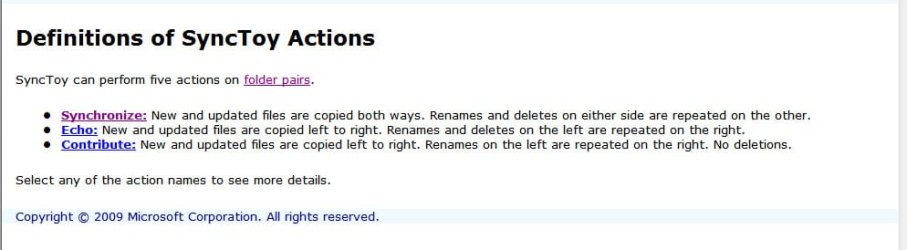
Have you selected "synchronisation" as the action to be performed?

1actions.jpg

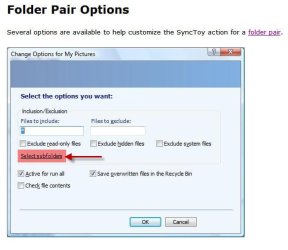
Next go to Folder Options>select subfolders and check whether all subfolders as you may want to synchronise are included.

2Folderoptions.jpg

Have you by mistake excluded any subfolder?

3check.jpg
 

My Computer

Computer Manufacturer/Model Number
self-assembled
OS
Windows 7 Ultimate 32bit
CPU
AMD Phenom II X3 720 Processor
Motherboard
Gigabyte GA-MA78GM-S2H Revision 1.0
Memory
Transcend DDR2 (PC2 6400) 4 X 1GB
Graphics Card(s)
Integrated + ATI Radeon 4550
Sound Card
Integrated Realtek ALC 889A
Monitor(s) Displays
DELL 1704 FPT
Screen Resolution
1280 x 1024
Hard Drives
Western Digital Caviar SE16 250 GB x2 in RAID 0
PSU
Coolermaster 400 W
Case
Zebronics Cube
Cooling
stock
Keyboard
Microsoft - wired
Mouse
Microsoft - wired
Internet Speed
ADSL 256-512Kbps
Have you selected "synchronisation" as the action to be performed?

Next go to Folder Options>select subfolders and check whether all subfolders as you may want to synchronise are included.

Have you by mistake excluded any subfolder?

I moved a file from Watched Movies to New Movies.
And it said in the preview that the required action is:
"Rename: File in the Watched Movies to New Movies"

Action: Rename
Source: Watched Movies
Destination: New Movies

So, is it the right action for moved files?
I hope so.
 

My Computer

Computer Manufacturer/Model Number
ASUS G72 Notebook
OS
Windows 7 Ultimate 64-bit
CPU
Intel® Core™2 Duo mobile processor P8700 2.53 GHz
Memory
6GB DDRII
Graphics Card(s)
NVIDIA GeForce GTX 260M
Sound Card
EAX Advanced HD 4.0 + Logitech Wireless Headset G930
Monitor(s) Displays
17.3" LED-backlit LCD high-definition plus widescreen
Screen Resolution
1600 x 900
Hard Drives
2 x Seagate Momentus 500 GB 5400.6 SATA 3Gb/s
Cooling
Targus
Mouse
Logitech Wireless Trackball M570
Internet Speed
3 to 6 Mbps Download / .5 to 1 Mbps Upload
Other Info
Clear Modem with Wi-fi*
Comodo Internet Security Premium
Back
Top