
How to Reset the Folder View Settings for All Folders with the Same Folder Template in Windows 7
Information
This will show you how to reset the folder view settings back to default for all folders that have been optimized with the same folder template in Windows 7.
Note
This will restore the default Group by, Sort by, Arrange by arrangement , Icon Size, and View arrangement folder view settings of all folders with the same folder template.
Tip
If you wanted to reset the folder views settings back to default for all folders and libraries in all folder templates instead, then see How to Reset All Folder View Settings to Default in Windows 7 instead of this tutorial.
Warning
The folder view of a library folder cannot be reset to default with this option. You will have to manually change the folder view settings back instead for it.
Here's How: 1. Navigate to the folder that you want to reset the folder view settings of it and for all folders with the same folder template as it. (See screenshots below)
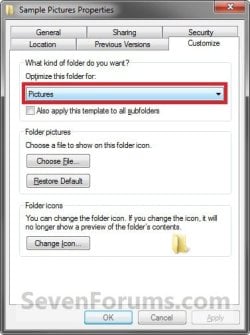
NOTE: For example, I had changed the Icon Size to Medium Icons, and to be Grouped by Names for the C:\Users\Public\Public Pictures\Sample Pictures folder, and would now like to restore it and all other folders that have the Pictures folder template back to their default folder view settings.
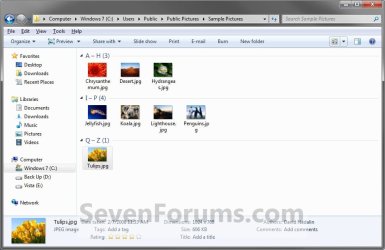
2. Open Folder Options from within this folder (step 1) and not through the Control Panel or from another folder. (See screenshot below)
NOTE: You would want to use either OPTION TWO or OPTION THREE at that link.
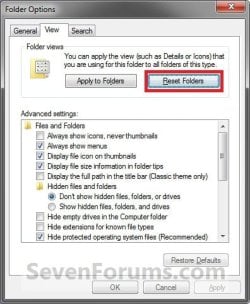
3. Click on the View tab, then click on the Reset Folders button. (See sceenshot above)
NOTE: If the Reset Folders button is grayed out, then please see the WARNING box at the top of the tutorial for why.
4. Click on Yes to confirm. (See screenshot below)
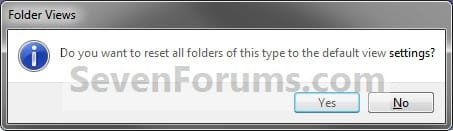
5. Click on OK. (See screenshot below step 2)
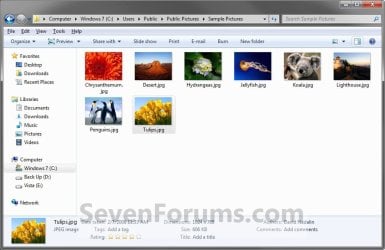
6. The folder in step 1, and all folders with the same folder template as it, will now be restored back to the default folder view settings. (See screenshot below)
NOTE: This would be for all folders with the Pictures folder template for the example C:\Users\Public\Public Pictures\Sample Pictures folder that I have used in step 1.
7. Repeat these steps if you would like to reset the folder views of another folder with a different folder template, and all folders with the same folder template as it.
That's it,
Shawn
Related Tutorials
- How to Back Up and Restore Your Folder View Settings in Vista, Windows 7, and Windows 8
- How to Reset All Folder View Settings to Default in Windows 7
- How to "Apply to Folders" a Specific Folder View to All Folders with the Same Folder Template in Windows 7
- How to Change a Folder Template in Windows 7
- How to Set a Default Folder Template for All Folders in Windows 7
- How to Change the File and Folder View Arrangement in Windows 7 Explorer
- How to Change the Icon Size in a Windows 7 Explorer Window
- How to Change the Group by, Sort by, and Arrange by Folder View in Windows 7 Explorer
- How to Set a Default Folder View for All Folders in Windows 7
- How to Disable Auto Arrange in Windows 7 Explorer to have Free Sorting
- How to Add or Remove Windows Explorer Columns
- How to Change the Width of Columns in Windows Explorer
Attachments
Last edited:


