Folder with invalid character does not open.

Brian J Hoskins

New member
Local time
2:36 PM
Messages
13
Location
Laugharne, Carmarthenshire, UK
Hi all,

I have encountered an issue where a folder will not open under Windows 7. Selecting the folder does nothing, and right-selecting the folder does not bring up any context menu. I happen to know that there is media content inside the folder.

Closer inspection of the folder name gave me cause for concern about the ":" character and, sure enough, it turns out that this is an illegal character for an NTFS folder name. I am guessing this is why Windows does not want to open the folder for me, though I cannot explain how it allowed me to create it in the first place.

I can't rename the folder either - if I try that using 'F2' then it allows me to edit the name but as soon as I press enter Windows complains that it can't find the file specified.

Any ideas how I can recover this situation?

InvalidCharacterFolder.png
 
Last edited:

My Computer

Computer type
PC/Desktop
Computer Manufacturer/Model Number
Custom Build
OS
Windows 7 Professional x64
CPU
INTEL Core i7 4820K
Motherboard
Gigabyte X79-UP4
Memory
4x 4GB DDR3 Performance Desktop Memory - 16GB Total
Hard Drives
2x500GB SATA
PSU
Corsair GS700
Cooling
Coolermaster Sedion CPU Water Cooler
Antivirus
AVG Internet Security
Browser
Chrome
Even stranger:

I decided to mount this disk on my Linux system to see if I would have more luck there. Linux allowed me to rename the folder, removing the ":" character. I browsed completely away from the drive, back in, and yes - it was indeed renamed. Excellent. I dismounted the drive from Linux, connected it back to Windows 7, and then the folder was back with the ":" character in it again!!!
I dismounted, put it back on my Linux system, and sure enough the ":" character is back.

What is going on here?!
 

My Computer

Computer type
PC/Desktop
Computer Manufacturer/Model Number
Custom Build
OS
Windows 7 Professional x64
CPU
INTEL Core i7 4820K
Motherboard
Gigabyte X79-UP4
Memory
4x 4GB DDR3 Performance Desktop Memory - 16GB Total
Hard Drives
2x500GB SATA
PSU
Corsair GS700
Cooling
Coolermaster Sedion CPU Water Cooler
Antivirus
AVG Internet Security
Browser
Chrome
Even stranger:

I decided to mount this disk on my Linux system to see if I would have more luck there. Linux allowed me to rename the folder, removing the ":" character. I browsed completely away from the drive, back in, and yes - it was indeed renamed. Excellent. I dismounted the drive from Linux, connected it back to Windows 7, and then the folder was back with the ":" character in it again!!!
I dismounted, put it back on my Linux system, and sure enough the ":" character is back.

What is going on here?!

Maybe the problem is caused by an infection; virus or malware. Have you run any scans with products designed to check for infections? Have you installed any new software?

HTH
 

My Computer

Computer type
PC/Desktop
Computer Manufacturer/Model Number
Custom Built
OS
Windows 7 Professional x64
CPU
Intel i5 quad processor
Motherboard
DP67BG
Memory
16 GB
Graphics Card(s)
Radeon HD 5770
Sound Card
Realtek High Definition Audio
Monitor(s) Displays
Samsung SyncMaster
Screen Resolution
1920X1080
Hard Drives
WD 2TB (SATA Internal)
WD 1TB (USB External)
PSU
Corsair GS800
Case
Tower (Generic)
Cooling
3 Internal Fans
Keyboard
MS Wireless
Mouse
MS Optical Wired
Internet Speed
54 mbps
Antivirus
Emsisoft
Browser
IE-Version 9, Palemoon-Version 24.2.0
Maybe the problem is caused by an infection; virus or malware. Have you run any scans with products designed to check for infections? Have you installed any new software?

HTH

Hmmm, I somehow doubt that but I will try it when I get home just to make certain. Thanks.
 

My Computer

Computer type
PC/Desktop
Computer Manufacturer/Model Number
Custom Build
OS
Windows 7 Professional x64
CPU
INTEL Core i7 4820K
Motherboard
Gigabyte X79-UP4
Memory
4x 4GB DDR3 Performance Desktop Memory - 16GB Total
Hard Drives
2x500GB SATA
PSU
Corsair GS700
Cooling
Coolermaster Sedion CPU Water Cooler
Antivirus
AVG Internet Security
Browser
Chrome
Used to have this type of problem in dos days dealing with files from unix servers and such and used to use XtreeGold to sort things.

This purports to be the natural sucessor to the old program and may be worth a try

ZTreeWin

Not tested or tried so cannot give any guarantee :)
 

My Computers

System One System Two

  • Computer type
    PC/Desktop
    Computer Manufacturer/Model Number
    ChillBlast - Custom to my design
    OS
    Windows 11 Pro x64 [Latest Release and Release Preview]
    CPU
    Ryzen 9 5950X, 3.8 - 5.2 MHz
    Motherboard
    Asus Prime X570-Pro
    Memory
    64GB [2 x 32GB] DDR4 3200MHz
    Graphics Card(s)
    4GB NVIDIA GEFORCE GTX 1650 Ti
    Sound Card
    On-board SPDIF to 5.1 System + HDMI [5.1 system]
    Monitor(s) Displays
    32" UHD 32 Bit HDR Monitor + 43" UHD 4K 32Bit HDR TV
    Screen Resolution
    2 x 3840 x 2160 @60Hz
    Hard Drives
    1TB M2 SSD OS, 500GB Fast Access SSD, 2 x 8TB Data + Various Externals from 1TB to 4TB, 10TB NAS
    PSU
    NZXT C750 80 PLUS Gold 750W Modular PSU
    Case
    Workstation Case [Matt Black]
    Cooling
    NZXT Kraken X63 280mm CPU Cooler +2x Quiet Case fans
    Keyboard
    Logitech Wireless MX Keys & K400 + others
    Mouse
    Logitech Wireless MX Master 3S
    Internet Speed
    920 MB Down 50 MB Up
    Antivirus
    BitDefender Total Security Pro
    Browser
    Chrome (always run latest Non-Beta)
    Other Info
    Also run ...
    Laptop - Quad 8GB - Windows 10 Pro x64
    Nexus 7 Android tablet x2
    Samsung 10.2" tablet
    Blackview TAB 8 4G Android Tablet c/w Keyboard
    Wacom Intuos Pro Medium Pen Pad
    Wacom Intuos Pro Small Pen Pad
    Wacom Expresskeys Remote
    Loopdeck+ Graphics Controller
    Shuttle Pro v2 Control
  • Computer type
    Laptop
    System Manufacturer/Model Number
    Dell XPS 17 10750H
    OS
    Windows 11 Pro x64 Latest RP
    CPU
    Intel I7 10750H 5.0GHz
    Motherboard
    Dell XPS
    Memory
    32GB [2x16GB] DDR4 2933 MHz
    Graphics Card(s)
    nVidia GTX1650Ti 4 GB GDDR6
    Sound Card
    Stock [Realtek] 4 Speaker
    Monitor(s) Displays
    17" IPS UHD+ Infinity Edge Touchscreen
    Screen Resolution
    3840 x 2400
    Hard Drives
    2TB M2 NVMe, 4TB External + various 500GB & 1TB External NVMe (also have access to spinner HDD from
    PSU
    Stock
    Case
    Stock XPS Aluminium & Carbon Fibre
    Cooling
    Stock - Active Fan Control
    Keyboard
    Backlit + Various Logitech
    Mouse
    Stock Track Pad + Logitech MX Trackball
    Internet Speed
    72 MB Down 18MB Up
    Browser
    Chrome
    Other Info
    Also run ...
    Laptop - Quad 8GB - Windows 10 Pro x64
    Nexus 7 Android tablet x2
    10.2" tablet
    Sony Z3 Android Smartphone
    Wacom Intuos Pro Medium Pen Pad
    Wacom Intuos Pro Small Pen Pad
    Wacom Expresskeys Remote
    Loopdeck+ Graphics Controller
    Shuttle Pro v2 Control Pad
    10TB NAS

My Computer

Computer type
PC/Desktop
Computer Manufacturer/Model Number
Packard Bell
OS
Windows 7 Home Premium 64bit
CPU
Intel(R) Core(TM) i3-2120 CPU @ 3.30GHz
Motherboard
Packard Bell IPISB-AG
Memory
3.00 GB
Graphics Card(s)
(1) Intel(R) HD Graphics (2) VNC Mirror Driver
Sound Card
Realtek High Definition Audio
Monitor(s) Displays
AIO LCD
Screen Resolution
1920 x 1080
Hard Drives
WDC WD10EADX-22TDHB0 ATA Device
Fixed hard disk media
4 partitions
931.51 GB
Keyboard
Wireless
Mouse
Wireless
Antivirus
Microsoft Security Essentials
Browser
IE; Firefox
Other Info
Also:
Samsung N220 Plus Netbook - Windows 7 Home
HP laptop
iPad 5
Something to try

Hi.

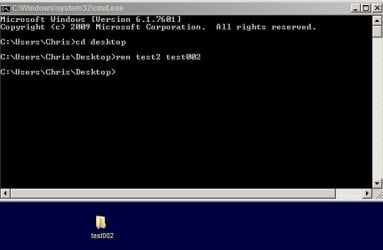
You could try renaming the folder using command prompt. (Start> Run then type cmd.exe) press Enter.

Use the cd command to change to the directory where the folder is located then try renaming it.

Here's an example showing a folder named test2 being renamed to test002 on my desktop.

Before:

cmd.jpg

After:

cmd2.jpg

As you can see - type:

ren foldername newfoldername

Press enter.

I've actually got no idea if the folder name containing the invalid character will be accepted for renaming but it's worth a try!
 
Last edited:

My Computer

Computer type
Laptop
Computer Manufacturer/Model Number
ASUS
OS
Microsoft Windows 7 Home Premium 64-bit 7601 Multiprocessor Free Service Pack 1
CPU
AMD C-60 APU with Radeon(tm) HD Graphics
Motherboard
ASUSTeK COMPUTER INC. X501U
Memory
4.00 GB
Graphics Card(s)
AMD Radeon HD 6290 Graphics
Sound Card
(1) AMD High Definition Audio Device (2) Realtek High Defi
Screen Resolution
1366 x 768 x 32 bits (4294967296 colors) @ 60 Hz
Hard Drives
Hitachi HTS545050A7E380 SATA Disk Device
Antivirus
Comodo CIS & FW, SecureAplus App Whitelisting, Threatfire
Browser
Cyberfox 64bit, Opera 64bit, Airfox
Other Info
Spy-The-Spy, HitmanPro.Alert, Norton Connect Safe, MJRegWatcher, BitDefender TrafficLight, Voodoo Shield, Zemana AntiMalware
MFT

Even stranger:

I decided to mount this disk on my Linux system to see if I would have more luck there. Linux allowed me to rename the folder, removing the ":" character. I browsed completely away from the drive, back in, and yes - it was indeed renamed. Excellent. I dismounted the drive from Linux, connected it back to Windows 7, and then the folder was back with the ":" character in it again!!!
I dismounted, put it back on my Linux system, and sure enough the ":" character is back.

What is going on here?!

I reckon that it's possible that the folder retained it's original name due to the entry in the MFT - it would still contain the original folder name for the folder in that location. I'm not sure that this is the case but the test would be to move the renamed folder to somewhere else in your windows partition using Linux.
 

My Computer

Computer type
Laptop
Computer Manufacturer/Model Number
ASUS
OS
Microsoft Windows 7 Home Premium 64-bit 7601 Multiprocessor Free Service Pack 1
CPU
AMD C-60 APU with Radeon(tm) HD Graphics
Motherboard
ASUSTeK COMPUTER INC. X501U
Memory
4.00 GB
Graphics Card(s)
AMD Radeon HD 6290 Graphics
Sound Card
(1) AMD High Definition Audio Device (2) Realtek High Defi
Screen Resolution
1366 x 768 x 32 bits (4294967296 colors) @ 60 Hz
Hard Drives
Hitachi HTS545050A7E380 SATA Disk Device
Antivirus
Comodo CIS & FW, SecureAplus App Whitelisting, Threatfire
Browser
Cyberfox 64bit, Opera 64bit, Airfox
Other Info
Spy-The-Spy, HitmanPro.Alert, Norton Connect Safe, MJRegWatcher, BitDefender TrafficLight, Voodoo Shield, Zemana AntiMalware
Thank you very much to everyone for your suggestions. Very much appreciated.

It will be a couple of days before I can try them all out and report back so I thought I'd at least send my thanks in the meantime.
 

My Computer

Computer type
PC/Desktop
Computer Manufacturer/Model Number
Custom Build
OS
Windows 7 Professional x64
CPU
INTEL Core i7 4820K
Motherboard
Gigabyte X79-UP4
Memory
4x 4GB DDR3 Performance Desktop Memory - 16GB Total
Hard Drives
2x500GB SATA
PSU
Corsair GS700
Cooling
Coolermaster Sedion CPU Water Cooler
Antivirus
AVG Internet Security
Browser
Chrome
You're very welcome, Brian.

I hope one of them works for you. Let us know how it goes. ;)
 

My Computer

Computer type
PC/Desktop
Computer Manufacturer/Model Number
Packard Bell
OS
Windows 7 Home Premium 64bit
CPU
Intel(R) Core(TM) i3-2120 CPU @ 3.30GHz
Motherboard
Packard Bell IPISB-AG
Memory
3.00 GB
Graphics Card(s)
(1) Intel(R) HD Graphics (2) VNC Mirror Driver
Sound Card
Realtek High Definition Audio
Monitor(s) Displays
AIO LCD
Screen Resolution
1920 x 1080
Hard Drives
WDC WD10EADX-22TDHB0 ATA Device
Fixed hard disk media
4 partitions
931.51 GB
Keyboard
Wireless
Mouse
Wireless
Antivirus
Microsoft Security Essentials
Browser
IE; Firefox
Other Info
Also:
Samsung N220 Plus Netbook - Windows 7 Home
HP laptop
iPad 5
Sorry guys, I must have forgotten to return here and post an update! I only realised when I came back here to fix a bad link that my website was emailing me about.

I did end up fixing the problem but for the life of me I cannot remember how I did it. Clearly other people are visiting this thread as that's why my website emailed me about the broken screengrab link (which I've now fixed). So if someone else solves it for themselves please post how you did it!
 
Last edited:

My Computer

Computer type
PC/Desktop
Computer Manufacturer/Model Number
Custom Build
OS
Windows 7 Professional x64
CPU
INTEL Core i7 4820K
Motherboard
Gigabyte X79-UP4
Memory
4x 4GB DDR3 Performance Desktop Memory - 16GB Total
Hard Drives
2x500GB SATA
PSU
Corsair GS700
Cooling
Coolermaster Sedion CPU Water Cooler
Antivirus
AVG Internet Security
Browser
Chrome
There may have been other reserved characters used in the files that were in that folder.
Perhaps you edited them while you were in Linux.

I had to edit a bunch of stuff (a few days ago) before I could transfer it to Windows.
 

My Computer

Computer type
PC/Desktop
Computer Manufacturer/Model Number
n/a
OS
W7 Ultimate SP1, LM19.2 MATE, W10 Home 1703, W10 Pro 1703 VM, #All 64 bit
CPU
AMD Phenom II x6 1100T, 3.3 GHz
Motherboard
ASUS M4A88T-M/USB3 (AM3)
Memory
12GB DDR3 1333 G-Skill (4GB x 2), G-Skill (2GB x 2)
Graphics Card(s)
NVIDIA GeForce GTX 660
Sound Card
Realtek?
Monitor(s) Displays
Samsung S23B350
Screen Resolution
1920x1080
Hard Drives
WD Green 2TB (SATA), WD Green 3TB (SATA), WD Blue 4TB (SATA), WD Blue 6TB (SATA)
PSU
Cooler Master
Case
Antec GX300 Tower
Cooling
3x Antec TRICOOL 120mm Fans
Mouse
Wired Optical
Internet Speed
DSL
Antivirus
Avast
Browser
Pale Moon (64 bit)
Other Info
2018-12-27 Upgraded HDDs
2015-12-10 Upgraded case, graphics card, storage
2015-08-15 Upgraded motherboard & RAM
2015-07-15 Upgraded LM17.1 to LM17.2
Back
Top