folders and files disappear -no previous versions available

dado pausini

New member
Local time
12:13 PM
Messages
12
Hi, there!

I'm facing a very peculiar issue, hope you could help me, if I'm in the right section.
I have two HDDs with Win7 in the same machine. Some time ago, a lighting storm ruined my network adapter. I replaced it, but some folders disappeared and others returned to what they where in 2020, so I lost a lot of files.
The content of those important folders was replaced by folders named with numbers, as well as archives like destop.ini , bak. extensions, and one named GORQA. No older versions, nor "newer", were available to be restored by the system.
Now, this happenned again -not the lightings. After some trouble installing a video and audio program, I couldn't boot into main drive anymore, even after rebuilding the boot. It would work for a while and fail when booting again.
Some folders and files returned to older versions, even those backed up.
I'm booting into the second HDD and the main one keeps on appearing and disappearing on My Computer. When they show up in the boot manager, they're ok, but Diskpart and manufacturers tools like Data Lifeguard and Sea Tools change their drive letters, taking one HDD for the other. Almost like an occasional identity crisis.
I think they are in conflict and maybe it's the cause of everything. What do you think?
Thank you,
Dado
 

My Computers My Computers

  • At a glance

    win7 64bit Home Premium and UltimateAMDFX 4.3008GBRadeon HD 6570
    Computer type
    PC/Desktop
    Computer Manufacturer/Model Number
    custom build
    OS
    win7 64bit Home Premium and Ultimate
    CPU
    AMDFX 4.300
    Motherboard
    Asustek M5A78L
    Memory
    8GB
    Graphics Card(s)
    Radeon HD 6570
    Hard Drives
    Western Digital Blue 1TB
    Seagate Barracuda 1TB
    Seagate Barracuda 1 TB
    Antivirus
    avast
    Browser
    opera
  • Computer type
    PC/Desktop
Lets see how is your drive health (on all drives).

Logical test:
Open a CMD window as administrator and type:
chkdsk X: /f
replace X with the partitions letters and hit enter. It will ask if you want to un mount the drive to test it = Yes
Pay attention on the results, specially bad blocks, bad clusters, bad sectors etc

and last one
chkdsk c: /f
It will say your disk is in use and if you want to schedule to next start = yes
Restart
Pay attention on the results, specially bad blocks, bad clusters, bad sectors etc

For a SMART, download, extract and run Crystal Disk Info It is a portable, don't need to be installed.

Just as a remark, drive letters are assigned by the OS to the partitions. That is why when you boot from a drive you may have drive letters assigned to partitions that are different when you boot from another drive.
 

My Computers My Computers

  • At a glance

    Windows 7 HP 64i5 6600K - 800MHz to 4200MHz4+4G GSkill DDR4 3000IG - Intel 530
    Computer type
    PC/Desktop
    Computer Manufacturer/Model Number
    custom build
    OS
    Windows 7 HP 64
    CPU
    i5 6600K - 800MHz to 4200MHz
    Motherboard
    GA-Z170-HD3P
    Memory
    4+4G GSkill DDR4 3000
    Graphics Card(s)
    IG - Intel 530
    Monitor(s) Displays
    Samsung 226BW
    Screen Resolution
    1680x1050
    Hard Drives
    (1) -1 SM951 – 128GB M.2 AHCI PCIe SSD drive for Windows 7 and Lubuntu
    (2) -1 WD SATA 3 - 1T for Data
    (3) -1 WD SATA 3 - 1T for backup
    PSU
    Thermaltake 450W TR2 gold
    Keyboard
    Old and good Chicony mechanical keyboard
    Mouse
    Logitech mX performance - 9 buttons (had to disable some)
    Internet Speed
    500Mb/s
    Browser
    Firefox 64
    Other Info
    TinyWall firewall
  • At a glance

    Windows 7 Proi7-4500U 800MHz to 3.0GHz(4+4)G DDR3 1600IG intel 4400 + NVIDIA GeForce GT 745M
    Computer type
    Laptop
    System Manufacturer/Model Number
    Asus Q550LF
    OS
    Windows 7 Pro
    CPU
    i7-4500U 800MHz to 3.0GHz
    Motherboard
    Asus Q550LF
    Memory
    (4+4)G DDR3 1600
    Graphics Card(s)
    IG intel 4400 + NVIDIA GeForce GT 745M
    Sound Card
    Realtek
    Monitor(s) Displays
    LG Display LP156WF4-SPH1
    Screen Resolution
    1920 x 1080
    Hard Drives
    BX500 120G SSD for Windows and programs +
    1T HDD for data
    Internet Speed
    500 Mb/s
    Browser
    Firefox
    Other Info
    TinyWall firewall
Thank you, Megahertz.

Just run checkdisk and both HDDs are ok, no bad blocks, bad sectors nor bad clusters.
Same with Crystal Disk, that says Healthy for both of them.
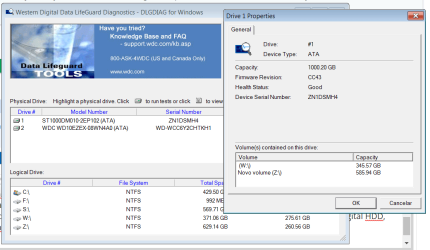
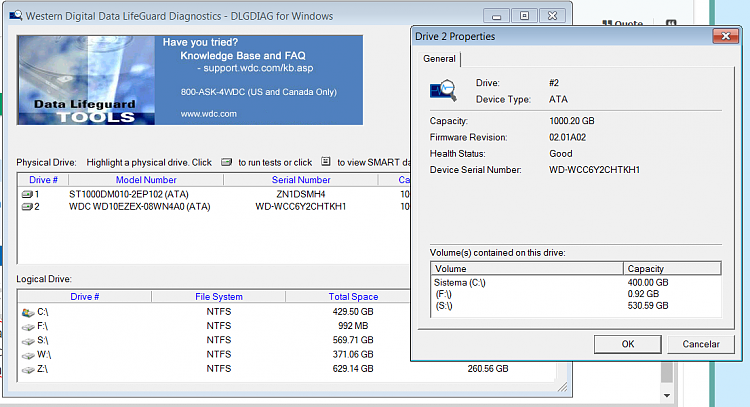
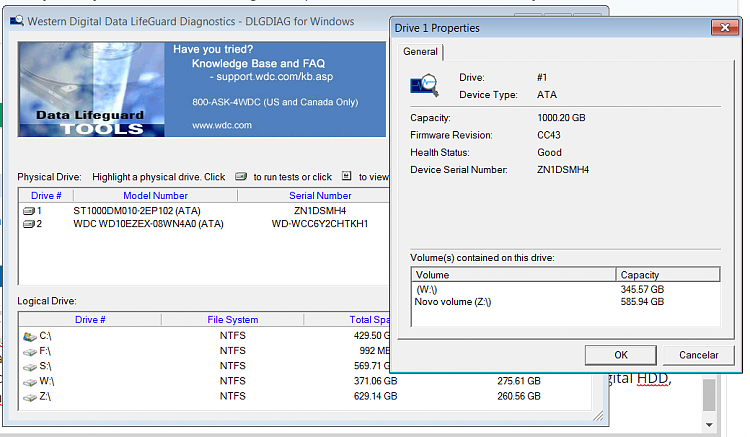
Referring to the drive letters, the WD Data Lifeguard Diagnostics shows the drives W and Z belonging to the Seagate HDD, but they belong to the Western Digital (disk2).

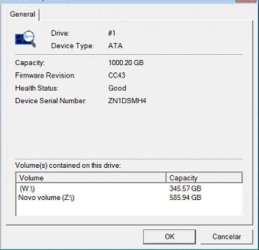
IMAGE1.png

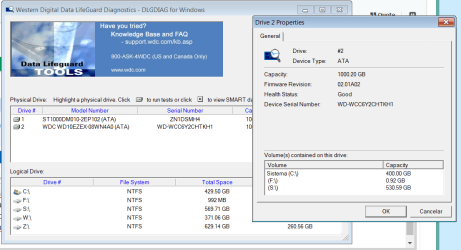
And, it shows drives C, F and S as belonging to the Western Digital HDD, but they are in the Seagate (disk 1)

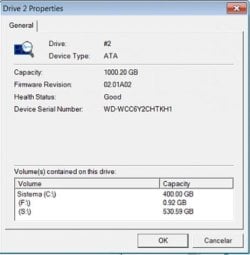
IMAGE2.png

The WD HDD is unacessible, so I've been working on the Seagate lately.
I know it looks a bit confusing. Please let me know if I made it clear.
 

My Computers My Computers

  • At a glance

    win7 64bit Home Premium and UltimateAMDFX 4.3008GBRadeon HD 6570
    Computer type
    PC/Desktop
    Computer Manufacturer/Model Number
    custom build
    OS
    win7 64bit Home Premium and Ultimate
    CPU
    AMDFX 4.300
    Motherboard
    Asustek M5A78L
    Memory
    8GB
    Graphics Card(s)
    Radeon HD 6570
    Hard Drives
    Western Digital Blue 1TB
    Seagate Barracuda 1TB
    Seagate Barracuda 1 TB
    Antivirus
    avast
    Browser
    opera
  • Computer type
    PC/Desktop
Referring to the drive letters, the WD Data Lifeguard Diagnostics shows the drives W and Z belonging to the Seagate HDD, but they belong to the Western Digital (disk2).

And, it shows drives C, F and S as belonging to the Western Digital HDD, but they are in the Seagate (disk 1)

As I wrote before, the drive letters are assigned to a partition by the OS. Windows partition will always be C:, so it doesn't matter the drive it booted from. The other partitions you can assign any letter to them or even no letter.

If you boot from drive A, partition 1, you can assign a partition letter to partition 2 and 3 (same drive A) as D: and E:. On drive B ,that also has Windows, you can assign a partition letter X: to Windows partition 1 (of drive B) and assign a partition letter to partition 2 and 3 (same drive B) as Y: and Z:.

If you boot from drive B, partition 1, you can assign a partition letter to partition 2 and 3 (same drive B) as D: and E:. On drive A, that also has Windows, you can assign a partition letter X: to Windows partition 1 (of drive A) and assign a partition letter to partition 2 and 3 (same drive A) as Y: and Z:.

The example above will happen if you clone one drive into another.

- - - Updated - - -

What you mean by WD HDD isn't accessible?
Please post a whole screen Disk Manager Image. Don't forget to expand the columns so we can read them.
Disk Management - Post a Screen Capture Image
 

My Computers My Computers

  • At a glance

    Windows 7 HP 64i5 6600K - 800MHz to 4200MHz4+4G GSkill DDR4 3000IG - Intel 530
    Computer type
    PC/Desktop
    Computer Manufacturer/Model Number
    custom build
    OS
    Windows 7 HP 64
    CPU
    i5 6600K - 800MHz to 4200MHz
    Motherboard
    GA-Z170-HD3P
    Memory
    4+4G GSkill DDR4 3000
    Graphics Card(s)
    IG - Intel 530
    Monitor(s) Displays
    Samsung 226BW
    Screen Resolution
    1680x1050
    Hard Drives
    (1) -1 SM951 – 128GB M.2 AHCI PCIe SSD drive for Windows 7 and Lubuntu
    (2) -1 WD SATA 3 - 1T for Data
    (3) -1 WD SATA 3 - 1T for backup
    PSU
    Thermaltake 450W TR2 gold
    Keyboard
    Old and good Chicony mechanical keyboard
    Mouse
    Logitech mX performance - 9 buttons (had to disable some)
    Internet Speed
    500Mb/s
    Browser
    Firefox 64
    Other Info
    TinyWall firewall
  • At a glance

    Windows 7 Proi7-4500U 800MHz to 3.0GHz(4+4)G DDR3 1600IG intel 4400 + NVIDIA GeForce GT 745M
    Computer type
    Laptop
    System Manufacturer/Model Number
    Asus Q550LF
    OS
    Windows 7 Pro
    CPU
    i7-4500U 800MHz to 3.0GHz
    Motherboard
    Asus Q550LF
    Memory
    (4+4)G DDR3 1600
    Graphics Card(s)
    IG intel 4400 + NVIDIA GeForce GT 745M
    Sound Card
    Realtek
    Monitor(s) Displays
    LG Display LP156WF4-SPH1
    Screen Resolution
    1920 x 1080
    Hard Drives
    BX500 120G SSD for Windows and programs +
    1T HDD for data
    Internet Speed
    500 Mb/s
    Browser
    Firefox
    Other Info
    TinyWall firewall
Western Digital Blue 1TB
Seagate Barracuda 1TB

Post a screenshot of the disk management window - so we can see the disks and partitions

Type diskmgmt.msc in start search box and click it when it appears.
 

My Computers My Computers

  • At a glance

    7 X64i5 84002x8gb 3200mhz
    Computer type
    PC/Desktop
    OS
    7 X64
    CPU
    i5 8400
    Motherboard
    gigabyte b365m ds3h
    Memory
    2x8gb 3200mhz
    Hard Drives
    various
    PSU
    pure power 11 400w cm
    Case
    Coolermaster
    Cooling
    cryorig m9i
  • At a glance

    7x64g54008gb ddr4 2400
    Computer type
    PC/Desktop
    OS
    7x64
    CPU
    g5400
    Motherboard
    ga b365m ds3h
    Memory
    8gb ddr4 2400
    PSU
    xfx pro 450w
What I meant is that the WD HDD doesn't initialize anymore.
I rebuilt the boot, it worked for a while, but now it doesn"t boot. The screen turns black for a while and returns to the OS selection display.
So, I boot from the Seagate HDD, but Data Lifeguard Diagnostics shows drive C on the WD HDD (previous IMAGE 2), instead of Seagate.
Sometime ago, when I could boot from the WD HDD, the W drive was changed to C and the Z drive remained as Z. The former C changed to H, and F and S kept their letters on the Seagate.
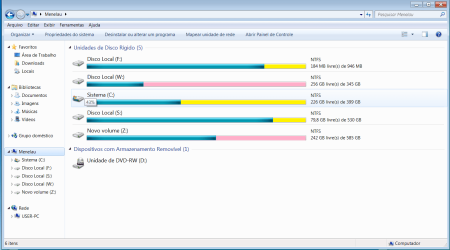
The File Manager displays all of them right. Seagate is in yellow and WD in pink.

Manager.png

When I was rebuilding the boot, it took many tries and I had suspected that sometimes the system was taking one drive for another. At least one program is doing that.


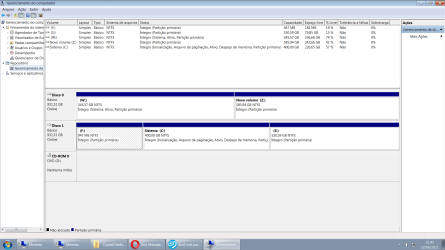
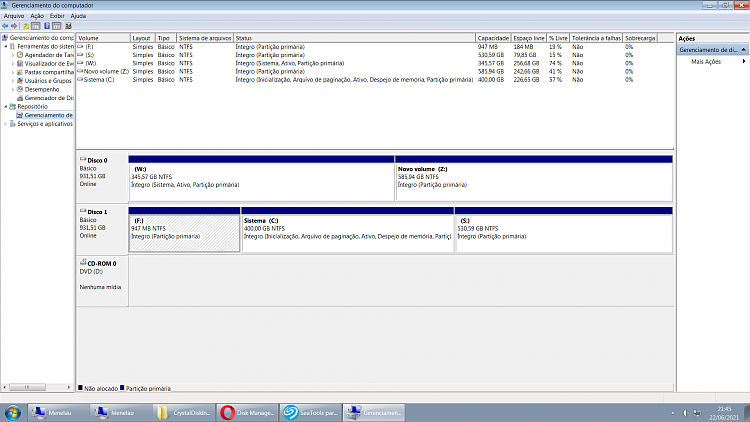
The disk manager.

imagem_2021-06-22_214612.png
 

My Computers My Computers

  • At a glance

    win7 64bit Home Premium and UltimateAMDFX 4.3008GBRadeon HD 6570
    Computer type
    PC/Desktop
    Computer Manufacturer/Model Number
    custom build
    OS
    win7 64bit Home Premium and Ultimate
    CPU
    AMDFX 4.300
    Motherboard
    Asustek M5A78L
    Memory
    8GB
    Graphics Card(s)
    Radeon HD 6570
    Hard Drives
    Western Digital Blue 1TB
    Seagate Barracuda 1TB
    Seagate Barracuda 1 TB
    Antivirus
    avast
    Browser
    opera
  • Computer type
    PC/Desktop
thats better.

in diskmgmt view :

Disk0 partition1 is active and system

Disk1 partition2 is booted os.

It matches wd lifeguard.

This is called disk0 in diskmgmt and is called disk1 in wd lifeguard

disk1.JPG

This is called disk1 in diskmgmt and is called disk2 in wd lifeguard

disk2JPG.JPG

It looks perfectly normal.
 

My Computers My Computers

  • At a glance

    7 X64i5 84002x8gb 3200mhz
    Computer type
    PC/Desktop
    OS
    7 X64
    CPU
    i5 8400
    Motherboard
    gigabyte b365m ds3h
    Memory
    2x8gb 3200mhz
    Hard Drives
    various
    PSU
    pure power 11 400w cm
    Case
    Coolermaster
    Cooling
    cryorig m9i
  • At a glance

    7x64g54008gb ddr4 2400
    Computer type
    PC/Desktop
    OS
    7x64
    CPU
    g5400
    Motherboard
    ga b365m ds3h
    Memory
    8gb ddr4 2400
    PSU
    xfx pro 450w
The point is that that drive C just can't be in the WD HDD, because I only can boot from the Seagate.

419765d1624409955-folders-files-disappear-no-previous-versions-available-disk2jpg.jpg


This is the WD HDD. Drives C, F and S are not supposed to be here.


419766d1624409955-folders-files-disappear-no-previous-versions-available-disk1.jpg


And this is the Seagate. Drives W and Z shouldn't be here, as well.

In other words:
Disk 0 in bootmngr is actually Disk 2 in WD Lifeguard and it's the WD HDD.

419762d1624400215t-folders-files-disappear-no-previous-versions-available-image2.png


419764d1624409178t-folders-files-disappear-no-previous-versions-available-imagem_2021-06-22_214612.png


And Disk 1 in bootmngr is Disk 1 in WD Lifeguard. It's the Seagate HDD

419761d1624400167t-folders-files-disappear-no-previous-versions-available-image1.png

The manufacturer application identified them wrongly.

Quite a mess isn't it?
 

My Computers My Computers

  • At a glance

    win7 64bit Home Premium and UltimateAMDFX 4.3008GBRadeon HD 6570
    Computer type
    PC/Desktop
    Computer Manufacturer/Model Number
    custom build
    OS
    win7 64bit Home Premium and Ultimate
    CPU
    AMDFX 4.300
    Motherboard
    Asustek M5A78L
    Memory
    8GB
    Graphics Card(s)
    Radeon HD 6570
    Hard Drives
    Western Digital Blue 1TB
    Seagate Barracuda 1TB
    Seagate Barracuda 1 TB
    Antivirus
    avast
    Browser
    opera
  • Computer type
    PC/Desktop
Disk0 partition1 is system. That is the one you boot from.

Disk1 partition2 is boot - that is the one you are booted into

It looks normal.
 

My Computers My Computers

  • At a glance

    7 X64i5 84002x8gb 3200mhz
    Computer type
    PC/Desktop
    OS
    7 X64
    CPU
    i5 8400
    Motherboard
    gigabyte b365m ds3h
    Memory
    2x8gb 3200mhz
    Hard Drives
    various
    PSU
    pure power 11 400w cm
    Case
    Coolermaster
    Cooling
    cryorig m9i
  • At a glance

    7x64g54008gb ddr4 2400
    Computer type
    PC/Desktop
    OS
    7x64
    CPU
    g5400
    Motherboard
    ga b365m ds3h
    Memory
    8gb ddr4 2400
    PSU
    xfx pro 450w
Lets rebuild your boot loader on drive 1
Open a CMD window as administrator and type:
diskpart
select volume c
active
exit
bcdboot C:\Windows /s C: /f BIOS
exit

Shutdown, detach drive 0 (unplug SATA or power supply cable), make sure drive 1 is first on the BIOS Boot priority list and try to boot.
 

My Computers My Computers

  • At a glance

    Windows 7 HP 64i5 6600K - 800MHz to 4200MHz4+4G GSkill DDR4 3000IG - Intel 530
    Computer type
    PC/Desktop
    Computer Manufacturer/Model Number
    custom build
    OS
    Windows 7 HP 64
    CPU
    i5 6600K - 800MHz to 4200MHz
    Motherboard
    GA-Z170-HD3P
    Memory
    4+4G GSkill DDR4 3000
    Graphics Card(s)
    IG - Intel 530
    Monitor(s) Displays
    Samsung 226BW
    Screen Resolution
    1680x1050
    Hard Drives
    (1) -1 SM951 – 128GB M.2 AHCI PCIe SSD drive for Windows 7 and Lubuntu
    (2) -1 WD SATA 3 - 1T for Data
    (3) -1 WD SATA 3 - 1T for backup
    PSU
    Thermaltake 450W TR2 gold
    Keyboard
    Old and good Chicony mechanical keyboard
    Mouse
    Logitech mX performance - 9 buttons (had to disable some)
    Internet Speed
    500Mb/s
    Browser
    Firefox 64
    Other Info
    TinyWall firewall
  • At a glance

    Windows 7 Proi7-4500U 800MHz to 3.0GHz(4+4)G DDR3 1600IG intel 4400 + NVIDIA GeForce GT 745M
    Computer type
    Laptop
    System Manufacturer/Model Number
    Asus Q550LF
    OS
    Windows 7 Pro
    CPU
    i7-4500U 800MHz to 3.0GHz
    Motherboard
    Asus Q550LF
    Memory
    (4+4)G DDR3 1600
    Graphics Card(s)
    IG intel 4400 + NVIDIA GeForce GT 745M
    Sound Card
    Realtek
    Monitor(s) Displays
    LG Display LP156WF4-SPH1
    Screen Resolution
    1920 x 1080
    Hard Drives
    BX500 120G SSD for Windows and programs +
    1T HDD for data
    Internet Speed
    500 Mb/s
    Browser
    Firefox
    Other Info
    TinyWall firewall
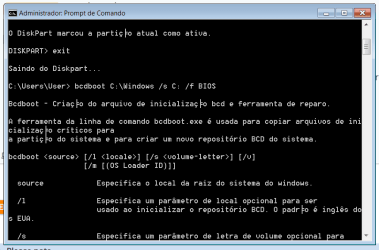
First of all, I apologize. You are right. I mistook the newest HDD with the older -they were three before, I unplugged one, it was a bit messy.Sorry about that.

About the procedures, diskpart marked the partition as active.
I think the second step didn't work properly:

bcd.png
 
Last edited:

My Computers My Computers

  • At a glance

    win7 64bit Home Premium and UltimateAMDFX 4.3008GBRadeon HD 6570
    Computer type
    PC/Desktop
    Computer Manufacturer/Model Number
    custom build
    OS
    win7 64bit Home Premium and Ultimate
    CPU
    AMDFX 4.300
    Motherboard
    Asustek M5A78L
    Memory
    8GB
    Graphics Card(s)
    Radeon HD 6570
    Hard Drives
    Western Digital Blue 1TB
    Seagate Barracuda 1TB
    Seagate Barracuda 1 TB
    Antivirus
    avast
    Browser
    opera
  • Computer type
    PC/Desktop
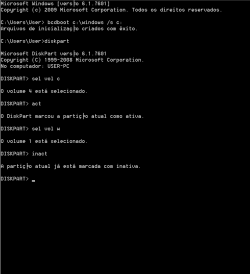
There is no /f bios switch in win7 bcdboot.

It is just
bcdboot c:\windows /s c:
if that gives a success message, then:

diskpart
sel vol c
act
sel vol w
inact
exi
 

My Computers My Computers

  • At a glance

    7 X64i5 84002x8gb 3200mhz
    Computer type
    PC/Desktop
    OS
    7 X64
    CPU
    i5 8400
    Motherboard
    gigabyte b365m ds3h
    Memory
    2x8gb 3200mhz
    Hard Drives
    various
    PSU
    pure power 11 400w cm
    Case
    Coolermaster
    Cooling
    cryorig m9i
  • At a glance

    7x64g54008gb ddr4 2400
    Computer type
    PC/Desktop
    OS
    7x64
    CPU
    g5400
    Motherboard
    ga b365m ds3h
    Memory
    8gb ddr4 2400
    PSU
    xfx pro 450w
Sorry SIW2.
bcdboot C:\Windows /s C: /f BIOS
works for Win 10
 

My Computers My Computers

  • At a glance

    Windows 7 HP 64i5 6600K - 800MHz to 4200MHz4+4G GSkill DDR4 3000IG - Intel 530
    Computer type
    PC/Desktop
    Computer Manufacturer/Model Number
    custom build
    OS
    Windows 7 HP 64
    CPU
    i5 6600K - 800MHz to 4200MHz
    Motherboard
    GA-Z170-HD3P
    Memory
    4+4G GSkill DDR4 3000
    Graphics Card(s)
    IG - Intel 530
    Monitor(s) Displays
    Samsung 226BW
    Screen Resolution
    1680x1050
    Hard Drives
    (1) -1 SM951 – 128GB M.2 AHCI PCIe SSD drive for Windows 7 and Lubuntu
    (2) -1 WD SATA 3 - 1T for Data
    (3) -1 WD SATA 3 - 1T for backup
    PSU
    Thermaltake 450W TR2 gold
    Keyboard
    Old and good Chicony mechanical keyboard
    Mouse
    Logitech mX performance - 9 buttons (had to disable some)
    Internet Speed
    500Mb/s
    Browser
    Firefox 64
    Other Info
    TinyWall firewall
  • At a glance

    Windows 7 Proi7-4500U 800MHz to 3.0GHz(4+4)G DDR3 1600IG intel 4400 + NVIDIA GeForce GT 745M
    Computer type
    Laptop
    System Manufacturer/Model Number
    Asus Q550LF
    OS
    Windows 7 Pro
    CPU
    i7-4500U 800MHz to 3.0GHz
    Motherboard
    Asus Q550LF
    Memory
    (4+4)G DDR3 1600
    Graphics Card(s)
    IG intel 4400 + NVIDIA GeForce GT 745M
    Sound Card
    Realtek
    Monitor(s) Displays
    LG Display LP156WF4-SPH1
    Screen Resolution
    1920 x 1080
    Hard Drives
    BX500 120G SSD for Windows and programs +
    1T HDD for data
    Internet Speed
    500 Mb/s
    Browser
    Firefox
    Other Info
    TinyWall firewall
Got the success message.
Unplugged drive 0 and got this: "Reboot and Select proper Boot devices or insert Boot Media in the selected Boot device and press a key_"
-
 

My Computers My Computers

  • At a glance

    win7 64bit Home Premium and UltimateAMDFX 4.3008GBRadeon HD 6570
    Computer type
    PC/Desktop
    Computer Manufacturer/Model Number
    custom build
    OS
    win7 64bit Home Premium and Ultimate
    CPU
    AMDFX 4.300
    Motherboard
    Asustek M5A78L
    Memory
    8GB
    Graphics Card(s)
    Radeon HD 6570
    Hard Drives
    Western Digital Blue 1TB
    Seagate Barracuda 1TB
    Seagate Barracuda 1 TB
    Antivirus
    avast
    Browser
    opera
  • Computer type
    PC/Desktop
Did you activate vol c ?
 

My Computers My Computers

  • At a glance

    7 X64i5 84002x8gb 3200mhz
    Computer type
    PC/Desktop
    OS
    7 X64
    CPU
    i5 8400
    Motherboard
    gigabyte b365m ds3h
    Memory
    2x8gb 3200mhz
    Hard Drives
    various
    PSU
    pure power 11 400w cm
    Case
    Coolermaster
    Cooling
    cryorig m9i
  • At a glance

    7x64g54008gb ddr4 2400
    Computer type
    PC/Desktop
    OS
    7x64
    CPU
    g5400
    Motherboard
    ga b365m ds3h
    Memory
    8gb ddr4 2400
    PSU
    xfx pro 450w
yes, I did.

but I wasn't supposed to activate the w too?
provided I'm already booting from c?
 

My Computers My Computers

  • At a glance

    win7 64bit Home Premium and UltimateAMDFX 4.3008GBRadeon HD 6570
    Computer type
    PC/Desktop
    Computer Manufacturer/Model Number
    custom build
    OS
    win7 64bit Home Premium and Ultimate
    CPU
    AMDFX 4.300
    Motherboard
    Asustek M5A78L
    Memory
    8GB
    Graphics Card(s)
    Radeon HD 6570
    Hard Drives
    Western Digital Blue 1TB
    Seagate Barracuda 1TB
    Seagate Barracuda 1 TB
    Antivirus
    avast
    Browser
    opera
  • Computer type
    PC/Desktop
c should be active. w should be inactive.
 

My Computers My Computers

  • At a glance

    7 X64i5 84002x8gb 3200mhz
    Computer type
    PC/Desktop
    OS
    7 X64
    CPU
    i5 8400
    Motherboard
    gigabyte b365m ds3h
    Memory
    2x8gb 3200mhz
    Hard Drives
    various
    PSU
    pure power 11 400w cm
    Case
    Coolermaster
    Cooling
    cryorig m9i
  • At a glance

    7x64g54008gb ddr4 2400
    Computer type
    PC/Desktop
    OS
    7x64
    CPU
    g5400
    Motherboard
    ga b365m ds3h
    Memory
    8gb ddr4 2400
    PSU
    xfx pro 450w
I did ihe same procedures again and got the same message.
I had set the BIOS to boot from drive1 before, but apparently it was trying to boot from DVD drive.
So, I inserted the Install Boot Repair CD and it immediately booted from it, but the repair didn't work.

bcd2.png
 

My Computers My Computers

  • At a glance

    win7 64bit Home Premium and UltimateAMDFX 4.3008GBRadeon HD 6570
    Computer type
    PC/Desktop
    Computer Manufacturer/Model Number
    custom build
    OS
    win7 64bit Home Premium and Ultimate
    CPU
    AMDFX 4.300
    Motherboard
    Asustek M5A78L
    Memory
    8GB
    Graphics Card(s)
    Radeon HD 6570
    Hard Drives
    Western Digital Blue 1TB
    Seagate Barracuda 1TB
    Seagate Barracuda 1 TB
    Antivirus
    avast
    Browser
    opera
  • Computer type
    PC/Desktop
Might be a problem with the mbr or vbr executable code.

bootsect /nt60 c: /mbr
 

My Computers My Computers

  • At a glance

    7 X64i5 84002x8gb 3200mhz
    Computer type
    PC/Desktop
    OS
    7 X64
    CPU
    i5 8400
    Motherboard
    gigabyte b365m ds3h
    Memory
    2x8gb 3200mhz
    Hard Drives
    various
    PSU
    pure power 11 400w cm
    Case
    Coolermaster
    Cooling
    cryorig m9i
  • At a glance

    7x64g54008gb ddr4 2400
    Computer type
    PC/Desktop
    OS
    7x64
    CPU
    g5400
    Motherboard
    ga b365m ds3h
    Memory
    8gb ddr4 2400
    PSU
    xfx pro 450w
It gave me this message: "bootsect is not recognized as an internal or external command".
 

My Computers My Computers

  • At a glance

    win7 64bit Home Premium and UltimateAMDFX 4.3008GBRadeon HD 6570
    Computer type
    PC/Desktop
    Computer Manufacturer/Model Number
    custom build
    OS
    win7 64bit Home Premium and Ultimate
    CPU
    AMDFX 4.300
    Motherboard
    Asustek M5A78L
    Memory
    8GB
    Graphics Card(s)
    Radeon HD 6570
    Hard Drives
    Western Digital Blue 1TB
    Seagate Barracuda 1TB
    Seagate Barracuda 1 TB
    Antivirus
    avast
    Browser
    opera
  • Computer type
    PC/Desktop
Back
Top