Folders dissappear

hami812

New member
Local time
11:25 PM
Messages
4
Location
Penna
WIndows 7 is very frustrating. I consider myself somewhat intermediate user of PCs in general but this one has me stumped. The problem is after creating a folder and then attempting to go back and view the contents, I see the folder is not in the parent directory where i added it. Having seen this before on older releases, I went to folder options, selected show all folders (including hidden ones), and thought I had it nailed. it did work the first time I viewed the folders, but then when I returned by going to computer from Start icon, double clicked on C: drive, then went through the folders until I found the parent one where I added the new folders, it still not showing up. I went bakc to Explorer method by clicking on the folder icon on the toobar at bottom of screen, I still do not see it. Again when I do a search it shows up and I can click on the folder and get to the contents, but not when I open Explorer. I saw a few other folder option clues, and tried them. They also worked (un checked also show menus, and checked always show icons, never thumbnails) and these also worked for short time but not anymore.

Wha the heck is going on? How do I permmanetly fix this!! :shock:
 

My Computer

Computer Manufacturer/Model Number
Dell Latitude
OS
Windows 7 32 bit
CPU
Intel
Motherboard
Dell
Memory
2 gig
Monitor(s) Displays
Dell
Hard Drives
SCSI
Can you provide an example of a folder you are creating? What is the full path to it?

Have you run any malware scans?
 

My Computer

Computer type
PC/Desktop
Computer Manufacturer/Model Number
Lenovo IdeaCenter 450
OS
Windows 10 Pro X64
CPU
Intel Quad Core i7-4770 @ 3.4Ghz
Memory
16.0GB PC3-12800 DDR3 SDRAM 1600 MHz
Graphics Card(s)
Intel Integrated HD Graphics
Sound Card
Realtek HD Audio
Monitor(s) Displays
HP 22" LCD
Screen Resolution
1680 x 1050
Hard Drives
250GB Samsung EVO SATA-3 SSD
2TB Seagate ST2000DM001 SATA-2
1.5TB Seagate ST3150041AS SATA
Keyboard
Dell USB
Mouse
Lenovo USB
Internet Speed
Cable via Road Runner 3MB Upload, 30MB Download
Antivirus
Windows Defender, MBAM Pro, MBAE
Browser
Seamonkey
Other Info
UEFI/GPT
PLDS DVD-RW DH16AERSH
Folders dissapearing

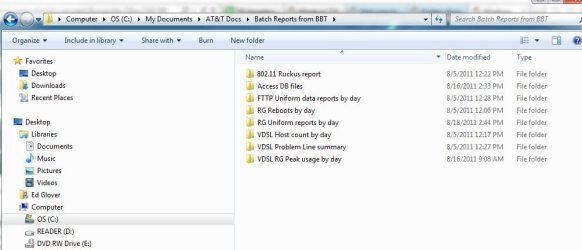
Sure. Some examples are below:

The batch reports from BBT which was just created in last week appears and sometimes dissappears depending on how you select it. Ity appears to be there today, but yesterday I was not able to view it consistently in Explorer, or via Computer, then C:\ drive and selecting the parent folder in wehich it resides. it just didn't show up. Now today it does show up.

Why is it doing this. makes me want to go bakc to XP if that were even do-able in the company I work for.

Thanks for quick response.
 

Attachments

  • folder that disappears and reappears.jpg
    folder that disappears and reappears.jpg
    44.9 KB · Views: 8

My Computer

Computer Manufacturer/Model Number
Dell Latitude
OS
Windows 7 32 bit
CPU
Intel
Motherboard
Dell
Memory
2 gig
Monitor(s) Displays
Dell
Hard Drives
SCSI
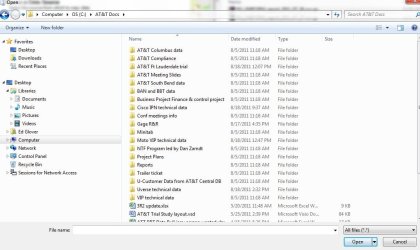
Example of it dissapearing

When I try to access a folder created through some applications (Microsoft SQL server), I cannot see the folder. Here is a jpg of that exactly as it looks through SQL server when attempting to open the folder and the folder is not there.
 

Attachments

  • folder that disappears when accessing via an application.jpg
    folder that disappears when accessing via an application.jpg
    75.5 KB · Views: 7

My Computer

Computer Manufacturer/Model Number
Dell Latitude
OS
Windows 7 32 bit
CPU
Intel
Motherboard
Dell
Memory
2 gig
Monitor(s) Displays
Dell
Hard Drives
SCSI
Where did you get a My Documents folder off the root of the C: drive? My Documents under Windows 7 is under C:\Users\<youruserid>.

Edit to add Link Shell Extension information.

I wonder if the problem has something to do with Junction points.

Try installing the Link Shell Extension. Then right click on C:\My Documents, is there a Link Properties tab?
 

My Computer

Computer type
PC/Desktop
Computer Manufacturer/Model Number
Lenovo IdeaCenter 450
OS
Windows 10 Pro X64
CPU
Intel Quad Core i7-4770 @ 3.4Ghz
Memory
16.0GB PC3-12800 DDR3 SDRAM 1600 MHz
Graphics Card(s)
Intel Integrated HD Graphics
Sound Card
Realtek HD Audio
Monitor(s) Displays
HP 22" LCD
Screen Resolution
1680 x 1050
Hard Drives
250GB Samsung EVO SATA-3 SSD
2TB Seagate ST2000DM001 SATA-2
1.5TB Seagate ST3150041AS SATA
Keyboard
Dell USB
Mouse
Lenovo USB
Internet Speed
Cable via Road Runner 3MB Upload, 30MB Download
Antivirus
Windows Defender, MBAM Pro, MBAE
Browser
Seamonkey
Other Info
UEFI/GPT
PLDS DVD-RW DH16AERSH
Ztruker,

Thanks for the reply and the great idea of using Shell links. Reminds me of Unix a bit with various shell capabilities for "linking". I actually discovered the problem is there are mirror folders with same name. My Laptop needed to be re imaged recently and when the files were copied back IT moved one folder into the wrong place from where I asked. I didn't know they even copied the folders over until after I moved all my personal data back into the correct place I wanted them and then notcied IT had copied all my files to root directory.

Mystery seems to be solved. But I am still not liking Win 7 for other reasons.
 

My Computer

Computer Manufacturer/Model Number
Dell Latitude
OS
Windows 7 32 bit
CPU
Intel
Motherboard
Dell
Memory
2 gig
Monitor(s) Displays
Dell
Hard Drives
SCSI
But I am still not liking Win 7 for other reasons.
What are the other reasons and can we help.
 

My Computer

Computer Manufacturer/Model Number
HP, Dell, Gateway, Toshiba - 4 laptops and 2 desktops
OS
Vista, Windows7, Mint Mate, Zorin, Windows 8
CPU
from 1.6GHz Duo to i7
Monitor(s) Displays
2x HP w2207
Hard Drives
5x HDD, 7x SSD, 12x Externals
Keyboard
with trackball - no mices
Mouse
Trackball mice
Internet Speed
DSL 6000
Back
Top