Folders Missing on Another Drive After Installing Windows 7

steverido

New member
Member
Local time
6:58 PM
Messages
70
I have disconnected one of my hard drives as it was a backup of my music software and after replacing my C drive for an SSD I plugged in the drive with my music software and it boots but is not showing any of the folders or software.

is this because Windows has assigned it another drive letter?

Thanks in advance
 

My Computer My Computer

OS
Windows 7 64
CPU
Intel Core 2 Q9400 Quad Core
Motherboard
EvGA 680i
Memory
OCZ Reaper - 4 x 1GB @ 800
Graphics Card(s)
2 x Evga 9400 GTX Super Super Clocked
Sound Card
Creative Soundblaster X-treme Music
Monitor(s) Displays
NEC mULTISYNC 20wgx
Screen Resolution
1680x1050
Hard Drives
4 X Seagate Barracuda 320 GB
1 X Seagate Barracuda 2 TB
1 x Seagate Barracuda 1TB
PSU
950 W PC Quiet & Cooling
Case
Antec 900
Cooling
Standard Plus Hard Drive 7 Case Fans
Keyboard
Wolf claw
Mouse
Microsoft
Internet Speed
18 MB/S
I have disconnected one of my hard drives as it was a backup of my music software and after replacing my C drive for an SSD I plugged in the drive with my music software and it boots but is not showing any of the folders or software.

is this because Windows has assigned it another drive letter?

Thanks in advance

Can you post an expanded Disk Management so we can see your situation.
 

My Computer My Computer

Computer type
PC/Desktop
Computer Manufacturer/Model Number
Custom Build
OS
Windows 7 Home Premium 32-Bit - Build 7600 SP1
CPU
Intel Core i3-2120 3.30Ghz
Motherboard
Asus P8Z68-V LX Intel Z68 Socket H2 ATX
Memory
Kingston 4 GB DDR3 1333 mhz
Graphics Card(s)
AMD Radeon HD6670
Sound Card
Sound Blaster Audigy SE 24-Bit
Monitor(s) Displays
Asus VE228
Screen Resolution
1440 X 900
Hard Drives
OCZ Vertex 3 120 GB Sata 3 SSD ==
Kingston SH103/S3 120 G Hyper X 120 GB SSD ==
Western Digital 500 GB Caviar Green 7200 RPM ==
PSU
Corsair CX600M == 600 Watt
Case
NZXT Apollo - Silver with Clear Side Panel
Cooling
Three 120 mm Fans
Keyboard
Microsoft Natural 4000
Mouse
Microsoft Custom Optical 3000
Internet Speed
AT&T Fiber Optic Wireless Network
Antivirus
Microsoft Security Essentials
Browser
Chrome
Other Info
120 mm Blue LED Fan -- Three Blue LED Lazer Light Sticks
Please post back a screenshot of your maximized Disk Management drive map and listings:

1. Type Disk Management in Start Search box.
2. Open Disk Mgmt. window and maximize it.
3. Type Snipping Tool in Start Search box.
4. Open Snipping Tool, choose Rectangular Snip, draw a box around full map and all listings.
5, Save Snip, attach using paper clip in Reply Box.

Tell us what is on each partition.
 
Steve,
HOW TO POST A SNAPSHOT OF DISK MANAGEMENT DISPLAY
Run disk management:
WIN |
type DISKMGMT.MSC | ENTER
This method gives you a display without the unneeded navigation pane.
WIN=key with Microsoft logo on top.

Maximize the output of Disk Management:
ALT-Spacebar key combo | X key (selects Maximize) |
Drag the field separators (such as between Status and Capacity) to show entire field.


Make a snapshot:
WIN |
type SNIPPING | ENTER | New
Drag the cursor around the area you want to snip.
File | Save as | select save location and name | Save


Post the snapshot:
Post a File or Screenshot in Seven Forums
 

My Computer My Computer

Computer Manufacturer/Model Number
Toshiba Satellite S875D-S7239 laptop
OS
MS Windows 7 Ultimate SP1 64-bit
CPU
AMD A10-4600M
Motherboard
AMD Pumori (Socket FT1)
Memory
6.00 GB Dual-Channel DDR3 @ 798MHz (11-11-12-28)
Graphics Card(s)
AMD Radeon HD 7660G
Sound Card
High Definition Audio Device
Monitor(s) Displays
Generic PnP Monitor (1600x900@60Hz)
Screen Resolution
1600x900@60Hz
Hard Drives
SSD 119GB Corsair CSSD-V128GB2 ATA Device
Keyboard
Standard PS/2 Keyboard
Mouse
HP Wireless Optical Mobile Mouse Model FHA-3410
Internet Speed
What the local pub, local coffee shop offers.
Other Info
Optical Drive:MATSHITA BD-CMB UJ160B ATA Device


Also have an Asus ha1002xp netbook with Win 7 Ultimate installed.
: Folders Missing on Another Drive After Installing Windows 7 Reply to

Please post back a screenshot of your maximized Disk Management drive map and listings:

1. Type Disk Management in Start Search box.
2. Open Disk Mgmt. window and maximize it.
3. Type Snipping Tool in Start Search box.
4. Open Snipping Tool, choose Rectangular Snip, draw a box around full map and all listings.
5, Save Snip, attach using paper clip in Reply Box.

Tell us what is on each partition.

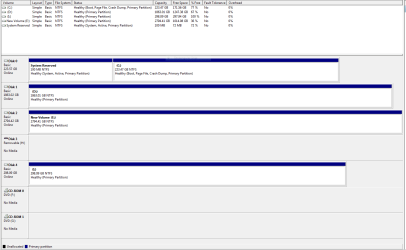
Thanks for the replies. By the way I have attached the drive as a removable drive although I don't see that this will make a difference.
 

Attachments

  • Capture Disk Management.PNG
    Capture Disk Management.PNG
    20.6 KB · Views: 20

My Computer My Computer

OS
Windows 7 64
CPU
Intel Core 2 Q9400 Quad Core
Motherboard
EvGA 680i
Memory
OCZ Reaper - 4 x 1GB @ 800
Graphics Card(s)
2 x Evga 9400 GTX Super Super Clocked
Sound Card
Creative Soundblaster X-treme Music
Monitor(s) Displays
NEC mULTISYNC 20wgx
Screen Resolution
1680x1050
Hard Drives
4 X Seagate Barracuda 320 GB
1 X Seagate Barracuda 2 TB
1 x Seagate Barracuda 1TB
PSU
950 W PC Quiet & Cooling
Case
Antec 900
Cooling
Standard Plus Hard Drive 7 Case Fans
Keyboard
Wolf claw
Mouse
Microsoft
Internet Speed
18 MB/S
Since you didn't Tell Us What Is On Each Partition, we have no idea which you're referring to.

If it is H: try plugging it in internally to see if it is detected and accessible. If so run Disk Check .

If not, install Partition Wizard which can sometimes see a HD which Explorer can't, right click it to Check File System which might bring it back to life.
 
Steve,
I believe that the solution to your problem is quite simple, but as Greg requested, let us know what is where please.

In other words, are your pics on E:, as an example?

What may help you to know what is where is:
JAM Software - Windows Freeware

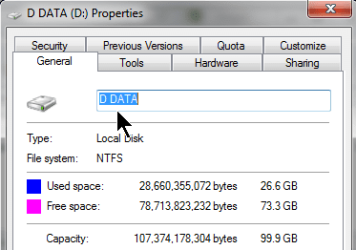
A suggestion is to give your partitions labels which you can accomplish with DiskManagement.

rtclk on partition; choose Properties; enter a label in the label box; OK button

RtClk on partition.png

Click on Properties.png

Label the partitiion.png
 

My Computer My Computer

Computer Manufacturer/Model Number
Toshiba Satellite S875D-S7239 laptop
OS
MS Windows 7 Ultimate SP1 64-bit
CPU
AMD A10-4600M
Motherboard
AMD Pumori (Socket FT1)
Memory
6.00 GB Dual-Channel DDR3 @ 798MHz (11-11-12-28)
Graphics Card(s)
AMD Radeon HD 7660G
Sound Card
High Definition Audio Device
Monitor(s) Displays
Generic PnP Monitor (1600x900@60Hz)
Screen Resolution
1600x900@60Hz
Hard Drives
SSD 119GB Corsair CSSD-V128GB2 ATA Device
Keyboard
Standard PS/2 Keyboard
Mouse
HP Wireless Optical Mobile Mouse Model FHA-3410
Internet Speed
What the local pub, local coffee shop offers.
Other Info
Optical Drive:MATSHITA BD-CMB UJ160B ATA Device


Also have an Asus ha1002xp netbook with Win 7 Ultimate installed.
Steve,
I believe that the solution to your problem is quite simple, but as Greg requested, let us know what is where please.

In other words, are your pics on E:, as an example?

What may help you to know what is where is:
JAM Software - Windows Freeware

A suggestion is to give your partitions labels which you can accomplish with DiskManagement.

rtclk on partition; choose Properties; enter a label in the label box; OK button

View attachment 228508

View attachment 228509

View attachment 228510

Hi Guys,

Apologies.

The drive in question is I, disc 4. I plugged it in as an external drive but will try what you have suggested. It is showing 100% free.

Thanks
 

My Computer My Computer

OS
Windows 7 64
CPU
Intel Core 2 Q9400 Quad Core
Motherboard
EvGA 680i
Memory
OCZ Reaper - 4 x 1GB @ 800
Graphics Card(s)
2 x Evga 9400 GTX Super Super Clocked
Sound Card
Creative Soundblaster X-treme Music
Monitor(s) Displays
NEC mULTISYNC 20wgx
Screen Resolution
1680x1050
Hard Drives
4 X Seagate Barracuda 320 GB
1 X Seagate Barracuda 2 TB
1 x Seagate Barracuda 1TB
PSU
950 W PC Quiet & Cooling
Case
Antec 900
Cooling
Standard Plus Hard Drive 7 Case Fans
Keyboard
Wolf claw
Mouse
Microsoft
Internet Speed
18 MB/S
will await the updated diskmanagement snip
and precise clarification regarding where what folder is.
 

My Computer My Computer

Computer Manufacturer/Model Number
Toshiba Satellite S875D-S7239 laptop
OS
MS Windows 7 Ultimate SP1 64-bit
CPU
AMD A10-4600M
Motherboard
AMD Pumori (Socket FT1)
Memory
6.00 GB Dual-Channel DDR3 @ 798MHz (11-11-12-28)
Graphics Card(s)
AMD Radeon HD 7660G
Sound Card
High Definition Audio Device
Monitor(s) Displays
Generic PnP Monitor (1600x900@60Hz)
Screen Resolution
1600x900@60Hz
Hard Drives
SSD 119GB Corsair CSSD-V128GB2 ATA Device
Keyboard
Standard PS/2 Keyboard
Mouse
HP Wireless Optical Mobile Mouse Model FHA-3410
Internet Speed
What the local pub, local coffee shop offers.
Other Info
Optical Drive:MATSHITA BD-CMB UJ160B ATA Device


Also have an Asus ha1002xp netbook with Win 7 Ultimate installed.
Hi Guys,

Apologies for the late response. Busy with work and not been able to write back.

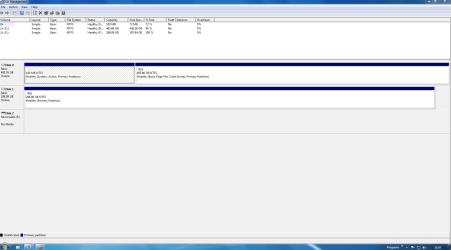
I have installed the drive into another computer with only the C drive and the drive that has my backup on.

The C drive on this computer is literally networked to my main PC and is only being used as a media center to my TV.

The C drive has no software installed apart from codecs and media such as media browser.

The E drive has all of my music writing samples and virtual synthesizer software only as a backup. I have tried plugging it into two computers now and it shows up as empty. I have tried changing the drive letter to what I thought it was originally but that did not work either so I don't understand how it could just vanish.
 

Attachments

  • Capture.PNG
    Capture.PNG
    32.1 KB · Views: 4

My Computer My Computer

OS
Windows 7 64
CPU
Intel Core 2 Q9400 Quad Core
Motherboard
EvGA 680i
Memory
OCZ Reaper - 4 x 1GB @ 800
Graphics Card(s)
2 x Evga 9400 GTX Super Super Clocked
Sound Card
Creative Soundblaster X-treme Music
Monitor(s) Displays
NEC mULTISYNC 20wgx
Screen Resolution
1680x1050
Hard Drives
4 X Seagate Barracuda 320 GB
1 X Seagate Barracuda 2 TB
1 x Seagate Barracuda 1TB
PSU
950 W PC Quiet & Cooling
Case
Antec 900
Cooling
Standard Plus Hard Drive 7 Case Fans
Keyboard
Wolf claw
Mouse
Microsoft
Internet Speed
18 MB/S
At this stage it looks like there is nothing on that drive. Maybe the MFT (master file table) got damaged. Try with Recuva whether you can recover some of the data. Download Recuva 1.43.623 - FileHippo.com
 

My Computer My Computer

Computer Manufacturer/Model Number
HP, Dell, Gateway, Toshiba - 4 laptops and 2 desktops
OS
Vista, Windows7, Mint Mate, Zorin, Windows 8
CPU
from 1.6GHz Duo to i7
Monitor(s) Displays
2x HP w2207
Hard Drives
5x HDD, 7x SSD, 12x Externals
Keyboard
with trackball - no mices
Mouse
Trackball mice
Internet Speed
DSL 6000
Thanks, I will give it a shot.
 

My Computer My Computer

OS
Windows 7 64
CPU
Intel Core 2 Q9400 Quad Core
Motherboard
EvGA 680i
Memory
OCZ Reaper - 4 x 1GB @ 800
Graphics Card(s)
2 x Evga 9400 GTX Super Super Clocked
Sound Card
Creative Soundblaster X-treme Music
Monitor(s) Displays
NEC mULTISYNC 20wgx
Screen Resolution
1680x1050
Hard Drives
4 X Seagate Barracuda 320 GB
1 X Seagate Barracuda 2 TB
1 x Seagate Barracuda 1TB
PSU
950 W PC Quiet & Cooling
Case
Antec 900
Cooling
Standard Plus Hard Drive 7 Case Fans
Keyboard
Wolf claw
Mouse
Microsoft
Internet Speed
18 MB/S
Back
Top