Font issue in Google Chrome.

vrn

New member
Local time
12:11 PM
Messages
3
Hello, I am having this font issue in Google Chrome, the font shows up like this on some websites:

Image 2011-12-10 at 12.57.19 PM.png

I think it is because of some corrupt font, but I don't know the real problem.
I would be glad if you guys could help.
Thanks in advance.
 

My Computer My Computer

At a glance

Windows 7 Ultimate x64
OS
Windows 7 Ultimate x64
I don't see anything. The image goes to a black screen with a tiny blue dot in the middle. Is that what you meant to show?
 

My Computer My Computer

At a glance

Windows 7 Ultimate
Computer type
Laptop
Computer Manufacturer/Model Number
Dell Inspiron
OS
Windows 7 Ultimate
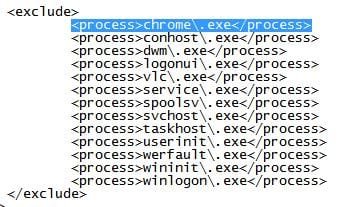
Ah yes. You're using GDIPP? You need to exclude Chrome from the process, or use a stylish. Google fixed this issue in the Beta and Dev builds, and the fix will be in the next stable release. Go to the settings XML file in the GDIPP programs file, and add "<process>chrome\.exe</process>" to the exclude process.

Here are some links of interest:

Chrome "Options" Font display issue?!?! - Google Chrome Help

http://www.sevenforums.com/browsers...ble-14-0-835-163-font-issues.html#post1586211

Firefox 3.5 - No text-shadow on websites - userstyles.org
 

Attachments

  • GDIPP exclude Chrome.JPG
    GDIPP exclude Chrome.JPG
    27.8 KB · Views: 34

My Computer My Computer

At a glance

Windows 7 Ultimate
Computer type
Laptop
Computer Manufacturer/Model Number
Dell Inspiron
OS
Windows 7 Ultimate
Ah yes. You're using GDIPP? You need to exclude Chrome from the process, or use a stylish. Google fixed this issue in the Beta and Dev builds, and the fix will be in the next stable release. Go to the settings XML file in the GDIPP programs file, and add "<process>chrome\.exe</process>" to the exclude process.

Here are some links of interest:

Chrome "Options" Font display issue?!?! - Google Chrome Help

http://www.sevenforums.com/browsers...ble-14-0-835-163-font-issues.html#post1586211

Firefox 3.5 - No text-shadow on websites - userstyles.org

Thanks, that fixed it.
 

My Computer My Computer

At a glance

Windows 7 Ultimate x64
OS
Windows 7 Ultimate x64
Well for all intents the fix was for, it's now mute. Google just released the stable version of 16. You shouldn't need any "fix" for the fonts now, so you could either undo what you did, or just leave it, as it shouldn't hurt anything by staying modified.
 

My Computer My Computer

At a glance

Windows 7 Ultimate
Computer type
Laptop
Computer Manufacturer/Model Number
Dell Inspiron
OS
Windows 7 Ultimate
Back
Top