chromatose
New member
- Local time
- 9:21 PM
- Messages
- 3
Hi,
didn't find anything, it's not the usual problem of systemwide bold fonts...
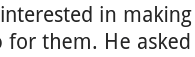
More and more pages i read frequently seem to use a font, which my Win7 has some trouble with. It looks bold and especially the 'e' doesn't have its hole, as can be seen in the first pic, 2nd is correct on a pad.
This occurs only in browsers. System not affected.
Compatibility view, Cleartype or dpi-settings do not change anything.
Website looks ok on Smartphone and Linux.
Thx for hints!
didn't find anything, it's not the usual problem of systemwide bold fonts...
More and more pages i read frequently seem to use a font, which my Win7 has some trouble with. It looks bold and especially the 'e' doesn't have its hole, as can be seen in the first pic, 2nd is correct on a pad.
This occurs only in browsers. System not affected.
Compatibility view, Cleartype or dpi-settings do not change anything.
Website looks ok on Smartphone and Linux.
Thx for hints!
Attachments

My Computer
At a glance
windows 7 home premium 64
- OS
- windows 7 home premium 64