Font Problem

gohardsupreme

New member
Local time
7:06 PM
Messages
133
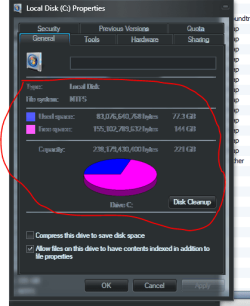
Does anyone know why fonts look so blurry whenever i right click on something and go to properties. if that isnt clear look at the picture and you should be able to see what im talking about. thanks in advance
 

Attachments

  • Capture.PNG
    Capture.PNG
    21.6 KB · Views: 30

My Computer

Computer Manufacturer/Model Number
Gateway T-1628
OS
windows 7 home premium sp1 x86
CPU
AMD Turion 64 x2 Mobile Technology 2.0 GHz
Motherboard
GATEWAY (Socket M2/S1G1) ATI RS690/RS690M Chipset
Memory
3gb DDR2 RAM
Graphics Card(s)
ATI Radeon x1200 series
Sound Card
SigmaTel High Def audio
Monitor(s) Displays
Generic PnP Monitor
Screen Resolution
1280x800
Hard Drives
250gb Western Digital
Does anyone know why fonts look so blurry whenever i right click on something and go to properties. if that isnt clear look at the picture and you should be able to see what im talking about. thanks in advance

You may try two things and see what happens :
1. apply fullglass.exe (probably included in the theme, hope it is by Mr. Grim)
1. Change the theme.
 

My Computer

Computer type
PC/Desktop
Computer Manufacturer/Model Number
Self Assembled
OS
Microsoft Windows 10 Pro Insider Preview 64-bit
CPU
Intel(R) Core(TM) i3-4130 CPU @ 3.40GHz
Motherboard
Gigabyte Technology Co., Ltd. B85M-D3H
Memory
Corsair Vengence 4GB x2 (8.00GB Dual-Channel DDR3 @ 798MHz)
Graphics Card(s)
2047MB GeForce GTS 450 (ZOTAC International)
Sound Card
Onboard (Realtek High Definition Audio)
Monitor(s) Displays
LG Flatron E2040T
Screen Resolution
1600x900
Hard Drives
Western Digital 1 TB
Seagate 500 GB
PSU
Corsair VS550
Case
Cooler Master K380
Cooling
Cooler Master Seidon 120V Plus
Keyboard
Logitech MK260r
Mouse
Logitech MK260r
Internet Speed
PMPL Broadband
Antivirus
Windows Defender + MBAM
Browser
Firefox
Other Info
Dell Studio 15" Laptop
Looks like the letters are transparent. You can verify that by moving the Properties box on top of some other window that is not solid color.
The system that draws the text (called "GDI") dates back to Windows 95 and doesn't support transparency. So the darker the text is, the more transparent it gets (notice how the white text at the bottom looks fine). Software that supports glass needs to take special care when drawing text. Unfortunately the Properties page is not expecting transparency, so glitches like this are to be expected.

 

My Computer

Computer Manufacturer/Model Number
Me :) I build all my PCs
OS
Windows 7 Home 64, Vista Ultimate 64
that explains it. when i disable fullglass.exe the fonts are fine. is it possible to keep the transparency and have normal text?
 

My Computer

Computer Manufacturer/Model Number
Gateway T-1628
OS
windows 7 home premium sp1 x86
CPU
AMD Turion 64 x2 Mobile Technology 2.0 GHz
Motherboard
GATEWAY (Socket M2/S1G1) ATI RS690/RS690M Chipset
Memory
3gb DDR2 RAM
Graphics Card(s)
ATI Radeon x1200 series
Sound Card
SigmaTel High Def audio
Monitor(s) Displays
Generic PnP Monitor
Screen Resolution
1280x800
Hard Drives
250gb Western Digital
Back
Top