Is it possible for me through someway to customize the font size in dialog boxes inside windows7 X64?. It's too small for my eyes. I'm running a Samsung Syncmaster S22B300B (DVI Cable) with its default resolution of 1920x1080. I tried changing DPI settings to a little bit higher number but changing it to just 108% dpi still make unpleasant stuff (especially icons) look deformed. The overall look doesn't really look right so I set it back to 100%
Here's an image below to show what I mean of the tiny font inside dialog boxes:
My Computer
At a glance
Windows 7 x64Core i54 GB DDR3 memoryATI Radeon HD5450
Try this:
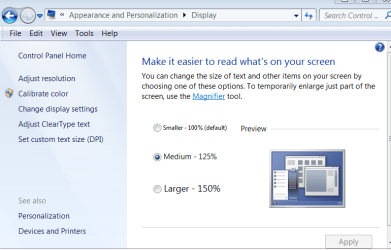
Right click in a blank area of your desktop. Choose "Personalize" then at bottom left click "Display" then in the windows that opens check the 125% radio button and click apply. You will need to reboot to change the effect!
My Computer
At a glance
Microsoft Windows 7 Home Premium 64-bit 7601 ...Intel(R) Core(TM) i7-3770 CPU @ 3.40GHz8.00 GBIntel(R) HD Graphics 4000
Computer type
PC/Desktop
OS
Microsoft Windows 7 Home Premium 64-bit 7601 Multiprocessor Free Service Pack 1
CPU
Intel(R) Core(TM) i7-3770 CPU @ 3.40GHz
Motherboard
ASUSTeK COMPUTER INC. P8H77-M
Memory
8.00 GB
Graphics Card(s)
Intel(R) HD Graphics 4000
Sound Card
On Board
Monitor(s) Displays
Dell 24"
Screen Resolution
1920 x 1080
Hard Drives
(1) INTEL SSDSC2CT180A3 ATA Device (2) ST500DM002-1BD142 ATA Device (3) WDC WD3200AAKS-75L9A0 ATA Device (4) Generic- Compact Flash USB Device (5) Generic- MS/MS-Pro USB Device (6) Generic- SD/MMC USB Device (7) Generic- SM/xD-Picture USB
I already did that before even posting. Font look OK with higher dpi settings but everything else looks weird and deformed especially icons of programs (they look jagged). The screen size seems to be smaller and thus holds less information that before (as if I'm using a smaller screen size).
Is there any hack just to have the fonts inside these dialog boxes become a little bigger?
My Computer
At a glance
Windows 7 x64Core i54 GB DDR3 memoryATI Radeon HD5450
I already did that before even posting. Font look OK with higher dpi settings but everything else looks weird and deformed especially icons of programs (they look jagged). The screen size seems to be smaller and thus holds less information that before (as if I'm using a smaller screen size).
Is there any hack just to have the fonts inside these dialog boxes become a little bigger?
When you edit the Display as per the attached screenshot:
that shouldn't make the icons pixelated as it seems to be doing. Can you try changing to 125% again and this time check the screen resolution. It should still be at 1920 x 1080 which is the recommended optimum for this monitor. I have a Samsung similar monitor and that displays OK at 125%, I always use that resolution and 125% display without any pixelation at all! Is this a new monitor that you have recently added? Have you tried for a firmware update and a driver update for it?
EDIT:
Have just read your last thread about importing third party icons. Pity you didn't give full details of what you downloaded as i was assuming that you were using the standard Windows icons but apparently "You don't like them!"
Here's a prime example of making life difficult for anyone trying to help you when you fail to give all the necessary details.
I'm off to go fishing!!!!
My Computer
At a glance
Microsoft Windows 7 Home Premium 64-bit 7601 ...Intel(R) Core(TM) i7-3770 CPU @ 3.40GHz8.00 GBIntel(R) HD Graphics 4000
Computer type
PC/Desktop
OS
Microsoft Windows 7 Home Premium 64-bit 7601 Multiprocessor Free Service Pack 1
CPU
Intel(R) Core(TM) i7-3770 CPU @ 3.40GHz
Motherboard
ASUSTeK COMPUTER INC. P8H77-M
Memory
8.00 GB
Graphics Card(s)
Intel(R) HD Graphics 4000
Sound Card
On Board
Monitor(s) Displays
Dell 24"
Screen Resolution
1920 x 1080
Hard Drives
(1) INTEL SSDSC2CT180A3 ATA Device (2) ST500DM002-1BD142 ATA Device (3) WDC WD3200AAKS-75L9A0 ATA Device (4) Generic- Compact Flash USB Device (5) Generic- MS/MS-Pro USB Device (6) Generic- SD/MMC USB Device (7) Generic- SM/xD-Picture USB
Thanks guys for all your trials to help
@Kari
of course LCDs work with only 1 resolution and anything else would be looking crappy.
@mitchell65
I tried switching to 125% again and it's still looking kinda weird. I double checked the resolution and found it the same (1920 x 1080) but to be absolutely sure, I changed it temporarily to another resolution and then back again to it but still things just don't look right as before.
e.g. Yahoo messenger's icon still don't look quite right in the taskbar and the icon of another program called "FreeFileSync" also look jagged in the taskbar. itunes don't look right either. This is just to name a few. I thought that the icons look jagged because I have "Use Small Icons" checked in the taskbar properties so I unchecked it but the icons for the programs I mentioned above as examples still look bad for my taste.
P.S. No custom icons at all for folders or anything. I'm just talking about the program's icons on my taskbar.
I provided screen shots for yahoo, freefilesync, itunes with "use small icons" turned on then turned off in Taskbar properties
"Use small icons" turned off
"Use small icons" turned on
My Computer
At a glance
Windows 7 x64Core i54 GB DDR3 memoryATI Radeon HD5450
Sorry been away from this awhile. Can't remember if you have been able to try a different monitor?
EDIT now see you are using a Samsung Syncmaster S22B300B but i have been using your system specs that quote a different monitor. If the Samsung is new to you, have you installed the software that should have come with the monitor?
My Computer
At a glance
Microsoft Windows 7 Home Premium 64-bit 7601 ...Intel(R) Core(TM) i7-3770 CPU @ 3.40GHz8.00 GBIntel(R) HD Graphics 4000
Computer type
PC/Desktop
OS
Microsoft Windows 7 Home Premium 64-bit 7601 Multiprocessor Free Service Pack 1
CPU
Intel(R) Core(TM) i7-3770 CPU @ 3.40GHz
Motherboard
ASUSTeK COMPUTER INC. P8H77-M
Memory
8.00 GB
Graphics Card(s)
Intel(R) HD Graphics 4000
Sound Card
On Board
Monitor(s) Displays
Dell 24"
Screen Resolution
1920 x 1080
Hard Drives
(1) INTEL SSDSC2CT180A3 ATA Device (2) ST500DM002-1BD142 ATA Device (3) WDC WD3200AAKS-75L9A0 ATA Device (4) Generic- Compact Flash USB Device (5) Generic- MS/MS-Pro USB Device (6) Generic- SD/MMC USB Device (7) Generic- SM/xD-Picture USB
Yes I have the monitor's driver installed and its name is identified correctly in the device manager. I think the dimensions of the monitor are kinda too tight for this resolution asI believe I'd have been better if I bought the 23 inch model which was slightly higher in price, offered the same resolution, but with increased millimeters horizontally & vertically but I'm a cheapskate LOL
My Computer
At a glance
Windows 7 x64Core i54 GB DDR3 memoryATI Radeon HD5450