
Lately I noticed that the fonts look really bad, but I didn't understand why. I have gdipp installed, which is a font-rendering program that simulates Linux/OSX font rendering instead of Windows' ClearType. I thought maybe it stopped working, so I uninstalled it and installed it again but they look the same.
So, finally, I compared them to the fonts I get on the desktop and I noticed that the ones under a folder do not have any sort of shadow, which could be why they have that odd look that I dislike.
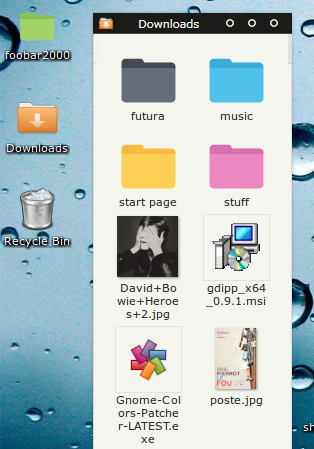
My question (assuming this is the problem): how do I get the shadow back? I'm pretty sure these fonts used to have that shadow and for some reason they don't have it anymore.
Thanks.
So, finally, I compared them to the fonts I get on the desktop and I noticed that the ones under a folder do not have any sort of shadow, which could be why they have that odd look that I dislike.
My question (assuming this is the problem): how do I get the shadow back? I'm pretty sure these fonts used to have that shadow and for some reason they don't have it anymore.
Thanks.
My Computer
- Computer type
- Laptop
- OS
- Windows 8 64 Bits
