Fonts messed up with certain applications.

wws

New member
Local time
9:07 PM
Messages
20
Certain fonts on my Windows 7 SP1 computer have been messed up for a while. The fonts seem to be too large and bolded. This is not a system-wide issue, only certain programs exhibit it. For some reason, application installers are where the problem most commonly asserts itself. This started happening when I transferred my user account from Windows XP last year, so maybe it has something to do with that. I recall having this problem on XP too. Can you look at my example and possibly provide a solution or insight as to the source of the problem? Thanks!

Here is an example
http://i.imgur.com/XvpsE5b.png
 

My Computer My Computer

Computer type
PC/Desktop
OS
Windows 7 64 bit
You should try rebuilding the font cache.

Open Windows Explorer and navigate to the Local folder

C:\Windows:\ServiceProfiles:\LocalService:\Appdata:\Local

And then delete the fntcache.dat file.

Restart your computer and a new fntcache.dat will be created.

See if that helps.
 

My Computer My Computer

Computer type
PC/Desktop
Computer Manufacturer/Model Number
Home Built - Jan 2013
OS
Windows 7 64 Bit Home Premium SP1
CPU
i7-3820
Motherboard
Asus P9X79-PRO - Bios 4608
Memory
GSkill F3-14900CL9Q - 16GB
Graphics Card(s)
EVGA GeForce GTX660 - Driver 352.86
Sound Card
On board Realtek ALC898
Monitor(s) Displays
Acer S271HL
Screen Resolution
1920 x 1080
Hard Drives
#1- Samsung 840 Pro Series
#2- Western Digital WD1002FAEX Sata3 Black
#3- Western Digital WD1002FAEX Sata3 Black
PSU
Corsair CMPSU-850TX-V2 - 850 watt (by Seasonic)
Case
Corsair Obsidian 550D
Cooling
Standard 3 120mm case fans, Cooler Master Hyper 212 EVO
Keyboard
MS KC-0405
Mouse
Intellimouse 5-button
Internet Speed
56 Mbits/Sec (on a good day)
Antivirus
Avast & Malwarebytes
Browser
Firefox
Other Info
Asus DVD - DRW-24B1ST 24X
I see TVeblen has replied, follow his guidance first.


There are two areas on your machine that I would like you to check, the first one is in the registry. Have you ever explored the registry, are you comfortable going in there?

Use this to easily find the two entries I need you to check: Registry Editor - Find and Find Next When you get to Step 5 type/copy/paste - MS Shell Dlg - in the Find What box, then click on Find Next.

You should be at HKEY_LOCAL_MACHINE\SOFTWARE\Microsoft\Windows NT\CurrentVersion\FontSubstitutes and see this MS Shell Dlg highlighted in the right view panel that shows the Names of the Keys in that hive (FontSubstitutes)
This is mine:
reg1.JPG

Now I need you to go to: Control Panel\All Control Panel Items\Fonts, in the upper right corner you will see a Search Fonts box, type/copy/paste - sserife.fon - into that box and let Windows do its thing.

Do you see any result?
This is mine:
fon1.JPG

Post back if that is what you see or not. The Registry can be modified if different, and if you don't see MS Sans Serif Regular it will need to be installed.
 

My Computer My Computer

Computer type
PC/Desktop
Computer Manufacturer/Model Number
Gateway DX4831-01e (Mid-Tower Desktop)
OS
Originally Win 7 Hm Prem x64 Ver 6.1.7600 Build 7601-SP1 | Upgraded to Windows 10 December 14, 2019
CPU
Intel i3 530 2.93GHz, 2933MHz 2 Cores 4 Logical Processors
Motherboard
Gateway H57M01 133 megahertz
Memory
6GB of 1,333MHz DDR3 SDRAM
Graphics Card(s)
32MB Intel Graphics Media Accelerator HD IGChip
Sound Card
Realtek High Definition Audio
Monitor(s) Displays
Gateway HX2000 20inch TFT active matrix TN
Screen Resolution
1600 x 900 x 59 hertz
Hard Drives
WDC WD10EADS-00M2B0 [HDD] (1000.20 GB) -- drive 0,
HL-DT-ST DVDRAM GH41N [CD-ROM dr]
Four card readers, and Four USB 2.0
PSU
300watts.
Case
Mid-Tower Desktop
Cooling
Stock from Gateway
Keyboard
Natural Ergonomic Keyboard 4000, see Other Info
Mouse
Orig. Gateway wore out now using Insignia USB wired optical
Internet Speed
Vz FIOS 10ms png 57.64Mbps down 65.53Mbps up Speedtest.org
Antivirus
Zamana Anti-logger with Anti-malware, MSE, Windows Firewall,
Browser
IE11.0.9600.19399-Upd ver11.0.135, Firefox 68.0.1 x64
Other Info
System Specs by Belarc.

BIOS: American Megatrends Inc. P01-A0 11/17/2009

Replaced the MS 'Natural' Standard PS/2 Enhanced 101-102 Keyboard with a new Natural Ergonomic Keyboard 4000 on August 1st 2014.

Canon Pixma MG3222 Printer.

Updated to IE11 on 12102015 | Fios Quantum Router g1100

Additional AV: SpywareBlaster, manual Mbam, SAS
You should try rebuilding the font cache.

Open Windows Explorer and navigate to the Local folder

C:\Windows:\ServiceProfiles:\LocalService:\Appdata:\Local

And then delete the fntcache.dat file.

Restart your computer and a new fntcache.dat will be created.

See if that helps.

I see TVeblen has replied, follow his guidance first.


There are two areas on your machine that I would like you to check, the first one is in the registry. Have you ever explored the registry, are you comfortable going in there?

Use this to easily find the two entries I need you to check: Registry Editor - Find and Find Next When you get to Step 5 type/copy/paste - MS Shell Dlg - in the Find What box, then click on Find Next.

You should be at HKEY_LOCAL_MACHINE\SOFTWARE\Microsoft\Windows NT\CurrentVersion\FontSubstitutes and see this MS Shell Dlg highlighted in the right view panel that shows the Names of the Keys in that hive (FontSubstitutes)
This is mine:
View attachment 309883

Now I need you to go to: Control Panel\All Control Panel Items\Fonts, in the upper right corner you will see a Search Fonts box, type/copy/paste - sserife.fon - into that box and let Windows do its thing.

Do you see any result?
This is mine:
View attachment 309885

Post back if that is what you see or not. The Registry can be modified if different, and if you don't see MS Sans Serif Regular it will need to be installed.

Hey thanks to both of you for replying so quickly and helpfully! I will try tveblen's advice first. I already tried going to font settings and pushing "Reset all fonts to defaults" but that didn't do anything.

Anak, I am familiar with the registry and will try your method if TVeblen's doesn't work.

Thank you both again!
 

My Computer My Computer

Computer type
PC/Desktop
OS
Windows 7 64 bit
You should try rebuilding the font cache.

Open Windows Explorer and navigate to the Local folder

C:\Windows:\ServiceProfiles:\LocalService:\Appdata:\Local

And then delete the fntcache.dat file.

Restart your computer and a new fntcache.dat will be created.

See if that helps.

I see TVeblen has replied, follow his guidance first.


There are two areas on your machine that I would like you to check, the first one is in the registry. Have you ever explored the registry, are you comfortable going in there?

Use this to easily find the two entries I need you to check: Registry Editor - Find and Find Next When you get to Step 5 type/copy/paste - MS Shell Dlg - in the Find What box, then click on Find Next.

You should be at HKEY_LOCAL_MACHINE\SOFTWARE\Microsoft\Windows NT\CurrentVersion\FontSubstitutes and see this MS Shell Dlg highlighted in the right view panel that shows the Names of the Keys in that hive (FontSubstitutes)
This is mine:
View attachment 309883

Now I need you to go to: Control Panel\All Control Panel Items\Fonts, in the upper right corner you will see a Search Fonts box, type/copy/paste - sserife.fon - into that box and let Windows do its thing.

Do you see any result?
This is mine:
View attachment 309885

Post back if that is what you see or not. The Registry can be modified if different, and if you don't see MS Sans Serif Regular it will need to be installed.

Hey,

First of all, sorry for the late reply. I was on vacation for spring break and didn't get back till yesterday.

Anak, I looked at both your locations and everything looks just like your examples. I will now try TVeblen's advice.
 

My Computer My Computer

Computer type
PC/Desktop
OS
Windows 7 64 bit
You should try rebuilding the font cache.

Open Windows Explorer and navigate to the Local folder

C:\Windows:\ServiceProfiles:\LocalService:\Appdata:\Local

And then delete the fntcache.dat file.

Restart your computer and a new fntcache.dat will be created.

See if that helps.

I see TVeblen has replied, follow his guidance first.


There are two areas on your machine that I would like you to check, the first one is in the registry. Have you ever explored the registry, are you comfortable going in there?

Use this to easily find the two entries I need you to check: Registry Editor - Find and Find Next When you get to Step 5 type/copy/paste - MS Shell Dlg - in the Find What box, then click on Find Next.

You should be at HKEY_LOCAL_MACHINE\SOFTWARE\Microsoft\Windows NT\CurrentVersion\FontSubstitutes and see this MS Shell Dlg highlighted in the right view panel that shows the Names of the Keys in that hive (FontSubstitutes)
This is mine:
View attachment 309883

Now I need you to go to: Control Panel\All Control Panel Items\Fonts, in the upper right corner you will see a Search Fonts box, type/copy/paste - sserife.fon - into that box and let Windows do its thing.

Do you see any result?
This is mine:
View attachment 309885

Post back if that is what you see or not. The Registry can be modified if different, and if you don't see MS Sans Serif Regular it will need to be installed.

Guys, I tried Anak's advice and my system looks just like his.

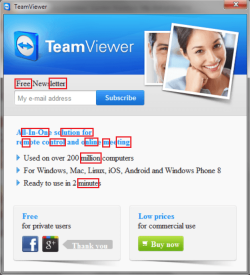
Here is another example of what I'm talking about.

http://i.imgur.com/SiWO3XL.png

You can see the problem especially in the "Free Newsletter" text and All-In-One solution for remote control and private meeting." See how the text is more bold and obvious than usual?

Thanks for all your help!

wws
 

My Computer My Computer

Computer type
PC/Desktop
OS
Windows 7 64 bit
You should post a link to a page you believe to have a problem.
Then post a screen shot of that page here.

Then we can see if what you see is what we get.

(That page looks perfectly normal to me)
 

My Computer My Computer

Computer type
PC/Desktop
Computer Manufacturer/Model Number
Home Built - Jan 2013
OS
Windows 7 64 Bit Home Premium SP1
CPU
i7-3820
Motherboard
Asus P9X79-PRO - Bios 4608
Memory
GSkill F3-14900CL9Q - 16GB
Graphics Card(s)
EVGA GeForce GTX660 - Driver 352.86
Sound Card
On board Realtek ALC898
Monitor(s) Displays
Acer S271HL
Screen Resolution
1920 x 1080
Hard Drives
#1- Samsung 840 Pro Series
#2- Western Digital WD1002FAEX Sata3 Black
#3- Western Digital WD1002FAEX Sata3 Black
PSU
Corsair CMPSU-850TX-V2 - 850 watt (by Seasonic)
Case
Corsair Obsidian 550D
Cooling
Standard 3 120mm case fans, Cooler Master Hyper 212 EVO
Keyboard
MS KC-0405
Mouse
Intellimouse 5-button
Internet Speed
56 Mbits/Sec (on a good day)
Antivirus
Avast & Malwarebytes
Browser
Firefox
Other Info
Asus DVD - DRW-24B1ST 24X
I think I see what you mean, everything I blocked is bolder than the rest of the word. Some words only have one darkened (bolder) letter.

messy font.png


This is different than the newsletter page you have, but here's what I'm seeing, everything looks even to me:

messy font1.PNG


I'm thinking; You upgraded from XP to 7 and you had this problem even when you had XP installed.

From your thread starter, my reasoning is in blue:
Certain fonts on my Windows 7 SP1 computer have been messed up for a while. The fonts seem to be too large and bolded.

That would explain this, Application installers would use system fonts.
This is not a system-wide issue, only certain programs exhibit it. For some reason, application installers are where the problem most commonly asserts itself.


This started happening when I transferred my user account from Windows XP last year, so maybe it has something to do with that. I recall having this problem on XP too.
It could be you had a corrupted XP user account and transferred the problem over to the upgrade.

Can you look at my example and possibly provide a solution or insight as to the source of the problem? Thanks!
There is an outside chance you may have an ailing Video display (Monitor) and/or video card. Using an older XP machine would indicate older equipment.
Have you ever tried to adjust your video display settings or upgraded your video card drivers?

This could also be a problem if you're using the Aero display feature in 7 which XP didn't have, but you did say it was a problem in XP to. Use this Tutorial to check: http://www.sevenforums.com/tutorials/258-color-bit-depth-display-settings.html Notice the other tutorials at the bottom of the page they may help.

Your system specs are incomplete so I can't help much in that area until you fill them out. Best I can offer for now is to try an adjust the monitor settings. If you accepted the settings as they were while with XP, your XP user account transferred those settings over to the 7 OS.
If you want to start with a new User Account: http://www.sevenforums.com/tutorials/181024-user-account-create.html

If you're having problems adjusting your monitor or you don't have the manual anymore, fill in your specs and we'll see if we can find one for you. Include the video card (graphics card) your using.
 

My Computer My Computer

Computer type
PC/Desktop
Computer Manufacturer/Model Number
Gateway DX4831-01e (Mid-Tower Desktop)
OS
Originally Win 7 Hm Prem x64 Ver 6.1.7600 Build 7601-SP1 | Upgraded to Windows 10 December 14, 2019
CPU
Intel i3 530 2.93GHz, 2933MHz 2 Cores 4 Logical Processors
Motherboard
Gateway H57M01 133 megahertz
Memory
6GB of 1,333MHz DDR3 SDRAM
Graphics Card(s)
32MB Intel Graphics Media Accelerator HD IGChip
Sound Card
Realtek High Definition Audio
Monitor(s) Displays
Gateway HX2000 20inch TFT active matrix TN
Screen Resolution
1600 x 900 x 59 hertz
Hard Drives
WDC WD10EADS-00M2B0 [HDD] (1000.20 GB) -- drive 0,
HL-DT-ST DVDRAM GH41N [CD-ROM dr]
Four card readers, and Four USB 2.0
PSU
300watts.
Case
Mid-Tower Desktop
Cooling
Stock from Gateway
Keyboard
Natural Ergonomic Keyboard 4000, see Other Info
Mouse
Orig. Gateway wore out now using Insignia USB wired optical
Internet Speed
Vz FIOS 10ms png 57.64Mbps down 65.53Mbps up Speedtest.org
Antivirus
Zamana Anti-logger with Anti-malware, MSE, Windows Firewall,
Browser
IE11.0.9600.19399-Upd ver11.0.135, Firefox 68.0.1 x64
Other Info
System Specs by Belarc.

BIOS: American Megatrends Inc. P01-A0 11/17/2009

Replaced the MS 'Natural' Standard PS/2 Enhanced 101-102 Keyboard with a new Natural Ergonomic Keyboard 4000 on August 1st 2014.

Canon Pixma MG3222 Printer.

Updated to IE11 on 12102015 | Fios Quantum Router g1100

Additional AV: SpywareBlaster, manual Mbam, SAS
Back
Top