fonts problem in ie9

65daysofstatic

New member
Local time
2:19 PM
Messages
5
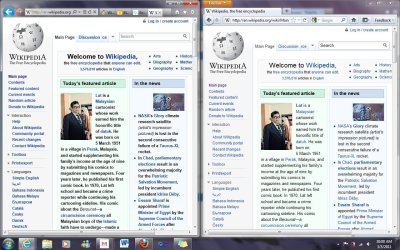
Hi guys, I have IE9 RC installed no big problems so far, but somehow now some fonts are displaying too bold and I didnt change any settings, I tried resetting to defaults but it didnt solve the problem.

Do you know what can be the problem??

I attached an image.
 

Attachments
  • asdasd.jpg
    asdasd.jpg
    198.4 KB · Views: 992

My Computer

OS
windows 7 ultimate x64
any idea how can I fix this? I already reinstalled ie9 and the problem has not been fixed.
 

My Computer

OS
windows 7 ultimate x64

My Computer

Computer Manufacturer/Model Number
LAPTOP. HP Pavilion dv7-4010TX .
OS
Win 7 Ultimate 64-bit. SP1.
CPU
Intel i7 -720QM.[1.6GHz Turbo Boost 2.8GHz. 6MB Cache.]
Memory
8 DDR 3 RAM. 1066MHZ
Graphics Card(s)
ATI 1024 MB. DDR3. Radeon HD5650
Monitor(s) Displays
17.3" High Definition Brightview LCD. LED Backlit.
Screen Resolution
1600 x 900.
Hard Drives
640GB
Case
Laptop / notebook.
Mouse
Logitech Anywhere mouse. MX.
Internet Speed
ADSL [ but too slow ]
thanks for the reply.

I tried to adjust the clear type but that didnt solve my problem

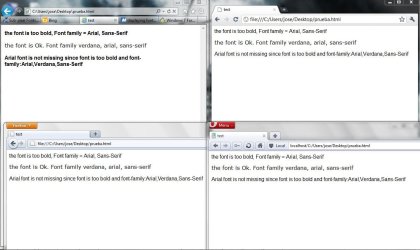
I did some tests with an html with some text and changing the font family.
The problem comes when I set the font-family to "Arial,Sans-Serif", if I change the font family to "Verdana" it displays the font correctly.

IE9 is not missing the font but rendering it differently I don't know why, I uninstalled and tried with IE8 and no problems :S
 

Attachments

  • font_problem.JPG
    font_problem.JPG
    96.2 KB · Views: 276

My Computer

OS
windows 7 ultimate x64
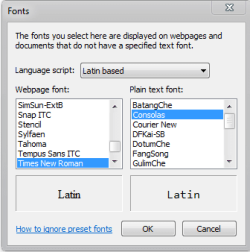
Click the gear icon, go to Internet Options.
On the General tab click Fonts and post back a screenshot.
fonts.PNG
 

My Computer

Computer type
Laptop
Computer Manufacturer/Model Number
Custom
OS
Windows 7 Home Premium x64
CPU
Intel Core i5 2500K
Motherboard
MSI MS-7750
Memory
8GB DDR3
Graphics Card(s)
nVidia GeForce GTX650 Ti BOOST
Sound Card
Realtek
Monitor(s) Displays
21' Philips
Screen Resolution
Full HD
Hard Drives
1TB
PSU
500W
the only difference is Courier New instead of Consolas, but that did not change anything :(
 

Attachments

  • Capture.JPG
    Capture.JPG
    43.5 KB · Views: 26
  • Capture2.JPG
    Capture2.JPG
    32.3 KB · Views: 29

My Computer

OS
windows 7 ultimate x64
That's okay, I changed that myself on purpose.
It's a shame IE doesn't have more options to customize the fonts.
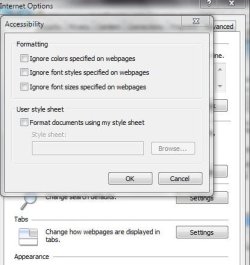
Perhaps checking "ignore font styles specified..." would help, though I doubt that will fix everything.
 

My Computer

Computer type
Laptop
Computer Manufacturer/Model Number
Custom
OS
Windows 7 Home Premium x64
CPU
Intel Core i5 2500K
Motherboard
MSI MS-7750
Memory
8GB DDR3
Graphics Card(s)
nVidia GeForce GTX650 Ti BOOST
Sound Card
Realtek
Monitor(s) Displays
21' Philips
Screen Resolution
Full HD
Hard Drives
1TB
PSU
500W
Hi guys, I have IE9 RC installed no big problems so far, but somehow now some fonts are displaying too bold and I didnt change any settings, I tried resetting to defaults but it didnt solve the problem.

Do you know what can be the problem??

I attached an image.


Try turning off Hardware acceleration, and see if that makes any difference.

http://www.sevenforums.com/tutorial...rer-9-gpu-hardware-acceleration-turn-off.html


Not sure about it's enabled effects in IE9 since I don't use it, but I do know that having Hardware Acceleration has similar font display issues when it's enabled in Firefox, from a Direct2D and DirectWrite issue.

Possible something similar is happening there.
 

My Computer

Computer type
PC/Desktop
Computer Manufacturer/Model Number
Airbot 2.0
OS
Windows 7 Ultimate x64 SP1
CPU
Core i7 920 (D0) @ 4Ghz, *26c idle *65c full load on air
Motherboard
Asus P6X58D Premium - Sata 6Gb/s - USB 3.0
Memory
12GB DDR3 Corsair Dominator -CMD12GX3M6A1600C8 at 1600MHz
Graphics Card(s)
Zotac Geforce GTX 770
Sound Card
ASUS Xonar D2X
Monitor(s) Displays
1 LG 24" Flatron W2453V-PF 1 Samsung 24" P2450H both 2ms RT
Screen Resolution
1920x1080@60hz
Hard Drives
1 Samsung 250GB 840 Evo SSD
1 OCZ Vertex2 180GB SSD
1 TB Samsung Spinpoint F1 7200RPM 32MB cache
2 500GB WD Caviar Blacks 7200RPM 32MB cache (WD5001AALS)

Pioneer DVD Burner DVR-S18M
PSU
Corsair HX1000W
Case
Cooler Master HAF 932
Cooling
Case Fans *3 230mm, *1 140mm/CPU - *Tuniq Tower 120 Extreme
Keyboard
Logitech Wireless MK700
Mouse
Logitech Wireless MK700
Internet Speed
DL 15 Mbps UL 0.98 Mbps
Antivirus
None
Browser
Firefox Nightly
Other Info
Processor-7.7 *RAM- 7.9 *Graphics-7.9 *Gaming Graphics- 7.9 *SSD- 7.8 W.E.I final score= 7.7
*Phone- LG Nexus 5
hi,
thank you for your response.
I tried turning off HW acceleration but it didnt fix it.

If I check "ignore font styles" every site will be displayed with the times new roman or the one that is selected.

I reported this to connect.microsoft.com to see if they know how to fix it.
 

My Computer

OS
windows 7 ultimate x64
Have this problem too in IE9 right now. Was any solution found ?

In comparison the same pages rendered in Firefox look much, much more readable.
 

My Computer

Computer Manufacturer/Model Number
Lenovo Thinkpad W500 4058 CTO
OS
Windows 7 Pro x64
CPU
Intel(R) Core(TM)2 Duo CPU T9600 @ 2.80GHz, 2
Motherboard
n/a
Memory
4GB
Graphics Card(s)
Mobile Intel 4 Ser Express Set, ATI Mobility FireGL V5700
Sound Card
Conexant 20561 SmartAudio HD
Monitor(s) Displays
Lenovo L201 1600 x 1200 DVI
Screen Resolution
Native 1920 x 1200
Hard Drives
Blu-Ray R/W
SSD 120GB: SAMSUNG MMCQE28G8MUP-0VA
Also 300GB Samsumg drive
PSU
n/a
Case
n/a
Cooling
n/a
Keyboard
IBM std PS/2 black
Mouse
Microsoft Trackball Explorer
Internet Speed
~4MB
Other Info
Integrated: Camera; GPS
Lenovo dock station
Linksys DNS 323 2 x 0.5TB NAS
Synology DS209+II 2 x 1.5TB NAS
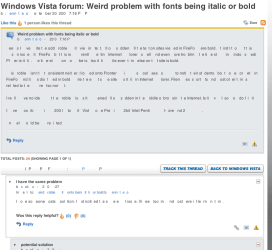
Check this out, i have a similar problem

font problems.PNG

This problems are not on all websites, anyone who knows what to do:cool:
 

My Computer

OS
Windows 7 Ultimate x64
Back
Top