Fonts with Borders

Judesman

New member
Member
VIP
Local time
8:02 PM
Messages
217
Is there any way that I can put a coloured border around a font using Word or Publisher 2007 please? I am sure there was some way I could do this in earlier versions of Word without using Wordart.
 

My Computer

Computer type
PC/Desktop
Computer Manufacturer/Model Number
Dell OptiPlex 960
OS
Windows 7 64 bit
Memory
8 GB
Graphics Card(s)
Redeon HD 4670
Monitor(s) Displays
Dell
Antivirus
Norton
Browser
IE 10
In Word you can put borders around anything (in the Page Layout section of the Ribbon), and you can also do a Text Box around text (in the Insert section of the Ribbon).
 

My Computer

Computer Manufacturer/Model Number
HP Pavillion dv5t (generation 1)
OS
Vista 64 bit and 32 bit (SP2)
CPU
Intel(R) Core(TM)2 Duo Processor T9400 (2.53 GHz
Memory
4GB DDR2 System Memory (2 Dimm)
Graphics Card(s)
512 MB NVIDIA GeForce 9600M GT
Monitor(s) Displays
15.4" diagonal WSXGA+ High-Definition HP BrightView Widescre
Screen Resolution
1680 x 1050
Hard Drives
320GB 5400RPM SATA Hard Drive with HP ProtectSmart Hard Drive Protection
Keyboard
Built-in HP
Mouse
Built in - Synaptics TouchPad V6.5 on PS/2 Port
Internet Speed
Max
Other Info
~ Intel Next-Gen Wireless-N Mini-card w/Bluetooth ~ Blu-Ray ROM DVD+/-R/RW ~ Integ. HDTV Hybrid Tuner ~ 12 Cell Battery ~ MS Office (Home Premium) 2007 ~
Thank you Imperfect1. What I want to do is outline the font not actually put a border around the text. I am sure I used to be able to do this in earlier versions of Word including giving a font a hatched background (infill) etc.
 
Last edited:

My Computer

Computer type
PC/Desktop
Computer Manufacturer/Model Number
Dell OptiPlex 960
OS
Windows 7 64 bit
Memory
8 GB
Graphics Card(s)
Redeon HD 4670
Monitor(s) Displays
Dell
Antivirus
Norton
Browser
IE 10
I have had an email from the Forum telling me that Bugmeister has posted but the post is not appearing here. It says try WordArt.

I have got up a document I prepared years ago (in another version of Word I think) and when I open it and click on the WordArt it brings up two more ribbons on Word 2007 -Design and Layout that are not there when I open a new document. If I then click format I get two tabs above that give me WordArt Tools and Table Tools. This might be the answer to my problem but how do I get these to appear in a new document please. Any help appreciated.
 

My Computer

Computer type
PC/Desktop
Computer Manufacturer/Model Number
Dell OptiPlex 960
OS
Windows 7 64 bit
Memory
8 GB
Graphics Card(s)
Redeon HD 4670
Monitor(s) Displays
Dell
Antivirus
Norton
Browser
IE 10
I'm getting too old for this and I don't think I will ever get to grips with Word 2007. Why do they keep changing things. Anyway I now see that I have to insert WordArt and Tables before the relevant ribbon tabs appear so my problem is resolved. Sorry to have bothered you all.
 

My Computer

Computer type
PC/Desktop
Computer Manufacturer/Model Number
Dell OptiPlex 960
OS
Windows 7 64 bit
Memory
8 GB
Graphics Card(s)
Redeon HD 4670
Monitor(s) Displays
Dell
Antivirus
Norton
Browser
IE 10
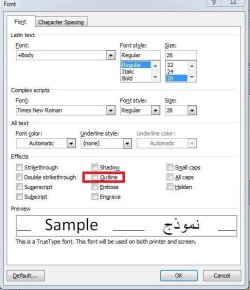
There is a way to achieve an outline on the font without WordArt.


  1. Highlight the text in question.
  2. Touch the tiny arrow on the bottom right of the Font tab on the ribbon.
  3. There is an effects section just below half way down the dialogue which has opened.
  4. Next, simply put a check in the box by 'Outline' below 'Shadow' in the centre section.

All done. :D
 

Attachments

  • font outline.jpg
    font outline.jpg
    36.9 KB · Views: 13

My Computer

Computer type
PC/Desktop
Computer Manufacturer/Model Number
Packard Bell
OS
Windows 7 Home Premium 64bit
CPU
Intel(R) Core(TM) i3-2120 CPU @ 3.30GHz
Motherboard
Packard Bell IPISB-AG
Memory
3.00 GB
Graphics Card(s)
(1) Intel(R) HD Graphics (2) VNC Mirror Driver
Sound Card
Realtek High Definition Audio
Monitor(s) Displays
AIO LCD
Screen Resolution
1920 x 1080
Hard Drives
WDC WD10EADX-22TDHB0 ATA Device
Fixed hard disk media
4 partitions
931.51 GB
Keyboard
Wireless
Mouse
Wireless
Antivirus
Microsoft Security Essentials
Browser
IE; Firefox
Other Info
Also:
Samsung N220 Plus Netbook - Windows 7 Home
HP laptop
iPad 5
Thank you very much Irene, that is appreciated. I was looking for a way to infill the outline with colour or texture that I had done in the past and WordArt is the answer but I could not see how to acheive it. All resolved now. This is the problem when I don't use these facilities very often, I forget how to do it. Old age!!!

Many thanks.
 

My Computer

Computer type
PC/Desktop
Computer Manufacturer/Model Number
Dell OptiPlex 960
OS
Windows 7 64 bit
Memory
8 GB
Graphics Card(s)
Redeon HD 4670
Monitor(s) Displays
Dell
Antivirus
Norton
Browser
IE 10
Back
Top