You are using an out of date browser. It may not display this or other websites correctly.
You should upgrade or use an
alternative browser.
For fellow newbies with slow boot - this might help
Hey all!
I was going to post another thread going "OMG BOOT TIEM SLOW HOW FIX?", but I lurked around and tried fixing it myself.
I recently upgraded hardware, and wondered... "Why is my boot time so slow when it wasn't on my old specs?"
I ventured into the dark raptured cave of the BIOS.. And considering I have almost NO experience in it, it was scary.
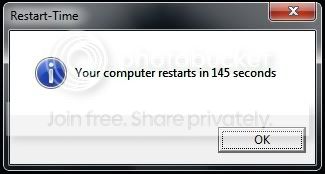
Boot time at first:
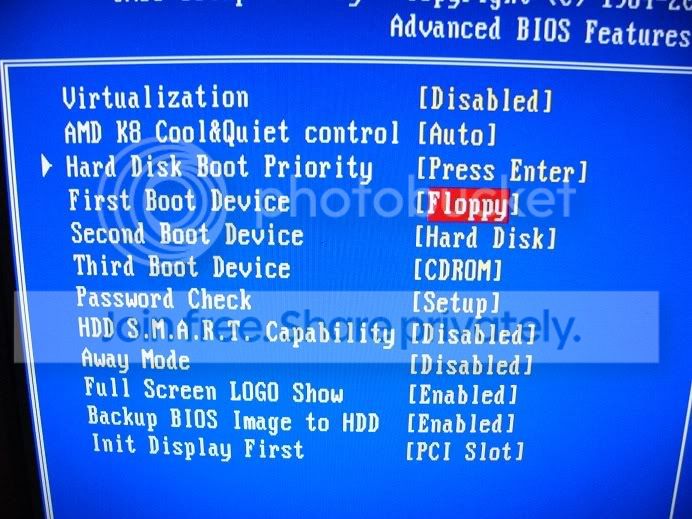
What I did was go into the Advanced BIOS Features
And saw this
And changed it to this
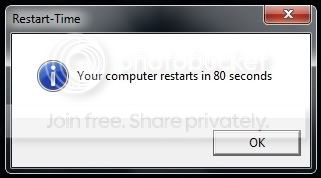
And BAM!
It was a huge accomplishment for me, considering i'm almost a computer illiterate.
I also wanna thank all of you here on this forum, who help/try their best to help others, have some cake

Windows 7 (7600)AMD Phenom II 945 X4 3ghz2x2GB Kingston DDR2 HyperX PC8500GeForce GTX 275 - OS
- Windows 7 (7600)
- CPU
- AMD Phenom II 945 X4 3ghz
- Motherboard
- Gigabyte GA-MA770-UD3
- Memory
- 2x2GB Kingston DDR2 HyperX PC8500
- Graphics Card(s)
- GeForce GTX 275
- Sound Card
- Line 6 TonePort UX1 / Realtek HiDef Audio
- Monitor(s) Displays
- BenQ FP93G X 19''
- Screen Resolution
- 1280x1024
- Hard Drives
- WD Caviar Blue 300gb
- PSU
- ACE RawDeal Plus 620W
- Cooling
- Big fan on side of case
- Keyboard
- Microsoft Sidewinder X6
- Mouse
- Logitech G5
- Internet Speed
- 4mbps
- Other Info
- Old HDD and DVD drive. All else is newly upgraded.
You can change the initial display first slot to PCI-e for your card.
7600.20510 x86P4 550 3.4 GHz HT running at 3.5 GHzOCZ 2 GB(2x1GB) DDR400mHz running @ 414 mHzHIS Radeon HD 3850 IceQ 3 Turbo HDMI Dual DL-... - Computer Manufacturer/Model Number
- self built
- OS
- 7600.20510 x86
- CPU
- P4 550 3.4 GHz HT running at 3.5 GHz
- Motherboard
- MSI PM8M3-V (MS-7211 v1.x) Micro-ATX mainboard
- Memory
- OCZ 2 GB(2x1GB) DDR400mHz running @ 414 mHz
- Graphics Card(s)
- HIS Radeon HD 3850 IceQ 3 Turbo HDMI Dual DL-DVI AGP
- Sound Card
- MOTU Traveler firewire studio interface 192 kHz 24 bit
- Monitor(s) Displays
- 22" widescreen Acer X223W LCD, 17" Compaq P75 CRT
- Screen Resolution
- 1680x1050 and 1280x1024
- Hard Drives
- SATA I x2 WD, 400 GB and 120 GB, SATA 2 WD Caviar Black 1 TB
- PSU
- 350W generic
- Case
- Cybertronpc, it glows blue
- Cooling
- stock cpu fan, Ice-Q 3 gpu and system, many case fans
- Keyboard
- Logitch Classical Keyboard 200
- Mouse
- Logitech Mediaplay cordless
- Internet Speed
- 1792/448 kbits/sec
- Other Info
- SATA II PCI fake RAID adapter, 1 GB Readyboost, original ATI Remote Wonder (even works with WMC perfectly), Logitech Rumblepad 2 game controller x2
New member
Thread Starter
You can change the initial display first slot to PCI-e for your card.
Yeah, I noticed that after taking the pics, gonna change that now

Thanks!
Windows 7 (7600)AMD Phenom II 945 X4 3ghz2x2GB Kingston DDR2 HyperX PC8500GeForce GTX 275 - OS
- Windows 7 (7600)
- CPU
- AMD Phenom II 945 X4 3ghz
- Motherboard
- Gigabyte GA-MA770-UD3
- Memory
- 2x2GB Kingston DDR2 HyperX PC8500
- Graphics Card(s)
- GeForce GTX 275
- Sound Card
- Line 6 TonePort UX1 / Realtek HiDef Audio
- Monitor(s) Displays
- BenQ FP93G X 19''
- Screen Resolution
- 1280x1024
- Hard Drives
- WD Caviar Blue 300gb
- PSU
- ACE RawDeal Plus 620W
- Cooling
- Big fan on side of case
- Keyboard
- Microsoft Sidewinder X6
- Mouse
- Logitech G5
- Internet Speed
- 4mbps
- Other Info
- Old HDD and DVD drive. All else is newly upgraded.
Why was it floppy in the first place?
Windows 7 Ultimate x86-64[email protected] 1066MHz FSB6GB DDR3 1066MHz9300M GS 256MB Dedicated (Speed) + Intel4500M... - Computer Manufacturer/Model Number
- Sony Vaio Z46GDU
- OS
- Windows 7 Ultimate x86-64
- CPU
- [email protected] 1066MHz FSB
- Motherboard
- Sony branded
- Memory
- 6GB DDR3 1066MHz
- Graphics Card(s)
- 9300M GS 256MB Dedicated (Speed) + Intel4500MHD (Stamina)
- Sound Card
- Realtek HD Audio
- Monitor(s) Displays
- 13.1' WXGA
- Screen Resolution
- 1600x900
- Hard Drives
- 320GB 7200RPM w/ 16MB cache
- Internet Speed
- 1MB/s
New member
Power User
VIP
Why was it floppy in the first place?
Because thats default for 90% of motherboards
Windows 7 PRO x64Phenom II 1090T @ 4.00GHz8gb DDR31x ATI Diamond 5850 - OS
- Windows 7 PRO x64
- CPU
- Phenom II 1090T @ 4.00GHz
- Motherboard
- Crosshair IV Formula
- Memory
- 8gb DDR3
- Graphics Card(s)
- 1x ATI Diamond 5850
- Monitor(s) Displays
- 50in HDTV (HDMI)
- Screen Resolution
- 1080P
- Hard Drives
- 2x 1TB barracuda
1x 1TB WD Black
1x 2TB WD
1x OCZ Vertex 2 40GB
- PSU
- 1000w Xion
- Case
- Armor+ VH6000BWS
- Cooling
- W/C
- Internet Speed
- 60Mbps down, 7 up
Simba my best friend
Pro User
But who uses a floppy drive these days? My floppy drive and all controllers is disabled in the bios.
Windows 7 Home Premium x64AMD Bulldozer FX-8 8120 Black Edition @ 4GHzCorsair Vengeance 16GB DDR3 PC3-12800C9 1600MHzMSI nVidia Geforce GTX 670 OC 2048MB GDDR5 - Computer type
- PC/Desktop
- Computer Manufacturer/Model Number
- Me
- OS
- Windows 7 Home Premium x64
- CPU
- AMD Bulldozer FX-8 8120 Black Edition @ 4GHz
- Motherboard
- Asus Crosshair V Formula 990FX
- Memory
- Corsair Vengeance 16GB DDR3 PC3-12800C9 1600MHz
- Graphics Card(s)
- MSI nVidia Geforce GTX 670 OC 2048MB GDDR5
- Sound Card
- Sound Blaster X-Fi 2 MB 2
- Monitor(s) Displays
- Samsung SyncMaster SA350 22" LED HDMI
- Screen Resolution
- 1920x1080
- Hard Drives
- Seagate Barracuda SATA II 500GB 16MB Cache 7200.12
- PSU
- Corsair Professional Series Gold AX1200 (1200Watts)
- Case
- Antec 1200 Ultimate Gaming Case
- Cooling
- Antec Kuhler H20 620
- Keyboard
- Logitech G510
- Mouse
- Microsoft Wireless 3000
- Internet Speed
- Upto 40Mb/s Fibre Optic Broadband