
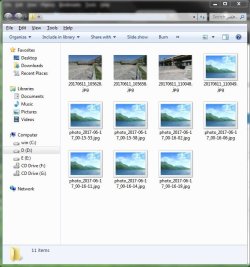
The following methods did not work:
1-my computer, organize, folder and search options, view, uncheck Always show icons, never thumbnails, ok.
2-right click on my computer, properties, advanced system settings, advanced tab, performance settings, check show thumbnails instead of icons, ok.
3- Local Group Policy Editor method: win+R, gpedit.msc, user configuration, administrative templates, windows componenets, windows explorer, right click on turn off the display of thumbnailsand only display icons, edit & ...
4-To Clear and Reset Thumbnail Cache using Disk Cleanup
5-To Clear and Reset Thumbnail Cache using a BAT File
and other methods ...
please help me
my system is windows 7 64 bit
1-my computer, organize, folder and search options, view, uncheck Always show icons, never thumbnails, ok.
2-right click on my computer, properties, advanced system settings, advanced tab, performance settings, check show thumbnails instead of icons, ok.
3- Local Group Policy Editor method: win+R, gpedit.msc, user configuration, administrative templates, windows componenets, windows explorer, right click on turn off the display of thumbnailsand only display icons, edit & ...
4-To Clear and Reset Thumbnail Cache using Disk Cleanup
5-To Clear and Reset Thumbnail Cache using a BAT File
and other methods ...
please help me
my system is windows 7 64 bit
Attachments
Last edited:
My Computer
At a glance
windows 7 64 bit
- Computer type
- Laptop
- Computer Manufacturer/Model Number
- Dell
- OS
- windows 7 64 bit

