Force DVI/HDMI resolutions and refresh rates

How to Force DVI or HDMI Resolutions and Refresh Rates in Windows 7

   Information
There have been innumerable posts on SevenForums about things like 59Hz refresh rates and 1080p 16:9 HDTVs that display only 1024x768 when connected with DVI or HDMI. After a ton of research and development I think I've got a working solution for virtually all of these issues.


Starting with Vista, Microsoft has required graphics vendors to read and respect monitor capability information from the display itself if they wanted to pass Windows Hardware Quality Labs (WHQL) certification. This display capability data is encapsulated in an EDID. Few HDTV manufacturers sought WHQL and it's unclear whether Microsoft tests display EDIDs from monitor manufacturers as a WHQL requirement. Please let me know if you have a WHQL display that seems to have a bad EDID.

As a result, many DVI/HDMI connected HDTVs and some monitors are locked into displaying only those resolutions and refresh rates that are specified in the EDID. No graphics adapter or driver is supposed to allow configurations not listed in the EDID at least as a default. Newer ATI drivers allow for a small number of HD resolutions to be forced but it's been hit or miss for the users I've surveyed and nVidia's offerings don't seem to be a 100% solution either.

The natural solution would appear to be changing the EDID information in the display. Rarely, this is possible with Powestrip if the display stores the EDID in a flash memory but more commonly the EDID is stored in an EPROM that can only be updated with specialized hardware. I've talked with several display vendors during the development of this tutorial and none of them consider a bad EDID grounds for warranty service. So if next to no displays support updating the EDID through software and the manufacturer won't fix the hardware, what are we left to do? Break out the toolkit and warm up the soldering iron?

While that's well within my capabilities it seems to put some end-users off a bit, although I really can't understand why -- I love the smell of solder in the morning! :geek: But there has to be a better way right? Again, Microsoft has a solution if you really dig for it and do your homework: How to Use an INF to Override the Monitor EDID While it's not intended for end users, what really fun stuff is? The challenge was to develop a method accessible to a greater audience -- to improve on the solution that Microsoft provides that's intended for hardware manufacturers and make it work for us.
   Warning

Prerequisites
  • Read and understand both linked documents above.
  • Post questions if anything is unclear before you proceed.
  • Don't blame me when you ruin your $3000 HDTV. Smoke can happen.
  • Read up on what your displays true capabilities are stick close to them.
  • This is more of a coffee tutorial than a beer tutorial...


Procedure
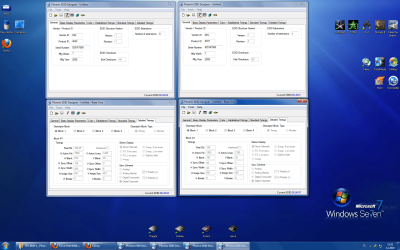
  1. Download View attachment Phoenix.zip and extract it to a working folder.
  2. Run it and click the registry toolbar button.
  3. Click the pencil toolbar button for edit mode.
  4. Change the EDID settings to reflect you display's true capabilities
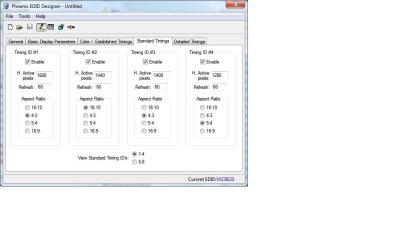
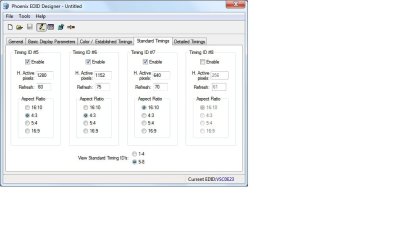
  5. Pay special attention to the Standard Timings tab.
  6. Detailed Timing blocks 2-4 provide some very interested additional options.
  7. Save the EDID to a .DAT file in the working folder.
  8. Download moninfo.exe and install it.
  9. Open the saved .DAT with MonInfo and make sure it doesn't complain about it
  10. If it does post here for help
  11. If MonInfo reads in an displays the settings the way you configured them in Phoenix then...
  12. Select Create INF... from the file menu and save it to the working folder.
  13. Feel free to edit the strings in the INF to your liking.
  14. Open Start, type devmgmt.msc and press Enter.
  15. Select the monitor you want to change, right click and select Update Driver Software
  16. Use the tried and true "Have Disk" method to select the INF and install it.
  17. Reboot and enjoy your new resolution!


Last edited by a moderator:
Btw, how do you check the monitors refresh rate? I mean, I can do it in the drivers/windows, but I personally wouldnt rely too much on that tbh.
 

My Computer My Computer

At a glance

Tomatoe
OS
Tomatoe
With crt, the monitor goes in protection, so that shouldn't be a problem
With LCD, you can burn your panel so watch out!
 

My Computer My Computer

At a glance

Windows 7 32-bit
OS
Windows 7 32-bit
Hi everybody,
I need help with my 30 inch monitor and Nvidia 295GTX ...
i have DELL 3008WFP monitor, and i can not get native 2560x1600 resolution max. is: 1920x1080 through DVI and 1920 x 1200 through VGA. Native resolution for this monitor is 2560x1600........
I changed graphic card drivers, DVI-D cables.......
I have new G-Force GTX295 + Core I7-950 + Windows 7 pro/64bit.....I changed the drivers, DVI_D cables....... nothing
Please help.
 

My Computer My Computer

At a glance

7/64I7-950CORSAIR Dominator CM3X2 DDR3 1600 8gbGTX295
OS
7/64
CPU
I7-950
Motherboard
Asus P6T
Memory
CORSAIR Dominator CM3X2 DDR3 1600 8gb
Graphics Card(s)
GTX295
Sound Card
Creative X-FI
Monitor(s) Displays
DELL 3008WFP
Hard Drives
WD3000 Velociraptor
WD15EADS
PSU
Corsair TX 850
Case
Coolermaster 932HAF
Here is the couple of DVI situations, and Riva tuner and Powerstrip info.


57012334.png


dsc0487a.jpg
 
Last edited:

My Computer My Computer

At a glance

7/64I7-950CORSAIR Dominator CM3X2 DDR3 1600 8gbGTX295
OS
7/64
CPU
I7-950
Motherboard
Asus P6T
Memory
CORSAIR Dominator CM3X2 DDR3 1600 8gb
Graphics Card(s)
GTX295
Sound Card
Creative X-FI
Monitor(s) Displays
DELL 3008WFP
Hard Drives
WD3000 Velociraptor
WD15EADS
PSU
Corsair TX 850
Case
Coolermaster 932HAF
I extract EDID info from registry with Phoenix, and there is two different DELL3008WFP info in registry.
 

Attachments

  • edid.png
    edid.png
    403 KB · Views: 1,205

My Computer My Computer

At a glance

7/64I7-950CORSAIR Dominator CM3X2 DDR3 1600 8gbGTX295
OS
7/64
CPU
I7-950
Motherboard
Asus P6T
Memory
CORSAIR Dominator CM3X2 DDR3 1600 8gb
Graphics Card(s)
GTX295
Sound Card
Creative X-FI
Monitor(s) Displays
DELL 3008WFP
Hard Drives
WD3000 Velociraptor
WD15EADS
PSU
Corsair TX 850
Case
Coolermaster 932HAF
testarossa: read the whole thread. Theres a better tut than the one on page 1.
 

My Computer My Computer

At a glance

Tomatoe
OS
Tomatoe
Solved :D

this procedure work:
Procedure
  1. Download Phoenix.zip and extract it to a working folder.
  2. Run it and click the registry toolbar button.
  3. Click the pencil toolbar button for edit mode.
  4. Change the EDID settings to reflect you display's true capabilities
  5. Pay special attention to the Standard Timings tab.
  6. Detailed Timing blocks 2-4 provide some very interested additional options.
  7. Save the EDID to a .DAT file in the working folder.
  8. Download moninfo.exe and install it.
  9. Open the saved .DAT with MonInfo and make sure it doesn't complain about it
  10. If it does post here for help
  11. If MonInfo reads in an displays the settings the way you configured them in Phoenix then...
  12. Select Create INF... from the file menu and save it to the working folder.
  13. Feel free to edit the strings in the INF to your liking.
  14. Open Start, type devmgmt.msc and press Enter.
  15. Select the monitor you want to change, right click and select Update Driver Software
  16. Use the tried and true "Have Disk" method to select the INF and install it.
  17. Reboot and enjoy your new resolution!
, i am happy man now:)
Thanks to all
 

My Computer My Computer

At a glance

7/64I7-950CORSAIR Dominator CM3X2 DDR3 1600 8gbGTX295
OS
7/64
CPU
I7-950
Motherboard
Asus P6T
Memory
CORSAIR Dominator CM3X2 DDR3 1600 8gb
Graphics Card(s)
GTX295
Sound Card
Creative X-FI
Monitor(s) Displays
DELL 3008WFP
Hard Drives
WD3000 Velociraptor
WD15EADS
PSU
Corsair TX 850
Case
Coolermaster 932HAF
Anyways, I have flashed my bios which seems to be working even better. However, when I do put an inf file (I´m using the original one actually from the viewsonic cd for my vx2268wm, it works fine) It seems to work for a while and then its like the refresh rate settings are changed. Things that can cause this are a reboot, or that I plug/unplug 1 of my two other monitors/tv.

Any sollution?
 

My Computer My Computer

At a glance

Tomatoe
OS
Tomatoe
Anyways, I have flashed my bios which seems to be working even better. However, when I do put an inf file (I´m using the original one actually from the viewsonic cd for my vx2268wm, it works fine) It seems to work for a while and then its like the refresh rate settings are changed. Ie windows/ccc dont find that my monitor actually supports other hz´s than 60.

. Things that can cause this are a reboot, or that I plug/unplug 1 of my two other monitors/tv.

Any sollution?
 

My Computer My Computer

At a glance

Tomatoe
OS
Tomatoe
Also, I notice this:
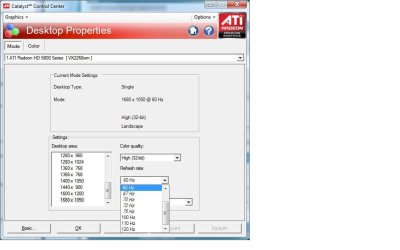
Shouldnt 1680x1050 be present in Phoenix(getting the same from softmccs btw)? As you can see those timings are in catalyst control center( same one as in win btw). Also they are non italic which means they are supported by the monitor.
 

Attachments

  • ccc100-120hz.jpg
    ccc100-120hz.jpg
    45.1 KB · Views: 926
  • p1.jpg
    p1.jpg
    43.9 KB · Views: 748
  • p2.jpg
    p2.jpg
    43.2 KB · Views: 664

My Computer My Computer

At a glance

Tomatoe
OS
Tomatoe
ok, this is a bit beyond my capabilities, but i think its my only option at this point. i have a syncmaster 2343bwx and cant get it to display its native resolution, either with the dvi OR the vga cables. seems as though windows 7 doesnt recognise the monitors capabilities properly. the native resolution should be 2048 x 1152 but all i can get is- dvi: 1280 x 720 and vga: 1920 x 1080 any help would be GREATLY appreciated
 

My Computer My Computer

At a glance

windows 7 ultimateintel core 2 quad q9550 @ 2.83 ghz 1333 fsb6 gb corsair ddr3 1333BFG GTX 280
Computer Manufacturer/Model Number
custom
OS
windows 7 ultimate
CPU
intel core 2 quad q9550 @ 2.83 ghz 1333 fsb
Motherboard
evga 790i ftw ultra
Memory
6 gb corsair ddr3 1333
Graphics Card(s)
BFG GTX 280
Sound Card
soundblaster xfi fatality champion platinum
Monitor(s) Displays
samsung syncmaster 2343 bwx 23 inch lcd
Hard Drives
western digital 500 gb.
PSU
corsair hx1000 modular
Case
3dcool.com
Cooling
air
Hi everyone,

Got the same CRT limitations (60hz at any resolution) like many of you (windows 7 an XP). I read your article and tried to extract EDID with Phoenix but the list is empty. Seems that my monitor is too old to be detected (dunno).
It's a Iiyama 19" 1451. Is there a way to make a driver another way or any tricks that may help. I'm desperated and dont know what to do to make it work.
 

My Computer My Computer

At a glance

Windows XPCore 2 duo 85004 GoATI 5770
OS
Windows XP
CPU
Core 2 duo 8500
Motherboard
Gigabyte EP45-DS3
Memory
4 Go
Graphics Card(s)
ATI 5770
Sound Card
Sound Blaster Audigy
Monitor(s) Displays
CRT Iiyama Vision Master 1451
Fixed major annoyance with this work around!!

This worked great!!!! An online MMO I play only allows me to set resolutions based on native resolutions for my display. When I upgraded to windows 7 from vista, I lost all my 1280x### resolutions. This work around gave me back my favorite game and solved a MAJOR annoyance.

Thanks so much.
 

My Computer My Computer

At a glance

Windows 7 Ultimate
OS
Windows 7 Ultimate
Argh... I had a similar problem to ESElrond a few pages back - I couldn't get the EDID out of the monitor at all (Samsung 1200NF), although it's supposed to support it. The short version is, the problem was I was using a VGA->5BNC cable.

Once I hooked up VGA->VGA (via DVI adapter), I got the EDID fine and none of this hackery was even necessary for me (but I appreciate the effort put into the tutorials regardless!). So, I just thought I'd post this just in case someone else is in the same situation - try a different cable first!

The weird/frustrating part was even in Win7 it worked fine with the VGA->5BNC cable, with no EDID info, as long as it was connected to the on-board graphics (HD 3300), which has a VGA port. Then I bought a HD5770 which is DVI only so I had to use an adapter, and was unable to go above 60Hz in any mode. With the on-board I could get all the same modes I always had in XP (1600x1200 @85 is my normal mode). I could not get EDID via the on-board adapter either - it showed up as "Generic non-PnP". Installing the Samsung INF (which I had to hack) made no difference. Overall a very frustrating night but I'm glad it's working now.
 

My Computer My Computer

At a glance

Windows 7AMD Phenom II 955BE8GB OCZSapphire HD 5770
OS
Windows 7
CPU
AMD Phenom II 955BE
Motherboard
ASUS M4A78T-E
Memory
8GB OCZ
Graphics Card(s)
Sapphire HD 5770
Hello!

I have a problem with my Iiyama visionmaster pro 454 (ref : HM903DT)

I have made a .inf with, I think, the right values but ATI catalyst just allow me to do 1024*768 at 120htz, instead of 1280*1024... I have a 5870 .

can you help me?
 

My Computer My Computer

At a glance

WINDOWS 7 64 bits
OS
WINDOWS 7 64 bits
Hello!

I have a problem with my Iiyama visionmaster pro 454 (ref : HM903DT)

I have made a .inf with, I think, the right values but ATI catalyst just allow me to do 1024*768 at 120htz, instead of 1280*1024... I have a 5870 .

can you help me?

I've got the same monitor. The monitor doesn't allow 120hz at 1280x1024. Only up to 1280x960. After that you'll gonna have to use 100hz.
 

My Computer My Computer

At a glance

Windows 7 Ultimate 64-bit RTM
OS
Windows 7 Ultimate 64-bit RTM
can't do more than 85htz on 1280*1024 :'(
 

My Computer My Computer

At a glance

WINDOWS 7 64 bits
OS
WINDOWS 7 64 bits
Desktop OK, games still 85 Hz

Hi!

Red thread from beginning and done my own monitor.inf by Monitor Asset Manager. Win7 said that it have already best driver to non PnP monitor etc.

My display monitor is 22" Sony G500 and I have nVidia GTX 275 graphic card with newest WHQL drivers 196.21. Win7 is RTM 64-bit edition (Ultimate). My target is resolution 1280 x 960 @ 100 Hz. I cat get it easy to Desktop, but at games refreash rate drops back to 85 Hz.

SoftMCCS couldn't read EDID or DDC/CI. Maybe becouse I use DVI-VGA dongle. Phonenix EDID Designer shows only blanko screen.

So I download the "PED_HELPER (macros free version 0.2).xls" file and done my own EDID.dat file and red it by Monitor Asset Manager and created new monitor.inf file. But when trying to update monitor driver, Win7 said that it have already best driver for it. Is there way to force this driver loading?

I have tryed RivaTuner, PowerStrip and Refresh Rate Patcher 1.0.1 and some early refrash force programs from WinXP. No help. By default nVidia 196.21 drivers let me choose right refresh rate to Desktop, like 100 Hz to resolution 1280 x 960, but when I start game, max. refresh rate is still 85 Hz.
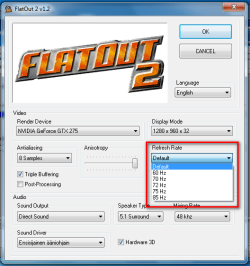
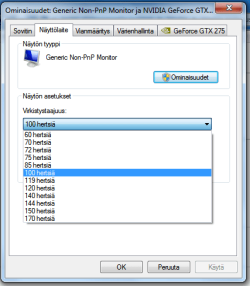
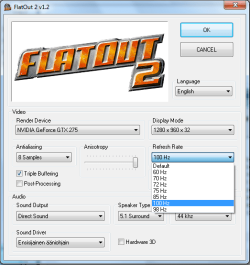
Becouse my English is what is it, I attach some pictures here. How you see, all settings seems to be OK, but at games highest refresh is still 85 Hz. I think I need to find way how to force monitor.inf or I didn't make it right.

EDIT:

I got it work!! There is one place where to **** up, when offering new own monitor.inf driver to your monitor. Control Panel/ System/ Device Manager/ Monitor, Generic Non-PnP monitor, right click "Upgrade device driver". Choose "Find driver from your own computer". Here is the place where I sucks and waste my time and hairs. Don't start browse here and offer your driver here, becouse Win7 say that it have already best driver etc. Choose below link "Choose device driver from this computer". No you see box, where is Generic Non-PnP Monitor and Generic PnP Monitor. Now you see button "Disk...". Press it browse to your own monitor.inf. Win7 pop up warning box etc. Now just reboot and you have your refresh rates on your games too.

Damn it I am happy now. I have wasted about this since first Win7 beta versions and therefore still used WinXP.
 

Attachments

  • FO2_game.png
    FO2_game.png
    31.4 KB · Views: 886
  • nVidia_Change_Resolution.png
    nVidia_Change_Resolution.png
    9 KB · Views: 865
  • nVidia_Properties.png
    nVidia_Properties.png
    13.9 KB · Views: 878
  • 100Hz!.png
    100Hz!.png
    29 KB · Views: 886
Last edited:

My Computer My Computer

At a glance

WinXP
OS
WinXP
Thank you! Finally Windows 7 can do what XP could!

:DThank you!!!:D

It was really pissing me off that Windows 7 wouldn't let me set anything other than 75Hz for my Sylvania F89 CRT. This was especially annoying because Battlefield 2 would not start at all unless the monitor supported 60Hz mode!

Following your guide to the letter, I was able to (rather easily) enable 1600x1200@60Hz mode for my display. I also unlocked resolutions up to 2048x1536@60Hz, since I knew from Windows XP that my monitor could handle them.

By the way, if anyone gets an obnoxious error in Phoenix on page 1 of Detailed Timings about how "Pixel Clock must be between 1000 and 655000", just ignore it. You can safely leave that value at 0, set to read-only mode, pick a different page, and go back to edit mode.
 

My Computer My Computer

At a glance

Windows 7 64-bitAMD Opteron 180: 2.4GHz dual-core2GB DDR400 2-3-2-5Geforce 8800GT 512MB
OS
Windows 7 64-bit
CPU
AMD Opteron 180: 2.4GHz dual-core
Motherboard
Gigabyte K8N-939-SLI
Memory
2GB DDR400 2-3-2-5
Graphics Card(s)
Geforce 8800GT 512MB
Sound Card
Creative X-Fi XtremeMusic
Monitor(s) Displays
Sylvania F89 CRT, Samsung 204B LCD
Screen Resolution
1600x1200
Hard Drives
Hitachi 1TB 7200rpm
Hitachi 1TB 7200rpm
Case
iCute
Cooling
lots of blinking fans
Keyboard
Precision Squared PSK-5700
Mouse
IntelliMouse Explorer 3.0
:DThank you!!!:D

It was really pissing me off that Windows 7 wouldn't let me set anything other than 75Hz for my Sylvania F89 CRT. This was especially annoying because Battlefield 2 would not start at all unless the monitor supported 60Hz mode!

Following your guide to the letter, I was able to (rather easily) enable 1600x1200@60Hz mode for my display. I also unlocked resolutions up to 2048x1536@60Hz, since I knew from Windows XP that my monitor could handle them.

By the way, if anyone gets an obnoxious error in Phoenix on page 1 of Detailed Timings about how "Pixel Clock must be between 1000 and 655000", just ignore it. You can safely leave that value at 0, set to read-only mode, pick a different page, and go back to edit mode.

Thanks. After all the research I did to come up with this guide I got mostly complaints. As a result I left this site and have only recently come back. I've also seen many of my techniques used for driver issues and such so I'm happy to have helped. I think Windows 7 is off and on it's way so thanks for all the fish!
 

My Computer My Computer

At a glance

El Capitan / Windows 10i7-4980HQ16GBIris 5200
Computer type
Laptop
Computer Manufacturer/Model Number
Apple
OS
El Capitan / Windows 10
CPU
i7-4980HQ
Memory
16GB
Graphics Card(s)
Iris 5200
Back
Top