force programs to connect through specific network?

rde

New member
Local time
1:02 PM
Messages
2
I have 2 networks available with internet access, one is my land line and the other is 3G.

So is there any way to force a program to always use the same network when it connects to the internet?

My end-game is to use the networks for different specific tasks.

Thanks in advance for any replies!
 

My Computer

Computer type
PC/Desktop
OS
Windows 7 Home Premium x64
CPU
Intel
Motherboard
MSI
Graphics Card(s)
nVidia
Browser
Chrome
To my knowledge it isn't possible unless third party applications are used :(.

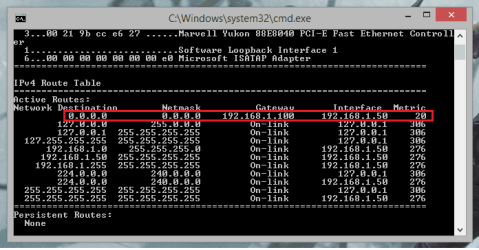
When faced with multiple interfaces the machine will first use the destination IP address in order to determine which interface to use. Normally this is used so that you can access machines that are in different subnets. In terms of the interent the machine will have a default route (0.0.0.0) which means if it is faced with an IP address that isn't on its LAN (Typically an internet IP address) the machine will forward the information to the router. In multiple interface environments you may have two default routes to different routers. In your case, one to the LAN wired connection and the other on the 3G connnection. If a machine is tied between two different routes it will use the metric to determine the best path to take. Normally a wired connection will have a lower (better) metric than a 3G connection so the machine will use that interface to connect to the internet.

routing table.png

The only possible way that I could think that this would work would be to either change the metric of the connection that you wish to use so that it is the lowest forcing your machine to use that connection or to disable any interfaces that you don't wish to use when connecting to the internet which will then force the machine to use the only possible router that it can communicate with.

Hopefully this will help explain how a machine determines what interface to use when faced with multiple connections to the internet and maybe someone knows a third party software solution to complete such task :(

Josh :)
 

My Computer

Computer type
PC/Desktop
Computer Manufacturer/Model Number
Custom Built
OS
Windows 7 Professional x64 SP1 ; Windows Server 2012 R2 Standard
CPU
Intel Core i5 2400 @ 3.10GHz
Motherboard
Foxconn H67MP-S/-V/H67MP
Memory
8.0GB DDR3 @ 665MHz (2GBx4)
Graphics Card(s)
AMD Radeon HD 6870
Sound Card
Realtek High Definition Audio
Monitor(s) Displays
AOC 2243W & SMB1930NW
Screen Resolution
1440x900 & 1920x1080
Hard Drives
977GB Seagate ST31000524AS ATA Drive (SATA)
250GB WD iSCSI attached Drive
PSU
750W Gaming PSU
Case
Novatech Night
Cooling
Fan
Keyboard
Dell Standard PS/2 Keyboard
Mouse
R.A.T 07 Gaming Mouse
Internet Speed
Download: 10 Mbps Ping: 30ms Upload: 0.81 Mbps
Browser
Google Chrome
Other Info
Optiarc DVD RW AD-5260S ATA Device
  • Like
Reactions: rde
I have 2 networks available with internet access, one is my land line and the other is 3G.

So is there any way to force a program to always use the same network when it connects to the internet?

My end-game is to use the networks for different specific tasks.

Thanks in advance for any replies!

There is software for this called Connectify Dispatch where you can combine the bandwidth of Ethernet or wifi plus 3 or 4G.

I'm not completely sure how the per program routing is handled by you should be able to configure it for this.

Connectify Dispatch - The Software Internet Load Balancer
 

My Computer

Computer type
PC/Desktop
Computer Manufacturer/Model Number
Home built
OS
Windows 7 Ult, Windows 8.1 Pro,
CPU
Q9650-4.275GHz, E8600 4.5GHz, E6750-3.8GHz
Motherboard
Evga 780i FTW
Memory
G.Skill PC2 9600 1200Mhz 5 5 5 15 2T
Graphics Card(s)
GTX480
Sound Card
Asus Xonar D2
Monitor(s) Displays
HannsG
Screen Resolution
1680X1050
Hard Drives
GSkill Phoenix Pro 120GB SSD
PSU
ThermalTake Toughpower 1000Watt modular
Case
ThermalTake XaserV
Cooling
Xigmatek S1283
Keyboard
Logitech G15
Mouse
Logitech G9
Internet Speed
T1
I have 2 networks available with internet access, one is my land line and the other is 3G.

So is there any way to force a program to always use the same network when it connects to the internet?

My end-game is to use the networks for different specific tasks.

Thanks in advance for any replies!

There is software for this called Connectify Dispatch where you can combine the bandwidth of Ethernet or wifi plus 3 or 4G.

I'm not completely sure how the per program routing is handled by you should be able to configure it for this.

Connectify Dispatch - The Software Internet Load Balancer

:thumbsup:

Good find! Will have to try it out myself :geek:
 

My Computer

Computer type
PC/Desktop
Computer Manufacturer/Model Number
Custom Built
OS
Windows 7 Professional x64 SP1 ; Windows Server 2012 R2 Standard
CPU
Intel Core i5 2400 @ 3.10GHz
Motherboard
Foxconn H67MP-S/-V/H67MP
Memory
8.0GB DDR3 @ 665MHz (2GBx4)
Graphics Card(s)
AMD Radeon HD 6870
Sound Card
Realtek High Definition Audio
Monitor(s) Displays
AOC 2243W & SMB1930NW
Screen Resolution
1440x900 & 1920x1080
Hard Drives
977GB Seagate ST31000524AS ATA Drive (SATA)
250GB WD iSCSI attached Drive
PSU
750W Gaming PSU
Case
Novatech Night
Cooling
Fan
Keyboard
Dell Standard PS/2 Keyboard
Mouse
R.A.T 07 Gaming Mouse
Internet Speed
Download: 10 Mbps Ping: 30ms Upload: 0.81 Mbps
Browser
Google Chrome
Other Info
Optiarc DVD RW AD-5260S ATA Device
I have 2 networks available with internet access, one is my land line and the other is 3G.

So is there any way to force a program to always use the same network when it connects to the internet?

My end-game is to use the networks for different specific tasks.

Thanks in advance for any replies!

There is software for this called Connectify Dispatch where you can combine the bandwidth of Ethernet or wifi plus 3 or 4G.

I'm not completely sure how the per program routing is handled by you should be able to configure it for this.

Connectify Dispatch - The Software Internet Load Balancer

:thumbsup:

Good find! Will have to try it out myself :geek:

To bad it costs a few bucks but I keep seeing people with 3G and another ISP connection asking for this type of software.

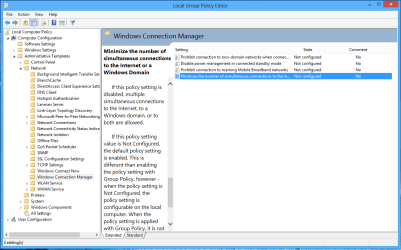
There are some Group Policy settings that allows the use of two connections at the same time but without this type of software I don't see how it would do any good.
 

Attachments

  • Group Policy for using two connections at once.PNG
    Group Policy for using two connections at once.PNG
    33.4 KB · Views: 7

My Computer

Computer type
PC/Desktop
Computer Manufacturer/Model Number
Home built
OS
Windows 7 Ult, Windows 8.1 Pro,
CPU
Q9650-4.275GHz, E8600 4.5GHz, E6750-3.8GHz
Motherboard
Evga 780i FTW
Memory
G.Skill PC2 9600 1200Mhz 5 5 5 15 2T
Graphics Card(s)
GTX480
Sound Card
Asus Xonar D2
Monitor(s) Displays
HannsG
Screen Resolution
1680X1050
Hard Drives
GSkill Phoenix Pro 120GB SSD
PSU
ThermalTake Toughpower 1000Watt modular
Case
ThermalTake XaserV
Cooling
Xigmatek S1283
Keyboard
Logitech G15
Mouse
Logitech G9
Internet Speed
T1
Aye, still it's something I didn't know was possible. It'd be interesting to see how it handles the difference in bandwidths.

As for the group policy, that's probably used in organisations to stop users evading proxy servers and firewalls when connecting to the internet however I can't be for sure and is just a rough guess.

Josh :)
 

My Computer

Computer type
PC/Desktop
Computer Manufacturer/Model Number
Custom Built
OS
Windows 7 Professional x64 SP1 ; Windows Server 2012 R2 Standard
CPU
Intel Core i5 2400 @ 3.10GHz
Motherboard
Foxconn H67MP-S/-V/H67MP
Memory
8.0GB DDR3 @ 665MHz (2GBx4)
Graphics Card(s)
AMD Radeon HD 6870
Sound Card
Realtek High Definition Audio
Monitor(s) Displays
AOC 2243W & SMB1930NW
Screen Resolution
1440x900 & 1920x1080
Hard Drives
977GB Seagate ST31000524AS ATA Drive (SATA)
250GB WD iSCSI attached Drive
PSU
750W Gaming PSU
Case
Novatech Night
Cooling
Fan
Keyboard
Dell Standard PS/2 Keyboard
Mouse
R.A.T 07 Gaming Mouse
Internet Speed
Download: 10 Mbps Ping: 30ms Upload: 0.81 Mbps
Browser
Google Chrome
Other Info
Optiarc DVD RW AD-5260S ATA Device

My Computer

Computer type
PC/Desktop
Computer Manufacturer/Model Number
Home built
OS
Windows 7 Ult, Windows 8.1 Pro,
CPU
Q9650-4.275GHz, E8600 4.5GHz, E6750-3.8GHz
Motherboard
Evga 780i FTW
Memory
G.Skill PC2 9600 1200Mhz 5 5 5 15 2T
Graphics Card(s)
GTX480
Sound Card
Asus Xonar D2
Monitor(s) Displays
HannsG
Screen Resolution
1680X1050
Hard Drives
GSkill Phoenix Pro 120GB SSD
PSU
ThermalTake Toughpower 1000Watt modular
Case
ThermalTake XaserV
Cooling
Xigmatek S1283
Keyboard
Logitech G15
Mouse
Logitech G9
Internet Speed
T1
Thank you all for the input, this topic has been very helpful. After having done some research and testing I ended up going with Shadowjk's first suggestion to change the metric values, it functions as a decent workaround for now because one of the program I'm currently running is actually able to use a network device exclusively, however a long term solution to my problem remains to be found.

Can't tell for sure if Connectify would have worked, I'm not quite prepared to invest so much into 3rd party software, but appreciate the link none the less.

Among other things I tried "ForceBindIP" freeware, but it only works with applications programmed with the windows socket API, so it was of little use to me right now.

If anyone stumbles upon this post in the future with new information please post it! :)

-rde
 

My Computer

Computer type
PC/Desktop
OS
Windows 7 Home Premium x64
CPU
Intel
Motherboard
MSI
Graphics Card(s)
nVidia
Browser
Chrome
Back
Top