Solved Foreign Characters/Characters appearing.

Fangus

New member
Local time
7:33 PM
Messages
16
Hi there. This is an odd problem, whenever certain characters are used ("^ are just some) then a letter is pressed foreign characters appear.
I.E
When I press
" Then O it comes up as Ö, instead of "O, and so on.
Does anyone have any ideas, on how this could be fixed. I've checked in the regional/language settings, and in the G15 control Panel.
Thanks
 

My Computer

OS
Windows 7 RC (x64)
CPU
Intel E8400 @3.5 Ghz
Motherboard
Asus P5KC
Memory
4GB DDR2
Graphics Card(s)
ATI Radeon 4850
Sound Card
Auzentech X-FI Prelude
Monitor(s) Displays
20" HANNSPREE LCD
Screen Resolution
1440X900
Keyboard
Logitech G15
Mouse
Razer Deathadder
I use English, German and Finnish keyboard layouts on a daily basis. Never had this kind of issue.

Could you please tell which language settings you are using?

Kari
 

My Computer

Computer type
Laptop
Computer Manufacturer/Model Number
HP ENVY 17-1150eg
OS
Windows 10 Pro x64 EN-GB
CPU
1.6 GHz Intel Core i7-720QM Processor
Memory
6 GB
Graphics Card(s)
ATI Mobility Radeon HD 5850 Graphics
Sound Card
Beats sound system with integrated subwoofer
Monitor(s) Displays
17" laptop display, 22" LED and 32" Full HD TV through HDMI
Screen Resolution
1600*900 (1), 1920*1080 (2&3)
Hard Drives
Internal: 2 x 500 GB SATA Hard Disk Drive 7200 rpm
External: 2TB for backups, 3TB USB3 network drive for media
Cooling
As Envy runs a bit warm, I have it on a Cooler Master pad
Keyboard
Logitech diNovo Media Desktop Laser (bluetooth)
Mouse
Logitech Performance Mouse MX
Internet Speed
50/10 Mbps VDSL
Antivirus
Windows Defender 4.3.9431.0
Browser
Maxthon 3.5.2., IE11
Keyboard is US-Internaional, Everything esle is UK English
 

My Computer

OS
Windows 7 RC (x64)
CPU
Intel E8400 @3.5 Ghz
Motherboard
Asus P5KC
Memory
4GB DDR2
Graphics Card(s)
ATI Radeon 4850
Sound Card
Auzentech X-FI Prelude
Monitor(s) Displays
20" HANNSPREE LCD
Screen Resolution
1440X900
Keyboard
Logitech G15
Mouse
Razer Deathadder
Weird. I'm writing this using English (United States) kb-layout, I can not reproduce your issue: "O, not Ö. I had to switch to Finnish kb-layout to produce the Ö.

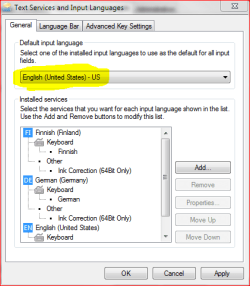
First place to start looking is to check English is you default keyboard layout.

kb.PNG

Kari
 

My Computer

Computer type
Laptop
Computer Manufacturer/Model Number
HP ENVY 17-1150eg
OS
Windows 10 Pro x64 EN-GB
CPU
1.6 GHz Intel Core i7-720QM Processor
Memory
6 GB
Graphics Card(s)
ATI Mobility Radeon HD 5850 Graphics
Sound Card
Beats sound system with integrated subwoofer
Monitor(s) Displays
17" laptop display, 22" LED and 32" Full HD TV through HDMI
Screen Resolution
1600*900 (1), 1920*1080 (2&3)
Hard Drives
Internal: 2 x 500 GB SATA Hard Disk Drive 7200 rpm
External: 2TB for backups, 3TB USB3 network drive for media
Cooling
As Envy runs a bit warm, I have it on a Cooler Master pad
Keyboard
Logitech diNovo Media Desktop Laser (bluetooth)
Mouse
Logitech Performance Mouse MX
Internet Speed
50/10 Mbps VDSL
Antivirus
Windows Defender 4.3.9431.0
Browser
Maxthon 3.5.2., IE11
Yup it's set to US-International, which is the layout of my keyboard, however when I set it to any UK keyboard set, the problem goes away, but obviously that's a complete different layout
 

My Computer

OS
Windows 7 RC (x64)
CPU
Intel E8400 @3.5 Ghz
Motherboard
Asus P5KC
Memory
4GB DDR2
Graphics Card(s)
ATI Radeon 4850
Sound Card
Auzentech X-FI Prelude
Monitor(s) Displays
20" HANNSPREE LCD
Screen Resolution
1440X900
Keyboard
Logitech G15
Mouse
Razer Deathadder
OK, I just tried setting all my regional settings to US, but that had no effect. Anyone else have any suggestions?
 

My Computer

OS
Windows 7 RC (x64)
CPU
Intel E8400 @3.5 Ghz
Motherboard
Asus P5KC
Memory
4GB DDR2
Graphics Card(s)
ATI Radeon 4850
Sound Card
Auzentech X-FI Prelude
Monitor(s) Displays
20" HANNSPREE LCD
Screen Resolution
1440X900
Keyboard
Logitech G15
Mouse
Razer Deathadder
Had a busy day at work, no time for SevenForums earlier.

Was just surfing and googling, trying to find an explanation. Only thing I found even remotely connected to your issue is a situation where user doesn't realize the the software (kb-layout) and hardware (keyboard) don't match. Happens to me all the time, my keyboard is German so when I type English and / or Finnish, I have to remember where certain characters really are because the layout don't match with the keyboard I'm using.

Back to topic: I really have no clue. I have tried to reproduce your issue, but it's a no go. Can't make that kind of typo.

I mention this thread to some of the more advanced members, maybe somebody knows something.

Kari
 

My Computer

Computer type
Laptop
Computer Manufacturer/Model Number
HP ENVY 17-1150eg
OS
Windows 10 Pro x64 EN-GB
CPU
1.6 GHz Intel Core i7-720QM Processor
Memory
6 GB
Graphics Card(s)
ATI Mobility Radeon HD 5850 Graphics
Sound Card
Beats sound system with integrated subwoofer
Monitor(s) Displays
17" laptop display, 22" LED and 32" Full HD TV through HDMI
Screen Resolution
1600*900 (1), 1920*1080 (2&3)
Hard Drives
Internal: 2 x 500 GB SATA Hard Disk Drive 7200 rpm
External: 2TB for backups, 3TB USB3 network drive for media
Cooling
As Envy runs a bit warm, I have it on a Cooler Master pad
Keyboard
Logitech diNovo Media Desktop Laser (bluetooth)
Mouse
Logitech Performance Mouse MX
Internet Speed
50/10 Mbps VDSL
Antivirus
Windows Defender 4.3.9431.0
Browser
Maxthon 3.5.2., IE11
Hi there. This is an odd problem, whenever certain characters are used ("^ are just some) then a letter is pressed foreign characters appear.
I.E
When I press
" Then O it comes up as Ö, instead of "O, and so on.
Does anyone have any ideas, on how this could be fixed. I've checked in the regional/language settings, and in the G15 control Panel.
Thanks

Fangus.

That is normal behavior.

ö "o

The ö is made like this:
shift+" then o = ö

shift+" then space, then o = "o

If you want to use the strange signs like " ^ ' etc,
and you don't want ö ô é

then you need to press space after the foreign sign.

greetings
 

My Computer

OS
Win7 Build 7600 x86
CPU
Pentium II 300MHz
Motherboard
Asus
Memory
32mb EDO RAM
Graphics Card(s)
Diamond Viper
Sound Card
Soundblaster 16
Monitor(s) Displays
14" AOC CRT 16K color
Screen Resolution
800x600
Hard Drives
300mb Quantum fireball
PSU
110 Watts
Cooling
Passive
Keyboard
Trust Ergonomic
Mouse
Generic
Internet Speed
256K u 128K d
Does this issue happen everywhere or only in Word, for example, what appears to be happening is that the software is automatically creating special characters.

This functionality is sometimes available as an option in word processors but I did not think it was available in windows 7 natively
 

My Computers

System One System Two

  • Computer type
    PC/Desktop
    Computer Manufacturer/Model Number
    ChillBlast - Custom to my design
    OS
    Windows 11 Pro x64 [Latest Release and Release Preview]
    CPU
    Ryzen 9 5950X, 3.8 - 5.2 MHz
    Motherboard
    Asus Prime X570-Pro
    Memory
    64GB [2 x 32GB] DDR4 3200MHz
    Graphics Card(s)
    4GB NVIDIA GEFORCE GTX 1650 Ti
    Sound Card
    On-board SPDIF to 5.1 System + HDMI [5.1 system]
    Monitor(s) Displays
    32" UHD 32 Bit HDR Monitor + 43" UHD 4K 32Bit HDR TV
    Screen Resolution
    2 x 3840 x 2160 @60Hz
    Hard Drives
    1TB M2 SSD OS, 500GB Fast Access SSD, 2 x 8TB Data + Various Externals from 1TB to 4TB, 10TB NAS
    PSU
    NZXT C750 80 PLUS Gold 750W Modular PSU
    Case
    Workstation Case [Matt Black]
    Cooling
    NZXT Kraken X63 280mm CPU Cooler +2x Quiet Case fans
    Keyboard
    Logitech Wireless MX Keys & K400 + others
    Mouse
    Logitech Wireless MX Master 3S
    Internet Speed
    920 MB Down 50 MB Up
    Antivirus
    BitDefender Total Security Pro
    Browser
    Chrome (always run latest Non-Beta)
    Other Info
    Also run ...
    Laptop - Quad 8GB - Windows 10 Pro x64
    Nexus 7 Android tablet x2
    Samsung 10.2" tablet
    Blackview TAB 8 4G Android Tablet c/w Keyboard
    Wacom Intuos Pro Medium Pen Pad
    Wacom Intuos Pro Small Pen Pad
    Wacom Expresskeys Remote
    Loopdeck+ Graphics Controller
    Shuttle Pro v2 Control
  • Computer type
    Laptop
    System Manufacturer/Model Number
    Dell XPS 17 10750H
    OS
    Windows 11 Pro x64 Latest RP
    CPU
    Intel I7 10750H 5.0GHz
    Motherboard
    Dell XPS
    Memory
    32GB [2x16GB] DDR4 2933 MHz
    Graphics Card(s)
    nVidia GTX1650Ti 4 GB GDDR6
    Sound Card
    Stock [Realtek] 4 Speaker
    Monitor(s) Displays
    17" IPS UHD+ Infinity Edge Touchscreen
    Screen Resolution
    3840 x 2400
    Hard Drives
    2TB M2 NVMe, 4TB External + various 500GB & 1TB External NVMe (also have access to spinner HDD from
    PSU
    Stock
    Case
    Stock XPS Aluminium & Carbon Fibre
    Cooling
    Stock - Active Fan Control
    Keyboard
    Backlit + Various Logitech
    Mouse
    Stock Track Pad + Logitech MX Trackball
    Internet Speed
    72 MB Down 18MB Up
    Browser
    Chrome
    Other Info
    Also run ...
    Laptop - Quad 8GB - Windows 10 Pro x64
    Nexus 7 Android tablet x2
    10.2" tablet
    Sony Z3 Android Smartphone
    Wacom Intuos Pro Medium Pen Pad
    Wacom Intuos Pro Small Pen Pad
    Wacom Expresskeys Remote
    Loopdeck+ Graphics Controller
    Shuttle Pro v2 Control Pad
    10TB NAS
Does this issue happen everywhere or only in Word, for example, what appears to be happening is that the software is automatically creating special characters.

This functionality is sometimes available as an option in word processors but I did not think it was available in windows 7 natively
Yup it happens everywhere.
Hi there. This is an odd problem, whenever certain characters are used ("^ are just some) then a letter is pressed foreign characters appear.
I.E
When I press
" Then O it comes up as Ö, instead of "O, and so on.
Does anyone have any ideas, on how this could be fixed. I've checked in the regional/language settings, and in the G15 control Panel.
Thanks

Fangus.

That is normal behavior.

ö "o

The ö is made like this:
shift+" then o = ö

shift+" then space, then o = "o

If you want to use the strange signs like " ^ ' etc,
and you don't want ö ô é

then you need to press space after the foreign sign.

greetings

Thanks, but this problem wasn't available from the start, and doesnt happen when I switch Keyboard layouts, do you know of anyway to switch it off, as it's annoying.
 

My Computer

OS
Windows 7 RC (x64)
CPU
Intel E8400 @3.5 Ghz
Motherboard
Asus P5KC
Memory
4GB DDR2
Graphics Card(s)
ATI Radeon 4850
Sound Card
Auzentech X-FI Prelude
Monitor(s) Displays
20" HANNSPREE LCD
Screen Resolution
1440X900
Keyboard
Logitech G15
Mouse
Razer Deathadder
Does this issue happen everywhere or only in Word, for example, what appears to be happening is that the software is automatically creating special characters.

This functionality is sometimes available as an option in word processors but I did not think it was available in windows 7 natively
Yup it happens everywhere.
Hi there. This is an odd problem, whenever certain characters are used ("^ are just some) then a letter is pressed foreign characters appear.
I.E
When I press
" Then O it comes up as Ö, instead of "O, and so on.
Does anyone have any ideas, on how this could be fixed. I've checked in the regional/language settings, and in the G15 control Panel.
Thanks

Fangus.

That is normal behavior.

ö "o

The ö is made like this:
shift+" then o = ö

shift+" then space, then o = "o

If you want to use the strange signs like " ^ ' etc,
and you don't want ö ô é

then you need to press space after the foreign sign.

greetings

Thanks, but this problem wasn't available from the start, and doesnt happen when I switch Keyboard layouts, do you know of anyway to switch it off, as it's annoying.

It's part of the US international keyboard.
We (the Dutch) use the US international by default. A Dutch keyboard doesn't exist anymore for many years.
We always use the foreign signs, since we are multilingual. :D

Chose the US keyboard, not the US international.
That should do the trick. (I hope)
 

My Computer

OS
Win7 Build 7600 x86
CPU
Pentium II 300MHz
Motherboard
Asus
Memory
32mb EDO RAM
Graphics Card(s)
Diamond Viper
Sound Card
Soundblaster 16
Monitor(s) Displays
14" AOC CRT 16K color
Screen Resolution
800x600
Hard Drives
300mb Quantum fireball
PSU
110 Watts
Cooling
Passive
Keyboard
Trust Ergonomic
Mouse
Generic
Internet Speed
256K u 128K d
Fangus, US-International keyboard setup is what is doing it.
I am in XP so not all that I will say might be precise, but I don't think it should be very different:
Control Panel -> Regional and Language options -> in input languages click "details" -> Installed services: Add US keyboard layout
At this point you will have US-International and US. Delete US-International. It will tell you it cannot do it now, but US will then be the default one and if you delete US-International again it shoudl disappear
I hope it was clear enough
 

My Computer

Computer Manufacturer/Model Number
Wally, Innc.
OS
Windows 7 x64 finally!
CPU
AMD Athlon II X2 240
Motherboard
Biostar TA790GX XE
Memory
OCZ Platinum 4GB DDR2 1066 (will not work past 800MHz)
Graphics Card(s)
MSI R4670-MD1G Radeon HD 4670 1GB 128-bit GDDR3
Sound Card
ATI High Definition Audio Device Realtek ALC888
Monitor(s) Displays
HP w19e
Screen Resolution
1440x900
Hard Drives
Western Digital Caviar Green WD5000AADS 500GB SATA
Western Digital Caviar Blue WD5000AAKS 500GB SATA
PSU
Athena Power Micro ATX 400W
Case
HEC 6T 6T10BB Black MicroATX Mini Tower
Cooling
stock
Keyboard
wired, many keys
Mouse
HP wireless, 2 buttons, 1 wheel
Internet Speed
DSL 2Mb (recently getting 1.65M!)
Fangus, US-International keyboard setup is what is doing it.
I am in XP so not all that I will say might be precise, but I don't think it should be very different:
Control Panel -> Regional and Language options -> in input languages click "details" -> Installed services: Add US keyboard layout
At this point you will have US-International and US. Delete US-International. It will tell you it cannot do it now, but US will then be the default one and if you delete US-International again it shoudl disappear
I hope it was clear enough

Copycat. :p

j/k :D
 

My Computer

OS
Win7 Build 7600 x86
CPU
Pentium II 300MHz
Motherboard
Asus
Memory
32mb EDO RAM
Graphics Card(s)
Diamond Viper
Sound Card
Soundblaster 16
Monitor(s) Displays
14" AOC CRT 16K color
Screen Resolution
800x600
Hard Drives
300mb Quantum fireball
PSU
110 Watts
Cooling
Passive
Keyboard
Trust Ergonomic
Mouse
Generic
Internet Speed
256K u 128K d
Does this issue happen everywhere or only in Word, for example, what appears to be happening is that the software is automatically creating special characters.

This functionality is sometimes available as an option in word processors but I did not think it was available in windows 7 natively
Yup it happens everywhere.
Fangus.

That is normal behavior.

ö "o

The ö is made like this:
shift+" then o = ö

shift+" then space, then o = "o

If you want to use the strange signs like " ^ ' etc,
and you don't want ö ô é

then you need to press space after the foreign sign.

greetings

Thanks, but this problem wasn't available from the start, and doesnt happen when I switch Keyboard layouts, do you know of anyway to switch it off, as it's annoying.

It's part of the US international keyboard.
We (the Dutch) use the US international by default. A Dutch keyboard doesn't exist anymore for many years.
We always use the foreign signs, since we are multilingual. :D

Chose the US keyboard, not the US international.
That should do the trick. (I hope)
That did it! Thank you very much!
 

My Computer

OS
Windows 7 RC (x64)
CPU
Intel E8400 @3.5 Ghz
Motherboard
Asus P5KC
Memory
4GB DDR2
Graphics Card(s)
ATI Radeon 4850
Sound Card
Auzentech X-FI Prelude
Monitor(s) Displays
20" HANNSPREE LCD
Screen Resolution
1440X900
Keyboard
Logitech G15
Mouse
Razer Deathadder
Yup it happens everywhere.


Thanks, but this problem wasn't available from the start, and doesnt happen when I switch Keyboard layouts, do you know of anyway to switch it off, as it's annoying.

It's part of the US international keyboard.
We (the Dutch) use the US international by default. A Dutch keyboard doesn't exist anymore for many years.
We always use the foreign signs, since we are multilingual. :D

Chose the US keyboard, not the US international.
That should do the trick. (I hope)
That did it! Thank you very much!

you're welcome.
 

My Computer

OS
Win7 Build 7600 x86
CPU
Pentium II 300MHz
Motherboard
Asus
Memory
32mb EDO RAM
Graphics Card(s)
Diamond Viper
Sound Card
Soundblaster 16
Monitor(s) Displays
14" AOC CRT 16K color
Screen Resolution
800x600
Hard Drives
300mb Quantum fireball
PSU
110 Watts
Cooling
Passive
Keyboard
Trust Ergonomic
Mouse
Generic
Internet Speed
256K u 128K d
Thank you very much guys - that solved the issue here as well!!! All the very best to you!!!
 

My Computer

OS
Win7 Ultimate 64bit
Back
Top