Solved Forgot Admin Password Please Help!

Alex999

New member
Local time
9:06 PM
Messages
6
I forgot the password to my admin user account and cant log in. I tried windows password key, konboot, and trinity rescue kit and none of them booted from disc. Then i went into bios and put the internal optical disk drive first and internal hard disk drive second. Still doesnt boot from disc . Does anyone know how to fix this problem?

Im using the Sony Vaio S series home premium 64bit vpcsc41fm
 

My Computer

OS
Windows 7 Home Premium 64bit
Trinity rescue disk can fix this.
 

My Computer

Computer Manufacturer/Model Number
HP C2N70UA#ABA Laptop
OS
Windows 8 64-bit (6.2, Build 9200) (9200.win8_rtm.120725-1247)
CPU
AMD Quad-Core A10-4600M APU 2.3Ghz Turbo to 3.4
Memory
8GB DDR3
Graphics Card(s)
AMD Radeon HD 7660G
Sound Card
Altec Lansing with SRS Premium Sound
Monitor(s) Displays
17" Laptop HD Display (720p)
Screen Resolution
1600*900
Hard Drives
750GB (5400 RPM), with smart protect
Western Digital 1TB Passport
Cooling
HP Cool Sense
Keyboard
Island Style
Mouse
Logitech 625 Wireless
Internet Speed
30MBps
The software is not the problem man. All the software that i put up can fix the problem. My problem though is just getting my Vaio S series to boot the CD from the optical disc.
 

My Computer

OS
Windows 7 Home Premium 64bit
How in the world do you FORGET your password.

Are those discs retail ? Did you make them yourself ?
 

My Computer

Computer type
PC/Desktop
Computer Manufacturer/Model Number
Skylake Special #666
OS
Windows 10 Pro x64
CPU
Intel Core i7 6700K
Motherboard
Asus Sabertooth Z170 Mark 1
Memory
GSkill TridentZ RGB 16GB 3600 16-16-16-36
Graphics Card(s)
EVGA GTX 980 Ti SC x2
Sound Card
Realtek High Definition
Monitor(s) Displays
AOC G2460PG
Screen Resolution
1920 x 1080 144Hz
Hard Drives
Samsung 860 Pro 256GB, Seagate Barracuda 4TB x2
PSU
EVGA 1000 P2, EVGA White Custom Braided Cables
Case
Corsair Vengeance C70 Gunmetal Black
Cooling
Corsair H100i v2, Corsair ML120 x2, Thermal Grizzly Kryonaut
Keyboard
Logitech G910 Orion Spectrum
Mouse
Logitech G700s
Internet Speed
Verizon Fios Quantum Gateway 75/75
Antivirus
Windows Defender, Malwarebytes Free 3.8.3
Browser
Chrome
Other Info
Corsair SP120 x4, LG Blu-ray Drive, Durabrand HT-395 100 Watt Dolby Digital Amp, Corsair H2100 Wireless 7.1 Headset
did you save the setting after you changed it? the last BIOS tab should offer a "exit and save changes" option.

Another way is try placing the iso on a bootable usb stick and boot from that (YUMI is a good program to do that)
 

My Computer

Computer type
PC/Desktop
Computer Manufacturer/Model Number
custom built
OS
Win 7 Pro 64-bit 7601
CPU
AMD Phenom 9650 QuadCore, revision DR-B3
Motherboard
ASUS M4A78
Memory
5 GB yes I run 2x 2GB and 1x 1GB, different brand, spank me.
Graphics Card(s)
NVIDIA GeForce 9800 GT 512 Mb, unknown manufacturer.
Sound Card
Crappy Realtek Integrated Audio
Monitor(s) Displays
Fujitsu Siemens P19-3P
Screen Resolution
1280 x 1024 x 32 bits @ 60 Hz Oh yeah, 4:3 rocks!
Hard Drives
(1) MAXTOR S TM3320613AS SATA Disk Device (2) STM35004 18AS SATA Disk Device (3) TOSHIBA USB 2.5"-HDD
PSU
whatever, around 450w
Case
Scavenged from old company PC, 10+ years old
Cooling
CPU fan, GPU fan, case fan, nothing fancy
Keyboard
Microsoft, PS/2, white.
Mouse
Optical, logitec.
Internet Speed
effective max speeds: 70-ish kB/s down 30-ish kB/s up
Antivirus
Avira, free edition.
Browser
Firefox with FXChrome to make it look like Google Chrome :P
Other Info
Was discarded by previous owner due to "horrible performance".
Was running Win Xp from a IDE drive. Yeah. Was a pain.
SATA II drive and Win7 and it zips away! Yay!
did you save the setting after you changed it? the last BIOS tab should offer a "exit and save changes" option.

Another way is try placing the iso on a bootable usb stick and boot from that (YUMI is a good program to do that)

Yeah i did save the setting in bios. I tried booting from usb as well but i used a program called ISO to USB to no avail. In bios i also put the external device as the first device above internal hard disk and still nothing. Ive ban at it for 2 days with no solution :confused:
 

My Computer

OS
Windows 7 Home Premium 64bit
How in the world do you FORGET your password.

Are those discs retail ? Did you make them yourself ?

I made it two days before shutting off my computer so when i turned it on i was surprised by the password my self. And no i created those discs myself in order to get rid of the password.
 

My Computer

OS
Windows 7 Home Premium 64bit
try having the network boot in the first spot, then the removable device, then the cd reader, possibly leaving the hdd out of boot order.

I had some dumb bios that didn't boot anything from USB if network boot wasn't first, never had issues with cds, but it's worth a try.

I'd also try the "reset factory/optimal settings" or similar bios option. Also check if there are settings that prevent it from booting USBs or CDs (but you'll probably have already looked for this).
 

My Computer

Computer type
PC/Desktop
Computer Manufacturer/Model Number
custom built
OS
Win 7 Pro 64-bit 7601
CPU
AMD Phenom 9650 QuadCore, revision DR-B3
Motherboard
ASUS M4A78
Memory
5 GB yes I run 2x 2GB and 1x 1GB, different brand, spank me.
Graphics Card(s)
NVIDIA GeForce 9800 GT 512 Mb, unknown manufacturer.
Sound Card
Crappy Realtek Integrated Audio
Monitor(s) Displays
Fujitsu Siemens P19-3P
Screen Resolution
1280 x 1024 x 32 bits @ 60 Hz Oh yeah, 4:3 rocks!
Hard Drives
(1) MAXTOR S TM3320613AS SATA Disk Device (2) STM35004 18AS SATA Disk Device (3) TOSHIBA USB 2.5"-HDD
PSU
whatever, around 450w
Case
Scavenged from old company PC, 10+ years old
Cooling
CPU fan, GPU fan, case fan, nothing fancy
Keyboard
Microsoft, PS/2, white.
Mouse
Optical, logitec.
Internet Speed
effective max speeds: 70-ish kB/s down 30-ish kB/s up
Antivirus
Avira, free edition.
Browser
Firefox with FXChrome to make it look like Google Chrome :P
Other Info
Was discarded by previous owner due to "horrible performance".
Was running Win Xp from a IDE drive. Yeah. Was a pain.
SATA II drive and Win7 and it zips away! Yay!
Made what 2 days b4 ?

Discs could have not been prepared properly.

Drop in an install disc, restart, bring up the boot menu by pressing the proper Fkey, shown on boot screen.

Boot from the dvd drive.

See if the install disc will boot.
 

My Computer

Computer type
PC/Desktop
Computer Manufacturer/Model Number
Skylake Special #666
OS
Windows 10 Pro x64
CPU
Intel Core i7 6700K
Motherboard
Asus Sabertooth Z170 Mark 1
Memory
GSkill TridentZ RGB 16GB 3600 16-16-16-36
Graphics Card(s)
EVGA GTX 980 Ti SC x2
Sound Card
Realtek High Definition
Monitor(s) Displays
AOC G2460PG
Screen Resolution
1920 x 1080 144Hz
Hard Drives
Samsung 860 Pro 256GB, Seagate Barracuda 4TB x2
PSU
EVGA 1000 P2, EVGA White Custom Braided Cables
Case
Corsair Vengeance C70 Gunmetal Black
Cooling
Corsair H100i v2, Corsair ML120 x2, Thermal Grizzly Kryonaut
Keyboard
Logitech G910 Orion Spectrum
Mouse
Logitech G700s
Internet Speed
Verizon Fios Quantum Gateway 75/75
Antivirus
Windows Defender, Malwarebytes Free 3.8.3
Browser
Chrome
Other Info
Corsair SP120 x4, LG Blu-ray Drive, Durabrand HT-395 100 Watt Dolby Digital Amp, Corsair H2100 Wireless 7.1 Headset
try having the network boot in the first spot, then the removable device, then the cd reader, possibly leaving the hdd out of boot order.

I had some dumb bios that didn't boot anything from USB if network boot wasn't first, never had issues with cds, but it's worth a try.

I'd also try the "reset factory/optimal settings" or similar bios option. Also check if there are settings that prevent it from booting USBs or CDs (but you'll probably have already looked for this).

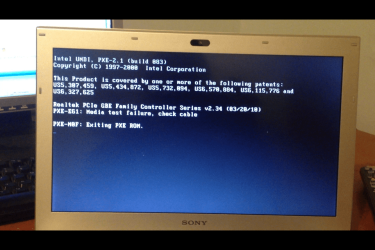
Yeah i did look into that. Anyways i put network boot as first and the result was a bit a different but at least we're getting somewhere for once. This is what came up after i followed your steps...
123.png
 

My Computer

OS
Windows 7 Home Premium 64bit
so network boot works (well, it tries to, but there is nothing for it to boot from on the network), yet it doesn't even consider booting from USB and DVD after it.

When you go in the BIOS screen about boot devices, do you see the actual device names or just generic names when the device is plugged in (for USB anyway, the CD drive is always in)?

The last try, most bioses do have a manual-ish available boot device selection option that you bring up by pressing a button while it is starting up, if you are fast enough you should see it listed in the initial screen, otherwise it's usually F10 or F12 or del or some other F-something key.
 

My Computer

Computer type
PC/Desktop
Computer Manufacturer/Model Number
custom built
OS
Win 7 Pro 64-bit 7601
CPU
AMD Phenom 9650 QuadCore, revision DR-B3
Motherboard
ASUS M4A78
Memory
5 GB yes I run 2x 2GB and 1x 1GB, different brand, spank me.
Graphics Card(s)
NVIDIA GeForce 9800 GT 512 Mb, unknown manufacturer.
Sound Card
Crappy Realtek Integrated Audio
Monitor(s) Displays
Fujitsu Siemens P19-3P
Screen Resolution
1280 x 1024 x 32 bits @ 60 Hz Oh yeah, 4:3 rocks!
Hard Drives
(1) MAXTOR S TM3320613AS SATA Disk Device (2) STM35004 18AS SATA Disk Device (3) TOSHIBA USB 2.5"-HDD
PSU
whatever, around 450w
Case
Scavenged from old company PC, 10+ years old
Cooling
CPU fan, GPU fan, case fan, nothing fancy
Keyboard
Microsoft, PS/2, white.
Mouse
Optical, logitec.
Internet Speed
effective max speeds: 70-ish kB/s down 30-ish kB/s up
Antivirus
Avira, free edition.
Browser
Firefox with FXChrome to make it look like Google Chrome :P
Other Info
Was discarded by previous owner due to "horrible performance".
Was running Win Xp from a IDE drive. Yeah. Was a pain.
SATA II drive and Win7 and it zips away! Yay!
Made what 2 days b4 ?

Discs could have not been prepared properly.

Drop in an install disc, restart, bring up the boot menu by pressing the proper Fkey, shown on boot screen.

Boot from the dvd drive.

See if the install disc will boot.

Don't have an install disk :cry: . The damn Vaio just wont boot from disc or usb.
 

My Computer

OS
Windows 7 Home Premium 64bit
How many accounts are on this computer? If more than one what are they?
 

My Computer

Computer type
PC/Desktop
Computer Manufacturer/Model Number
Home made Desktop
OS
Windows 10 Pro. 64/ version 1709 Windows 7 Pro/64
CPU
Intel i7-6800K @ 4.3
Motherboard
ASUS X-99 Deluxe II
Memory
Corsair Platinum 16 gig @2400
Graphics Card(s)
EVGA GTX 1070 OC
Monitor(s) Displays
Asus 27" LED LCD/VE278Q
Screen Resolution
1920-1080 or 1280-720 HDMI
Hard Drives
INTEL SSD 730-240 Gb Sata 3.0/
PSU
EVGA Platium 1200W
Case
Phanteks Luxe Tempered Glass 8 fans/ one radiator
Cooling
XSPC/ Water Cooled CPU
Keyboard
Das 4 Professional
Mouse
Logitech M705/MX Anywhere 2-S
Internet Speed
100 mbits
Antivirus
Microsoft Security Essentials/ Malwarebytes Premium 3.0/ SAS
Browser
I.E. 11 default/Firefox/ ISP Time Warner Cable/Spectrum
Other Info
LG BluRay Burner/
Sound system-KLipsch-THX/
Icy Dock ssd Hot Swap bays.
frankly, this seems like a BIOS issue of some kind (i.e. an issue of the machine, not of the software), as Win 7 has nothing to do with preventing boot of CDs or USB drives before it's even loaded.

Ask the customer support, since I think it's well into warranty and they should fix it for free.


If it's not under warranty, keep reading.

Another trick you can try (or maybe not as I suspect that its HDD isn't easily removable) is removing the hdd and placing it in another computer where the BIOS is more cooperative (disconnect all other hdds from it while doing this). Resetting passwords is just hacking a file without booting the Win7 in that disk, so it should run fine.
This won't fix the no-boot-from-CD-or-USB issues though.

The very very last thing I'd try to do is update the BIOS if possible without booting into win 7. If the BIOS was broken or buggy (the fact it does not boot from USB or CD could indicate that) this should fix it. Updating BIOS is pretty dangerous to do though, as if it goes wrong the machine is completely ruined (and someone has to desolder and replace a physical motherboard component to make it go again).

as a sidenote, there is some strong evidence that the BIOS may be crappy.
from their BIOS update utility I linked:

This utility updates the BIOS to resolve the following issues:
The computer intermittently does not charge the battery.
The computer may shutdown at random.
The computer may not resume from standby or hibernation
The computer may hang, freeze, (stop responding) or is unable to start Windows® after POST
Reduces fan noise
The computer may hang or freeze, (stop responding) during playback of a High Definition video while using battery power
The computer may display No Boot / No OS Found errors due to a failure in communication between the BIOS and the Hard Drive
Unable to login to the computer due to a critical battery message when starting Windows using battery power
Battery status shows as "Not present" when the battery is fully charged


I mean, did they code the BIOS overnight and forgot to test it before use? I could understand an e-machines or an Acer or some random foxconn, but an ultrabook with a BIOS like this? Really?

 

My Computer

Computer type
PC/Desktop
Computer Manufacturer/Model Number
custom built
OS
Win 7 Pro 64-bit 7601
CPU
AMD Phenom 9650 QuadCore, revision DR-B3
Motherboard
ASUS M4A78
Memory
5 GB yes I run 2x 2GB and 1x 1GB, different brand, spank me.
Graphics Card(s)
NVIDIA GeForce 9800 GT 512 Mb, unknown manufacturer.
Sound Card
Crappy Realtek Integrated Audio
Monitor(s) Displays
Fujitsu Siemens P19-3P
Screen Resolution
1280 x 1024 x 32 bits @ 60 Hz Oh yeah, 4:3 rocks!
Hard Drives
(1) MAXTOR S TM3320613AS SATA Disk Device (2) STM35004 18AS SATA Disk Device (3) TOSHIBA USB 2.5"-HDD
PSU
whatever, around 450w
Case
Scavenged from old company PC, 10+ years old
Cooling
CPU fan, GPU fan, case fan, nothing fancy
Keyboard
Microsoft, PS/2, white.
Mouse
Optical, logitec.
Internet Speed
effective max speeds: 70-ish kB/s down 30-ish kB/s up
Antivirus
Avira, free edition.
Browser
Firefox with FXChrome to make it look like Google Chrome :P
Other Info
Was discarded by previous owner due to "horrible performance".
Was running Win Xp from a IDE drive. Yeah. Was a pain.
SATA II drive and Win7 and it zips away! Yay!
For anyone reading this in the future:

Alex999 repped post 5 saying

I looked back and used YUMI and it got the job done through ubunta.
 

My Computer

Computer type
PC/Desktop
Computer Manufacturer/Model Number
custom built
OS
Win 7 Pro 64-bit 7601
CPU
AMD Phenom 9650 QuadCore, revision DR-B3
Motherboard
ASUS M4A78
Memory
5 GB yes I run 2x 2GB and 1x 1GB, different brand, spank me.
Graphics Card(s)
NVIDIA GeForce 9800 GT 512 Mb, unknown manufacturer.
Sound Card
Crappy Realtek Integrated Audio
Monitor(s) Displays
Fujitsu Siemens P19-3P
Screen Resolution
1280 x 1024 x 32 bits @ 60 Hz Oh yeah, 4:3 rocks!
Hard Drives
(1) MAXTOR S TM3320613AS SATA Disk Device (2) STM35004 18AS SATA Disk Device (3) TOSHIBA USB 2.5"-HDD
PSU
whatever, around 450w
Case
Scavenged from old company PC, 10+ years old
Cooling
CPU fan, GPU fan, case fan, nothing fancy
Keyboard
Microsoft, PS/2, white.
Mouse
Optical, logitec.
Internet Speed
effective max speeds: 70-ish kB/s down 30-ish kB/s up
Antivirus
Avira, free edition.
Browser
Firefox with FXChrome to make it look like Google Chrome :P
Other Info
Was discarded by previous owner due to "horrible performance".
Was running Win Xp from a IDE drive. Yeah. Was a pain.
SATA II drive and Win7 and it zips away! Yay!
Back
Top