
I was reading this :
http://www.sevenforums.com/performance-maintenance/117597-cannot-delete-active-system-partition.html
I noticed that somehow I installed win7pro on Disk 1 which is correct but booting up started with Disk 0 ... I just triple checked at BIOS boot setup ... PC has to start booting up on Disk 0 and then running Disk 1 as Win7Pro ... the old snail Win7pro was on Disk 2 and took that care of it ... done and formatted.
What I am asking is :
How do I get or move (I believe, it's the) "system" from Disk 0 to Disk 1, so I can boot up directly from Disk 1 and not Disk 0, so I can format Disk 0 and be done with it.
Fresh Win7Pro is on Disk 1 running live but it only can boot up thru Disk 0 first (gladly, I didnt kill that Disk 0 yet ... I believe this is correct ... If I killed that Disk 0 ... then my pc will be locked up and I will have to redo Win7Pro all over again and updating on a painful slow ATT's DSL (only internet connection here that is available) I do not want to go that direction.
I am ON Disk 1 running Fresh Win7Pro flawless and updated but only way to BOOTED up fresh Win7Pro is start with Disk 0.
Can you help ? Thank you.
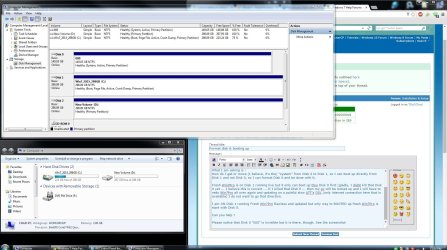
Please notice that Disk 0 "000" is invisible but it is there, though. See the screenshot.
http://www.sevenforums.com/performance-maintenance/117597-cannot-delete-active-system-partition.html
I noticed that somehow I installed win7pro on Disk 1 which is correct but booting up started with Disk 0 ... I just triple checked at BIOS boot setup ... PC has to start booting up on Disk 0 and then running Disk 1 as Win7Pro ... the old snail Win7pro was on Disk 2 and took that care of it ... done and formatted.
What I am asking is :
How do I get or move (I believe, it's the) "system" from Disk 0 to Disk 1, so I can boot up directly from Disk 1 and not Disk 0, so I can format Disk 0 and be done with it.
Fresh Win7Pro is on Disk 1 running live but it only can boot up thru Disk 0 first (gladly, I didnt kill that Disk 0 yet ... I believe this is correct ... If I killed that Disk 0 ... then my pc will be locked up and I will have to redo Win7Pro all over again and updating on a painful slow ATT's DSL (only internet connection here that is available) I do not want to go that direction.
I am ON Disk 1 running Fresh Win7Pro flawless and updated but only way to BOOTED up fresh Win7Pro is start with Disk 0.
Can you help ? Thank you.
Please notice that Disk 0 "000" is invisible but it is there, though. See the screenshot.
Attachments
My Computer
- Computer type
- PC/Desktop
- OS
- Win 7 Pro 32-bit

