Solved Format new HDD - quick or full ?

trinaz

New member
Member
VIP
Local time
1:21 PM
Messages
477
Location
Phoenix
When installing a new drive in Win 7 Pro 64bit...does it matter if you use quick format or the regular full format options ? Will windows automatically check the drive for errors and/or mark off bad clusters/sectors using quick format...or is it best to do an old fashion full format befor cloning an existing HDD to a newly purchased larger/faster HDD ?

Thanks, TR
 

My Computer

Computer type
PC/Desktop
Computer Manufacturer/Model Number
Self built
OS
Windows 7 Pro 64bit SP1
CPU
AMD FX-6100 Six-Core Processor
Motherboard
M5A78L-M LX PLUS
Memory
2ea Corsair-1333MHz-PC3-10666-240-pin-CMX4GX3M1A1333C9
Graphics Card(s)
NVIDIA GeForce GT 630 - 1023MB (EVGA)
Sound Card
OnBoard Via High Def Audio
Monitor(s) Displays
Samsung 204B main - ASUS VS228 secondary
Screen Resolution
1920x1080 main - 1920x1080 secondary
Hard Drives
Samsung SSD 840 128GB Win7 Pro 64bit - Western Digital WDC 465GB - Seagate 640GB Sata B/U - Maxtor 500GB Sata B/U - Maxtor 200GB Sata
PSU
Antec 650 watt
Cooling
Multiple case fans
Keyboard
MS USB dual Wireless Keyboard - IntelliType Pro
Mouse
MS USB dual Wireless Mouse - IntelliPoint
Internet Speed
Cox Cable
Antivirus
Bitdefender IS 2014
Browser
FireFox Primary - IE 11
Other Info
Hauppaguge Win TV HVR-1250 (Model 22xxx, Hybrid ATSC/QAM)
Samsung HD103SI USB 1TB Desktop Drive - Backup & Disk Image storage
1) With Full format, files are removed from the volume that you are formatting and the hard disk is scanned for bad sectors (Please note bad sectors are NOT repaired, only scanned). The scan for bad sectors is the reason why the Full format takes twice as long. With quick format, files are removed but the disk is not scanned for bad sectors. This option is best when your hard disk has been previously formatted and you are sure it is not damaged nor has bad sectors. So basically, a Full format scrubs the hard drive, rebuilds file structures, and scans the drive.

2) The format command behavior has changed in Windows Vista and win7. By default, the format command writes zeros to the whole disk when a full format is performed. In Windows XP and in earlier versions of the Windows operating system, the format command does not write zeros to the whole disk when a full format is performed.

3) For a brand-new unformatted hard drive, I would suggest a Full Format unless you're certain it has a clean slate and has no bad sectors. However, if you do format using Quick format, you can check your hard drive by using the chkdsk /r command afterwards.
 

My Computer

Computer Manufacturer/Model Number
Too many to describe...
OS
Windows 7 x64 pro/ Windows 7 x86 Pro/ XP SP3 x86
Yeah, what Bill2 said.

Also - a full reformat is going to ensure that the recording fidelity of the media is good. Detection of the bad sectors takes place at that time as well as a simple phyisical exercise of the media - all the sectors get recorded so you'll know the drive is in good working order when you're done.

-Max
 

My Computer

Computer Manufacturer/Model Number
Dell Inspiron 1545
OS
Windows 7 Ultimate
CPU
Intel Pentium dual-Core
Memory
4GB
a quick format resets the partition table, it does not remove any files at all.

once the partition table is reset, all sectors are flagged as writeable/empty and any data previously allocated under the previous partition table is overwritten.

Further, a full format does not write 0's and 1's, All format techniques available to windows are high level, this remains true with even windows vista and 7.
 

My Computer

OS
Windows 7
CPU
Core i7 920 D0
Motherboard
Rampage II Gene
Memory
Corsair Dominator 1600
Graphics Card(s)
Geforce GTX 275
Sound Card
Auzentech Prelude
Monitor(s) Displays
BenQ G2400WD
Screen Resolution
1920x1200
Hard Drives
WD AAKS 500GB
WD 1TB
Seagate 160GB
PSU
Corsair HX620
Case
NZXT Rogue
Cooling
TRUE Copper
Keyboard
Logitech G15
Internet Speed
Anywhere from 2.5 to 3.5mb
a quick format resets the partition table, it does not remove any files at all.

once the partition table is reset, all sectors are flagged as writeable/empty and any data previously allocated under the previous partition table is overwritten.

Further, a full format does not write 0's and 1's, All format techniques available to windows are high level, this remains true with even windows vista and 7.

Differences between a Quick format and a regular format during a "clean" installation of Windows XP

Change in the behavior of the format command in Windows Vista
 

My Computer

Computer Manufacturer/Model Number
Too many to describe...
OS
Windows 7 x64 pro/ Windows 7 x86 Pro/ XP SP3 x86
yeah, and i said 0 and 1's :P, which is typical low level / scramble format.
0's only is still a high level format technique.

that said, a proper low level format writes 1's across the entire drive then 0's which has the benefit of forcing a repair on bad sectors.

As for the quick format description.
Microsoft can TRY saying whatever they want, but i know how a quick format works, and its got nothing to do with removing files(on platter drives).
 

My Computer

OS
Windows 7
CPU
Core i7 920 D0
Motherboard
Rampage II Gene
Memory
Corsair Dominator 1600
Graphics Card(s)
Geforce GTX 275
Sound Card
Auzentech Prelude
Monitor(s) Displays
BenQ G2400WD
Screen Resolution
1920x1200
Hard Drives
WD AAKS 500GB
WD 1TB
Seagate 160GB
PSU
Corsair HX620
Case
NZXT Rogue
Cooling
TRUE Copper
Keyboard
Logitech G15
Internet Speed
Anywhere from 2.5 to 3.5mb
I suggest you do a quick format because a full format can take forever. Then run the cmd command chkdsk /f - that will fix possible bad sectors. In my experience this is a more efficient way to setup a new disk. Chances are high that there are no bad sectors.
 

My Computer

Computer Manufacturer/Model Number
HP, Dell, Gateway, Toshiba - 4 laptops and 2 desktops
OS
Vista, Windows7, Mint Mate, Zorin, Windows 8
CPU
from 1.6GHz Duo to i7
Monitor(s) Displays
2x HP w2207
Hard Drives
5x HDD, 7x SSD, 12x Externals
Keyboard
with trackball - no mices
Mouse
Trackball mice
Internet Speed
DSL 6000
When installing a new drive in Win 7 Pro 64bit...does it matter if you use quick format or the regular full format options ? Will windows automatically check the drive for errors and/or mark off bad clusters/sectors using quick format...or is it best to do an old fashion full format befor cloning an existing HDD to a newly purchased larger/faster HDD ?

Thanks, TR

Thanks all...should have mentioned this but didn't want to get too deep in on first question...

I also have Acronis (free version) which I have always used with working with Win 7...although I obviously have the MS options available.

Old drive is 500gb...new drive is 750gb. I thibnk the old 500gb took around 3 hours to format long/full.

Does it matter which I use (Win 7 or Acronis ) and there's bascially no difference betweeen full format and quick followed by checkdsk /f as far as verifying the intergrity of the drive before cloning to it ?

Thanks...
 

My Computer

Computer type
PC/Desktop
Computer Manufacturer/Model Number
Self built
OS
Windows 7 Pro 64bit SP1
CPU
AMD FX-6100 Six-Core Processor
Motherboard
M5A78L-M LX PLUS
Memory
2ea Corsair-1333MHz-PC3-10666-240-pin-CMX4GX3M1A1333C9
Graphics Card(s)
NVIDIA GeForce GT 630 - 1023MB (EVGA)
Sound Card
OnBoard Via High Def Audio
Monitor(s) Displays
Samsung 204B main - ASUS VS228 secondary
Screen Resolution
1920x1080 main - 1920x1080 secondary
Hard Drives
Samsung SSD 840 128GB Win7 Pro 64bit - Western Digital WDC 465GB - Seagate 640GB Sata B/U - Maxtor 500GB Sata B/U - Maxtor 200GB Sata
PSU
Antec 650 watt
Cooling
Multiple case fans
Keyboard
MS USB dual Wireless Keyboard - IntelliType Pro
Mouse
MS USB dual Wireless Mouse - IntelliPoint
Internet Speed
Cox Cable
Antivirus
Bitdefender IS 2014
Browser
FireFox Primary - IE 11
Other Info
Hauppaguge Win TV HVR-1250 (Model 22xxx, Hybrid ATSC/QAM)
Samsung HD103SI USB 1TB Desktop Drive - Backup & Disk Image storage
use win7, i've heard of some issues with acronis created partitions on windows 7.
 

My Computer

OS
Windows 7
CPU
Core i7 920 D0
Motherboard
Rampage II Gene
Memory
Corsair Dominator 1600
Graphics Card(s)
Geforce GTX 275
Sound Card
Auzentech Prelude
Monitor(s) Displays
BenQ G2400WD
Screen Resolution
1920x1200
Hard Drives
WD AAKS 500GB
WD 1TB
Seagate 160GB
PSU
Corsair HX620
Case
NZXT Rogue
Cooling
TRUE Copper
Keyboard
Logitech G15
Internet Speed
Anywhere from 2.5 to 3.5mb
yeah, and i said 0 and 1's :P, which is typical low level / scramble format.
0's only is still a high level format technique.

that said, a proper low level format writes 1's across the entire drive then 0's which has the benefit of forcing a repair on bad sectors.

Real low level is done at the manufactorer. It is the process of creating the physical structure on the harddrive. It the old days on old drives you could also do this yourself.

Full format in modern Windows will overwrite each and every sector. This is different from xp and earlier.
 

My Computer

OS
Windows
another question on this issue....where/how do you run chkdsk /f after formating....?...do I run from within windows at the run command ?

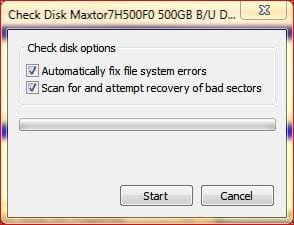
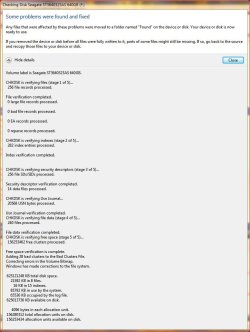
Is this different from checking both options on the Check Disk Options in windows under Properties/Tools ?

Thanks....
 

Attachments

  • chkdsk.jpg
    chkdsk.jpg
    18.2 KB · Views: 1,135
  • chkdsk2.jpg
    chkdsk2.jpg
    81 KB · Views: 71

My Computer

Computer type
PC/Desktop
Computer Manufacturer/Model Number
Self built
OS
Windows 7 Pro 64bit SP1
CPU
AMD FX-6100 Six-Core Processor
Motherboard
M5A78L-M LX PLUS
Memory
2ea Corsair-1333MHz-PC3-10666-240-pin-CMX4GX3M1A1333C9
Graphics Card(s)
NVIDIA GeForce GT 630 - 1023MB (EVGA)
Sound Card
OnBoard Via High Def Audio
Monitor(s) Displays
Samsung 204B main - ASUS VS228 secondary
Screen Resolution
1920x1080 main - 1920x1080 secondary
Hard Drives
Samsung SSD 840 128GB Win7 Pro 64bit - Western Digital WDC 465GB - Seagate 640GB Sata B/U - Maxtor 500GB Sata B/U - Maxtor 200GB Sata
PSU
Antec 650 watt
Cooling
Multiple case fans
Keyboard
MS USB dual Wireless Keyboard - IntelliType Pro
Mouse
MS USB dual Wireless Mouse - IntelliPoint
Internet Speed
Cox Cable
Antivirus
Bitdefender IS 2014
Browser
FireFox Primary - IE 11
Other Info
Hauppaguge Win TV HVR-1250 (Model 22xxx, Hybrid ATSC/QAM)
Samsung HD103SI USB 1TB Desktop Drive - Backup & Disk Image storage
.where/how do you run chkdsk /f after formating
You open an elevated Command Prompt (run as admin) , type chkdsk /f and hit Enter. Command Prompt you find in Start > All Programs > Accessories.
 

My Computer

Computer Manufacturer/Model Number
HP, Dell, Gateway, Toshiba - 4 laptops and 2 desktops
OS
Vista, Windows7, Mint Mate, Zorin, Windows 8
CPU
from 1.6GHz Duo to i7
Monitor(s) Displays
2x HP w2207
Hard Drives
5x HDD, 7x SSD, 12x Externals
Keyboard
with trackball - no mices
Mouse
Trackball mice
Internet Speed
DSL 6000
chckdsk /f does not scan for bad sectors. chkdsk /r does. /f does file level consistency checks, not sector level. That is why it is much faster.

If you do a quick format followed by a chkdsk /f, as suggested, the chkdsk does basically nothing since there are no files after the quick format.

Maybe the moderators won't delete this reply from me in this thread since I didn't say anything about MS.
 
Last edited:

My Computer

Computer type
PC/Desktop
Computer Manufacturer/Model Number
Home built (GeneO industries)/Model 4
OS
Windows 10 Pro. EFI boot partition, full EFI boot
CPU
i7 4770k 4.4GHz (44-44-43-43 turbo) @ 1.248V
Motherboard
ASUS Maximus VI Hero
Memory
16GB (8GBx2) @2200 MHz G.skill Sniper 10-11-10-30-1, 1.6V
Graphics Card(s)
MSI GTX 970 Gaming 4G
Sound Card
Onboard SupremeFX Audio
Monitor(s) Displays
NEC Spectraview 2490WUXi-SV
Screen Resolution
1920 x 1200
Hard Drives
Samsung 850 Pro 256GB (OS), Samsung 2x 128GB 840 Pro SSD in RAID0, 3x WD Blue 6Gb/s 1TB RAID0, WD 2TB Black external USB 3.0, 2TB WD20EARS Green external USB 3.0, 2x 500GB Seagate and 1 750 GB external USB, 1x 350GB external USB3
PSU
Seasonic X-850 (2012 KM3 model)
Case
Fractal Design Define R4
Cooling
NH-D14, NF-F12, NF-A15; NF-P14, NF-P12,NF-A14, S12A PWM
Keyboard
Cooler Master Storm Quickfire Rapid - Brown
Mouse
Logitech G602
Internet Speed
126.4 Mb/s down, 24.3 Mb/s up
Other Info
USB 3.0 x8 , SATA III x8, eSATA, USB 2.0 x6. Samsung DVD R/W drive.

WEI: CPU 7.8, Memory 7.9, Graphics 7.9, Disk 7.9
I was under the impression a quick format will wipe the partitioning table, and create a new one.
A full format will wipe the partitioning table, write zeros across the entire disk, then recreate the partion table.
So, when I need to recommission an old disk, I'd do a full format.
A brand new disk, sealed from the shop/factory would already be zero'd, so only needs a quick format.
 

My Computer

OS
Windows 7 Enterprise
CPU
Intel Pentium Dual E2200 @2.2GHz
Motherboard
Gigabyte II-G31
Memory
4GB
Graphics Card(s)
Palit GForce 9500GT 1GB
Sound Card
onBoard
Hard Drives
WesternDigital: 250GB + 1TB + 1TB + 2TB
PSU
450W
Case
CoolerMaster CM690
Cooling
Corsair H50
Mouse
Logitech MX518
I was under the impression a quick format will wipe the partitioning table, and create a new one.
A full format will wipe the partitioning table, write zeros across the entire disk, then recreate the partion table.
So, when I need to recommission an old disk, I'd do a full format.
A brand new disk, sealed from the shop/factory would already be zero'd, so only needs a quick format.

A full format also scans for bad sectors, which is something you probably want to do for a new disk. You don't want to start laying data down if you have any bad sectors.

Zeroing out is relatively new (vista) for added security.
 

My Computer

Computer type
PC/Desktop
Computer Manufacturer/Model Number
Home built (GeneO industries)/Model 4
OS
Windows 10 Pro. EFI boot partition, full EFI boot
CPU
i7 4770k 4.4GHz (44-44-43-43 turbo) @ 1.248V
Motherboard
ASUS Maximus VI Hero
Memory
16GB (8GBx2) @2200 MHz G.skill Sniper 10-11-10-30-1, 1.6V
Graphics Card(s)
MSI GTX 970 Gaming 4G
Sound Card
Onboard SupremeFX Audio
Monitor(s) Displays
NEC Spectraview 2490WUXi-SV
Screen Resolution
1920 x 1200
Hard Drives
Samsung 850 Pro 256GB (OS), Samsung 2x 128GB 840 Pro SSD in RAID0, 3x WD Blue 6Gb/s 1TB RAID0, WD 2TB Black external USB 3.0, 2TB WD20EARS Green external USB 3.0, 2x 500GB Seagate and 1 750 GB external USB, 1x 350GB external USB3
PSU
Seasonic X-850 (2012 KM3 model)
Case
Fractal Design Define R4
Cooling
NH-D14, NF-F12, NF-A15; NF-P14, NF-P12,NF-A14, S12A PWM
Keyboard
Cooler Master Storm Quickfire Rapid - Brown
Mouse
Logitech G602
Internet Speed
126.4 Mb/s down, 24.3 Mb/s up
Other Info
USB 3.0 x8 , SATA III x8, eSATA, USB 2.0 x6. Samsung DVD R/W drive.

WEI: CPU 7.8, Memory 7.9, Graphics 7.9, Disk 7.9
chckdsk /f does not scan for bad sectors. chkdsk /r does. /f does file level consistency checks, not sector level. That is why it is much faster.

If you do a quick format followed by a chkdsk /f, as suggested, the chkdsk does basically nothing since there are no files after the quick format.

Maybe the moderators won't delete this reply from me in this thread since I didn't say anything about MS.
You are right in so far as on a disk with a lot of data, the /R option is the better one because it attempts to recover the readable data. However, on an empty disk, the /F option is sufficient since it disables the bad sectors.
 

My Computer

Computer Manufacturer/Model Number
HP, Dell, Gateway, Toshiba - 4 laptops and 2 desktops
OS
Vista, Windows7, Mint Mate, Zorin, Windows 8
CPU
from 1.6GHz Duo to i7
Monitor(s) Displays
2x HP w2207
Hard Drives
5x HDD, 7x SSD, 12x Externals
Keyboard
with trackball - no mices
Mouse
Trackball mice
Internet Speed
DSL 6000
chckdsk /f does not scan for bad sectors. chkdsk /r does. /f does file level consistency checks, not sector level. That is why it is much faster.

If you do a quick format followed by a chkdsk /f, as suggested, the chkdsk does basically nothing since there are no files after the quick format.

Maybe the moderators won't delete this reply from me in this thread since I didn't say anything about MS.
You are right in so far as on a disk with a lot of data, the /R option is the better one because it attempts to recover the readable data. However, on an empty disk, the /F option is sufficient since it disables the bad sectors.

I believe you are wrong, sorry. On an empty disk /f does nothing as it does checking at the file/MFT level, which on an empty disk there is none.

/R on an empty disk does a lot - it checks every sector and repairs bad sectors - exactly like a full format does. how much is on a disk doesn't matter so much with /r - its purpose is a sector scan, but /r does include /f.
 

My Computer

Computer type
PC/Desktop
Computer Manufacturer/Model Number
Home built (GeneO industries)/Model 4
OS
Windows 10 Pro. EFI boot partition, full EFI boot
CPU
i7 4770k 4.4GHz (44-44-43-43 turbo) @ 1.248V
Motherboard
ASUS Maximus VI Hero
Memory
16GB (8GBx2) @2200 MHz G.skill Sniper 10-11-10-30-1, 1.6V
Graphics Card(s)
MSI GTX 970 Gaming 4G
Sound Card
Onboard SupremeFX Audio
Monitor(s) Displays
NEC Spectraview 2490WUXi-SV
Screen Resolution
1920 x 1200
Hard Drives
Samsung 850 Pro 256GB (OS), Samsung 2x 128GB 840 Pro SSD in RAID0, 3x WD Blue 6Gb/s 1TB RAID0, WD 2TB Black external USB 3.0, 2TB WD20EARS Green external USB 3.0, 2x 500GB Seagate and 1 750 GB external USB, 1x 350GB external USB3
PSU
Seasonic X-850 (2012 KM3 model)
Case
Fractal Design Define R4
Cooling
NH-D14, NF-F12, NF-A15; NF-P14, NF-P12,NF-A14, S12A PWM
Keyboard
Cooler Master Storm Quickfire Rapid - Brown
Mouse
Logitech G602
Internet Speed
126.4 Mb/s down, 24.3 Mb/s up
Other Info
USB 3.0 x8 , SATA III x8, eSATA, USB 2.0 x6. Samsung DVD R/W drive.

WEI: CPU 7.8, Memory 7.9, Graphics 7.9, Disk 7.9
This is from cmd chkdsk /? - But maybe I am reading it wrong.


/F Fixes errors on the disk.
/R Locates bad sectors and recovers readable information
(implies /F).
 

My Computer

Computer Manufacturer/Model Number
HP, Dell, Gateway, Toshiba - 4 laptops and 2 desktops
OS
Vista, Windows7, Mint Mate, Zorin, Windows 8
CPU
from 1.6GHz Duo to i7
Monitor(s) Displays
2x HP w2207
Hard Drives
5x HDD, 7x SSD, 12x Externals
Keyboard
with trackball - no mices
Mouse
Trackball mice
Internet Speed
DSL 6000
Yes, and indicates your mistake in your previous post. /f does not scan for bad sectors.
 

My Computer

Computer type
PC/Desktop
Computer Manufacturer/Model Number
Home built (GeneO industries)/Model 4
OS
Windows 10 Pro. EFI boot partition, full EFI boot
CPU
i7 4770k 4.4GHz (44-44-43-43 turbo) @ 1.248V
Motherboard
ASUS Maximus VI Hero
Memory
16GB (8GBx2) @2200 MHz G.skill Sniper 10-11-10-30-1, 1.6V
Graphics Card(s)
MSI GTX 970 Gaming 4G
Sound Card
Onboard SupremeFX Audio
Monitor(s) Displays
NEC Spectraview 2490WUXi-SV
Screen Resolution
1920 x 1200
Hard Drives
Samsung 850 Pro 256GB (OS), Samsung 2x 128GB 840 Pro SSD in RAID0, 3x WD Blue 6Gb/s 1TB RAID0, WD 2TB Black external USB 3.0, 2TB WD20EARS Green external USB 3.0, 2x 500GB Seagate and 1 750 GB external USB, 1x 350GB external USB3
PSU
Seasonic X-850 (2012 KM3 model)
Case
Fractal Design Define R4
Cooling
NH-D14, NF-F12, NF-A15; NF-P14, NF-P12,NF-A14, S12A PWM
Keyboard
Cooler Master Storm Quickfire Rapid - Brown
Mouse
Logitech G602
Internet Speed
126.4 Mb/s down, 24.3 Mb/s up
Other Info
USB 3.0 x8 , SATA III x8, eSATA, USB 2.0 x6. Samsung DVD R/W drive.

WEI: CPU 7.8, Memory 7.9, Graphics 7.9, Disk 7.9
Back
Top