Solved Format NTFS 500 Gb drive to FAT?

oldyeller38

oldyeller38
Local time
6:31 AM
Messages
31
Location
L:and-O-Lincoln
I just recently reformatted my computer with Windows 7 x64 Home Premium, then did the upgrade to Pro. Still got some programs yet to add, so my question is: I have an external 500 Gb Hdd formatted NTFS that shows 465.66 Gbs free space & I need 479.72 for a disk image wth Macrium. Can I format that drive as FAT & grain the needed space for the image or would it work if I could even do that?
 

My Computer My Computer

At a glance

windows 7 Premium 64 bitAMD HDT55TFBRBOX Phenom II 1055T Six Core Pro...Corsair CMX4GX3M1A1333C9 XMS3 8GB DDR3 RAM - ...MSI NVIDIA GeForce GT 610 2GB GDDR3 VGA/DVI/H...
Computer type
PC/Desktop
Computer Manufacturer/Model Number
bare bones from Tiger Direct
OS
windows 7 Premium 64 bit
CPU
AMD HDT55TFBRBOX Phenom II 1055T Six Core Processor - 2.80GH
Motherboard
GIGABYTE GA-M68MT-S2P nForce 630a Motherboard
Memory
Corsair CMX4GX3M1A1333C9 XMS3 8GB DDR3 RAM - PC10666, 1333MH
Graphics Card(s)
MSI NVIDIA GeForce GT 610 2GB GDDR3 VGA/DVI/HDMI Low Profile
Sound Card
SB wireless for i-tunes
Monitor(s) Displays
LG 32" LCD TV
Hard Drives
WD Caviar 500GB Serial ATA HD 7200/16MB/SATA-3G
WD5000AAKS DH (TSD-500AAKS)
Seagate Expansion USB 3.0 HDD-1TB
WD-My Passport 0748 USB 3.0 HDD-1TB
PSU
450W PSU
Case
DiabloTek CPA-0280 Elite ATX Mid Tower Case
Cooling
Thermo controlled 80mm case fan 1500-2500 rpm 31.85 cfm
Keyboard
YKB-LPW2-YUSB Keys-U-See wireless
Mouse
Logitech M-210 wireless
Internet Speed
100 MB
Antivirus
Kaspersky I.S. 2014 & Malwarebytes Anti-maleware
Browser
IE 11
Other Info
USB 3.0 card
SoundBlaster X-FI Xtreme Audio card &
SB for I-Tunes (R)
Canon MX-860 printer
I just recently reformatted my computer with Windows 7 x64 Home Premium, then did the upgrade to Pro. Still got some programs yet to add, so my question is: I have an external 500 Gb Hdd formatted NTFS that shows 465.66 Gbs free space & I need 479.72 for a disk image wth Macrium. Can I format that drive as FAT & grain the needed space for the image or would it work if I could even do that?

It's very very unlikely you need 479 GB for the Macrium image.

To calculate the approximate space required:

Decide which partitions are to be part of the disk image, presumably C and System Reserved.

Add up the occupied space on those partitions. How much is that?

The Macrium image would normally be 40 or 50 percent of that occupied space.

So--unless your occupied space is circa 1 TB, you wouldn't need 479.72 GB for the Macrium image. You can't calculate it exactly in advance regardless.
 

My Computer My Computer

At a glance

Windows 7 Home Premium SP1, 64-bitIntel Skylake i5-6600K, not overclocked8 GB HyperX DDR4-2666 (2 x 4 GB)none; graphics are integrated on CPU
Computer type
PC/Desktop
Computer Manufacturer/Model Number
Ignatz Special; 4 speed manual gearbox; factory air conditioning; one of one
OS
Windows 7 Home Premium SP1, 64-bit
CPU
Intel Skylake i5-6600K, not overclocked
Motherboard
AsRock Z170M Extreme 4, micro ATX
Memory
8 GB HyperX DDR4-2666 (2 x 4 GB)
Graphics Card(s)
none; graphics are integrated on CPU
Sound Card
onboard: Realtek ALC1150; external: USB Behringer UF0-202
Monitor(s) Displays
Dell S2340M 23 inch IPS
Screen Resolution
1600 x 900
Hard Drives
System: Crucial MX100 series SSD, 128 GB;
Data: Samsung Spinpoint 103SJ, 1 TB;
Backup: WD Caviar Green WD30EZRX-00D8PB0, 3 TB
PSU
Rosewill SilentNight 500 watt fanless, semi-modular
Case
Antec Solo II
Cooling
Noctua NH-U12S; Noctua F12 intake, Noctua S12A exhaust
Keyboard
Microsoft 200 6JH-00001 USB
Mouse
Dell or Microsoft optical wired; USB
Antivirus
Microsoft Security Essentials and Malwarebytes Premium
Browser
Pale Moon
Other Info
All fans PWM; speeds at idle: CPU circa 500 rpm; intake circa 600 rpm; exhaust circa 600 rpm; CPU temps 27 idle and 47 C load in a warm room (27 C/81 F) when running Intel Extreme Tuning Utility stress test.
Also FAT32 has a maximum file size limitation of 4GB.
 

My Computer My Computer

At a glance

Windows 10 Pro x64, Windows 8.1 Pro x64, Wind...INTEL i9-7920X LGA 206664 GB (4 X 16 GB) G-Skill V Series DDR4 3200 ...EVGA GTX 1060 SC 3 GB
Computer type
PC/Desktop
Computer Manufacturer/Model Number
Custom Built
OS
Windows 10 Pro x64, Windows 8.1 Pro x64, Windows 7 Ultimate x64 SP1,
CPU
INTEL i9-7920X LGA 2066
Motherboard
Gigabyte X299-WU8 F3
Memory
64 GB (4 X 16 GB) G-Skill V Series DDR4 3200 Quad Channel
Graphics Card(s)
EVGA GTX 1060 SC 3 GB
Sound Card
Realtek Onboard ALC1220
Monitor(s) Displays
2 x Samsung S27E310
Screen Resolution
1920x1080
Hard Drives
Samsung 2 x 970 EVO Plus 500 GB NVMe
1 x 6TB WD 6003FZBX SATA
1 x 6TB WD 60EFRX SATA
12 x 3TB WD 30EFRX SATA
PSU
Seasonic X-1050
Case
Thermaltake Armor+
Cooling
Corsair H80i V2 Liquid AOI Cooler
Keyboard
Logitech G510s
Mouse
Logitech MX Master 2S
Internet Speed
200 Mb/s
Antivirus
ESET NOD32 13.1
Browser
EDGE (Dev, Canary, Beta), Chrome
Other Info
ASUS RT-AC68U router
Malwarebytes 4.0.4
If you try it in Windows Disk Management you may not have a choice of FAT32. I just did a 250GB and found that to be true on Win7 so I booted to a GPARTED Live CD and did it there, no problem. I can't say if it will work with a 500GB.
 

My Computer My Computer

At a glance

Windows 7 Ultimate 64-bit, Windows 8.1 64-bit...
Computer type
PC/Desktop
Computer Manufacturer/Model Number
Customs, Dell, Gateway, HP, Toshiba, Acer, ASUS
OS
Windows 7 Ultimate 64-bit, Windows 8.1 64-bit, Mac OS X 10.10, Linux Mint 17, Windows 10 Pro TP
Keyboard
Microsoft
Mouse
Microsoft
I thank all of you for your replies. I just ordered a 2 Tb Hdd and will do a disk image to it, then install as my C drive. I have a 1Tb drive now and C partition is showing red while E is only showing 115 Gb's left.
 

My Computer My Computer

At a glance

windows 7 Premium 64 bitAMD HDT55TFBRBOX Phenom II 1055T Six Core Pro...Corsair CMX4GX3M1A1333C9 XMS3 8GB DDR3 RAM - ...MSI NVIDIA GeForce GT 610 2GB GDDR3 VGA/DVI/H...
Computer type
PC/Desktop
Computer Manufacturer/Model Number
bare bones from Tiger Direct
OS
windows 7 Premium 64 bit
CPU
AMD HDT55TFBRBOX Phenom II 1055T Six Core Processor - 2.80GH
Motherboard
GIGABYTE GA-M68MT-S2P nForce 630a Motherboard
Memory
Corsair CMX4GX3M1A1333C9 XMS3 8GB DDR3 RAM - PC10666, 1333MH
Graphics Card(s)
MSI NVIDIA GeForce GT 610 2GB GDDR3 VGA/DVI/HDMI Low Profile
Sound Card
SB wireless for i-tunes
Monitor(s) Displays
LG 32" LCD TV
Hard Drives
WD Caviar 500GB Serial ATA HD 7200/16MB/SATA-3G
WD5000AAKS DH (TSD-500AAKS)
Seagate Expansion USB 3.0 HDD-1TB
WD-My Passport 0748 USB 3.0 HDD-1TB
PSU
450W PSU
Case
DiabloTek CPA-0280 Elite ATX Mid Tower Case
Cooling
Thermo controlled 80mm case fan 1500-2500 rpm 31.85 cfm
Keyboard
YKB-LPW2-YUSB Keys-U-See wireless
Mouse
Logitech M-210 wireless
Internet Speed
100 MB
Antivirus
Kaspersky I.S. 2014 & Malwarebytes Anti-maleware
Browser
IE 11
Other Info
USB 3.0 card
SoundBlaster X-FI Xtreme Audio card &
SB for I-Tunes (R)
Canon MX-860 printer
You're welcome.
 

My Computer My Computer

At a glance

Windows 7 Ultimate 64-bit, Windows 8.1 64-bit...
Computer type
PC/Desktop
Computer Manufacturer/Model Number
Customs, Dell, Gateway, HP, Toshiba, Acer, ASUS
OS
Windows 7 Ultimate 64-bit, Windows 8.1 64-bit, Mac OS X 10.10, Linux Mint 17, Windows 10 Pro TP
Keyboard
Microsoft
Mouse
Microsoft
Since I had already composed my post - I am always slow.:) - here it goes anyway.

As ignatzatsonic said check Macrium Reflect and the maximum compression it would employ.(Usually imaging software allows you to set the compression level) From the compression level chosen you should be able to calculate the approximate image file size for the data size you want to image.

From your specs I see you have 2 1TB drives too. So what is the problem?

Coming to file size limitation that Pbcopter brought out, yes it is 4GB for FAT32. But again most imaging software will allow you to divide the image into 4GB chunks and so it shouldn't be a problem.

Check on the above facts.(I do not use macrium reflect)

If you are hellbent on storing the image into your 500GB drive then format it as FAT32 using FAT32Format Ridgecrop Consultants Ltd (Click on the picture to download the GUI Version) and see for yourself how much free space you get. Seeing is believing.:)
 

My Computer My Computer

At a glance

Windows 7 Home Premium 32 bit
OS
Windows 7 Home Premium 32 bit
I thank all of you for your replies. I just ordered a 2 Tb Hdd and will do a disk image to it, then install as my C drive. I have a 1Tb drive now and C partition is showing red while E is only showing 115 Gb's left.

Do you keep your personal data on C?

If you do, it's entirely possible that Windows is taking up maybe 100 GB, with your personal data taking up the rest of the occupied space.

If Windows and programs occupy 100 GB, then you'd need only maybe 45 GB for a Macrium image.

It's easy enough to keep Windows and applications on C and personal data on another partition entirely and not have that data partition be part of the Macrium image.
 

My Computer My Computer

At a glance

Windows 7 Home Premium SP1, 64-bitIntel Skylake i5-6600K, not overclocked8 GB HyperX DDR4-2666 (2 x 4 GB)none; graphics are integrated on CPU
Computer type
PC/Desktop
Computer Manufacturer/Model Number
Ignatz Special; 4 speed manual gearbox; factory air conditioning; one of one
OS
Windows 7 Home Premium SP1, 64-bit
CPU
Intel Skylake i5-6600K, not overclocked
Motherboard
AsRock Z170M Extreme 4, micro ATX
Memory
8 GB HyperX DDR4-2666 (2 x 4 GB)
Graphics Card(s)
none; graphics are integrated on CPU
Sound Card
onboard: Realtek ALC1150; external: USB Behringer UF0-202
Monitor(s) Displays
Dell S2340M 23 inch IPS
Screen Resolution
1600 x 900
Hard Drives
System: Crucial MX100 series SSD, 128 GB;
Data: Samsung Spinpoint 103SJ, 1 TB;
Backup: WD Caviar Green WD30EZRX-00D8PB0, 3 TB
PSU
Rosewill SilentNight 500 watt fanless, semi-modular
Case
Antec Solo II
Cooling
Noctua NH-U12S; Noctua F12 intake, Noctua S12A exhaust
Keyboard
Microsoft 200 6JH-00001 USB
Mouse
Dell or Microsoft optical wired; USB
Antivirus
Microsoft Security Essentials and Malwarebytes Premium
Browser
Pale Moon
Other Info
All fans PWM; speeds at idle: CPU circa 500 rpm; intake circa 600 rpm; exhaust circa 600 rpm; CPU temps 27 idle and 47 C load in a warm room (27 C/81 F) when running Intel Extreme Tuning Utility stress test.
That was a good suggestion by ignat. It is best done while installing Windows.Keeping the Windows OS exclusively in one partition and your data in other partitions will reduce the image size and result in faster imaging.

Next your other data should be copied and backed up one to one by other simple copy programs.I use Syncback for that. SyncBack Free Backup Software - freeware version

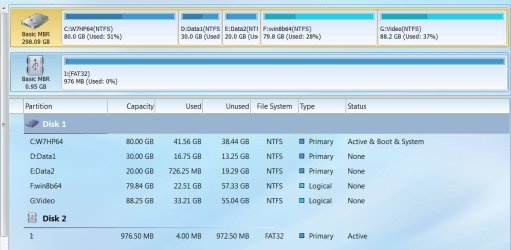
Screenshot showing my drive:

5-9-2015 1-48-50 PM.jpg
 

My Computer My Computer

At a glance

Windows 7 Home Premium 32 bit
OS
Windows 7 Home Premium 32 bit
A 465 GB is a 465 GB hard drive, you can`t make it any bigger.

You need to post the shot of disk management so we can see the drive layout.

all you should be concerned about is the C partition and the System Reserved partition (if you have one)
 

My Computer My Computer

At a glance

Windows 10 Pro x64Intel Core i7 6700KGSkill TridentZ RGB 16GB 3600 16-16-16-36EVGA GTX 980 Ti SC x2
Computer type
PC/Desktop
Computer Manufacturer/Model Number
Skylake Special #666
OS
Windows 10 Pro x64
CPU
Intel Core i7 6700K
Motherboard
Asus Sabertooth Z170 Mark 1
Memory
GSkill TridentZ RGB 16GB 3600 16-16-16-36
Graphics Card(s)
EVGA GTX 980 Ti SC x2
Sound Card
Realtek High Definition
Monitor(s) Displays
AOC G2460PG
Screen Resolution
1920 x 1080 144Hz
Hard Drives
Samsung 860 Pro 256GB, Seagate Barracuda 4TB x2
PSU
EVGA 1000 P2, EVGA White Custom Braided Cables
Case
Corsair Vengeance C70 Gunmetal Black
Cooling
Corsair H100i v2, Corsair ML120 x2, Thermal Grizzly Kryonaut
Keyboard
Logitech G910 Orion Spectrum
Mouse
Logitech G700s
Internet Speed
Verizon Fios Quantum Gateway 75/75
Antivirus
Windows Defender, Malwarebytes Free 3.8.3
Browser
Chrome
Other Info
Corsair SP120 x4, LG Blu-ray Drive, Durabrand HT-395 100 Watt Dolby Digital Amp, Corsair H2100 Wireless 7.1 Headset
C, D & E is the 1 Tb primary Hdd; G is an external drive.
 

Attachments

  • Hdd's0 May 09, 2015.jpg
    Hdd's0 May 09, 2015.jpg
    18.5 KB · Views: 12

My Computer My Computer

At a glance

windows 7 Premium 64 bitAMD HDT55TFBRBOX Phenom II 1055T Six Core Pro...Corsair CMX4GX3M1A1333C9 XMS3 8GB DDR3 RAM - ...MSI NVIDIA GeForce GT 610 2GB GDDR3 VGA/DVI/H...
Computer type
PC/Desktop
Computer Manufacturer/Model Number
bare bones from Tiger Direct
OS
windows 7 Premium 64 bit
CPU
AMD HDT55TFBRBOX Phenom II 1055T Six Core Processor - 2.80GH
Motherboard
GIGABYTE GA-M68MT-S2P nForce 630a Motherboard
Memory
Corsair CMX4GX3M1A1333C9 XMS3 8GB DDR3 RAM - PC10666, 1333MH
Graphics Card(s)
MSI NVIDIA GeForce GT 610 2GB GDDR3 VGA/DVI/HDMI Low Profile
Sound Card
SB wireless for i-tunes
Monitor(s) Displays
LG 32" LCD TV
Hard Drives
WD Caviar 500GB Serial ATA HD 7200/16MB/SATA-3G
WD5000AAKS DH (TSD-500AAKS)
Seagate Expansion USB 3.0 HDD-1TB
WD-My Passport 0748 USB 3.0 HDD-1TB
PSU
450W PSU
Case
DiabloTek CPA-0280 Elite ATX Mid Tower Case
Cooling
Thermo controlled 80mm case fan 1500-2500 rpm 31.85 cfm
Keyboard
YKB-LPW2-YUSB Keys-U-See wireless
Mouse
Logitech M-210 wireless
Internet Speed
100 MB
Antivirus
Kaspersky I.S. 2014 & Malwarebytes Anti-maleware
Browser
IE 11
Other Info
USB 3.0 card
SoundBlaster X-FI Xtreme Audio card &
SB for I-Tunes (R)
Canon MX-860 printer
What's on E?

What's on C other than Windows and apps?

A Macrium image of C and System Reserved should be roughly 230 to 250 GB.

A Macrium image of C, E, and System Reserved should be roughly 350 GB.

On the other hand, a Macrium image of Windows, applications, and System Reserved might take up as little as 30 or 40 GB. We don't know because we don't know how much of C is NOT Windows and apps.

Why do you need to include E in the image?

I think Paragon imaging (maybe Aomei also?) will allow you to EXCLUDE certain folders from your image. Sound like it might be useful to you if you can't or won't put personal data on its own partition.
 

My Computer My Computer

At a glance

Windows 7 Home Premium SP1, 64-bitIntel Skylake i5-6600K, not overclocked8 GB HyperX DDR4-2666 (2 x 4 GB)none; graphics are integrated on CPU
Computer type
PC/Desktop
Computer Manufacturer/Model Number
Ignatz Special; 4 speed manual gearbox; factory air conditioning; one of one
OS
Windows 7 Home Premium SP1, 64-bit
CPU
Intel Skylake i5-6600K, not overclocked
Motherboard
AsRock Z170M Extreme 4, micro ATX
Memory
8 GB HyperX DDR4-2666 (2 x 4 GB)
Graphics Card(s)
none; graphics are integrated on CPU
Sound Card
onboard: Realtek ALC1150; external: USB Behringer UF0-202
Monitor(s) Displays
Dell S2340M 23 inch IPS
Screen Resolution
1600 x 900
Hard Drives
System: Crucial MX100 series SSD, 128 GB;
Data: Samsung Spinpoint 103SJ, 1 TB;
Backup: WD Caviar Green WD30EZRX-00D8PB0, 3 TB
PSU
Rosewill SilentNight 500 watt fanless, semi-modular
Case
Antec Solo II
Cooling
Noctua NH-U12S; Noctua F12 intake, Noctua S12A exhaust
Keyboard
Microsoft 200 6JH-00001 USB
Mouse
Dell or Microsoft optical wired; USB
Antivirus
Microsoft Security Essentials and Malwarebytes Premium
Browser
Pale Moon
Other Info
All fans PWM; speeds at idle: CPU circa 500 rpm; intake circa 600 rpm; exhaust circa 600 rpm; CPU temps 27 idle and 47 C load in a warm room (27 C/81 F) when running Intel Extreme Tuning Utility stress test.

My Computer My Computer

At a glance

Windows 10 Pro x64Intel Core i7 6700KGSkill TridentZ RGB 16GB 3600 16-16-16-36EVGA GTX 980 Ti SC x2
Computer type
PC/Desktop
Computer Manufacturer/Model Number
Skylake Special #666
OS
Windows 10 Pro x64
CPU
Intel Core i7 6700K
Motherboard
Asus Sabertooth Z170 Mark 1
Memory
GSkill TridentZ RGB 16GB 3600 16-16-16-36
Graphics Card(s)
EVGA GTX 980 Ti SC x2
Sound Card
Realtek High Definition
Monitor(s) Displays
AOC G2460PG
Screen Resolution
1920 x 1080 144Hz
Hard Drives
Samsung 860 Pro 256GB, Seagate Barracuda 4TB x2
PSU
EVGA 1000 P2, EVGA White Custom Braided Cables
Case
Corsair Vengeance C70 Gunmetal Black
Cooling
Corsair H100i v2, Corsair ML120 x2, Thermal Grizzly Kryonaut
Keyboard
Logitech G910 Orion Spectrum
Mouse
Logitech G700s
Internet Speed
Verizon Fios Quantum Gateway 75/75
Antivirus
Windows Defender, Malwarebytes Free 3.8.3
Browser
Chrome
Other Info
Corsair SP120 x4, LG Blu-ray Drive, Durabrand HT-395 100 Watt Dolby Digital Amp, Corsair H2100 Wireless 7.1 Headset
Back
Top