format primary hard drive

fuzzytoad

New member
Local time
7:54 PM
Messages
5
Hey, I'm running 7 on a logical drive (I have windows xp on my primary, which I don't really want anymore). It should be alright if I just format my primary hard drive partition yeah? If not is there any alternative to completely overhauling my OS?
 

My Computer

OS
Windows 7
CPU
Intel Core i7-920
Motherboard
Rampage Gene II
Graphics Card(s)
ATI Radeon 5770
Hard Drives
Caviar Black 1tb
I THINK you could image the drive Windows 7 is on.....format and partition your drive and restore the image to where you need it.

Get a second opinion before you do this, but I think it should work.
 

My Computer

Computer Manufacturer/Model Number
Keeps changing - (Custom)
OS
Windows 7 Professional x64
CPU
Intel Core i7 860
Motherboard
Gigabyte GA-P55-UD4P
Memory
4GB DDR3 Mushkin 1600Mhz @ 7-8-7-20
Graphics Card(s)
MSI GTS250 1GB DDR3 Twin Frozr
Sound Card
Onboard realtek
Monitor(s) Displays
Samsung SyncMaster 24" P2450 + Samsung 20" 2033
Screen Resolution
1920 X 1080 and 1600 X 900 (#2 system 1440 X 900)
Hard Drives
Patriot Inferno 120GB SSD + 3 WD Blue 640GB drives
PSU
Corsair 750 HX Modular
Case
Lancool PC-K62
Cooling
Cooler Master TX3 CPU cooler and 4-140mm and 1-120mm case
Keyboard
Gigabyte USB keyboard
Mouse
Microsoft wireless laser mouse 5000
Internet Speed
7 Mb down 1.5 up
Other Info
System #2: AMD Phenom II X6 1055T (Freezer 7 Pro cooler) - Gigabyte 880GMA-UD2H - WD 500GB Black - 9500GT (1GB) 500W OCZ modular PSU - Antec 200 case. System #3 (LapTop) Core 2 Duo T6670 - 320GB 7200RPM HD - 4GB DDR3 RAM.
If you are dual booting 7 and XP your boot loader is probably on the XP/primary drive. If you format it I think you will find that you can't boot into windows 7 any more. Is each OS on it's own hard drive or one hard drive with two partitions?
 

My Computer

Computer type
PC/Desktop
Computer Manufacturer/Model Number
Home Built
OS
Windows 10 Education 64 bit
CPU
AMD Phenom II X4 980 Black Edition Deneb 3.7GHz
Motherboard
Asus M4N68T-M V2 µATX Motherboard
Memory
8GB 4GBx2 Kingston PC10600 DDR3 1333 Memory
Graphics Card(s)
Zotac NVIDIA Geforce GT640 2 Gig DDR3 PCIe
Sound Card
VIA VT1708s High Definition Audio 8-channel Onboard
Monitor(s) Displays
22" LG E2242 1080p and 2 19" I-INC AG191D
Screen Resolution
1280x1024 - 1920x1080 - 1280x1024
Hard Drives
Crucial M100 256 GB SSD and 500 GB WD Blue SATA
PSU
Thermaltake TR 620
Case
Power Up Black ATX Mid-Tower Case
Cooling
Stock heatsink and fan
Keyboard
Logitech Wireless K350 Wave
Mouse
Logitech Wireless M570 Trackman Wheel
Internet Speed
80 Mbps Down 30 Mbps Up
Antivirus
Windows Defender
Browser
Internet Explorer 11
Other Info
HP DVD1040e Lightscribe - External USB2
If you are dual booting 7 and XP your boot loader is probably on the XP/primary drive. If you format it I think you will find that you can't boot into windows 7 any more. Is each OS on it's own hard drive or one hard drive with two partitions?

This is true, you will have to take care of that. EasyBCD should do it or there are other programs and methods you can use.
 

My Computer

Computer Manufacturer/Model Number
Keeps changing - (Custom)
OS
Windows 7 Professional x64
CPU
Intel Core i7 860
Motherboard
Gigabyte GA-P55-UD4P
Memory
4GB DDR3 Mushkin 1600Mhz @ 7-8-7-20
Graphics Card(s)
MSI GTS250 1GB DDR3 Twin Frozr
Sound Card
Onboard realtek
Monitor(s) Displays
Samsung SyncMaster 24" P2450 + Samsung 20" 2033
Screen Resolution
1920 X 1080 and 1600 X 900 (#2 system 1440 X 900)
Hard Drives
Patriot Inferno 120GB SSD + 3 WD Blue 640GB drives
PSU
Corsair 750 HX Modular
Case
Lancool PC-K62
Cooling
Cooler Master TX3 CPU cooler and 4-140mm and 1-120mm case
Keyboard
Gigabyte USB keyboard
Mouse
Microsoft wireless laser mouse 5000
Internet Speed
7 Mb down 1.5 up
Other Info
System #2: AMD Phenom II X6 1055T (Freezer 7 Pro cooler) - Gigabyte 880GMA-UD2H - WD 500GB Black - 9500GT (1GB) 500W OCZ modular PSU - Antec 200 case. System #3 (LapTop) Core 2 Duo T6670 - 320GB 7200RPM HD - 4GB DDR3 RAM.
Lots of alternatives.

Depends how many partitions you have and how big they are.

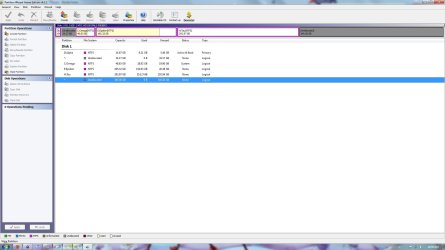
You could use the free Partition Wizard to convert the logical to Primary.

Make the 7 ( now Primary) into the "system " partition and then delete XP and copy 7 partition into that space, or use the Move/Resize function on a free partition manager to extend 7 partition into the space.

Or, make an image of the 7 partition - Macrium free is good for that - restore it to the current XP partition , selecting Active and Primary during the restore - then run startup repair from the 7 install dvd 3 times.

Post a screenie of your Disk Management window - and we can the easiest/best way:

http://www.sevenforums.com/tutorials/9733-how-post-screenshot-seven-forums.html
 

My Computers

System One System Two

  • Computer type
    PC/Desktop
    OS
    7 X64
    CPU
    i5 8400
    Motherboard
    gigabyte b365m ds3h
    Memory
    2x8gb 3200mhz
    Hard Drives
    various
    PSU
    pure power 11 400w cm
    Case
    Coolermaster
    Cooling
    cryorig m9i
  • Computer type
    PC/Desktop
    OS
    7x64
    CPU
    g5400
    Motherboard
    ga b365m ds3h
    Memory
    8gb ddr4 2400
    PSU
    xfx pro 450w
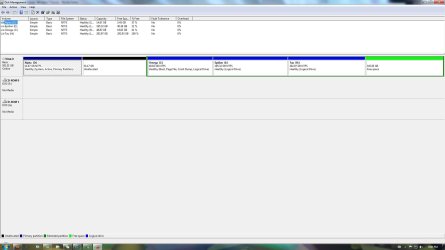
Here's a screen of my disk management. It's all on one hard drive. I'm booting off the C:drive right now, which is has my windows 7 and I want to delete the D drive which is active and boot right now. Thanks for the help.
 

Attachments

  • Untitled.jpg
    Untitled.jpg
    108.8 KB · Views: 405

My Computer

OS
Windows 7
CPU
Intel Core i7-920
Motherboard
Rampage Gene II
Graphics Card(s)
ATI Radeon 5770
Hard Drives
Caviar Black 1tb
To be honest that screen shot just confuses the hell out of me? :confused:
 

My Computer

Computer type
PC/Desktop
Computer Manufacturer/Model Number
Home Built
OS
Windows 10 Education 64 bit
CPU
AMD Phenom II X4 980 Black Edition Deneb 3.7GHz
Motherboard
Asus M4N68T-M V2 µATX Motherboard
Memory
8GB 4GBx2 Kingston PC10600 DDR3 1333 Memory
Graphics Card(s)
Zotac NVIDIA Geforce GT640 2 Gig DDR3 PCIe
Sound Card
VIA VT1708s High Definition Audio 8-channel Onboard
Monitor(s) Displays
22" LG E2242 1080p and 2 19" I-INC AG191D
Screen Resolution
1280x1024 - 1920x1080 - 1280x1024
Hard Drives
Crucial M100 256 GB SSD and 500 GB WD Blue SATA
PSU
Thermaltake TR 620
Case
Power Up Black ATX Mid-Tower Case
Cooling
Stock heatsink and fan
Keyboard
Logitech Wireless K350 Wave
Mouse
Logitech Wireless M570 Trackman Wheel
Internet Speed
80 Mbps Down 30 Mbps Up
Antivirus
Windows Defender
Browser
Internet Explorer 11
Other Info
HP DVD1040e Lightscribe - External USB2
Well here's an attachment using window's disk management, if it helps. What about it confuses you?

If it's about the names that's just because I got bored of the old "local disk" thing. They don't really mean anything. Omega (C: ) is the drive I'm booting off of, it has Windows 7 and its a logical. Alpha (D: ) has windows XP and it's the primary drive I'm trying to remove. All the other ones are just partitions I've made for media/programs etc.

There's an extra unallocated space separate from the rest of the free space. I don't know why that happened but I just resized my D drive since I didn't need all 50gb I allocated for it, and apparently they sequestered that bit of space (because it was cut from the primary drive I assume?).
 

Attachments

  • Untitled.jpg
    Untitled.jpg
    101 KB · Views: 109

My Computer

OS
Windows 7
CPU
Intel Core i7-920
Motherboard
Rampage Gene II
Graphics Card(s)
ATI Radeon 5770
Hard Drives
Caviar Black 1tb
You are not actually booting off of your C drive, you are booting off of your D drive. Actually we shouldn't be using drive letters and should be talking partitions. I bet if you boot up in XP and open disk management the drive letters will be different. The primary partition (the one you are booting from) will be C not D. The reality is you are booting off of the primary active partition, the one with XP on it. That is where the boot loader is. If you format it you will get a no operating system found error message.
 

My Computer

Computer type
PC/Desktop
Computer Manufacturer/Model Number
Home Built
OS
Windows 10 Education 64 bit
CPU
AMD Phenom II X4 980 Black Edition Deneb 3.7GHz
Motherboard
Asus M4N68T-M V2 µATX Motherboard
Memory
8GB 4GBx2 Kingston PC10600 DDR3 1333 Memory
Graphics Card(s)
Zotac NVIDIA Geforce GT640 2 Gig DDR3 PCIe
Sound Card
VIA VT1708s High Definition Audio 8-channel Onboard
Monitor(s) Displays
22" LG E2242 1080p and 2 19" I-INC AG191D
Screen Resolution
1280x1024 - 1920x1080 - 1280x1024
Hard Drives
Crucial M100 256 GB SSD and 500 GB WD Blue SATA
PSU
Thermaltake TR 620
Case
Power Up Black ATX Mid-Tower Case
Cooling
Stock heatsink and fan
Keyboard
Logitech Wireless K350 Wave
Mouse
Logitech Wireless M570 Trackman Wheel
Internet Speed
80 Mbps Down 30 Mbps Up
Antivirus
Windows Defender
Browser
Internet Explorer 11
Other Info
HP DVD1040e Lightscribe - External USB2
Use Partition Wizard - rt click the C drive and select Modify>Set as primary. Apply.

Then d/l this View attachment sispar.zip ( as usual, rt click, properties>unblock>apply>ok).

Unzip it and dble click on sispar.cmd. Select C as the system partition.

Hope it helps.
 
Last edited:

My Computers

System One System Two

  • Computer type
    PC/Desktop
    OS
    7 X64
    CPU
    i5 8400
    Motherboard
    gigabyte b365m ds3h
    Memory
    2x8gb 3200mhz
    Hard Drives
    various
    PSU
    pure power 11 400w cm
    Case
    Coolermaster
    Cooling
    cryorig m9i
  • Computer type
    PC/Desktop
    OS
    7x64
    CPU
    g5400
    Motherboard
    ga b365m ds3h
    Memory
    8gb ddr4 2400
    PSU
    xfx pro 450w
Back
Top