
Solved Format second hard drive

rftech

New member
Member
Local time
3:01 AM
Messages
43
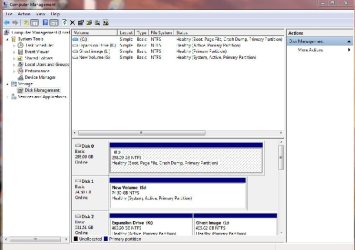
I am running Windows 7 64 bit, dual boot with Windows 8. Windows 7 is my my main OS and I setup with Windows 8 as dual boot. I no longer want Windows 8 or to dual boot. I went into msconfig, boot, removed Windows 8 from boot, left windows 7 as default. I tried to reformat the second drive, got message "Windows unable to complete format". I than changed the Drive Letter from J to S and tried to format again, got same message. What am I doing wrong or am I forgetting something. I am also including a screenshot of my Disk Manager.
 

Attachments
  • Disk Managment.jpg
    Disk Managment.jpg
    51.9 KB · Views: 11

My Computer

OS
Windows 7 pro
There are system files on the new volume and it is marked active. It has to be marked inactive before windows will let you format it. And you have to have a windows 7 installation dvd or a startup repair disc to run startup repair once you format the new volume. Make a system repair disc from windows 7 now, if you don`t have a W7 install DVD.

http://www.sevenforums.com/tutorials/197157-partition-mark-inactive.html

http://www.sevenforums.com/tutorials/2083-system-repair-disc-create.html

http://www.sevenforums.com/tutorials/71432-partition-mark-active.html

A better ( well different ) way to do the dual install would have been to unplug all other hard drives , then installed 8. You could then choose which operating system to boot with the bios.

Did you discover that windows 8 is terrible and not worth the effort ?
 

My Computer

Computer type
PC/Desktop
Computer Manufacturer/Model Number
Skylake Special #666
OS
Windows 10 Pro x64
CPU
Intel Core i7 6700K
Motherboard
Asus Sabertooth Z170 Mark 1
Memory
GSkill TridentZ RGB 16GB 3600 16-16-16-36
Graphics Card(s)
EVGA GTX 980 Ti SC x2
Sound Card
Realtek High Definition
Monitor(s) Displays
AOC G2460PG
Screen Resolution
1920 x 1080 144Hz
Hard Drives
Samsung 860 Pro 256GB, Seagate Barracuda 4TB x2
PSU
EVGA 1000 P2, EVGA White Custom Braided Cables
Case
Corsair Vengeance C70 Gunmetal Black
Cooling
Corsair H100i v2, Corsair ML120 x2, Thermal Grizzly Kryonaut
Keyboard
Logitech G910 Orion Spectrum
Mouse
Logitech G700s
Internet Speed
Verizon Fios Quantum Gateway 75/75
Antivirus
Windows Defender, Malwarebytes Free 3.8.3
Browser
Chrome
Other Info
Corsair SP120 x4, LG Blu-ray Drive, Durabrand HT-395 100 Watt Dolby Digital Amp, Corsair H2100 Wireless 7.1 Headset
The System boot files booting both OS's are on S.

Write or reinstate the System boot Files to C by marking C Active in Disk Mgmt: Partition - Mark as Active

Power down to unplug all other HD's, boot into Win7 DVD or System Repair Disk to run Startup Repair - Run up to 3 Separate Times until C starts and holds the System Active flags.

Afterwards plug back in the other HD's to wipe the old Win8 HD with Diskpart Clean Command , repartition in Disk Mgmt: Partition or Volume - Create New

Then mark K Inactive since only the OS drive should be marked Active: Partition - Mark as Inactive - Windows 7 Forums
 
Responce, Win 8

I dual booted with Windows 8 after I had already had Windows 7 on my computer for a while. I tried it for a while and with out touch screens or even a touch screen, I thought it was worse then 7. To me it was harder to get to the programs you wanted to run. I want to AddRam and Gregrocker for there response, they both supplied great solutions and I plan to use both. Thanks again, hope you guys had a good weekend, mine was a little hectic as I had my Autistic daughter, her mother and her sister both went to the coast for their birthday, they are twins.
 

My Computer

OS
Windows 7 pro
We`re always here, if you need more help. :)
 

My Computer

Computer type
PC/Desktop
Computer Manufacturer/Model Number
Skylake Special #666
OS
Windows 10 Pro x64
CPU
Intel Core i7 6700K
Motherboard
Asus Sabertooth Z170 Mark 1
Memory
GSkill TridentZ RGB 16GB 3600 16-16-16-36
Graphics Card(s)
EVGA GTX 980 Ti SC x2
Sound Card
Realtek High Definition
Monitor(s) Displays
AOC G2460PG
Screen Resolution
1920 x 1080 144Hz
Hard Drives
Samsung 860 Pro 256GB, Seagate Barracuda 4TB x2
PSU
EVGA 1000 P2, EVGA White Custom Braided Cables
Case
Corsair Vengeance C70 Gunmetal Black
Cooling
Corsair H100i v2, Corsair ML120 x2, Thermal Grizzly Kryonaut
Keyboard
Logitech G910 Orion Spectrum
Mouse
Logitech G700s
Internet Speed
Verizon Fios Quantum Gateway 75/75
Antivirus
Windows Defender, Malwarebytes Free 3.8.3
Browser
Chrome
Other Info
Corsair SP120 x4, LG Blu-ray Drive, Durabrand HT-395 100 Watt Dolby Digital Amp, Corsair H2100 Wireless 7.1 Headset
Back
Top