formating new HDD

soulfood

New member
Member
VIP
Local time
8:50 AM
Messages
180
hey, i want to format a new external 2 TB hard drive, will that get a virus? thanks
 

My Computer

Computer Manufacturer/Model Number
windows XP professional service pack 2
OS
XP windows Professional
CPU
intel core 2 Duo/ E8400 3.00 Ghz
Motherboard
Gigabyte EP355-DS3
Memory
3.50 GB
Graphics Card(s)
Gigabyte 512MB 8800GT
Sound Card
?
Monitor(s) Displays
HP 2159m
Hard Drives
C: 400GB
D: 80GB
G: 100GB
H: 300GB
PSU
?
Case
CoolerMaster Centurion CAC-TO5
Cooling
?
:confused:

Only if you download dodgy software to it, or visit disreputable sites...........but then so might your other disks in the computer.
 

My Computer

Computer type
PC/Desktop
Computer Manufacturer/Model Number
Golden Mk. I.4
OS
Windows 10 Pro x64 ; Xubuntu x64
CPU
Intel i7 860 @ 2.80 GHz O/C'ed to 4.0GHz
Motherboard
Gigabyte P55A-UD3R Rev.1. Award BIOS F13
Memory
16GB Corsair Vengance DDR3 @ 661 MHz Dual Channel (9-9-9-24)
Graphics Card(s)
EVGA NVidia GTX 560 1024MB
Sound Card
Realtek Integrated
Monitor(s) Displays
Dual Samsung SyncMaster 2494HS
Screen Resolution
1920*1080 and 1920*1080
Hard Drives
1*Samsung 840 EVO 120GB SSD;
1*OCZ Vertex 2 60GB SSD;
2*Samsung F3 SpinPoint 1TB in RAID0;
1*Samsung F1 SpinPoint 1TB;
2*Western Digital 1TB External USB 3.0
1*Western Digital 500GB External USB 3.0
1*Seagate 500GB External USB 2.0
PSU
Thermaltake ToughPower QFan 750W
Case
Thermaltake Element S VK60001W2Z
Cooling
Corsair H60 Water Cooling, 2*230mm and 2*80mm case fans
Keyboard
Logitech G110
Mouse
Logitech MX518
hey, i want to format a new external 2 TB hard drive, will that get a virus? thanks

The virus affects the operating system but can be stored in data files, emails attachments, executables, etc.... If you store an infected file on the external drive, the file will be infected, even if you move it to another system. The virus won't do anything though without an operating system to execute to infect.

Unplugging the external drive will only partially protect you. As soon as you connect it, a virus has the potential to spread itself to other files on the disk. Worth noting though is that most viruses tend to focus on the C:\ drive or for the more sophisticated virus it will use the %SYSTEM_HOME% variable (or others) to find where to install.:rolleyes:
 

My Computer

Computer Manufacturer/Model Number
Custom self assembled
OS
Windows 7 Ultimate x64
CPU
Intel Core i7 930
Motherboard
Gigabyte GA X58A UD7
Memory
Gskill 2x3 GB Ram
Graphics Card(s)
Sapphire ATI Radeon HD 5870
Monitor(s) Displays
LG 24MP88 24" LED Monitor
Screen Resolution
1920 X 1080
Hard Drives
Seagate barracuda 1 TB
PSU
Corsair GS 600W
Case
Cooler Master 690 II Plus
Cooling
Cooler Master Hyper 212X
Keyboard
Logitech G15 Gaming keyboard
Mouse
Logitech MX518 Gaming Mouse
Internet Speed
Broadband 50 Mbps speed [Hathway]
Other Info
Xbox 360 Wired Controller (x2)
AverMedia TV tuner Card [Internal]
Logitech HD C110 Web Camera
Netgear WGR614 Wireless-N 150 Router
Razer Goliathus Fragged Alpha Control Edition Mouse Pad
Well like Golden says ans Ali it could be anywhere and everywhere but if you want to isolate just that drive and make sure it alone is totally free then wipe it with either the DISKPART option or the Partition Wizard.

http://www.sevenforums.com/tutorials/52129-disk-clean-clean-all-diskpart-command.html

Partition Manager Server, server partition manager and partition magic server for Windows Server 2000/2003/2008. Server Partition software for Windows Server and None-Server partitions < free version
 

My Computer

Computer type
PC/Desktop
Computer Manufacturer/Model Number
Own build (new) Desk1 / Asus ROG Win 7 / Desk2 1st build
OS
Desk1 7 Home Prem / Desk2 10 Pro / Main lap Asus ROG 10 Pro 2 laptop Toshiba 7 Pro Asus P2520 7 & 10
CPU
Desk1 i5 3750K / Laptop i7 GTX 860M / Desk2 i5 2500
Motherboard
Desk1 Asus P877-V / Desk2 Gigabyte H67 UD3H / Laptop ?
Memory
Desk1 8GB (1866) / Desk2 16GB (1333) / Laptop 8Gb DDR3
Graphics Card(s)
Desk 1& 2NVidia GTX 650 & Laptops on board Intel
Sound Card
Desk 1 & 2 -XONAR DG Realtek High Def audio Laptop
Monitor(s) Displays
Desk 1 Benq HD 2450 / Desk2 Philips 24" / Laptop 17.5"
Screen Resolution
1920x1080 D1 & D2 & Laptop 1
Hard Drives
Desk1 Samsung 120GB 830 SSD
Asus ROG 256GB 850 Pro SSD
Desk2 Samsung 840 256 SSD
Toshiba 120GB EVO
PSU
Desk 1 Corsair HX 1050/ Laptop ? / Desk 2 Corsair HX 650
Case
Desk 1 Cooler HAF XM ? Toshiba laptop / Desk2 Coolermaster
Cooling
Fans on all Desk1 -2 Desk2 - all Coolermasters 5 Laptop ?
Keyboard
Desk 1 MS Sidewinder X6 Desk 2 MS Sidewinder X 4
Mouse
Desk 1&2 - Gigabyte MS 900 gamer - laptop - Logitec wireless
Internet Speed
ADSL2+
Other Info
One other Desktop (tester) and spare Toshba laptop both with SSD's
Running Kaspersky 2016 ISS on all machines config'd identically
Logitec audio stereo systems on each machine (x3)
Canon MG5250MFC
Router/modem TP-Link running WPA2SK
if i just connect the external Hard drive up, it should just know what to do , right? all i need to do is follow the prompts. correct?
 

My Computer

Computer Manufacturer/Model Number
windows XP professional service pack 2
OS
XP windows Professional
CPU
intel core 2 Duo/ E8400 3.00 Ghz
Motherboard
Gigabyte EP355-DS3
Memory
3.50 GB
Graphics Card(s)
Gigabyte 512MB 8800GT
Sound Card
?
Monitor(s) Displays
HP 2159m
Hard Drives
C: 400GB
D: 80GB
G: 100GB
H: 300GB
PSU
?
Case
CoolerMaster Centurion CAC-TO5
Cooling
?
You are using XP Pro with SP2. My first suggestion is to upgrade it straightaway to SP3.

That said when you format any drive it doesn't get a virus. On the other hand if it had any viruses earlier they shall get wiped out completely.

Good luck.
 

My Computer

Computer Manufacturer/Model Number
Custom Built
OS
Windows 7 Pro with SP1 32bit
Motherboard
Intel D845GVS1 X86-based PC
Memory
2 gigs of RAM
Graphics Card(s)
Intel(R) 82845G/GL/GE/PE/GV Graphics Controller
Sound Card
Realtek AC'97 Audio
Monitor(s) Displays
Samsung SyncMaster 931BF Black 19" LCD Monitor
Screen Resolution
1280X960
Hard Drives
1. SAMSUNG SP0822N ATA Device ~ 80 GigaBytes

2. Seagate FreeAgent Go USB Device ~ 500 GigaBytes
Keyboard
COMPAQ Standard PS/2 Keyboard
Mouse
iBall Laser Precise Speedster
Internet Speed
4 mb/sec
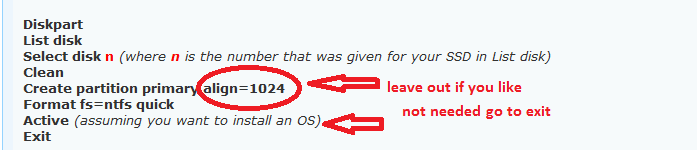
Yes if you are using the tutorials I qoted I personally wipe the drive with the Wizard and then format it with the DISKPART and I am sorry I quoted the wrong command prompt tutorial I use the one to format a SSD and it can be used as is except that just run to the part in the pic. You don't need to align as in that tutorial unless you are doing a SSD or want to the choice is yours.

http://www.sevenforums.com/tutorials/113967-ssd-alignment.html
 

Attachments

  • DISKp.PNG
    DISKp.PNG
    4.9 KB · Views: 4

My Computer

Computer type
PC/Desktop
Computer Manufacturer/Model Number
Own build (new) Desk1 / Asus ROG Win 7 / Desk2 1st build
OS
Desk1 7 Home Prem / Desk2 10 Pro / Main lap Asus ROG 10 Pro 2 laptop Toshiba 7 Pro Asus P2520 7 & 10
CPU
Desk1 i5 3750K / Laptop i7 GTX 860M / Desk2 i5 2500
Motherboard
Desk1 Asus P877-V / Desk2 Gigabyte H67 UD3H / Laptop ?
Memory
Desk1 8GB (1866) / Desk2 16GB (1333) / Laptop 8Gb DDR3
Graphics Card(s)
Desk 1& 2NVidia GTX 650 & Laptops on board Intel
Sound Card
Desk 1 & 2 -XONAR DG Realtek High Def audio Laptop
Monitor(s) Displays
Desk 1 Benq HD 2450 / Desk2 Philips 24" / Laptop 17.5"
Screen Resolution
1920x1080 D1 & D2 & Laptop 1
Hard Drives
Desk1 Samsung 120GB 830 SSD
Asus ROG 256GB 850 Pro SSD
Desk2 Samsung 840 256 SSD
Toshiba 120GB EVO
PSU
Desk 1 Corsair HX 1050/ Laptop ? / Desk 2 Corsair HX 650
Case
Desk 1 Cooler HAF XM ? Toshiba laptop / Desk2 Coolermaster
Cooling
Fans on all Desk1 -2 Desk2 - all Coolermasters 5 Laptop ?
Keyboard
Desk 1 MS Sidewinder X6 Desk 2 MS Sidewinder X 4
Mouse
Desk 1&2 - Gigabyte MS 900 gamer - laptop - Logitec wireless
Internet Speed
ADSL2+
Other Info
One other Desktop (tester) and spare Toshba laptop both with SSD's
Running Kaspersky 2016 ISS on all machines config'd identically
Logitec audio stereo systems on each machine (x3)
Canon MG5250MFC
Router/modem TP-Link running WPA2SK
Back
Top