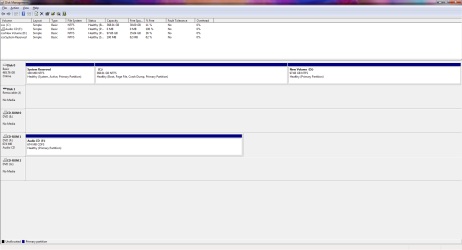
about 1 1/2 years ago, i was having BSOD issues...MS worked with me for a long time (KUDOS!!) Anyway...the cause of my problem was an overheated CPU due to the crappy stock fan INTEL sells you...
Very Long story short...MS formatted my HDD, I think it was just a "back up or dup installation"...and now I want my 90 gigs back and avail to me...how can i tell if W7 and everything is just duplicated on my disc or if I still need the formatting? It is called Drive D and I never seem to have to access it...
I hope this makes sense.
My Computer
Computer type
PC/Desktop
Computer Manufacturer/Model Number
custom
OS
Window 7 Pro Sp 1
CPU
Intel Core i5-4570 CPU @ 3.2Ghz
Motherboard
ASUS z87-PRO
Memory
2 x 4G Corsair
Graphics Card(s)
NVidia GTX 260 SC ed
Sound Card
On Board
Monitor(s) Displays
ACER x233H
Hard Drives
1 TB BLACK
PSU
Seasonic 850 80Plus GOLD
Case
Antec 900
Cooling
2 fwd fan 1 rear fan one top fan plus fans on CPU and GVA
You say you want 90 GB back and that you can't access the D drive.
Your second post implies you made an image file. Is it on the D drive? It's a way of restoring your PC to the way it was at the time the image was made. You don't need that image file to operate and you can delete it and reclaim the space--if that is what you want to do.
But I'm unclear on your situation.
More details or better explanation needed.
What is on the D drive? You may be able to delete it and add the space to C--if that is what you want to do.
A screen shot of your Disk Management window would probably help decipher the situation.
My Computer
Computer type
PC/Desktop
Computer Manufacturer/Model Number
Ignatz Special; 4 speed manual gearbox; factory air conditioning; one of one
OS
Windows 7 Home Premium SP1, 64-bit
CPU
Intel Skylake i5-6600K, not overclocked
Motherboard
AsRock Z170M Extreme 4, micro ATX
Memory
8 GB HyperX DDR4-2666 (2 x 4 GB)
Graphics Card(s)
none; graphics are integrated on CPU
Sound Card
onboard: Realtek ALC1150; external: USB Behringer UF0-202
Monitor(s) Displays
Dell S2340M 23 inch IPS
Screen Resolution
1600 x 900
Hard Drives
System: Crucial MX100 series SSD, 128 GB;
Data: Samsung Spinpoint 103SJ, 1 TB;
Backup: WD Caviar Green WD30EZRX-00D8PB0, 3 TB
Microsoft Security Essentials and Malwarebytes Premium
Browser
Pale Moon
Other Info
All fans PWM; speeds at idle: CPU circa 500 rpm; intake circa 600 rpm; exhaust circa 600 rpm; CPU temps 27 idle and 47 C load in a warm room (27 C/81 F) when running Intel Extreme Tuning Utility stress test.
On a side note, the Intel fans are rated and tested for the processors they ship with. If you had an overheating CPU, the HSF was either not installed properly, or the case itself was failing to properly cool the system.
OK...forget the fan issue...it was solved...the plastic clip was worn (cheap) and i bought a new fan and everything works fine now...
Back to D drive...Yes...I want the space back that is being called D drive...I want it back in my C drive...
Disc Management window? Unclear what that is exactly...
The Files on the D Drive are:
New Volume: (D)
WIndowsImageBackUp>
Stone-HOME>
Backup 2010-03-18 144458>
10 XML Docs 2 VHD files
Catalog>
Backup Global Catalog
Global Catalog
SPPMetadataCache>
File
My Computer
Computer type
PC/Desktop
Computer Manufacturer/Model Number
custom
OS
Window 7 Pro Sp 1
CPU
Intel Core i5-4570 CPU @ 3.2Ghz
Motherboard
ASUS z87-PRO
Memory
2 x 4G Corsair
Graphics Card(s)
NVidia GTX 260 SC ed
Sound Card
On Board
Monitor(s) Displays
ACER x233H
Hard Drives
1 TB BLACK
PSU
Seasonic 850 80Plus GOLD
Case
Antec 900
Cooling
2 fwd fan 1 rear fan one top fan plus fans on CPU and GVA
Microsoft Security Essentials and Malwarebytes Premium
Browser
Pale Moon
Other Info
All fans PWM; speeds at idle: CPU circa 500 rpm; intake circa 600 rpm; exhaust circa 600 rpm; CPU temps 27 idle and 47 C load in a warm room (27 C/81 F) when running Intel Extreme Tuning Utility stress test.
There is no personal data...it was created on mar 18 2010 and not touched since...all the "Date Midified" are the same.
Yes MS did it for me while truing to solve BSOD issues due to overheated PROC ( unknown at the time).
I tried to Prtsc...but nothing happened...
ALSO...Thank you for your time
My Computer
Computer type
PC/Desktop
Computer Manufacturer/Model Number
custom
OS
Window 7 Pro Sp 1
CPU
Intel Core i5-4570 CPU @ 3.2Ghz
Motherboard
ASUS z87-PRO
Memory
2 x 4G Corsair
Graphics Card(s)
NVidia GTX 260 SC ed
Sound Card
On Board
Monitor(s) Displays
ACER x233H
Hard Drives
1 TB BLACK
PSU
Seasonic 850 80Plus GOLD
Case
Antec 900
Cooling
2 fwd fan 1 rear fan one top fan plus fans on CPU and GVA
A printscreen won't magically cause a picture to appear in this thread.
You'd have to paste that printscreen into your photo editor. save the file, and then attach that file to your next post in this thread using "manage attachments" function.
No need to do that to the extent you have no personal data on D. Just delete the partition in Disk Management. Highlight it and look for "delete volume".
My Computer
Computer type
PC/Desktop
Computer Manufacturer/Model Number
Ignatz Special; 4 speed manual gearbox; factory air conditioning; one of one
OS
Windows 7 Home Premium SP1, 64-bit
CPU
Intel Skylake i5-6600K, not overclocked
Motherboard
AsRock Z170M Extreme 4, micro ATX
Memory
8 GB HyperX DDR4-2666 (2 x 4 GB)
Graphics Card(s)
none; graphics are integrated on CPU
Sound Card
onboard: Realtek ALC1150; external: USB Behringer UF0-202
Monitor(s) Displays
Dell S2340M 23 inch IPS
Screen Resolution
1600 x 900
Hard Drives
System: Crucial MX100 series SSD, 128 GB;
Data: Samsung Spinpoint 103SJ, 1 TB;
Backup: WD Caviar Green WD30EZRX-00D8PB0, 3 TB
Microsoft Security Essentials and Malwarebytes Premium
Browser
Pale Moon
Other Info
All fans PWM; speeds at idle: CPU circa 500 rpm; intake circa 600 rpm; exhaust circa 600 rpm; CPU temps 27 idle and 47 C load in a warm room (27 C/81 F) when running Intel Extreme Tuning Utility stress test.
Microsoft Security Essentials and Malwarebytes Premium
Browser
Pale Moon
Other Info
All fans PWM; speeds at idle: CPU circa 500 rpm; intake circa 600 rpm; exhaust circa 600 rpm; CPU temps 27 idle and 47 C load in a warm room (27 C/81 F) when running Intel Extreme Tuning Utility stress test.