formatting boot partition, single drive

20twins10

New member
Local time
8:30 PM
Messages
3
so i decided to finally put win7 onto my laptop. it was running xp of the main (c:/) and storage off the other half (d:/)

win7 DID infact install problem free to the main partition..

i'd like to format this partition and get rid of everything on that drive.. 60gig drive with 10gig free.. i need to leave the other partition alone as this is where all the backups remain. During the setup i was unable to select format c:/ and the system installed. booting into command prompt and attempting to format is useless.. a little lost at this poing. but glad i got it to even install. realy looking forward to running this.. time for a change.. much thanks..


Jeremy
 

My Computer

OS
win7

My Computer

Computer type
PC/Desktop
Computer Manufacturer/Model Number
Skylake Special #666
OS
Windows 10 Pro x64
CPU
Intel Core i7 6700K
Motherboard
Asus Sabertooth Z170 Mark 1
Memory
GSkill TridentZ RGB 16GB 3600 16-16-16-36
Graphics Card(s)
EVGA GTX 980 Ti SC x2
Sound Card
Realtek High Definition
Monitor(s) Displays
AOC G2460PG
Screen Resolution
1920 x 1080 144Hz
Hard Drives
Samsung 860 Pro 256GB, Seagate Barracuda 4TB x2
PSU
EVGA 1000 P2, EVGA White Custom Braided Cables
Case
Corsair Vengeance C70 Gunmetal Black
Cooling
Corsair H100i v2, Corsair ML120 x2, Thermal Grizzly Kryonaut
Keyboard
Logitech G910 Orion Spectrum
Mouse
Logitech G700s
Internet Speed
Verizon Fios Quantum Gateway 75/75
Antivirus
Windows Defender, Malwarebytes Free 3.8.3
Browser
Chrome
Other Info
Corsair SP120 x4, LG Blu-ray Drive, Durabrand HT-395 100 Watt Dolby Digital Amp, Corsair H2100 Wireless 7.1 Headset
Sorry for the confusion. I was getting tired at that point last night when i posted..

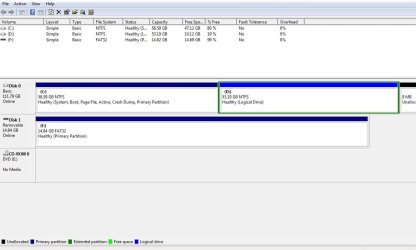
Here's a screenshot of the current drive setup.

Disk0 is split into the C & D partitions. C:/ being the boot drive, D:/ being storage
Disk1 is a miscrosd card in a usb adapter that I use for various file swapping from the laptop, pc tower and cell phones..

Disk0 C:/ is where Win7 is installed. This is the drive I'd like to format, and have Win7 on permanently. I'd just like to format it to get rid of all the old XP traces and program bits aswell.

Hope this made more sense.. Thanks for your time..
 

Attachments

  • screenshot.jpg
    screenshot.jpg
    56.9 KB · Views: 7

My Computer

OS
win7
If you didn't get access to the Drive Options shown in Steps 6/7 of Clean Install Windows 7
then you weren't correctly booting the installer to install Win7. Do that and you can format it first. How to Boot A Computer from CD or DVD - YouTube

If you will follow these same steps to get a perfect Clean Reinstall - Factory OEM Windows 7 then you'll get and keep a perfect install for as long as you stick with those tools and methods.

Study the option for syncing your data to the cloud or buy an external drive for backup since it is reckless to not have your data backed up at all times, especially during an install.
 
redoing the whole process again it seems to have allowed me to format that drive this time around. Last night it would not allow me to format it. my cd drive then and now is set to boot first.. But last night when I was in the drive options it wouldnt let me do anything to that partition.. Doing it again right now and this time it allowed me to click on the format option and now is copying files over..
 

My Computer

OS
win7
Let us know how it turns out.
 

My Computer

Computer type
PC/Desktop
Computer Manufacturer/Model Number
Skylake Special #666
OS
Windows 10 Pro x64
CPU
Intel Core i7 6700K
Motherboard
Asus Sabertooth Z170 Mark 1
Memory
GSkill TridentZ RGB 16GB 3600 16-16-16-36
Graphics Card(s)
EVGA GTX 980 Ti SC x2
Sound Card
Realtek High Definition
Monitor(s) Displays
AOC G2460PG
Screen Resolution
1920 x 1080 144Hz
Hard Drives
Samsung 860 Pro 256GB, Seagate Barracuda 4TB x2
PSU
EVGA 1000 P2, EVGA White Custom Braided Cables
Case
Corsair Vengeance C70 Gunmetal Black
Cooling
Corsair H100i v2, Corsair ML120 x2, Thermal Grizzly Kryonaut
Keyboard
Logitech G910 Orion Spectrum
Mouse
Logitech G700s
Internet Speed
Verizon Fios Quantum Gateway 75/75
Antivirus
Windows Defender, Malwarebytes Free 3.8.3
Browser
Chrome
Other Info
Corsair SP120 x4, LG Blu-ray Drive, Durabrand HT-395 100 Watt Dolby Digital Amp, Corsair H2100 Wireless 7.1 Headset
Back
Top