Formatting issues in Word

luxurymode

New member
Local time
11:25 PM
Messages
14
MS Office 2007 on Win 7.

Two issues/problems.

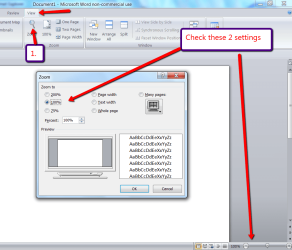
Every time I open a document, it displays two pages at a time. If I click to show only single page, it shrinks the document to a point where its too small to be readable. The only way I can really view one at a time is if I zoom in to 120%. I just want to view one page at a time at 100%.

Also, margins I have set (left, right, top, bottom) for other docs seems to be applying to documents I'm opening for the first time. How do I make it so that it opens docs with default formatting?
 

My Computer

OS
Windows 7 32 bit
In regard to your first question, generally speaking, the view of the Word page will automatically jump to 2 side-by-side pages at approximately 75%. Once you get much larger than that, it should revert to showing one page at a time, with the next page below it. Check your “Two Pages” icon (in the Ribbon) to see if it is enabled. If it is, uncheck it.

In regard to your second question, there are several possible explanations. The new document will open up in the format of the Normal template, so check the formatting section to make sure that your Normal template settings are what you want for your new docs, and don’t forget to click the link at the bottom of the formatting screen that says to apply the settings to either:
1. Only this document, or
2. New documents based on this template

If you wish to have each new doc to have different margins, you have to set them for each such document:
Click the Start orb, go into Word Options, Advanced and check:
1. Keep track of formatting.
2. Choose your Default paragraph style.
3. And at the very bottom of the screen, at the link entitled: Compatibility options for: select either This Document (Document’s Title) or All New Documents.
 

My Computer

Computer Manufacturer/Model Number
HP Pavillion dv5t (generation 1)
OS
Vista 64 bit and 32 bit (SP2)
CPU
Intel(R) Core(TM)2 Duo Processor T9400 (2.53 GHz
Memory
4GB DDR2 System Memory (2 Dimm)
Graphics Card(s)
512 MB NVIDIA GeForce 9600M GT
Monitor(s) Displays
15.4" diagonal WSXGA+ High-Definition HP BrightView Widescre
Screen Resolution
1680 x 1050
Hard Drives
320GB 5400RPM SATA Hard Drive with HP ProtectSmart Hard Drive Protection
Keyboard
Built-in HP
Mouse
Built in - Synaptics TouchPad V6.5 on PS/2 Port
Internet Speed
Max
Other Info
~ Intel Next-Gen Wireless-N Mini-card w/Bluetooth ~ Blu-Ray ROM DVD+/-R/RW ~ Integ. HDTV Hybrid Tuner ~ 12 Cell Battery ~ MS Office (Home Premium) 2007 ~
For your first problem, see picture
 

Attachments

  • 2011-01-05_2235.png
    2011-01-05_2235.png
    54.4 KB · Views: 15

My Computer

Computer Manufacturer/Model Number
HP, Dell, Gateway, Toshiba - 4 laptops and 2 desktops
OS
Vista, Windows7, Mint Mate, Zorin, Windows 8
CPU
from 1.6GHz Duo to i7
Monitor(s) Displays
2x HP w2207
Hard Drives
5x HDD, 7x SSD, 12x Externals
Keyboard
with trackball - no mices
Mouse
Trackball mice
Internet Speed
DSL 6000
Back
Top