Formatting Vista partition after installing Seven

More screenshots

It looks very promising.

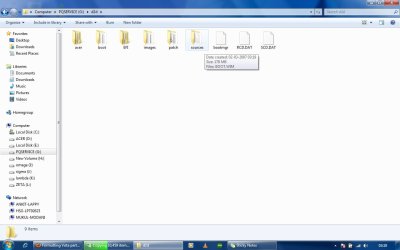
Have a look inside D2D, there maybe a.wim file. Post a screenie of the entire contents of D2D folder.

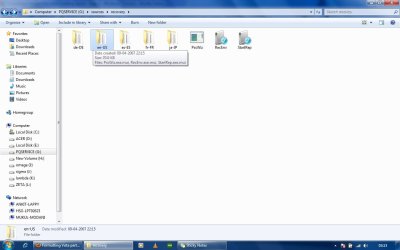
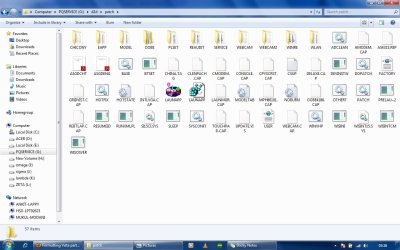
We need to see what is in the 2 folders obscured in your screenie on the right above.

Also , what is inside the Sources folder in the left screenshot above.

Pretty sure it can be done.

This is what the installation files typically look like.

View attachment 65805

I'm not sure how to show the entire contents (including files in subfolders if you mean). But I have attached the various screenshots. One is of the sources folder that you asked for (which is outside D2D), other than the recovery folder, all are empty. The other screenie is for the Patch folder which was obscured. The third is of the folder sources inside D2D and it contains a 178 MB .wim file. :)
 

Attachments

  • Sources.jpg
    Sources.jpg
    60 KB · Views: 15
  • Patch.jpg
    Patch.jpg
    98.5 KB · Views: 16
  • wim.jpg
    wim.jpg
    57.3 KB · Views: 15

My Computer My Computer

At a glance

Vista and Seven dual bootIntel Pentium Dual Core T2370 1.73GHz3GB DDR2 600MHzIntel x3100
Computer Manufacturer/Model Number
Acer Aspire 4715z
OS
Vista and Seven dual boot
CPU
Intel Pentium Dual Core T2370 1.73GHz
Memory
3GB DDR2 600MHz
Graphics Card(s)
Intel x3100
Hard Drives
Hitachi 120GB
Bootable CD required ?

Hi,

You can d/l this: View attachment 65355

Rt click and run as admin on sispar.cmd - select C when asked for partition and select N to adding existing boot menu entries.

Restart and C will be the "system" partition.

Boot the free Partition Wizard Bootable CD .

Rt click D ( vista) and delete. Ok and Apply.

Rt click the 7 partition, select Move/Resize . Grab the CENTRE of 7 partition and drag LEFT so the unallocated ( grey ) space you just created is on the RIGHT of 7 partition. OK and Apply.

Will take a few mins as the data on 7 partition needs to be moved.

You can then incorproate the unallocated space into E using Move/Resize.

That's it.

You may find if you mark Recovery partition Active, you will boot up the Acer recovery program.

You could also unhide the recov partition , give it a drive letter and add it to 7 boot menu.

Also, is PW bootable CD required to delete the Vista partition ? Can I do it with PW application itself on 7 ?
 

My Computer My Computer

At a glance

Vista and Seven dual bootIntel Pentium Dual Core T2370 1.73GHz3GB DDR2 600MHzIntel x3100
Computer Manufacturer/Model Number
Acer Aspire 4715z
OS
Vista and Seven dual boot
CPU
Intel Pentium Dual Core T2370 1.73GHz
Memory
3GB DDR2 600MHz
Graphics Card(s)
Intel x3100
Hard Drives
Hitachi 120GB
Hi,

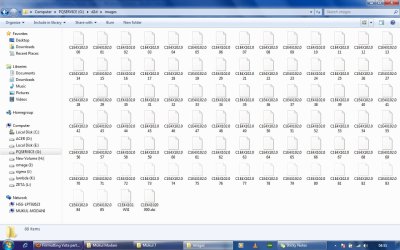
The last thing we need to know is what is inside the Images folder.

Click the Images folder to open it and post a screenie of the contents.

For the second question , after you have made 7 partition "system", it is possible to use PW from within Windows. However, it is more reliable- particularly for merging with unallocated space to the left- to use the boot disc.
 

My Computers My Computers

  • At a glance

    7 X64i5 84002x8gb 3200mhz
    Computer type
    PC/Desktop
    OS
    7 X64
    CPU
    i5 8400
    Motherboard
    gigabyte b365m ds3h
    Memory
    2x8gb 3200mhz
    Hard Drives
    various
    PSU
    pure power 11 400w cm
    Case
    Coolermaster
    Cooling
    cryorig m9i
  • At a glance

    7x64g54008gb ddr4 2400
    Computer type
    PC/Desktop
    OS
    7x64
    CPU
    g5400
    Motherboard
    ga b365m ds3h
    Memory
    8gb ddr4 2400
    PSU
    xfx pro 450w
One more screenie

Hi,

The last thing we need to know is what is inside the Images folder.

Click the Images folder to open it and post a screenie of the contents.

For the second question , after you have made 7 partition "system", it is possible to use PW from within Windows. However, it is more reliable- particularly for merging with unallocated space to the left- to use the boot disc.

There you go.
 

Attachments

  • Images.jpg
    Images.jpg
    118.1 KB · Views: 22

My Computer My Computer

At a glance

Vista and Seven dual bootIntel Pentium Dual Core T2370 1.73GHz3GB DDR2 600MHzIntel x3100
Computer Manufacturer/Model Number
Acer Aspire 4715z
OS
Vista and Seven dual boot
CPU
Intel Pentium Dual Core T2370 1.73GHz
Memory
3GB DDR2 600MHz
Graphics Card(s)
Intel x3100
Hard Drives
Hitachi 120GB
Si and AudGuy -

That EN-US file in Sources folder looks familar. Seems I recall a guy finding the install files in there to compile into bootable ISO to burn.

Of course, d2d also looks like most of the install files absent setup.

SIW2 may be the only guy out there who can put it together for you, if it can be.
 
Worth a look I suppose.

Those are split wim files - suggesting the rcovery discs are to be run off over numerous discs.

You can recombine them . Involves command prompt, then copy all neede folders and files to 7 partition and create a bootable .iso.

Another way is to reestablish the Acer alt+f10 startup into pqservice partition ,. Then use that to run off the recov discs as originally intended.

To do that, restart go into bios and under Main heading Disable the D2D recovery option , Save and exit.

Boot into 7 - use Paragon or similar to change pqservice partition from type 12 to 07 ntfs.

Next, open elevated cmd - type:

cd /d g:

then press enter

mbrwrdos.exe install rtmbr.bin

then press enter

close cmd prompt

Restart go back into Bios and Enable D2D recovery, Save and exit.

Should then be able to go into Acer recovery by using the alt+F10.

PQservice partition will need to be the Active partition.
 

My Computers My Computers

  • At a glance

    7 X64i5 84002x8gb 3200mhz
    Computer type
    PC/Desktop
    OS
    7 X64
    CPU
    i5 8400
    Motherboard
    gigabyte b365m ds3h
    Memory
    2x8gb 3200mhz
    Hard Drives
    various
    PSU
    pure power 11 400w cm
    Case
    Coolermaster
    Cooling
    cryorig m9i
  • At a glance

    7x64g54008gb ddr4 2400
    Computer type
    PC/Desktop
    OS
    7x64
    CPU
    g5400
    Motherboard
    ga b365m ds3h
    Memory
    8gb ddr4 2400
    PSU
    xfx pro 450w
Just a quick reminder that Acer mails Recov disks for free within the first 90 days of purchase.

They could also mail them for shipping cost after that time.

The ones they sent us were standalone Recov DVD not needing the Recov partition, and a driver/apps CD.
 
Back
Top