Forwarded Ports suddenly Not Working

PirateCreed

UnSober & UnDrunk
Local time
8:51 PM
Messages
10
On the last few days , my PC was still able to open the ports after I forwarded them through the Modem Settings in Chrome browser.
I was able to enable UPnP for the purpose of the VPN program called Tunngle . Everything just worked fine , I had no problem since the first day of Year 2015.

I didn't touch my PC for few days until today , all of my forwarded ports suddenly don't work . Every ports are still enabled in my Modem Settings and the IP Address is still correct as I use a static IP (192.168.1.35). But when I tried to test the port , it says failed.
Even the UPnP doesn't seemed to be working too as the Tunngle now indicates an error saying there's problem with the UPnP.

I got frustrated about all of the sudden that the ports don't work anymore.
I've searched for solution from day to night but nothing solved because my problem seems to be a little more strange.

[ Information ] :
- Only my PC are connected to Modem through cable , and other one such as Mini Ipad is connected through Wireless.
- DMZ = Disabled
- My Modem Model : D-Link DSL-2750E
- Using Static IP : 192.168.1.35
- Windows 7 Ultimate 64x
- Using Norton 360 Antivirus

[ Things I had done but no luck ] :
- Disabled Smart Firewall and the Antivirus Protection on Norton 360 Antivirus
- Added rules for ports in both Inbound and Outbound Rules inside Firewall Advanced Settings.
- Did the CMD stuff such as " ipconfig /release , /renew , /flushdns , /registerdns , netsh winsock , etc. "
- Restarted Modem & PC lots of time.

I don't really know what's the problem . Hope this frustrated problem of mine could be solved :confused:
Need help , thanks !
 

My Computer

Computer type
PC/Desktop
OS
W7 Ultramate *64*
CPU
Inter Corn 4460 i5
Memory
8 GingerBites
Graphics Card(s)
(G)aming(T)riple(X) Nine-7-"Oh"
Hard Drives
SSD - Primarity , HHD - Secondarity
Antivirus
Norton 360
Browser
Chrome

My Computer

Computer type
PC/Desktop
Computer Manufacturer/Model Number
Custom Build
OS
Windows 7 Ultimate x64 SP1
CPU
AMD Phenom 2 1090T
Motherboard
Gigabyte GA-890FXA-UD5
Memory
2x8GB Kingston HyperX Fury Black 1600Mhz Unganged
Graphics Card(s)
MSI GTX 970 Gaming 4G
Sound Card
Realtek On-Board HD 7.1 Audio / Logitech G35
Monitor(s) Displays
3xAcer GD245HQ
Screen Resolution
1920x1080
Hard Drives
Samsung 850 Pro 512GB SSD - OS /
WD Caviar Black SATA 3 - 1 TBx2 - Dynamic RAID 0 /
WD Caviar Green SATA 2 - 640GBx2 - Dynamic RAID 0 /
WD Caviar Green SATA 2 - 640GB - Internal Backup /
Seagate Barracude SATA 3 - 3TB - External Backup/ Sync
PSU
HighPower 1000W
Case
Cooler Master HAF 932
Cooling
Noctua NH-D14
Keyboard
Logitech G19
Mouse
Logitech G500
Internet Speed
100/4 Mbit Cable (100GB quota)
Antivirus
ZoneAlarm Extreme Security / MBAM Pro / MBAE Free / SAS Free
Browser
IE 11 - Firefox - Chrome
Other Info
Logitech F710/ G27/ G940/ Z5500 // TrackIR 5 // Nvidia 3D Surround Vision
Is the UPnP service running? Not exactly sure which ones but I guess you can check UPnP and SSDP.

How to enable UPnP in Windows.

Yes , both are enabled.

UPnP Device Host - Started
SSDP Discovery - Started

[ Extra Information : I had resetted my Modem Settings but still no luck. ]
 

My Computer

Computer type
PC/Desktop
OS
W7 Ultramate *64*
CPU
Inter Corn 4460 i5
Memory
8 GingerBites
Graphics Card(s)
(G)aming(T)riple(X) Nine-7-"Oh"
Hard Drives
SSD - Primarity , HHD - Secondarity
Antivirus
Norton 360
Browser
Chrome
Can you connect from local network? Or from the local host?
Is still ipconfig showing the correct IP address, or are you using other network card?


Is the UPnP service running? Not exactly sure which ones but I guess you can check UPnP and SSDP.

How to enable UPnP in Windows.

NEVER do this, disable them ASAP.
Both services (and the UPnP protocol really) is flawed and they carry significant security vulnerabilities. Keep them out of any computer to mitigate the exploits. On the other hand, neither help resolving port forwarding issues.
 

My Computer

Computer type
Laptop
Computer Manufacturer/Model Number
Toshiba Sattelite A665-S6092
OS
Windows 7 Ultimate x64
CPU
Intel Core i7-740QM
Memory
8 GB DDR3
Graphics Card(s)
NVIDIA GeForce 330GT
Screen Resolution
1366x768
Hard Drives
Samsung 840 SSD 500GB
1TB USB3 external HD
Cooling
Coolermaster Notepal U3 notebook cooling pad
Internet Speed
3mbps ASDL
Antivirus
ClamWin 0.98.7
Browser
Opera 12.17 x86 (main), Firefox 38 (sec), IE11 (last resort)
Can you connect from local network? Or from the local host?
Is still ipconfig showing the correct IP address, or are you using other network card?

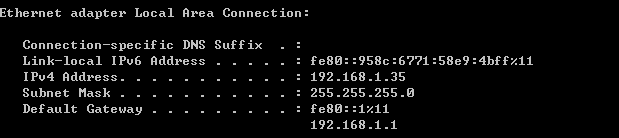
Yes , I'm using local network and ipconfig is showing my PC's correct IP address.

Untitled.png


I'm only using 1 network.

Untitled2.png


[ I've also tried uninstalling Tunngle and VPN Client networks but still no luck. ]
 

My Computer

Computer type
PC/Desktop
OS
W7 Ultramate *64*
CPU
Inter Corn 4460 i5
Memory
8 GingerBites
Graphics Card(s)
(G)aming(T)riple(X) Nine-7-"Oh"
Hard Drives
SSD - Primarity , HHD - Secondarity
Antivirus
Norton 360
Browser
Chrome

My Computer

Computer type
PC/Desktop
Computer Manufacturer/Model Number
Custom Build
OS
Windows 7 Ultimate x64 SP1
CPU
AMD Phenom 2 1090T
Motherboard
Gigabyte GA-890FXA-UD5
Memory
2x8GB Kingston HyperX Fury Black 1600Mhz Unganged
Graphics Card(s)
MSI GTX 970 Gaming 4G
Sound Card
Realtek On-Board HD 7.1 Audio / Logitech G35
Monitor(s) Displays
3xAcer GD245HQ
Screen Resolution
1920x1080
Hard Drives
Samsung 850 Pro 512GB SSD - OS /
WD Caviar Black SATA 3 - 1 TBx2 - Dynamic RAID 0 /
WD Caviar Green SATA 2 - 640GBx2 - Dynamic RAID 0 /
WD Caviar Green SATA 2 - 640GB - Internal Backup /
Seagate Barracude SATA 3 - 3TB - External Backup/ Sync
PSU
HighPower 1000W
Case
Cooler Master HAF 932
Cooling
Noctua NH-D14
Keyboard
Logitech G19
Mouse
Logitech G500
Internet Speed
100/4 Mbit Cable (100GB quota)
Antivirus
ZoneAlarm Extreme Security / MBAM Pro / MBAE Free / SAS Free
Browser
IE 11 - Firefox - Chrome
Other Info
Logitech F710/ G27/ G940/ Z5500 // TrackIR 5 // Nvidia 3D Surround Vision
Have you checked your external IP then? Some ISPs only give us dynamic ones, and a changing address is a sure cause of failure (you would be connecting to somewhere else instead).
Are the ports open in the local firewall, if any, for incoming connections?
 

My Computer

Computer type
Laptop
Computer Manufacturer/Model Number
Toshiba Sattelite A665-S6092
OS
Windows 7 Ultimate x64
CPU
Intel Core i7-740QM
Memory
8 GB DDR3
Graphics Card(s)
NVIDIA GeForce 330GT
Screen Resolution
1366x768
Hard Drives
Samsung 840 SSD 500GB
1TB USB3 external HD
Cooling
Coolermaster Notepal U3 notebook cooling pad
Internet Speed
3mbps ASDL
Antivirus
ClamWin 0.98.7
Browser
Opera 12.17 x86 (main), Firefox 38 (sec), IE11 (last resort)

My Computer

Computer type
PC/Desktop
OS
W7 Ultramate *64*
CPU
Inter Corn 4460 i5
Memory
8 GingerBites
Graphics Card(s)
(G)aming(T)riple(X) Nine-7-"Oh"
Hard Drives
SSD - Primarity , HHD - Secondarity
Antivirus
Norton 360
Browser
Chrome
Have you checked your external IP then? Some ISPs only give us dynamic ones, and a changing address is a sure cause of failure (you would be connecting to somewhere else instead).
Are the ports open in the local firewall, if any, for incoming connections?

My external/public IP is : 1.xx.xx.115 . ( Now it's 60.xx.xx.xx )

The ports that are to be forwarded are all set to Allow Connection & Enabled in both inbound and outbound rules on Firewall Settings.
 
Last edited:

My Computer

Computer type
PC/Desktop
OS
W7 Ultramate *64*
CPU
Inter Corn 4460 i5
Memory
8 GingerBites
Graphics Card(s)
(G)aming(T)riple(X) Nine-7-"Oh"
Hard Drives
SSD - Primarity , HHD - Secondarity
Antivirus
Norton 360
Browser
Chrome
Back
Top