Foxit adds 'safe mode' to counter PDF attacks

severedsolo

Jack of all Trades
Guru
Gold Member
VIP
Local time
3:41 PM
Messages
3,381
Location
Norfolk UK

My Computer My Computer

Computer type
PC/Desktop
Computer Manufacturer/Model Number
Medion Erazer (note to self: insert model number) - with custom additions
OS
Windows 10 Pro x64
CPU
Intel Core i5 7400 @ 3.00GHz
Motherboard
OEM supllied with PC
Memory
8GB 2133Mhz DDR4 (OEM supplied)
Graphics Card(s)
Gygabyte Windforce GTX 1050Ti (Factory Overclocked)
Sound Card
Realtek
Monitor(s) Displays
Acer Al1980 + HKC
Screen Resolution
1360*768(HKC) / 1280*1024(Acer)
Hard Drives
1TB Toshiba
1TB WD Caviar Green
120GB Samsung Evo 840
PSU
OEM supplied (no power rating on case)
Case
OEM Supplied
Cooling
Stock
Keyboard
Logitech Wireless
Mouse
Logitect Wireless
Internet Speed
40Mb/s Down 10Mb/s Up
Antivirus
Defender
Browser
Firefox
hi !

why not take a look at Foxit´s OWN webpage ?
Foxit Software - Foxit Reader 3.0 for Windows

"What’s New in Foxit Reader 3.3

The following is a list of exciting new features in Foxit Reader 3.3.

  • Secure Trust Manager
    The new Secure Trust Manager enables users to allow or deny unauthorized actions and data transmission, including URL connection, attachments PDF actions, and JavaScript functions; efficiently avoiding the attack from malicious contents and viruses.
  • Improved Ask Search Button Setting
    Enables users to show or hide the Ask Search Button in the Preferences menu.
  • Many Bug Fixes
    Fixes some bugs from previous versions including an issue where Ask Toolbar may be installed by default."

the "ASK-Searchbutton" is still there !?
considering ASK-toolbar being a securityrisk, can this "ASK-Searchbutton" be trusted ?
i do NOT want any "ASK-stuff" on my computer....

there are several other PDF-readers available, fx Sumatra.
PDFreaders.org - Get a Free Software PDF reader!
 

My Computer My Computer

Computer Manufacturer/Model Number
Dell
OS
W7-Enterprise + WS-2008 (Converted to Workstation)
CPU
P4 2,4GHz (at 1,8GHz, "slow" RDRAM, only 400MHz FSB...)
Motherboard
Intel 850E
Memory
2GB
Graphics Card(s)
NVIDIA QUADRO2 PRO 64MB
Sound Card
Yes
Monitor(s) Displays
Dell 1702FP
Screen Resolution
1280x1024
Hard Drives
Yes
PSU
Yes
Case
Yes
Cooling
Yes
Keyboard
Yes
Mouse
Yes, and i also have Cats...
Internet Speed
University: 100 MBit/s, Home: UMTS 7,2 MBit/s
Other Info
W7 on a DINOSAUR: P2 with 266MHz CPU & 160MB RAM

My Computer My Computer

OS
Windows 7 & Windows Vista Ultimate
Wow, I used to really like Foxit Reader. Is the ASK toolbar opt-in/opt-out at the point of installation? If not, I best switch to an alternative too. Much thanks.
 

My Computer My Computer

OS
Windows XP - Now Windows 7 Home Premium (64-bit).
Wow, I used to really like Foxit Reader. Is the ASK toolbar opt-in/opt-out at the point of installation? If not, I best switch to an alternative too. Much thanks.

Hallo Manhunter, you have the option to deselect it during installation ;)

EDIT; or at least you do with the exe download, don't know about the zip or msi downloads :confused:
 

My Computer My Computer

Computer Manufacturer/Model Number
Hewlett Packard Compaq Presario CQ60-305au
OS
Windows Seven Home Premium 32bit SP1
CPU
AMD Athlon QI46 2.1Ghz
Motherboard
Wistron 303c
Memory
2048 Mb DDR2 SD RAM
Graphics Card(s)
NVidea GE GoForce 8200M G/256mb dedicated graphics memory
Sound Card
MCP78S NVidea high definition
Monitor(s) Displays
15.6" High definition Brightview Widescreen
Screen Resolution
1336x768
Hard Drives
Toshiba MK2555GSX ATA
^Thanks Mitchell, very kind!
 

My Computer My Computer

OS
Windows XP - Now Windows 7 Home Premium (64-bit).
hi !

when i installed the previous version, (i´m not at home right now, i´m at the university, so i can´t say which version) i unchecked ALL "ASK-stuff", but i still got a ASK-searchbutton.

and there was no possibility to remove it without losing the function to search in documents....

http://www.foxitsoftware.com/pdf/reader/

this is what Foxit says: "
Foxit’s NO BLOAT PDF Reader
Small download, fast, accurate rendering
Take it with you with low cost mobile readers for your phone or PDA

"NO BLOAT" ???
then WTF is this "ASK"-bullsh*t ???
 

My Computer My Computer

Computer Manufacturer/Model Number
Dell
OS
W7-Enterprise + WS-2008 (Converted to Workstation)
CPU
P4 2,4GHz (at 1,8GHz, "slow" RDRAM, only 400MHz FSB...)
Motherboard
Intel 850E
Memory
2GB
Graphics Card(s)
NVIDIA QUADRO2 PRO 64MB
Sound Card
Yes
Monitor(s) Displays
Dell 1702FP
Screen Resolution
1280x1024
Hard Drives
Yes
PSU
Yes
Case
Yes
Cooling
Yes
Keyboard
Yes
Mouse
Yes, and i also have Cats...
Internet Speed
University: 100 MBit/s, Home: UMTS 7,2 MBit/s
Other Info
W7 on a DINOSAUR: P2 with 266MHz CPU & 160MB RAM
Shame on them, I used to really like Foxit Reader....as the other posters usefully said, plenty of freeware alternatives which respect our privacy.
 

My Computer My Computer

OS
Windows XP - Now Windows 7 Home Premium (64-bit).
well I am using the latest version of Foxit i unchecked all the ask stuff, and it hasn't installed any of it
 

My Computer My Computer

Computer type
PC/Desktop
Computer Manufacturer/Model Number
Medion Erazer (note to self: insert model number) - with custom additions
OS
Windows 10 Pro x64
CPU
Intel Core i5 7400 @ 3.00GHz
Motherboard
OEM supllied with PC
Memory
8GB 2133Mhz DDR4 (OEM supplied)
Graphics Card(s)
Gygabyte Windforce GTX 1050Ti (Factory Overclocked)
Sound Card
Realtek
Monitor(s) Displays
Acer Al1980 + HKC
Screen Resolution
1360*768(HKC) / 1280*1024(Acer)
Hard Drives
1TB Toshiba
1TB WD Caviar Green
120GB Samsung Evo 840
PSU
OEM supplied (no power rating on case)
Case
OEM Supplied
Cooling
Stock
Keyboard
Logitech Wireless
Mouse
Logitect Wireless
Internet Speed
40Mb/s Down 10Mb/s Up
Antivirus
Defender
Browser
Firefox
check your searchbutton (Control+F)...

going to install it later today, then i´ll check myself.
 

My Computer My Computer

Computer Manufacturer/Model Number
Dell
OS
W7-Enterprise + WS-2008 (Converted to Workstation)
CPU
P4 2,4GHz (at 1,8GHz, "slow" RDRAM, only 400MHz FSB...)
Motherboard
Intel 850E
Memory
2GB
Graphics Card(s)
NVIDIA QUADRO2 PRO 64MB
Sound Card
Yes
Monitor(s) Displays
Dell 1702FP
Screen Resolution
1280x1024
Hard Drives
Yes
PSU
Yes
Case
Yes
Cooling
Yes
Keyboard
Yes
Mouse
Yes, and i also have Cats...
Internet Speed
University: 100 MBit/s, Home: UMTS 7,2 MBit/s
Other Info
W7 on a DINOSAUR: P2 with 266MHz CPU & 160MB RAM
on wht application? explorer firefox and Foxit all have no signs of ASK
 

My Computer My Computer

Computer type
PC/Desktop
Computer Manufacturer/Model Number
Medion Erazer (note to self: insert model number) - with custom additions
OS
Windows 10 Pro x64
CPU
Intel Core i5 7400 @ 3.00GHz
Motherboard
OEM supllied with PC
Memory
8GB 2133Mhz DDR4 (OEM supplied)
Graphics Card(s)
Gygabyte Windforce GTX 1050Ti (Factory Overclocked)
Sound Card
Realtek
Monitor(s) Displays
Acer Al1980 + HKC
Screen Resolution
1360*768(HKC) / 1280*1024(Acer)
Hard Drives
1TB Toshiba
1TB WD Caviar Green
120GB Samsung Evo 840
PSU
OEM supplied (no power rating on case)
Case
OEM Supplied
Cooling
Stock
Keyboard
Logitech Wireless
Mouse
Logitect Wireless
Internet Speed
40Mb/s Down 10Mb/s Up
Antivirus
Defender
Browser
Firefox
on Foxit of course, what else ?

if you want to search for a word /words in a pdf-file, then there is a small window at the top-bar where you enter the word, my last installed Foxit-reader had "ASK" to the left of that window.

if you don´t see the searchbutton then you perhaps have removed it from the top-bar ?
right-click with your mouse on the bar and select search, and then see what happens...
 

My Computer My Computer

Computer Manufacturer/Model Number
Dell
OS
W7-Enterprise + WS-2008 (Converted to Workstation)
CPU
P4 2,4GHz (at 1,8GHz, "slow" RDRAM, only 400MHz FSB...)
Motherboard
Intel 850E
Memory
2GB
Graphics Card(s)
NVIDIA QUADRO2 PRO 64MB
Sound Card
Yes
Monitor(s) Displays
Dell 1702FP
Screen Resolution
1280x1024
Hard Drives
Yes
PSU
Yes
Case
Yes
Cooling
Yes
Keyboard
Yes
Mouse
Yes, and i also have Cats...
Internet Speed
University: 100 MBit/s, Home: UMTS 7,2 MBit/s
Other Info
W7 on a DINOSAUR: P2 with 266MHz CPU & 160MB RAM
well as i said, no sign of ASK,
 

My Computer My Computer

Computer type
PC/Desktop
Computer Manufacturer/Model Number
Medion Erazer (note to self: insert model number) - with custom additions
OS
Windows 10 Pro x64
CPU
Intel Core i5 7400 @ 3.00GHz
Motherboard
OEM supllied with PC
Memory
8GB 2133Mhz DDR4 (OEM supplied)
Graphics Card(s)
Gygabyte Windforce GTX 1050Ti (Factory Overclocked)
Sound Card
Realtek
Monitor(s) Displays
Acer Al1980 + HKC
Screen Resolution
1360*768(HKC) / 1280*1024(Acer)
Hard Drives
1TB Toshiba
1TB WD Caviar Green
120GB Samsung Evo 840
PSU
OEM supplied (no power rating on case)
Case
OEM Supplied
Cooling
Stock
Keyboard
Logitech Wireless
Mouse
Logitect Wireless
Internet Speed
40Mb/s Down 10Mb/s Up
Antivirus
Defender
Browser
Firefox
hmmm ?

installing later...
 

My Computer My Computer

Computer Manufacturer/Model Number
Dell
OS
W7-Enterprise + WS-2008 (Converted to Workstation)
CPU
P4 2,4GHz (at 1,8GHz, "slow" RDRAM, only 400MHz FSB...)
Motherboard
Intel 850E
Memory
2GB
Graphics Card(s)
NVIDIA QUADRO2 PRO 64MB
Sound Card
Yes
Monitor(s) Displays
Dell 1702FP
Screen Resolution
1280x1024
Hard Drives
Yes
PSU
Yes
Case
Yes
Cooling
Yes
Keyboard
Yes
Mouse
Yes, and i also have Cats...
Internet Speed
University: 100 MBit/s, Home: UMTS 7,2 MBit/s
Other Info
W7 on a DINOSAUR: P2 with 266MHz CPU & 160MB RAM
i have installed Foxit reader 3.3 now.

during the installation there is:
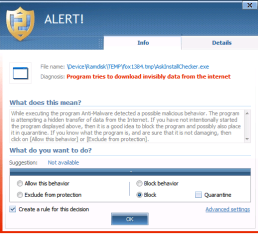
first the ASK-Installchecker that wants to connect to Internet !?

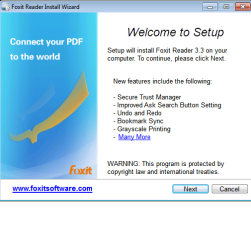
then an infoscreen saying "New features include the following...
the 2nd line is "Improved Ask Search Button Setting"

after accepting the License Terms comes the next screen showing the toolbar,
beneath it is a line saying:
"Foxit Toolbar powered by Ask.com"

then it´s still the same PRECHECKED options:
1. i Accept the License Terms and want to install Foxit Toolbar
2. Make Ask.com my default search
3. Reset my homepage to Foxit Startpage

after clicking next and selecting where to install (if custom install)
then clicking next again and selecting desktop settings (Icon etc.)
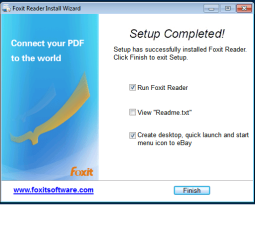
the next screen says:"Setup Completed"

the first 2 options is run Foxit Reader & View Readme.txt
the 3rd PRECHECKED option is to:"Create desktop, quick launch and start menu icon to eBay.

after starting Foxit i started looking for the ASK-searchbutton,

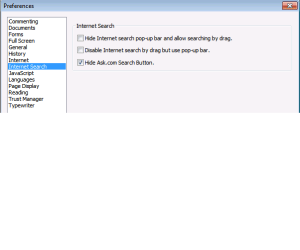
if you click on "Tools" then "Preferences", then the 8th setting "Internet search", then the 3rd option is "Hide Ask.com Search Button".

WOW !

it REALLY looks safe...:huh:
 

Attachments

  • FOXIT 1.png
    FOXIT 1.png
    19.9 KB · Views: 927
  • FOXIT 2.png
    FOXIT 2.png
    26.8 KB · Views: 863
  • FOXIT 3.png
    FOXIT 3.png
    24.9 KB · Views: 859
  • FOXIT 4.png
    FOXIT 4.png
    5.3 KB · Views: 865
  • FOXIT 5.png
    FOXIT 5.png
    13.7 KB · Views: 885

My Computer My Computer

Computer Manufacturer/Model Number
Dell
OS
W7-Enterprise + WS-2008 (Converted to Workstation)
CPU
P4 2,4GHz (at 1,8GHz, "slow" RDRAM, only 400MHz FSB...)
Motherboard
Intel 850E
Memory
2GB
Graphics Card(s)
NVIDIA QUADRO2 PRO 64MB
Sound Card
Yes
Monitor(s) Displays
Dell 1702FP
Screen Resolution
1280x1024
Hard Drives
Yes
PSU
Yes
Case
Yes
Cooling
Yes
Keyboard
Yes
Mouse
Yes, and i also have Cats...
Internet Speed
University: 100 MBit/s, Home: UMTS 7,2 MBit/s
Other Info
W7 on a DINOSAUR: P2 with 266MHz CPU & 160MB RAM
thanks SIW2 !

just had a quick look at it.
 

My Computer My Computer

Computer Manufacturer/Model Number
Dell
OS
W7-Enterprise + WS-2008 (Converted to Workstation)
CPU
P4 2,4GHz (at 1,8GHz, "slow" RDRAM, only 400MHz FSB...)
Motherboard
Intel 850E
Memory
2GB
Graphics Card(s)
NVIDIA QUADRO2 PRO 64MB
Sound Card
Yes
Monitor(s) Displays
Dell 1702FP
Screen Resolution
1280x1024
Hard Drives
Yes
PSU
Yes
Case
Yes
Cooling
Yes
Keyboard
Yes
Mouse
Yes, and i also have Cats...
Internet Speed
University: 100 MBit/s, Home: UMTS 7,2 MBit/s
Other Info
W7 on a DINOSAUR: P2 with 266MHz CPU & 160MB RAM
Thanks for the report, hackerman.
 

My Computer My Computer

OS
Windows 7 & Windows Vista Ultimate

My Computer My Computer

Computer Manufacturer/Model Number
Dell
OS
W7-Enterprise + WS-2008 (Converted to Workstation)
CPU
P4 2,4GHz (at 1,8GHz, "slow" RDRAM, only 400MHz FSB...)
Motherboard
Intel 850E
Memory
2GB
Graphics Card(s)
NVIDIA QUADRO2 PRO 64MB
Sound Card
Yes
Monitor(s) Displays
Dell 1702FP
Screen Resolution
1280x1024
Hard Drives
Yes
PSU
Yes
Case
Yes
Cooling
Yes
Keyboard
Yes
Mouse
Yes, and i also have Cats...
Internet Speed
University: 100 MBit/s, Home: UMTS 7,2 MBit/s
Other Info
W7 on a DINOSAUR: P2 with 266MHz CPU & 160MB RAM
From the review at Softpedia
The Good

The best part about this app is its simplicity, both regarding its ease of use and in terms of resource usage. It doesn’t need a lot to work and yet it gets the job done, and that is enabling users to view technical and scientific documentation with no effort on their part.

The Bad

A larger number of extensions that can be viewed would be an improvement – an all-in-one piece of software that sees not only documentation but also images, sketches or even graphs that can come with such documents. The file association feature is the worst thing about the app, because it tampers with how your system works.

The Truth

All in all, STDU Viewer offers pretty much everything that you would expect from a free piece of software. It offers good quality for the files that are being viewed and doesn’t require a lot of system resources or experience on the user’s part.

I really don't want an all-in-one and particularly do not care for programs that mess with the standard file associations.
 

My Computer My Computer

OS
Windows 7 & Windows Vista Ultimate
Back
Top