FPS drops in most of my games

bountier

New member
Local time
9:46 PM
Messages
7
Hello!

Recently, I have suffered strange FPS drops in most of my games. The weirdest thing is, that FPS drops occur not all the time. For example, I can start a game now and it will be running smoothly at 60-99 FPS. Then I can immediately close the game and start it again, and it will be very laggy and running at only 7-30 FPS :o . I can't understand why games run very unstable on my computer? Maybe it is RAM issue? And other thing to note that, when I'm playing a game (let's say it is Fallout 3), FPS can be from 60 to 99, but it can suddenly drop to 10-30 FPS, BUT if I will play longer with 10-30 FPS, the FPS stabilizes and goes to 60-99 FPS. So I can play games, but with very strange FPS drops. This problem occurs not on all my games.

My computer specifications:
Operating system: MS Windows 7 Ultimate 64-bit SP1
CPU: Intel Core i5 760 @ 2.80GHz (Lynnfield 45nm Technology)
RAM: 4.0GB Dual-Channel DDR3 @ 665MHz (9-9-9-24)
Graphics card: NVIDIA GeForce GTX 460
Monitor: SDM-HX73 (1280x1024@60Hz)
Motherboard: Gigabyte Technology Co., Ltd. H55M-S2H (Socket 1156)
Hard drive: 977GB Seagate ST31000528AS ATA Device (SATA)
Sound card: Realtek High Definition Audio
All my drivers are updated.

I am looking forward to hearing from you advices and possible problem solutions. :)
Thanks for your help! :)
bountier
 

My Computer My Computer

At a glance

Windows 7 Ultimate x64
OS
Windows 7 Ultimate x64
Could be something that's running in the background that is giving the cpu spikes. What do you run in the background?
 

My Computer My Computer

At a glance

Windows 10 64bitAMD Phenom II X4 925 (Deneb)(2.8GHz) OC 3.4GHzCorsair Vengeance DDR3 4GBX2 (8192MB)XFX HD 6870 1GB (OC)- 940MHz core, mem 1150MHz
Computer type
PC/Desktop
Computer Manufacturer/Model Number
custom build
OS
Windows 10 64bit
CPU
AMD Phenom II X4 925 (Deneb)(2.8GHz) OC 3.4GHz
Motherboard
M5A78L-MLX Plus
Memory
Corsair Vengeance DDR3 4GBX2 (8192MB)
Graphics Card(s)
XFX HD 6870 1GB (OC)- 940MHz core, mem 1150MHz
Monitor(s) Displays
Vizio 26' 1920x1080 / Acer 1336x768
Screen Resolution
1920x1080 60Hz /1336x768
Hard Drives
Kingston Digital 60GB SSDNow V300/500gb HDD Western Digital 7200rpm (/WD 160GB HDD 7200rpm
PSU
CORSAIR CX600 600w
Case
AZZA Orion 202 EVO
Cooling
cooler master hyper TX3 cpu cooler
Keyboard
Razer DeathStalker
Mouse
Logitech Optical Gaming Mouse G400
Antivirus
Defualt on win 10
Browser
Firefox
Other Info
cpu is overclocked in bios
Mhm, is that even possible? I run only anti-virus avast, DAEMON tools and sometimes utorrent.
 

My Computer My Computer

At a glance

Windows 7 Ultimate x64
OS
Windows 7 Ultimate x64
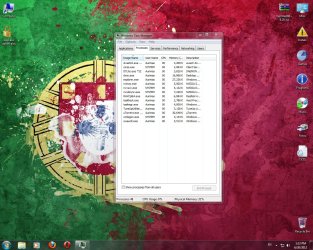
Yeah avast seems to spike the cpu when updating sometimes,try setting the game mode option in avast before playing so it doesn't bother you when your playing. Also if you can post some screen shots of task manger and show what processes are running.Right click the windows bar or do ctrl+alt+delete and select task manger.Then go to the tab call processes and take a screen shot by pressing the button called PrtScn and then open paint and right click and paste and save it as a picture. Then post the screen shots here by clicking the little paper clip to your far right on were you type to reply to a post and then press browse and select the screen shot and upload it.You might have some stuff that might be running that you don't need to run windows that spikes the cpu. Also the other thing you could do is update your drivers to the latest drivers provided for the video card which can be found here >>> NVIDIA DRIVERS 301.42WHQL
 

My Computer My Computer

At a glance

Windows 10 64bitAMD Phenom II X4 925 (Deneb)(2.8GHz) OC 3.4GHzCorsair Vengeance DDR3 4GBX2 (8192MB)XFX HD 6870 1GB (OC)- 940MHz core, mem 1150MHz
Computer type
PC/Desktop
Computer Manufacturer/Model Number
custom build
OS
Windows 10 64bit
CPU
AMD Phenom II X4 925 (Deneb)(2.8GHz) OC 3.4GHz
Motherboard
M5A78L-MLX Plus
Memory
Corsair Vengeance DDR3 4GBX2 (8192MB)
Graphics Card(s)
XFX HD 6870 1GB (OC)- 940MHz core, mem 1150MHz
Monitor(s) Displays
Vizio 26' 1920x1080 / Acer 1336x768
Screen Resolution
1920x1080 60Hz /1336x768
Hard Drives
Kingston Digital 60GB SSDNow V300/500gb HDD Western Digital 7200rpm (/WD 160GB HDD 7200rpm
PSU
CORSAIR CX600 600w
Case
AZZA Orion 202 EVO
Cooling
cooler master hyper TX3 cpu cooler
Keyboard
Razer DeathStalker
Mouse
Logitech Optical Gaming Mouse G400
Antivirus
Defualt on win 10
Browser
Firefox
Other Info
cpu is overclocked in bios
Thanks for advices, M1GU31. I tried the game mode option in avast called silent/gaming mode, but it didn't help me to stabilize game's FPS. Also, I downloaded and updated my video card drivers from link you gave me, but it also didn't help. The problem is that, when I run a game, it could run at normal FPS or at very low 12-25 FPS. When the game runs at bad FPS, I go to task manager, set the game's priority to Low or Realtime and the FPS normalizes, but sometimes not for long. I don't understand, how the priority helps the game run at better FPS rate... Also, I printed a screen of my processes tab in task manager:
 

Attachments

  • Processes.jpg
    Processes.jpg
    219 KB · Views: 119

My Computer My Computer

At a glance

Windows 7 Ultimate x64
OS
Windows 7 Ultimate x64
Not to many processes running in the background.What are your temperatures when in game?Also there's a program that handles system priorities in windows like when a program needs the priorities risen or lowered to improve system responsiveness called process lasso. Process Lasso Free - Auto-optimize process priorities and much more!
Anyways I would check to see if the video card is heating up because that can cause games to drop fps due to the card under clocking to avoid overheating.Make sure your case is getting airflow and check your temperatures in game to make sure they are not to high.You can check your temperatures with CPUID Hardware monitor(just make sure when you are installing to untick the install ask toolbar so you don't get any crap ware installed) CPUID - System & hardware benchmark, monitoring, reporting
 

My Computer My Computer

At a glance

Windows 10 64bitAMD Phenom II X4 925 (Deneb)(2.8GHz) OC 3.4GHzCorsair Vengeance DDR3 4GBX2 (8192MB)XFX HD 6870 1GB (OC)- 940MHz core, mem 1150MHz
Computer type
PC/Desktop
Computer Manufacturer/Model Number
custom build
OS
Windows 10 64bit
CPU
AMD Phenom II X4 925 (Deneb)(2.8GHz) OC 3.4GHz
Motherboard
M5A78L-MLX Plus
Memory
Corsair Vengeance DDR3 4GBX2 (8192MB)
Graphics Card(s)
XFX HD 6870 1GB (OC)- 940MHz core, mem 1150MHz
Monitor(s) Displays
Vizio 26' 1920x1080 / Acer 1336x768
Screen Resolution
1920x1080 60Hz /1336x768
Hard Drives
Kingston Digital 60GB SSDNow V300/500gb HDD Western Digital 7200rpm (/WD 160GB HDD 7200rpm
PSU
CORSAIR CX600 600w
Case
AZZA Orion 202 EVO
Cooling
cooler master hyper TX3 cpu cooler
Keyboard
Razer DeathStalker
Mouse
Logitech Optical Gaming Mouse G400
Antivirus
Defualt on win 10
Browser
Firefox
Other Info
cpu is overclocked in bios
Thanks for the program, M1GU31. I use this program sometimes. I don't understand why games ran smoothly before a month, but now I am suffering these strange problems. Could it be virus or maybe I need to defrag my disks? The problems started, when one day I turned on the computer and saw the windows freezes on Welcome screen, then I re-installed windows and games problems started. I tried to re-install windows one more time, but it didn't help. I checked the temperatures of my GPU and CPU. Yes, they are a little bit high (CPU 70-80 C, GPU 60-80 C when playing for the whole hour). But I think that this isn't temperatures problem because ,when I start my PC, temperatures are very low (30-40 C) and I start the game right away. The game is very laggy, with low FPS, but the CPU and GPU aren't overheating and their temperature is only 50-60 C. Anyway, I will try to clean PC from the dust one more time ( I did this one week ago), but I think it won't help. So, if there is other suggestions from you, M1GU31, or others, please post them there. Any help is appreciated! :)
 

My Computer My Computer

At a glance

Windows 7 Ultimate x64
OS
Windows 7 Ultimate x64
Why not give this a try. Download the latest version of GPUz. Create a folder wherever you want. Open GPUz and click on the sensor tab. At the bottom check the box, log to file, it will give you a selection box. Go to the folder you just created and select that folder. Play your game. After playing uncheck the box and open the folder, it will give you all info about your card, GPU clock, memory clock, temp, fan speed and a lot more. See what happens when you all of a sudden get the slow downs.
 

My Computers My Computers

  • At a glance

    Windows 11 ProRyzen 9 5900X32GB G Skill DDR4-3600EVGA RTX 3080 FTW 3 Ultra
    Computer type
    PC/Desktop
    Computer Manufacturer/Model Number
    ALWAYS UNDER CONSTRUCTION
    OS
    Windows 11 Pro
    CPU
    Ryzen 9 5900X
    Motherboard
    Asus X570 Crosshair Viii Hero
    Memory
    32GB G Skill DDR4-3600
    Graphics Card(s)
    EVGA RTX 3080 FTW 3 Ultra
    Sound Card
    On Board/Sennheiser PC37X Headset
    Monitor(s) Displays
    3 X Asus 27"
    Screen Resolution
    2560x1440
    Hard Drives
    2 X 1 TB NVME drives
    PSU
    EVGA 850
    Case
    Phanteks Eclipse P400A
    Cooling
    EVGA 280 AIO
    Keyboard
    Logitech G510s/ Logitech G13
    Mouse
    Logitech G502
    Internet Speed
    24/1
    Antivirus
    ESET/MBAM Pro/SAS Pro
    Browser
    Chrome/ Firefox/ Edge
  • At a glance

    Windows 11 ProIntel Ultra 9 288V32 GB LPDDR5X 8533
    Computer type
    Laptop
    System Manufacturer/Model Number
    Dell 16 Plus
    OS
    Windows 11 Pro
    CPU
    Intel Ultra 9 288V
    Memory
    32 GB LPDDR5X 8533
    Monitor(s) Displays
    16" Mini-LED HDR600 Touch 90 Hz
    Screen Resolution
    2560X1600
    Hard Drives
    1 TB NVME
If your CPU is running at 70-80 °C it is likely throttling down due to heat, which will lower performance in your games.

Re-apply the CPU thermal paste and consider getting an after market CPU cooler to further reduce those temps.
Best Thermal Paste Application Methods
 

My Computer My Computer

At a glance

Windows 7 Ult x64 - SP1/ Windows 8 Pro x64Intel Core i5-3570K 4.6GHz8GB (2X4GB) DDR3 1600 Corsair Vengeance CL8 1.5vSapphire HD 7770 Vapor-X OC 1GB DDR5
Computer type
PC/Desktop
Computer Manufacturer/Model Number
76~2.0
OS
Windows 7 Ult x64 - SP1/ Windows 8 Pro x64
CPU
Intel Core i5-3570K 4.6GHz
Motherboard
Gigabyte GA-Z77X UD3H, f18
Memory
8GB (2X4GB) DDR3 1600 Corsair Vengeance CL8 1.5v
Graphics Card(s)
Sapphire HD 7770 Vapor-X OC 1GB DDR5
Sound Card
Onboard VIA VT2021
Monitor(s) Displays
22" LCD Dell
Screen Resolution
1680x1050
Hard Drives
Samsung 840Pro 128GB SSD,
Seagate Barracuda 500GB SATA2 7200rpm 32MB cache, Seagate Barracuda 1TB SATA2 7200rpm 32MB cache,
PSU
Corsair HX650W
Case
Cooler Master Storm Scout
Cooling
Corsair H80 2x12cm Noctua NF P12 , 2x14cm case fans
Keyboard
Logitech Wave
Mouse
CM Sentinel
Internet Speed
Dismal
Antivirus
Avast
Browser
Opera Next
Other Info
Haswell laptop: HP Envy 17t-j, i7-4700MQ, GeForce 740M 2GB DDR3, 17.3" Full HD 1920x1080, 16GB RAM, Samsung 840 Pro 128GB, 1TB Hitachi 7200 HDD,
Desktop: eSATA ports,
External eSATA Seagate 500GB SATA2 7200rpm,
External WD USB 500GB
This may help with the thermal paste


My Computers My Computers

  • At a glance

    Windows 11 ProRyzen 9 5900X32GB G Skill DDR4-3600EVGA RTX 3080 FTW 3 Ultra
    Computer type
    PC/Desktop
    Computer Manufacturer/Model Number
    ALWAYS UNDER CONSTRUCTION
    OS
    Windows 11 Pro
    CPU
    Ryzen 9 5900X
    Motherboard
    Asus X570 Crosshair Viii Hero
    Memory
    32GB G Skill DDR4-3600
    Graphics Card(s)
    EVGA RTX 3080 FTW 3 Ultra
    Sound Card
    On Board/Sennheiser PC37X Headset
    Monitor(s) Displays
    3 X Asus 27"
    Screen Resolution
    2560x1440
    Hard Drives
    2 X 1 TB NVME drives
    PSU
    EVGA 850
    Case
    Phanteks Eclipse P400A
    Cooling
    EVGA 280 AIO
    Keyboard
    Logitech G510s/ Logitech G13
    Mouse
    Logitech G502
    Internet Speed
    24/1
    Antivirus
    ESET/MBAM Pro/SAS Pro
    Browser
    Chrome/ Firefox/ Edge
  • At a glance

    Windows 11 ProIntel Ultra 9 288V32 GB LPDDR5X 8533
    Computer type
    Laptop
    System Manufacturer/Model Number
    Dell 16 Plus
    OS
    Windows 11 Pro
    CPU
    Intel Ultra 9 288V
    Memory
    32 GB LPDDR5X 8533
    Monitor(s) Displays
    16" Mini-LED HDR600 Touch 90 Hz
    Screen Resolution
    2560X1600
    Hard Drives
    1 TB NVME
Thanks again for responses. I have already changed thermal paste. Before changing thermal paste, temperatures were from 70 to 95°C, but now when I changed it, temperatures, like I said, are from 70 to 80 °C. So, changing thermal paste helped me partly. I am considering to buy a CPU and case coolers, but firstly I want to know where the problem is exactly. Also, I tried the method, which essenbe offered me. I used that program (GPUz) to check my GPU stats and information when playing. All I can say that there, in the GPU stats log, is almost no difference when the game runs smoothly or laggy and with low FPS. GPU fan speed is from 40 to 45% and the temperature is from 40 to 60°C. But when I am playing a game, GPU load is from 90 to 99%. Does this mean something and can affect my games FPS? Like I said in my first post, I think that there can be RAM issue? Maybe bad sectors causing the FPS drops in my games? I think that I need to check my RAMs with program called Memtest86+. Can this program help to me? Anyway, that was my reflections about the problem. It would be great if you, guys, or other could give me more advices and help to resolve this annoying problem. I am looking forward to this thing! Waiting for more helpful advices! :)
 

My Computer My Computer

At a glance

Windows 7 Ultimate x64
OS
Windows 7 Ultimate x64
what CPU cooler are you using? The CPU temps are too high. And yes on the memtest, it could show whether you are having errors in your ram. What games are you playing? Intensive games use more ram and you have 4GB with a 64 bit OS. It takes about 1.5Gb just to run the OS. And what about your PSU? It may be helpful if you would fill out your system details in as much detail as possible. In the bottom left of your post you will see system specs, click that and click update system specs. You can look at mine to see what we are looking for. But, for whatever reason, if you are maxing out your GPU, you are going to have drops in FPS. FRAPS will cause that, if you are using it.
 

My Computers My Computers

  • At a glance

    Windows 11 ProRyzen 9 5900X32GB G Skill DDR4-3600EVGA RTX 3080 FTW 3 Ultra
    Computer type
    PC/Desktop
    Computer Manufacturer/Model Number
    ALWAYS UNDER CONSTRUCTION
    OS
    Windows 11 Pro
    CPU
    Ryzen 9 5900X
    Motherboard
    Asus X570 Crosshair Viii Hero
    Memory
    32GB G Skill DDR4-3600
    Graphics Card(s)
    EVGA RTX 3080 FTW 3 Ultra
    Sound Card
    On Board/Sennheiser PC37X Headset
    Monitor(s) Displays
    3 X Asus 27"
    Screen Resolution
    2560x1440
    Hard Drives
    2 X 1 TB NVME drives
    PSU
    EVGA 850
    Case
    Phanteks Eclipse P400A
    Cooling
    EVGA 280 AIO
    Keyboard
    Logitech G510s/ Logitech G13
    Mouse
    Logitech G502
    Internet Speed
    24/1
    Antivirus
    ESET/MBAM Pro/SAS Pro
    Browser
    Chrome/ Firefox/ Edge
  • At a glance

    Windows 11 ProIntel Ultra 9 288V32 GB LPDDR5X 8533
    Computer type
    Laptop
    System Manufacturer/Model Number
    Dell 16 Plus
    OS
    Windows 11 Pro
    CPU
    Intel Ultra 9 288V
    Memory
    32 GB LPDDR5X 8533
    Monitor(s) Displays
    16" Mini-LED HDR600 Touch 90 Hz
    Screen Resolution
    2560X1600
    Hard Drives
    1 TB NVME
Agree with essenbe, your CPU temps are too high, especially if you just re-applied the thermal paste.
Your complete 'System Specs' will help us to further analyze your problems.
Intel® Core™ i5-760 Processor
Tcase is 72.7°C, add 5°C for individual CPU core temp max of 77.7°C. Even with the stock Intel CPU cooler you should be at max in the low 60's.

DAEMON tools is known to cause issues, you should un-install it for testing.

Run memtest86+ for a minimum on 7 full passes with all RAM cards installed, best to run overnight.
Stop the test if you get any errors.
RAM - Test with Memtest86+
If you get any errors follow the steps in the tutorial linked above.

Can you download CPUZ and post a snip of the CPU, Mainboard, Memory, and SPD tabs.
For posting the information , enter 'Snipping tool' in the Start button > Search box, hit enter. Select the area you want to post and save to a convenient place.
How to Post a Screenshot in Seven Forums

Check your CPU core temperatures, this will give us info and help with diagnostics.
Use Real Temp , to check the CPU temps when at idle, under load and/or testing.
Let us know the minimum and maximum temps you get.
 

My Computer My Computer

At a glance

Windows 7 Ult x64 - SP1/ Windows 8 Pro x64Intel Core i5-3570K 4.6GHz8GB (2X4GB) DDR3 1600 Corsair Vengeance CL8 1.5vSapphire HD 7770 Vapor-X OC 1GB DDR5
Computer type
PC/Desktop
Computer Manufacturer/Model Number
76~2.0
OS
Windows 7 Ult x64 - SP1/ Windows 8 Pro x64
CPU
Intel Core i5-3570K 4.6GHz
Motherboard
Gigabyte GA-Z77X UD3H, f18
Memory
8GB (2X4GB) DDR3 1600 Corsair Vengeance CL8 1.5v
Graphics Card(s)
Sapphire HD 7770 Vapor-X OC 1GB DDR5
Sound Card
Onboard VIA VT2021
Monitor(s) Displays
22" LCD Dell
Screen Resolution
1680x1050
Hard Drives
Samsung 840Pro 128GB SSD,
Seagate Barracuda 500GB SATA2 7200rpm 32MB cache, Seagate Barracuda 1TB SATA2 7200rpm 32MB cache,
PSU
Corsair HX650W
Case
Cooler Master Storm Scout
Cooling
Corsair H80 2x12cm Noctua NF P12 , 2x14cm case fans
Keyboard
Logitech Wave
Mouse
CM Sentinel
Internet Speed
Dismal
Antivirus
Avast
Browser
Opera Next
Other Info
Haswell laptop: HP Envy 17t-j, i7-4700MQ, GeForce 740M 2GB DDR3, 17.3" Full HD 1920x1080, 16GB RAM, Samsung 840 Pro 128GB, 1TB Hitachi 7200 HDD,
Desktop: eSATA ports,
External eSATA Seagate 500GB SATA2 7200rpm,
External WD USB 500GB
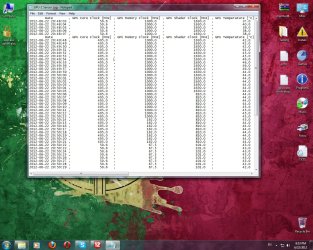
Thanks again, guys. You are very helpful! I haven't much time to posting a big reply and I only want to show what I noticed. In the screenshot you can see my GPU log logged by a program GPUz. I noticed that when FPS is low (8-30 FPS) GPU Core Clock is 50.6 Mhz and when FPS is good (55-100 FPS) GPU Core Clock is 405.0 Mhz. I searched in google about this problem a bit, I found out that there can be leaks or problems with my GPU Memory/Core Clock or something like that. This is my quick note about GPU and I don't know if it means something important.
essenbe and Dave76, thanks for advices and suggestions. I will actually answer your questions, post needed screenshots and update my system specs! I will do it soon (probably tomorrow). I just wanted to give a quick note about my GPU. Maybe it's worth something, I don't know.
Also, my PC started to lock down when I don't use it and when it is on idle. Maybe this is related to my problem because yesterday there was no lock downs.
I will update needed information soon. Thanks for the help! :)
 

Attachments

  • Drops!.jpg
    Drops!.jpg
    214.1 KB · Views: 26

My Computer My Computer

At a glance

Windows 7 Ultimate x64
OS
Windows 7 Ultimate x64
Back
Top