free cell

DWFII

New member
Member
VIP
Local time
9:44 AM
Messages
116
Location
High desert of Central Oregon
I suppose this is a silly question but I really miss free cell on windows 7. I tried copying freecell.exe and cards.dll from my XP system to the windows system32 directory on thge Win7 box but that didn't work. 7 complains that cards.dll is not on the system.

anyone got any suggestions?
 

My Computer

Computer Manufacturer/Model Number
custom
OS
Windows 7 Ultimate x64
CPU
Intel Core i5 320ghz
Memory
4gbDDR2 800mhz
Graphics Card(s)
Nvidia Gforce 9800
Sound Card
Creative Audigy 2 ZS
Monitor(s) Displays
NEC
Screen Resolution
1280x1024
Hard Drives
500gb ATA
320gb ATA
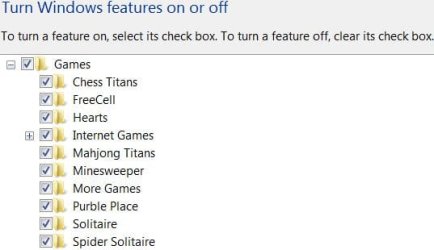
I do have Freecell on my Win7 system. Control Panel > Programs and Features > Turn Windows features on or off
 

Attachments

  • Capture.JPG
    Capture.JPG
    30.8 KB · Views: 120

My Computer

Computer Manufacturer/Model Number
Home built
OS
Windows 7 Ultimate 32 bit
CPU
Intel(R) Pentium(R) 4 CPU 3.00GHz
Motherboard
ASUS P4P800-VM Motherboard Chipset: Intel 865G + ICH5
Memory
2.50 GB RAM
Graphics Card(s)
NVIDIA GeForce 7600 GS
Sound Card
SoundMax Integrated Digital Audio (Chip)
Monitor(s) Displays
ViewSonic VX 1962 wm
Screen Resolution
1680 X 1050
Hard Drives
Seagate Barracuda 7200.10 80 GB
ST380215A ATA Device 18.6 GB
Western Digital "My Book" external hard drive 750 GB
Cooling
Fan based
Keyboard
Microsoft Comfort Curve Keyboard 2000 v10 USB
Mouse
Logitec optic USB
Internet Speed
3.01 Mb/s download 0.64 Mb/s upload
How's that? I have win 7 pro x64...pre-installed by Dell...and no freecell came with it.
 

My Computer

Computer Manufacturer/Model Number
custom
OS
Windows 7 Ultimate x64
CPU
Intel Core i5 320ghz
Memory
4gbDDR2 800mhz
Graphics Card(s)
Nvidia Gforce 9800
Sound Card
Creative Audigy 2 ZS
Monitor(s) Displays
NEC
Screen Resolution
1280x1024
Hard Drives
500gb ATA
320gb ATA
just copy the cards.dll from the XP system32 folder to the 7 system32 folder. Vista and 7 don't have the cards.dll.
 

My Computer

Computer type
Laptop
Computer Manufacturer/Model Number
HP EliteBook 8530w Mobile Workstation
OS
Windows 7 Ultimate x64 (XP, 98SE, 95, 3.11, DOS 7.10 on VM) + Ubuntu 10.04 LTS Lucid Lynx
CPU
Intel Core 2 Duo Processor P8600 (2.40 GHz, 3 MB L2 cache)
Motherboard
Mobile Intel PM45 Express Chipset ICH9M-Enhanced
Memory
4GB 800 MHz DDR2 SDRAM
Graphics Card(s)
ATI Mobility FireGL V5700 with 256 MB
Sound Card
SoundMAX Integrated Digital HD Audio
Monitor(s) Displays
15.4-inch WXGA anti-glare (1280 x 800 resolution)
Screen Resolution
1280 x 800
Hard Drives
500GB + 1TB
Mouse
Synaptics PS/2 Port Touchpad, USB Mouse
Internet Speed
4 Mbps
Antivirus
MSE
Browser
Firefox, Chrome, IE
Other Info
Authentec AES2810 Fingerprint Reader
Hmm, I have a retail Ultimate version. I was not aware that the different versions had different games. I will have to research that.

I edited my first post to include a snip of my "Turn Windows features on or off". What does yours show? If Freecell is listed but not checked, check it and reboot. If it is not there, maybe you can download it.
 

My Computer

Computer Manufacturer/Model Number
Home built
OS
Windows 7 Ultimate 32 bit
CPU
Intel(R) Pentium(R) 4 CPU 3.00GHz
Motherboard
ASUS P4P800-VM Motherboard Chipset: Intel 865G + ICH5
Memory
2.50 GB RAM
Graphics Card(s)
NVIDIA GeForce 7600 GS
Sound Card
SoundMax Integrated Digital Audio (Chip)
Monitor(s) Displays
ViewSonic VX 1962 wm
Screen Resolution
1680 X 1050
Hard Drives
Seagate Barracuda 7200.10 80 GB
ST380215A ATA Device 18.6 GB
Western Digital "My Book" external hard drive 750 GB
Cooling
Fan based
Keyboard
Microsoft Comfort Curve Keyboard 2000 v10 USB
Mouse
Logitec optic USB
Internet Speed
3.01 Mb/s download 0.64 Mb/s upload

My Computer

Computer Manufacturer/Model Number
Home built
OS
Windows 7 Ultimate 32 bit
CPU
Intel(R) Pentium(R) 4 CPU 3.00GHz
Motherboard
ASUS P4P800-VM Motherboard Chipset: Intel 865G + ICH5
Memory
2.50 GB RAM
Graphics Card(s)
NVIDIA GeForce 7600 GS
Sound Card
SoundMax Integrated Digital Audio (Chip)
Monitor(s) Displays
ViewSonic VX 1962 wm
Screen Resolution
1680 X 1050
Hard Drives
Seagate Barracuda 7200.10 80 GB
ST380215A ATA Device 18.6 GB
Western Digital "My Book" external hard drive 750 GB
Cooling
Fan based
Keyboard
Microsoft Comfort Curve Keyboard 2000 v10 USB
Mouse
Logitec optic USB
Internet Speed
3.01 Mb/s download 0.64 Mb/s upload
Dang, same here - have the Win7 Freecell on my Win7 Home Premium but not on my Win7 Professional.

:cry:
 

My Computer

Computer Manufacturer/Model Number
Self-built
OS
Windows 7 Home Premium x64
CPU
AMD Phenom II X2 3.2GHz
Motherboard
Biostar A760G M2+
Memory
4GB OCZ
Graphics Card(s)
nVidia GeForce 210
Sound Card
on board
Monitor(s) Displays
19" Mag Innovision
Screen Resolution
1440x900
Hard Drives
1TB Seagate Barracuda
PSU
Cooler Master eXtreme Power Plus 550W
Case
Cooler Master Elite 341
Internet Speed
18Mb AT&T uVerse
Dang, same here - have the Win7 Freecell on my Win7 Home Premium but not on my Win7 Professional.

:cry:

Windows 7 Pro here and Free Cell came with it.
 

My Computer

Computer Manufacturer/Model Number
Averatec 6130HS-20
OS
Windows 7 Professional 32-bit (6.1, Build 7600)
CPU
Intel(R) Pentium(R) 4 3.00 GHz HT
Memory
2.0 GB
Graphics Card(s)
ATI Mobility Radeon 9600 64MB
Sound Card
Realtek AC'97 Audio
Screen Resolution
1280 x 800
Hard Drives
Seagate 96023A 60GB 7200RPM -
Seagate FreeAgentDesktop 250GB
Cooling
20 Inch Box Fan
Mouse
Targus PAWM10 Wireless Optical Laptop Mouse
Got it!

[url=http://social.answers.microsoft.com said:
Answers Home Page[/url]]
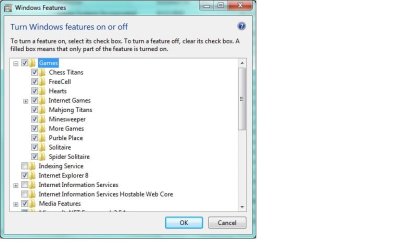
Check whether the games have been turned off in the Turn Windows Features on or off.

To turn Windows features on, follow this step:
1. Click the Start button, click Control Panel, click Programs, and then click Turn Windows features on or off. If you're prompted for an administrator password or confirmation, type the password or provide confirmation.
2. To turn a Windows feature on, select the check box next to the feature (i.e Games). Click OK.
Refer this link for more information:
Turn Windows features on or off
http://windows.microsoft.com/en-US/windows7/Turn-Windows-features-on-or-off
Regards,
Divya R – Microsoft Support.
 

Attachments

  • games.jpg
    games.jpg
    74.4 KB · Views: 40

My Computer

Computer Manufacturer/Model Number
Self-built
OS
Windows 7 Home Premium x64
CPU
AMD Phenom II X2 3.2GHz
Motherboard
Biostar A760G M2+
Memory
4GB OCZ
Graphics Card(s)
nVidia GeForce 210
Sound Card
on board
Monitor(s) Displays
19" Mag Innovision
Screen Resolution
1440x900
Hard Drives
1TB Seagate Barracuda
PSU
Cooler Master eXtreme Power Plus 550W
Case
Cooler Master Elite 341
Internet Speed
18Mb AT&T uVerse
freecell.exe to system32 folder

cards.dll to system folder
 

My Computer

OS
Windows 7 Ultimate x64
xp pro freecell

I like xp pro freecell better than the win7 freecell. just copy freecell.exe and cards.dll to a temp folder (does not have to be system folder) and play away. Works fine on win7 pro 64bit.
 

My Computer

Computer Manufacturer/Model Number
dell 990
OS
Windows 7 Professional 64bit
If you copy cards.dll to system folders, remember to put in in syswow64 on x64 systems, not in system32.

BTW, why to resurrect an old thread?
 

My Computer

Computer type
Laptop
Computer Manufacturer/Model Number
Toshiba Sattelite A665-S6092
OS
Windows 7 Ultimate x64
CPU
Intel Core i7-740QM
Memory
8 GB DDR3
Graphics Card(s)
NVIDIA GeForce 330GT
Screen Resolution
1366x768
Hard Drives
Samsung 840 SSD 500GB
1TB USB3 external HD
Cooling
Coolermaster Notepal U3 notebook cooling pad
Internet Speed
3mbps ASDL
Antivirus
ClamWin 0.98.7
Browser
Opera 12.17 x86 (main), Firefox 38 (sec), IE11 (last resort)
Back
Top